Understanding the concept of wildcarding in Sender Policy Framework

Quick Answer
SPF does not support true DNS wildcards. A wildcard DNS TXT record like *.example.com IN TXT 'v=spf1 ...' will only match subdomains that do not already have their own TXT records, and many DNS providers do not support wildcard TXT records at all. Per RFC 7208, best practice is to publish an explicit SPF record at every subdomain that sends email, plus a default SPF record at the apex that rejects or soft-fails everything else.

SPF does not support true DNS wildcards the way most people assume. A wildcard TXT record like *.example.com IN TXT "v=spf1 ..." only matches subdomains that do NOT already have their own TXT records, and many DNS providers do not permit wildcard TXT records in the first place. RFC 7208 defines SPF lookups on a per-domain basis: the receiving mail server queries the exact domain in the MAIL FROM envelope, and if no SPF record exists there it returns none, which is equivalent to no protection at all.
The practical consequence is that any subdomain without an explicit SPF record can be spoofed — even when the parent domain has a locked-down -all policy. Attackers routinely scan for unprotected subdomains (mail., smtp., sales., hr., stale DNS entries) and spoof messages from those instead of the well-protected apex.
This guide explains exactly how SPF lookups work at the DNS level, why wildcard TXT records behave differently from wildcard A records, the three safe alternatives (explicit per-subdomain records, a publisher-wide DMARC sp=reject policy, and apex SPF with subdomain DMARC alignment), and how to audit a domain for unprotected subdomains.
How does wildcarding work in SPF?
Wildcarding can simplify SPF management for organizations with numerous subdomains by avoiding explicitly listing each subdomain.
Example of a wildcard DNS record in SPF-
v=spf1 include:*.example.com -all
This configuration ensures that all subdomains of example.com, such as mail.example.com or info.example.com, are treated as authorized senders.
Practical use of wildcarding in SPF
Since wildcarding streamlines management, it is particularly beneficial for organizations with complicated domain structures or multiple subdomains. Instead of explicitly listing each subdomain in the SPF record, wildcarding allows a single configuration to cover all subdomains. Doing so helps domain owners save money on administration while ensuring that legitimate emails from any subdomain are authenticated correctly.
For example, consider an organization that uses multiple subdomains for different purposes, such as:
-
marketing.example.com for promotional emails
-
support.example.com for customer service communication
-
notifications.example.com for system alerts
Without wildcarding, the organization would need to explicitly list each subdomain in the SPF record as follows:
v=spf1 include:marketing.example.com include:support.example.com include:notifications.example.com -all
However, with wildcarding, the organization can simplify this configuration:
v=spf1 include:*.example.com -all
This single record automatically includes all subdomains under example.com, ensuring that emails from any legitimate subdomain are authenticated without requiring individual entries.
Apart from making it easier to maintain multiple domains for authentication, using wildcards in SPF increases scalability. This means the wildcard will automatically cover any subdomain you will add in the future. You don’t have to manually update your SPF record each time you create a new subdomain.

Moreover, it brings consistency by ensuring uniform SPF coverage across all subdomains. This surely minimizes the risks of misconfigurations or omitting a subdomain by mistake.
Caution with wildcards
While wildcard entries in SPF records make it easy to manage domains, they pose some risks-
Non-existent domain spoofing
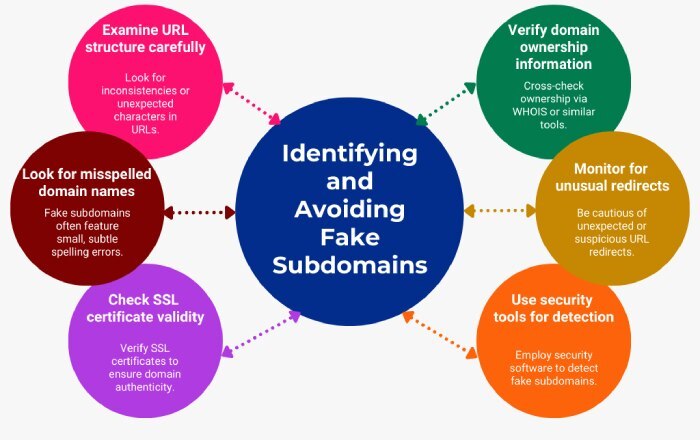
Wildcards can unintentionally validate non-existent subdomains, making it easier for attackers to spoof email addresses from fake subdomains.
Confusion with domain existence
Wildcards may create uncertainty for email servers about whether a domain exists, which could lead to the acceptance of emails from invalid subdomains.
Reduced control
By broadening the scope of authorized senders, wildcard entries reduce the ability to manage SPF authorization precisely, potentially including unintended or unauthorized sources.
Although some authentication systems are designed to handle unexpected records, relying solely on them can be inconsistent and risky.
Final words
The blog discusses both the risks and benefits of using wildcard entries in SPF. Now, if we consider both, then it’s suggested that you should only apply this concept to domains that are never used for sending emails. If you want to enhance email security, it’s better to go for targeted and selective SPF configurations. When it comes to email security, you have to go for a precise and focused approach to build stronger defenses against phishing and spoofing.
Topics
CEO
Founder and CEO of DuoCircle. Product strategy and commercial lead for AutoSPF's 2,000+ customer base.
LinkedIn Profile →