Best Email Deliverability Tools in 2026 The Complete Guide

Quick Answer
Email deliverability is the measure of whether your emails actually reach the intended recipient’s inbox, as opposed to being filtered to spam, quarantined, or rejected outright by the receiving mail server. It is distinct from email delivery, which simply means the receiving server accepted the message.
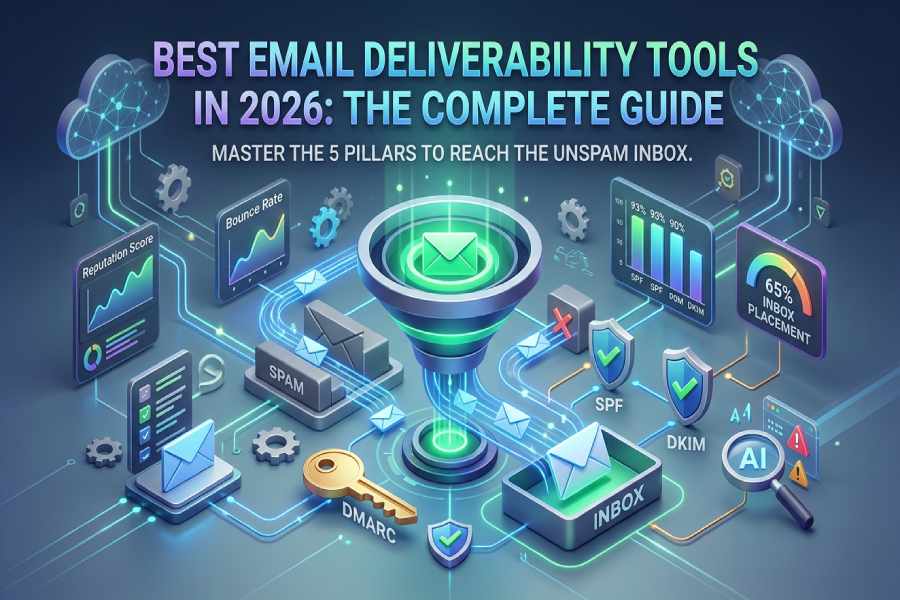
What Is Email Deliverability?
Email deliverability is the measure of whether your emails actually reach the intended recipient’s inbox, as opposed to being filtered to spam, quarantined, or rejected outright by the receiving mail server. It is distinct from email delivery, which simply means the receiving server accepted the message. An email can be “delivered” but land in spam, which means delivery succeeded but deliverability failed.
Deliverability is determined by a combination of technical, reputational, and behavioral factors. The technical layer includes email authentication protocols (SPF, DKIM, DMARC), DNS configuration, and sending infrastructure. The reputational layer includes sender reputation scores maintained by mailbox providers based on historical sending patterns, complaint rates, and bounce rates. The behavioral layer includes recipient engagement: open rates, click rates, reply rates, and spam complaints.
For businesses, deliverability is not an abstract metric. It directly determines whether transactional emails (invoices, password resets, order confirmations) reach customers, whether marketing campaigns generate revenue, and whether business communications are trusted by partners and prospects. A deliverability failure is a business failure.
Why Deliverability Matters More Than Ever in 2026
The email deliverability landscape has shifted dramatically in the last two years, and the stakes for getting it wrong have never been higher.
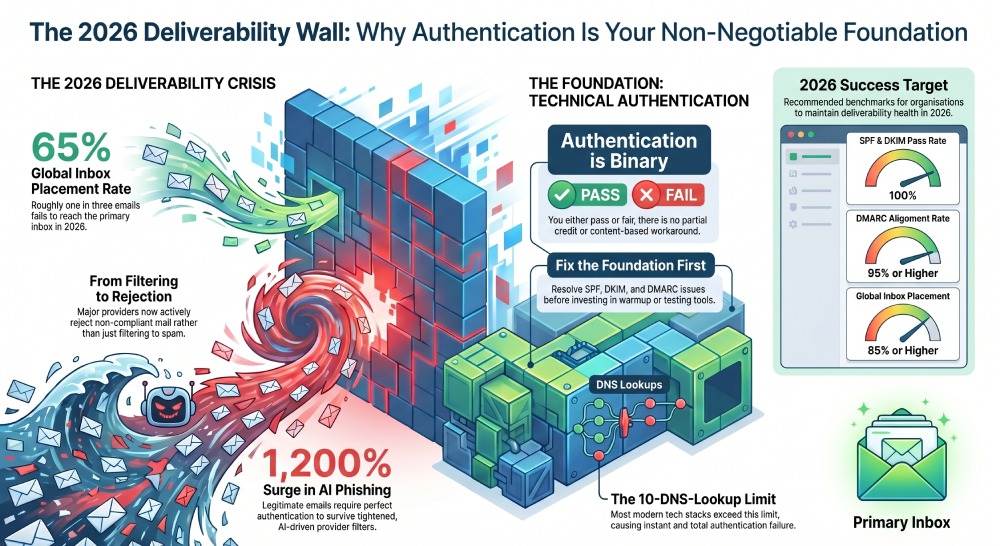
The global inbox placement rate is only 65%. According to data aggregated by Unspam.email from thousands of daily deliverability tests across 195+ countries, only 65% of emails reach the inbox. A full 32% land in spam, and 2% are sorted into tabs like Promotions. This means roughly one in three emails fails to reach the primary inbox, even when authentication is configured.
Mailbox providers are rejecting non-compliant email. Gmail and Yahoo began enforcing SPF, DKIM, and DMARC requirements for bulk senders (5,000+ messages per day) in February 2024. Microsoft followed in May 2025. Messages that fail authentication checks are now actively rejected, not just filtered. Non-compliance is no longer a deliverability drag; it is a deliverability wall.
Authentication adoption is high, but enforcement gaps persist. SPF adoption reached 93% and DKIM reached 90% in 2026, yet the inbox placement rate remains at 65%. This disconnect reveals that authentication is necessary but not sufficient. Sender reputation, content quality, list hygiene, and engagement signals all contribute to the final deliverability outcome.
AI-generated phishing is forcing stricter filtering. AI-generated phishing content surged over 1,200% in 2025. In response, mailbox providers have tightened their filtering algorithms, making legitimate email more susceptible to false positives. Proper authentication signals (SPF pass, DKIM pass, DMARC alignment) are the primary signals that differentiate legitimate senders from AI-generated forgeries in these tightened filters.
DMARC enforcement is becoming regulatory. PCI DSS v4.0 mandated DMARC for organizations processing payment card data as of March 2025. CISA BOD 18-01 requires p=reject for U.S. federal domains. Google and Yahoo require DMARC for bulk senders. These mandates mean deliverability and compliance are now intertwined.
The Five Pillars of Email Deliverability

Email deliverability is not a single problem solved by a single tool. It is a system with five interconnected pillars, and a weakness in any one of them undermines the others.
1. Authentication (SPF, DKIM, DMARC). Authentication verifies that an email was actually sent by the domain it claims to come from. SPF checks the sending IP against a domain’s authorized list. DKIM verifies a cryptographic signature to prove the message was not tampered with. DMARC ties SPF and DKIM together and tells receiving servers what to do when authentication fails. Without authentication, mailbox providers have no way to distinguish your legitimate email from a spoofed forgery, and their default response is increasingly to reject or filter it. Generate a signing key with our free DKIM generator to cover the DKIM half of that foundation.
2. Sender Reputation. Mailbox providers maintain reputation scores for sending IP addresses and domains based on historical behavior. Factors include bounce rates, spam complaint rates, volume consistency, and engagement patterns. A poor sender reputation overrides even perfect authentication. Reputation is built over time and can be damaged quickly by a single bad campaign or a purchased email list.
3. List Hygiene. Invalid email addresses, spam traps, and inactive subscribers degrade sender reputation with every campaign. List hygiene tools validate email addresses before sending, identify and remove risky contacts, and segment lists based on engagement. Clean lists reduce bounces and complaints, which in turn protect sender reputation.
4. Content and Engagement. Email content affects deliverability through spam filter scoring (subject line triggers, HTML quality, image-to-text ratio) and through recipient engagement. Emails that are opened, clicked, and replied to signal legitimacy to mailbox providers. Emails that are ignored, deleted without reading, or marked as spam signal the opposite.
5. Infrastructure and Sending Practices. Sending volume consistency, IP warmup for new senders, dedicated vs. shared IP management, and sending cadence all affect how mailbox providers evaluate your email stream. Sudden volume spikes, inconsistent sending patterns, and sending from cold IPs trigger spam filters regardless of content quality.
The tools reviewed in this guide address different pillars. Understanding which pillar your deliverability problem sits on determines which tool you need.
Authentication Is the Foundation: Why SPF, DKIM, and DMARC Come First
Of the five pillars, authentication is the only binary one. Your email either passes authentication or it does not. There is no partial pass, no gradual improvement, no workaround through better content or cleaner lists. If SPF returns a PermError because your record exceeds 10 DNS lookups, every email from your domain fails authentication regardless of how strong your sender reputation is or how engaged your list is.
This is why authentication must be solved before investing in any other deliverability tool. Warmup tools, inbox placement testers, and reputation monitors all assume that your authentication is already passing. If it is not, the data from those tools is meaningless because the root cause of your deliverability problems is not reputation or content but a broken technical foundation.
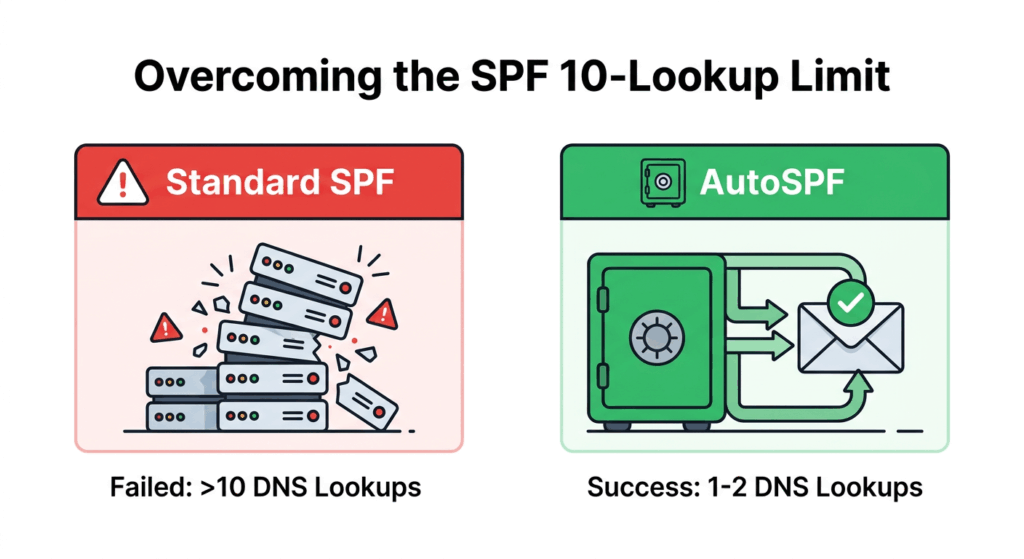
The specific authentication challenge that most organizations face is the SPF 10-DNS-lookup limit defined by RFC 7208. Modern businesses using five or more email-sending services (Google Workspace, Microsoft 365, Salesforce, SendGrid, HubSpot, Mailchimp, Zendesk) routinely exceed this limit. When SPF exceeds 10 lookups, it returns a PermError, authentication fails for every message, and deliverability collapses regardless of everything else you are doing right. Reviewing SPF record examples makes it easier to spot when your own record is drifting toward that limit.
SPF management tools (like AutoSPF) solve this specific problem through automatic flattening or macros. DMARC management tools (like DMARC Report, PowerDMARC, or EasyDMARC) provide the reporting and enforcement workflow. Together, they form the authentication foundation that every other deliverability tool depends on.
Key Features to Look for in an Email Deliverability Tool
The features that matter depend on which pillar you are addressing. Here is what to look for across the major categories.
For authentication tools: Automatic SPF flattening or macro support to stay within the 10-lookup limit. DMARC reporting with visual dashboards and enforcement guidance. Automatic re-scanning of vendor IPs (15-minute intervals or faster). DNS uptime SLAs of 99.99% or higher.
For inbox placement testing tools: Seed list testing across major providers (Gmail, Outlook, Yahoo, Apple Mail). Provider-specific placement results (inbox vs. spam vs. tabs). Spam score analysis with actionable recommendations. Pre-send testing capability before campaigns go live.
For sender reputation monitoring tools: IP and domain reputation tracking across major mailbox providers. Blacklist monitoring with real-time alerts. Bounce categorization (hard vs. soft) with trend analysis. Integration with Google Postmaster Tools data.
For email warmup tools: Network of real inboxes (not fake accounts) for warmup interactions. Gradual volume ramp schedules. Engagement simulation (opens, replies, moves from spam to inbox). Compatibility with major email providers (Google Workspace, Outlook 365).
For list hygiene tools: Real-time email validation at the point of capture. Bulk list cleaning with detailed result categorization. Spam trap detection. Catch-all domain identification. Integration with CRMs and marketing platforms.
Authentication Tools vs. Monitoring Tools vs. Warmup Tools: Understanding the Categories
Email deliverability tools fall into distinct categories that solve different problems. Many organizations make the mistake of buying a warmup tool when their real problem is broken authentication, or investing in inbox placement testing when their list hygiene is the root cause.
| Category | What It Solves | When You Need It | Examples |
|---|---|---|---|
| Authentication (SPF/DKIM/DMARC) | Verifies sender identity at the protocol level | Always, this is the foundation | AutoSPF, PowerDMARC, EasyDMARC, Valimail, DMARC Report |
| Inbox Placement Testing | Shows where emails land (inbox vs. spam vs. tabs) | Before major campaigns; when diagnosing placement drops | GlockApps, Validity Everest, Mailgun Optimize |
| Sender Reputation Monitoring | Tracks IP/domain reputation and blacklisting | Ongoing monitoring; after reputation incidents | MxToolbox, Google Postmaster Tools, ZeroBounce |
| Email Warmup | Builds sending reputation for new or cold domains/IPs | New domain setup; recovering from reputation damage | Warmup Inbox, TrulyInbox, Mailreach, Lemwarm |
| List Hygiene and Validation | Removes invalid, risky, and inactive email addresses | Before every campaign; at point of list acquisition | ZeroBounce, NeverBounce, Bouncer |
| All-in-One Platforms | Combines multiple categories in a single dashboard | When you need broad coverage and want one vendor | Validity Everest, GlockApps, Mailtrap |
The critical insight for buyers: Authentication tools and reputation/warmup tools solve fundamentally different problems. You likely need tools from at least two categories. An authentication tool ensures your emails can be verified as legitimate. A monitoring or warmup tool ensures your sending behavior earns trust from mailbox providers. Neither substitutes for the other.
How to Choose the Right Deliverability Tool
Step 1: Diagnose your problem. Run your domain through a free SPF checker (such as AutoSPF’s free tool at autospf.com/tools/spf-checker) and a DMARC checker. If your SPF record exceeds 10 lookups, or your DMARC policy is p=none or missing, authentication is your first priority. No other tool will help until this is fixed.
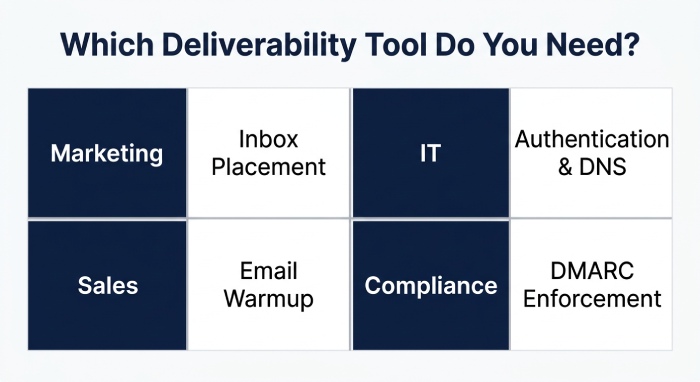
Step 2: Determine your category. Are you a marketing team optimizing campaigns? You need inbox placement testing and reputation monitoring. Are you an IT team ensuring email infrastructure reliability? You need authentication and DNS monitoring. Are you a sales team doing cold outreach? You need warmup and reputation tools. Are you a compliance team meeting regulatory requirements? You need DMARC enforcement tooling.
Step 3: Match budget to impact. Authentication tools (starting at $37/mo for SPF management) have the highest impact-per-dollar because they address a binary pass/fail foundation. Warmup tools ($15-99/mo) have strong ROI for cold outreach teams. Enterprise monitoring platforms ($400+/mo) are justified when email is a revenue-critical channel.
Common Deliverability Mistakes That Tools Can Prevent
Exceeding the SPF 10-lookup limit. The most common authentication failure. SPF management tools with automatic flattening or macros prevent this entirely. You can also start clean with an SPF record generator that builds a compliant record from scratch.
Sending from a cold domain without warmup. New domains have no sending reputation. Mailbox providers treat them with suspicion. Warmup tools build reputation gradually before production sending begins.
Ignoring DMARC reports. Publishing a DMARC record with p=none and never reading the reports means you have visibility you are not using. DMARC reporting tools transform raw XML into actionable dashboards.
Sending to purchased or unverified lists. Purchased lists contain spam traps and invalid addresses that destroy sender reputation instantly. List hygiene tools catch these before sending.
Not testing inbox placement before campaigns. An email that renders beautifully in your preview can still land in spam. Inbox placement testing tools catch this before your entire list receives the spammed version.
Treating authentication as a one-time setup. SPF records break when vendors rotate IPs. DKIM keys expire. DMARC policies need to progress from monitoring to enforcement. Automated tools handle ongoing maintenance. Domains that also send from subdomains need attention too; see our guide to subdomain SPF records.
Deliverability Benchmarks by Provider: Where the Gaps Are
Understanding how deliverability varies across mailbox providers helps you prioritize which problems to solve and which tools to deploy.
According to data from Unspam.email’s 2026 deliverability benchmark, which aggregates thousands of daily tests across 195+ countries, inbox placement rates vary dramatically by provider. Gmail delivers approximately 73% of tested emails to the inbox, with 91% of those landing in the Primary tab rather than Promotions. ProtonMail and Amazon WorkMail deliver over 99% to the inbox. But Outlook sends approximately 52% of tested emails to spam, with only 48% reaching the inbox. Yahoo has the lowest inbox rate at just 23%, with 78% landing in spam.
These provider-specific gaps mean that an email can pass authentication, have strong sender reputation, and still land in spam at certain providers due to provider-specific filtering algorithms. Tools that provide provider-specific placement data (like GlockApps and Validity Everest) help identify which providers are problematic, while authentication tools (like AutoSPF and PowerDMARC) ensure the foundational signals are strong across all providers.
DMARC enforcement rates also vary by organization size. According to EasyDMARC’s 2026 DMARC Adoption Report, Fortune 500 companies lead with 95% DMARC adoption and over 80% enforcement. But among the top 1.8 million domains globally, only about 9% combine enforcement with reporting. This means the vast majority of domains are either not authenticated or not enforcing their authentication policies, leaving deliverability improvements on the table.
For organizations benchmarking their own deliverability, the key metrics to track are: SPF pass rate (target: 100%), DKIM pass rate (target: 100%), DMARC alignment rate (target: 95%+), inbox placement rate (target: 85%+ across all providers), spam complaint rate (target: below 0.1%), and bounce rate (target: below 2%).
Summary Comparison Table
| Tool | Category | Primary Function | SPF Management | DMARC Reporting | Inbox Testing | Warmup | Starting Price | Best For | Not Ideal For |
|---|---|---|---|---|---|---|---|---|---|
| AutoSPF | Authentication | SPF flattening + macros | Yes (dedicated, 15-min rescan) | Via sister product DMARC Report | No | No | $37/mo | Fixing SPF as the deliverability foundation | Teams needing inbox placement testing or warmup |
| GlockApps | All-in-One Diagnostics | Inbox placement + spam testing | No | Yes (DMARC Analyzer) | Yes (seed list) | No | Free tier; paid from ~$59/mo | Pre-campaign inbox placement diagnostics | Teams needing active SPF management |
| Validity Everest | Enterprise Monitoring | Sender reputation + placement | No | Yes (monitoring) | Yes (comprehensive) | No | Contact for pricing | Enterprise teams needing comprehensive analytics and sender certification | SMBs and budget-conscious buyers |
| MxToolbox | DNS Diagnostics + SPF | Blacklist monitoring + SPF flattening | Yes (Delivery Center) | Yes (basic) | No | No | Free tools; $399/mo (Delivery Center Plus) | IT admins needing DNS diagnostics suite | Teams needing warmup or inbox placement testing |
| Warmup Inbox | Email Warmup | Domain/IP reputation building | No (checks only) | No | No | Yes (real inbox network) | ~$15/mo | New domains and cold outreach reputation building | Teams with authentication problems (warmup won’t fix broken SPF) |
| ZeroBounce | List Hygiene + Monitoring | Email validation + blacklist monitoring | No | Yes (basic monitoring) | Yes (placement testing) | Yes | Pay-per-validation; plans from ~$40/mo | Enterprise-level list validation before campaigns | Teams needing active SPF/DMARC management |
| PowerDMARC | Authentication Platform | Full DMARC + SPF + DKIM suite | Yes (PowerSPF macros) | Yes (AI-powered) | No | No | From $8/mo | Full authentication stack from one vendor | Teams needing warmup or inbox placement testing |
| Google Postmaster Tools | Reputation Monitoring | Gmail-specific domain reputation | No | No | No | No | Free | Monitoring Gmail-specific reputation | Teams needing cross-provider visibility or active management |
| Mailtrap | Development Testing | Email testing sandbox + sending API | No | No | No (sandbox testing) | No | Free tier; paid from $15/mo | Developer teams testing email infrastructure | Marketing teams or non-technical users |
Pricing sourced from published vendor pages, G2, and review sites as of April 2026. Contact vendors for current rates.
Tool Reviews
AutoSPF
AutoSPF is a dedicated, enterprise-grade SPF management platform built exclusively for solving the SPF 10-DNS-lookup limit through automatic flattening and macro-based optimization, addressing the foundational authentication layer that all other deliverability efforts depend on.
AutoSPF sits in the authentication category of deliverability tools. It does not test inbox placement, warm up domains, or validate email lists. What it does is ensure that the SPF authentication check, which every receiving mail server performs for every inbound email, passes reliably for every message your domain sends. If your SPF record exceeds 10 DNS lookups (which most businesses using five or more email-sending services do), AutoSPF solves that specific problem with either automatic flattening (re-scanning upstream vendor IPs every 15 minutes) or SPF macros (bypassing the 10-lookup limit entirely with 1-2 DNS lookups).
For deliverability-focused buyers, the value proposition is straightforward: AutoSPF fixes the foundational authentication layer so that investment in warmup tools, inbox placement testing, and reputation monitoring is not wasted on emails that would fail SPF regardless. A broken SPF record undermines every other deliverability tool in your stack.
AutoSPF has been in operation since 2018 and serves over 2,000 businesses. The company holds SOC-2 Type II certification. DNS availability is served through Cloudflare infrastructure with a 99.99% uptime SLA. Setup follows a 60-second copy-paste-replace model. According to G2, AutoSPF holds High Performer, Easiest to Use, Best Support, and Easiest Setup badges. Reviewers on G2 consistently highlight the exceptional quality of support.
Top Features:
- Automatic SPF flattening with 15-minute re-scan cycles
- True SPF macro support (RFC 7208) for unlimited includes with 1-2 DNS lookups
- 99.99% DNS uptime SLA served through Cloudflare
- SOC-2 Type II certification with enterprise compliance documentation
- 60-second setup: copy, paste, replace one DNS record
- Unlimited emails on all plans with no monthly cap
- IP obfuscation via macros
- DMARC alignment support via sister product DMARC Report
Pricing: Plus: $37/mo (1 domain). Premium: $97/mo (5 domains, macros). Enterprise: $387/mo (10 domains, macros, SSO/SAML). 30-day free trial.
Best For: Any organization whose deliverability problems trace back to broken SPF authentication. If your SPF record exceeds 10 DNS lookups, this is the first tool to deploy before investing in any other deliverability solution.
How Does It Compare: AutoSPF is the most focused authentication tool on this list. It does one thing with enterprise-grade reliability. It does not replace inbox placement testing, warmup tools, or reputation monitoring. It ensures that the foundation those tools depend on is solid. Pair it with a DMARC reporting tool (DMARC Report, PowerDMARC, or EasyDMARC) and an inbox placement tester (GlockApps or Validity Everest) for comprehensive deliverability coverage.
GlockApps
GlockApps is a comprehensive email diagnostics platform that combines inbox placement testing, spam score analysis, DMARC monitoring, and blacklist tracking into a single tool designed for pre-campaign deliverability testing and ongoing monitoring.
GlockApps sends test emails to seed lists of real addresses across major mailbox providers and reports exactly where each one landed: primary inbox, spam folder, promotions tab, or missing entirely. The spam score analysis flags specific content, header, and authentication issues affecting placement. The DMARC Analyzer provides weekly and monthly DMARC digests with alerts for authentication failures.
According to multiple independent reviews, GlockApps is considered one of the most comprehensive diagnostic tools available for understanding where emails land and why. The platform offers a free tier with limited tests, making it accessible for initial diagnostics.
Top Features:
- Inbox placement testing across major providers with seed lists
- Spam score analysis with actionable content and header recommendations
- DMARC Analyzer with weekly/monthly digests
- Blacklist monitoring with real-time alerts
- Email rendering preview across devices
Pricing: Free tier with limited tests. Paid plans from approximately $59/mo.
Best For: Email marketing teams that need to test inbox placement before major campaigns and diagnose why emails are landing in spam.
How Does It Compare: GlockApps is the strongest inbox placement diagnostic tool on this list. It shows where emails land but does not fix the underlying causes. If the diagnostic reveals SPF authentication failures, you need an authentication tool (like AutoSPF) to fix the root cause. If it reveals content or reputation issues, you need warmup or content optimization.
Validity Everest
Validity Everest is an enterprise-grade email deliverability analytics platform that provides comprehensive sender reputation monitoring, inbox placement testing, and design optimization, used by large-volume senders who need deep visibility into deliverability performance across providers.
Everest reports on all sources sending emails on behalf of your domain, tracks SPF and DKIM authentication status, flags IP addresses that fail authentication, and provides continuous monitoring with alerts. The platform includes sender certification capabilities through the Validity Sender Certification program, which provides preferential treatment at participating mailbox providers.
Top Features:
- Comprehensive sender reputation monitoring across providers
- Inbox placement testing with provider-specific breakdowns
- Continuous authentication monitoring (SPF, DKIM, DMARC)
- Sender certification program for preferential inbox placement
- Design and content optimization with rendering previews
Pricing: Contact Validity for enterprise pricing.
Best For: Enterprise email marketing teams and high-volume senders that need the deepest analytics and are willing to invest in comprehensive monitoring.
How Does It Compare: Everest is the most comprehensive enterprise monitoring platform on this list. According to independent reviews, the pricing positions it firmly in the enterprise market. Organizations with smaller sending volumes or tighter budgets will find more accessible options in GlockApps or the free Google Postmaster Tools.
MxToolbox
MxToolbox is the industry-standard DNS diagnostic platform with SPF flattening available as part of its Delivery Center Plus subscription, alongside blacklist monitoring, email delivery testing, and comprehensive DNS tooling used by IT administrators worldwide for nearly two decades.
For deliverability, MxToolbox provides blacklist monitoring across 100+ blacklist databases, SPF flattening through Delivery Center, email delivery analytics, and Google/Yahoo bulk sender compliance checks. The free SuperTool, MX Lookup, and SPF Checker are widely used for ad hoc diagnostics. MxToolbox does not offer SPF macros.
Top Features:
- Blacklist monitoring across 100+ databases
- SPF flattening integrated with Delivery Center Plus
- Free diagnostic tools (SuperTool, MX Lookup, SPF Checker)
- Email delivery analytics and compliance checks
- IP reputation tracking
Pricing: Free diagnostic tools. Delivery Center Plus: $399/mo.
Best For: IT administrators who need DNS diagnostics, blacklist monitoring, and SPF flattening as part of a broader infrastructure monitoring toolkit.
How Does It Compare: MxToolbox is the strongest DNS diagnostics platform on this list. The $399/mo price reflects the full suite, not just SPF management. Organizations needing only SPF flattening will find dedicated tools more cost-effective. MxToolbox does not offer inbox placement testing or email warmup.
Warmup Inbox
Warmup Inbox is a dedicated email warmup tool that builds sender reputation for new or cold domains by sending and receiving emails through a network of real inboxes, simulating the engagement patterns that mailbox providers use to evaluate sender trustworthiness.
The tool connects to Gmail, Outlook, Zoho, or any SMTP account and automatically sends daily warmup messages. It monitors reputation score changes and provides authentication checks (SPF, DKIM, DMARC) as part of its diagnostic dashboard. According to independent reviews, Warmup Inbox offers solid integration coverage across major providers and a clean, simple dashboard.
Top Features:
- Warmup through real inbox network (not fake accounts)
- Authentication checks (SPF, DKIM, DMARC)
- Daily reputation score tracking
- Integration with Google Workspace, Outlook, Zoho, Mailgun, SendGrid, Amazon SES
Pricing: Starting from approximately $15/mo.
Best For: Sales teams doing cold outreach, organizations setting up new sending domains, or teams recovering from reputation damage.
How Does It Compare: Warmup Inbox solves the reputation-building problem but does not fix authentication issues. If your SPF record is broken, warming up your inbox will not help because authentication fails before reputation is evaluated. Fix authentication first, then warm up. According to independent reviews, Warmup Inbox does not include inbox placement testing or blacklist monitoring.
ZeroBounce
ZeroBounce is an email validation and deliverability platform known for fast, accurate list hygiene with additional inbox placement testing, blacklist monitoring, DMARC monitoring, and email warmup capabilities, supporting enterprise-scale list processing.
ZeroBounce’s core strength is email validation: it checks addresses against syntax rules, domain validity, and mailbox existence. For bulk validation, it supports lists of over 1 million contacts. The platform is GDPR, SOC 2, and PCI compliant. Beyond validation, ZeroBounce offers inbox placement testing, blacklist monitoring, and an email warmup feature.
Top Features:
- Email validation with 12 data points per address
- Bulk validation supporting 1M+ contacts
- Inbox placement testing and blacklist monitoring
- DMARC authentication monitoring
- SOC 2, GDPR, and PCI compliance
Pricing: Pay-per-validation model. Plans from approximately $40/mo.
Best For: Email marketing teams that need enterprise-grade list validation before campaigns and want additional deliverability monitoring in one platform.
How Does It Compare: ZeroBounce is the strongest list hygiene tool on this list. It is most valuable when paired with an authentication tool (for SPF/DMARC) and used before every campaign to prevent the reputation damage caused by sending to invalid addresses.
PowerDMARC
PowerDMARC is a full-stack email authentication platform that manages DMARC, SPF, DKIM, BIMI, MTA-STS, and TLS-RPT from a single dashboard with AI-powered threat intelligence, serving as the authentication foundation for deliverability.
PowerSPF uses hosted macros for SPF optimization. The platform provides AI-powered DMARC reporting with eight dashboard views, real-time threat intelligence, and MSP multi-tenancy. On G2, PowerDMARC holds a 4.9/5 rating across 238 reviews. According to G2 feedback, some users note pricing can scale upward with many domains.
Top Features:
- PowerSPF hosted macros for unlimited SPF includes
- AI-powered DMARC reporting and threat intelligence
- Full protocol coverage: DMARC, SPF, DKIM, BIMI, MTA-STS, TLS-RPT
- Real-time alerts and reputation monitoring
Pricing: From $8/mo. Enterprise pricing is quote-based.
Best For: Organizations that want the entire authentication stack (SPF + DMARC + DKIM + BIMI) managed from one platform as their deliverability foundation.
How Does It Compare: PowerDMARC addresses the authentication pillar comprehensively but does not include inbox placement testing, warmup, or list validation. Pair it with GlockApps for inbox testing and ZeroBounce for list hygiene for full deliverability coverage.
Google Postmaster Tools
Google Postmaster Tools is a free reputation monitoring service provided by Google that shows how Gmail evaluates your domain and IP reputation, providing visibility into delivery errors, spam rates, and authentication results specific to Gmail.
The tool is free and requires only DNS verification of domain ownership. It provides domain and IP reputation scores, spam rate tracking, authentication results (SPF, DKIM, DMARC), and delivery error breakdowns specific to Gmail. It does not provide data for other mailbox providers.
Top Features:
- Free domain and IP reputation monitoring for Gmail
- Spam rate tracking against Google’s thresholds
- Authentication result visibility (SPF, DKIM, DMARC)
- Delivery error categorization
Pricing: Free.
Best For: Any sender who wants basic, free visibility into how Gmail evaluates their domain. Essential as a baseline monitoring tool alongside paid solutions.
How Does It Compare: Google Postmaster Tools is Gmail-only and provides monitoring without actionable management. It tells you that your reputation is declining but does not fix the underlying issue. Pair it with authentication tools (AutoSPF, PowerDMARC) and reputation tools (MxToolbox, GlockApps) for a complete picture.
Mailtrap
Mailtrap is an email testing and sending platform that provides a sandbox environment for testing email infrastructure in development, plus an email sending API for production delivery with detailed analytics and deliverability monitoring.
The sandbox captures outgoing emails in a safe environment where developers can inspect headers, check spam scores, review authentication records, and validate formatting without sending to real recipients. The Email Sending API provides infrastructure for transactional and bulk email with delivery analytics.
Top Features:
- Email sandbox for safe testing in development
- Spam score analysis and header inspection
- Authentication record validation (SPF, DKIM, DMARC)
- Email Sending API with delivery analytics
Pricing: Free tier available. Paid plans from $15/mo.
Best For: Development teams building and testing email infrastructure who want to validate deliverability before production deployment.
How Does It Compare: Mailtrap solves a development-specific problem that other tools on this list do not address. It is not a replacement for production-stage deliverability tools but rather a complement used during the build phase. A_ccording to independent reviews, Mailtrap is one of the most useful tools for preventing deliverability issues before they reach production._
How to Choose: Decision Framework
| Your Primary Problem | First Tool to Deploy | Second Tool to Add |
|---|---|---|
| SPF record exceeds 10 lookups (PermError) | AutoSPF | DMARC reporting tool (DMARC Report or PowerDMARC) |
| No DMARC or stuck on p=none | PowerDMARC or EasyDMARC | AutoSPF (if SPF is also broken) |
| Emails landing in spam despite passing authentication | GlockApps or Validity Everest | Warmup tool or list hygiene tool |
| New domain with no sending reputation | Warmup Inbox or TrulyInbox | Authentication tools (AutoSPF + DMARC) |
| High bounce rates degrading reputation | ZeroBounce or NeverBounce | Reputation monitoring (MxToolbox or Google Postmaster Tools) |
| Need full visibility across all pillars | GlockApps + AutoSPF + Google Postmaster Tools | ZeroBounce for list hygiene |
| Enterprise-scale monitoring and certification | Validity Everest | PowerDMARC for authentication |
| Developer testing email infrastructure | Mailtrap | Production monitoring tools after deployment |
Role-Based Buyer Guidance
For Email Marketing Managers: Your deliverability stack should include authentication (AutoSPF + DMARC tool), inbox placement testing (GlockApps), and list hygiene (ZeroBounce). Run placement tests before every major campaign. Monitor Google Postmaster Tools weekly for Gmail-specific reputation trends.
For IT Directors and System Administrators: Focus on the authentication foundation first. SPF management (AutoSPF) and DMARC enforcement (PowerDMARC or EasyDMARC) are infrastructure decisions, not marketing decisions. Add blacklist monitoring (MxToolbox) for ongoing DNS health. Your metric is authentication pass rate, not inbox placement.
For Sales Leaders Running Cold Outreach: Your stack needs warmup (Warmup Inbox), authentication (AutoSPF), and reputation monitoring (Google Postmaster Tools). Cold outreach from a new domain without warmup and authentication is the fastest way to destroy a domain’s reputation. Invest in infrastructure before investing in sequences.
For Compliance Officers: DMARC enforcement tools (PowerDMARC, EasyDMARC) with SPF management (AutoSPF) satisfy Gmail/Yahoo sender requirements, PCI DSS v4.0 authentication mandates, and CISA BOD 18-01 for federal domains. Ensure your tooling provides audit logs, SLAs, and compliance documentation.
Implementation Considerations
Fix authentication first, optimize second. If your SPF record is broken, investing in warmup or inbox placement testing is wasting money. Authentication is binary: it passes or it fails. Fix the foundation, then layer on optimization tools.
Start with free tools for diagnosis. AutoSPF’s free SPF Checker, Google Postmaster Tools, and GlockApps’ free tier provide enough diagnostic data to identify your primary deliverability problem without any investment.
Build your stack incrementally. You do not need every tool from day one. Start with authentication (the non-negotiable foundation), add reputation monitoring, and then layer on inbox placement testing and warmup as your email program matures.
Monitor continuously, not periodically. Deliverability problems surface between campaigns. A vendor IP rotation on Tuesday can break your SPF by Wednesday. An IP blacklisting can tank your reputation overnight. Automated, continuous monitoring catches these before they impact delivery.
Frequently Asked Questions
Is authentication alone enough for good deliverability?
No. Authentication (SPF, DKIM, DMARC) is necessary but not sufficient. SPF adoption is at 93% and DKIM at 90% in 2026, yet the global inbox placement rate is only 65%. Authentication ensures your emails can be verified as legitimate. Sender reputation, list hygiene, content quality, and engagement determine whether verified emails reach the inbox or go to spam.
Which tool should I buy first?
If your SPF record exceeds 10 DNS lookups, start with an SPF management tool (AutoSPF). If your authentication is already passing, start with inbox placement testing (GlockApps) to diagnose where your emails are actually landing. If you are setting up a new domain, start with warmup (Warmup Inbox) alongside authentication.
Can warmup tools fix broken SPF?
No. Warmup tools build sender reputation by simulating engagement. They do not modify DNS records or fix authentication configuration. If your SPF record is broken (PermError), warmup will not help because authentication fails before reputation is evaluated by the receiving server.
How much should I budget for deliverability tooling?
A solid stack for most organizations costs $100-300/mo: SPF management ($37-97/mo), DMARC reporting ($25-75/mo), and inbox placement testing ($59/mo). Enterprise teams with large sending volumes may invest $500-2,000/mo in comprehensive monitoring platforms like Validity Everest.
What is the difference between email delivery and email deliverability?
Delivery means the receiving server accepted your message (it did not bounce). Deliverability means the message reached the inbox (not spam). An email can be “delivered” but still land in spam, which means delivery succeeded but deliverability failed. The 65% global inbox placement rate means 35% of “delivered” emails never reach the intended inbox.
We hope this guide has helped clarify where your deliverability challenges sit and which tools address them. If your SPF record exceeds 10 DNS lookups, fixing that foundation is the highest-impact first step. You can try AutoSPF free for 30 days at autospf.com/pricing, or check your SPF record instantly with our free SPF Checker at autospf.com/tools/spf-checker. No credit card required.
This guide is maintained and updated regularly. Last updated: April 2026. If you believe any characterization in this guide is inaccurate, please contact us at autospf.com/contact-us and we will investigate and correct it promptly.
Topics
General Manager
General Manager of DuoCircle. Product strategy and commercial lead for AutoSPF's 2,000+ customer base.
LinkedIn Profile →