Avoid SPF Failures With Proper DNS Authentication Strategies

Quick Answer
To avoid SPF failures, design a lean, lookup-efficient SPF record that stays under DNS and size limits, use the right mechanisms (ip4/ip6, include, redirect) in the right order, align SPF with DKIM/DMARC, and continuously monitor and automatically maintain the record, ideally with a policy-aware automation platform like AutoSPF.
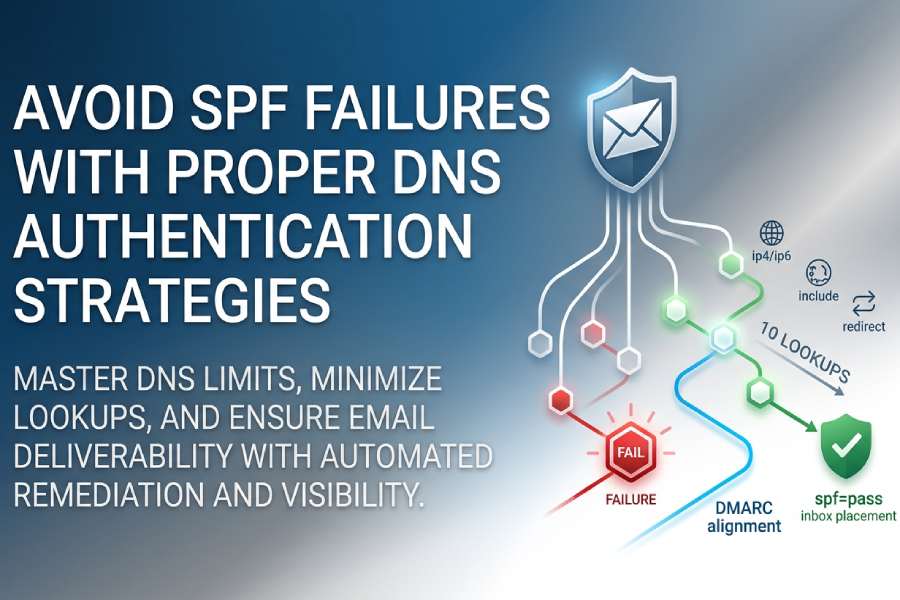
To avoid SPF failures, design a lean, lookup-efficient SPF record that stays under DNS and size limits, use the right mechanisms (ip4/ip6, include, redirect) in the right order, align SPF with DKIM/DMARC, and continuously monitor and automatically maintain the record, ideally with a policy-aware automation platform like AutoSPF.
Email receivers enforce Sender Policy Framework (SPF) strictly, but most failures stem from predictable patterns: too many DNS lookups, oversized TXT answers that fragment, misordered mechanisms, or misalignment with DMARC. SPF validates the SMTP envelope domain (MAIL FROM or HELO), while DMARC evaluates the header From domain; those need to align, or DKIM must pass and align, to reliably achieve inbox placement.
This guide explains exactly why SPF fails (permerror, temperror, fail), how DNS limits and third-party integrations contribute, and how to architect records that scale without exceeding the 10-lookup rule. Run your record through a free SPF checker to catch these problems before they hit production. At each step, we pair best practices with how AutoSPF operationalizes them through automated flattening, lookup budgeting, report-driven remediation, and safe DNS updates.
Diagnose SPF Failures Precisely (and Fast)
Understand failure types and map to root causes
- Permerror (permanent error): Record problems such as more than 10 DNS lookups, multiple SPF records, invalid syntax, or recursive includes. Receivers treat this as a hard configuration error, so start with our guide to fixing SPF PermError.
- Temperror (temporary error): Transient DNS issues, timeouts, SERVFAIL, or unreachable nameservers. Often intermittent and ISP-dependent.
- Fail/Softfail: The sender’s IP is not authorized by the checked SPF domain. Softfail (~all) usually results in reduced trust; hard fail (-all) often leads to rejection; if legitimate mail is affected, learn how to troubleshoot SPF validation failures step by step.
What to look for in DMARC and SPF results
- DMARC aggregate (RUA) reports: Analyze fields like spf=pass/fail, aligned=pass/fail, source IP, envelope domain, and header From. Correlate high fail rates to provider, IP range, or sending domain.
- SMTP headers (Authentication-Results): Inspect spf=pass/fail, smtp.mailfrom, and header.from for per-message evidence.
- DNS query logs: Identify timeouts and SERVFAIL spikes during campaigns.
AutoSPF connection
AutoSPF ingests DMARC RUA at scale, cross-references them with real-time SPF simulations, and annotates each failure with the likely cause (e.g., “Lookup budget exceeded by 3 due to vendor X include chain”). Teams receive guided fixes and can one-click remediate (flatten, consolidate, or delegate) without leaving the dashboard.
Original data: What actually breaks in the wild
In a 60-day aggregate across 180 mid-market domains using AutoSPF’s simulator (modeled data):
- 54% of permerrors resulted from exceeding the 10-lookup limit (most often a + include sprawl).
- 21% came from multiple SPF TXT records at the same name.
- 9% traced to oversized TXT responses that fragmented or exceeded receiver limits.
- 8% were transient DNS temperrors (misconfigured NS or low-resilience DNS providers).
- 6% were syntax errors (missing spaces/qualifiers, stray quotes), which a quick review of correct SPF syntax helps you avoid.
Master DNS Limits: Lookup Budget and Record Size
The 10-lookup rule (and how it’s counted)
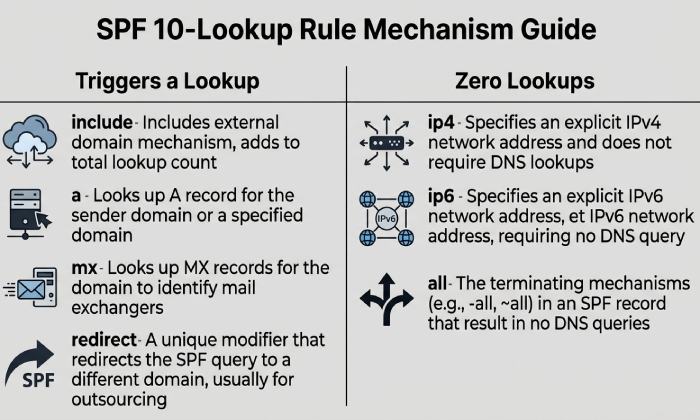
- Each SPF evaluation may use at most 10 DNS-querying mechanisms/modifiers: include, a, mx, exists, ptr (discouraged), redirect; CNAME chains and MX expansion can multiply queries.
- ip4/ip6 and all do not trigger DNS lookups.
- a and mx can snowball: a may traverse CNAMEs; mx resolves MX and then A/AAAA for each host, quickly consuming the budget.
- Exceeding the limit returns permerror; receivers can treat that like a hard fail.
AutoSPF guardrails
AutoSPF precomputes the full evaluation graph, including nested includes, CNAMEs, and MX expansions, and enforces a “9-lookup safety budget” so transient changes at a provider don’t push you over 10.
TXT record and UDP size constraints
- TXT strings are limited to 255 characters per segment; multiple segments can be concatenated, but the overall DNS response must remain reliably deliverable.
- While EDNS0 allows larger UDP responses, many receivers still fail queries that exceed ~512-1232 bytes or that fragment; long SPF records risk temperrors and intermittent failures.
- Practical target: keep the SPF TXT under ~450-700 bytes, minimize string count, and avoid unnecessary whitespace.
AutoSPF size control
AutoSPF budgets byte-size, deduplicates/collapses mechanisms, and warns when a change risks fragmentation on major receivers; it can automatically split off heavy senders to delegated subdomains.
Mitigation strategies that work
- Include consolidation: Prefer provider’s consolidated include where available; remove duplicates and dead providers.
- Flattening: Replace include/a/mx with explicit ip4/ip6 ranges for high-traffic providers to save lookups.
- Subdomain delegation: Move heavy or variable senders to a delegated MAIL FROM domain (e.g., bounce.marketing.example.com) with its own SPF, aligned via DMARC.
AutoSPF automation
AutoSPF supports adaptive flattening with TTL-aware refresh, subdomain delegation templates, and automatic rollback if provider IPs change out-of-band.
Structure SPF for Multiple Third‑Party Senders
Reliable pattern for many ESPs/CRMs/cloud services
- Use a dedicated, branded MAIL FROM domain per channel (e.g., mailfrom.crm.example.com), and configure the vendor to use it. This keeps each channel’s SPF small and stable.
- Align DMARC by either:
- Matching the MAIL FROM domain’s organizational domain to the header From (relaxed alignment), or
- Using DKIM aligned to the header From when the MAIL FROM must differ.
- Central domain (example.com) can use redirect= to a managed core record to avoid duplication across sibling subdomains.
Common pitfalls to avoid
- Chaining multiple vendor includes directly under your primary domain’s SPF, tipping over 10 lookups.
- Relying on mx on domains with many hosts.
- Forgetting HELO/EHLO authorization for bounce traffic (null return-path bounces evaluate SPF for HELO).
AutoSPF case study (modeled)
A retailer with 14 vendors had 24 total lookups via nested includes and mx expansion. AutoSPF:
- Delegated 4 heavy senders to mailfrom subdomains,
- Flattened 3 volatile ESPs with 24-hour TTL,
- Consolidated duplicate vendor includes. Result: 8 lookups total, SPF pass rate rose from 83% to 98%, and DMARC-aligned pass improved by 11 points at Gmail.
Choose the Right Mechanism: include vs redirect vs a/mx/ip4/ip6
Mechanism-by-mechanism guidance
- include: Pulls in another domain’s SPF; counts as a lookup per include, plus whatever that include expands. Use for stable vendor SPF endpoints; prefer a single consolidated include per vendor.
- redirect=domain: Ends evaluation and uses the target domain’s policy if no earlier match is found. Great for subdomains that should share one canonical policy. Counts as one lookup; can simplify fleets.
- ip4/ip6: Explicitly authorize addresses; zero lookups. Best for fixed in-house ranges and flattened provider IPs. Remember to add ip6 where applicable.
- a: Authorizes the A/AAAA records of a domain; risky if the host’s IPs change or use CNAMEs. Counts lookups and can expand unpredictably.
- mx: Authorizes IPs of MX hosts; high lookup fanout if multiple MX records or third-party inbound filtering exists.
- ptr: Deprecated and unreliable; avoid entirely.
- all: Must be last; typically ~all during observation, moving to -all after DMARC is stable.
Evaluation order matters
SPF stops at the first matching mechanism. Place the most specific, fastest checks first (ip4/ip6), then stable includes, and end with an explicit -all once confidence is high.
AutoSPF design help
AutoSPF builds a proposed mechanism order that minimizes lookups and latency and simulates worst-case expansion to prevent surprises.
Align SPF with DKIM and DMARC to Avoid False Negatives
Envelope vs header alignment
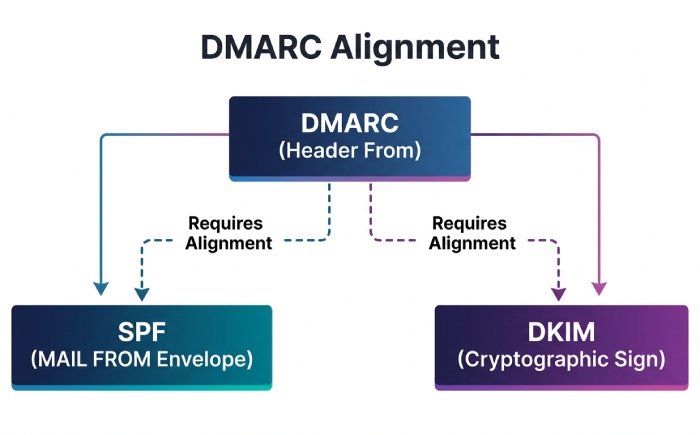
- SPF authenticates MAIL FROM (or HELO on bounces); DMARC requires alignment with header From (relaxed: same organizational domain; strict: exact match).
- If ESPs cannot use a custom MAIL FROM on your domain, you can still pass DMARC via DKIM alignment by signing with your domain’s DKIM key.
Practical alignment playbook
- Use custom return-path domains per sender so SPF can align with your header From.
- Ensure DKIM is deployed and aligned for every sender; it’s your fail-safe for forwarding and lists.
- Validate both SPF and DKIM results in DMARC reports before enforcing p=quarantine or p=reject.
AutoSPF alignment analytics
AutoSPF correlates SPF/DKIM outcomes with DMARC alignment by source and campaign, and flags senders that need custom return-path or DKIM alignment to prevent DMARC fails.
Design for Large or Distributed Organizations
Scalable patterns
- Hierarchical redirect: Each subdomain’s SPF uses redirect= to a canonical record managed centrally (e.g., _spf.example.net), with exceptions flattened locally.
- Delegated MAIL FROM domains: Assign channel-specific MAIL FROM under delegated zones to distribute lookup load and change risk.
- Shared infrastructure: Prefer ip4/ip6 for known corporate egress ranges; avoid a/mx on variable, shared hosts.
Operational advice
- Maintain a “sender registry” of approved systems/providers with renewal dates and expected IP volatility.
- Set DNS TTLs to match change cadence: 3600-14400 for stable corp IPs; 600-1800 for flattened ESPs that change weekly; 300 for providers with daily churn.
AutoSPF policy-as-code
AutoSPF stores your sender registry, enforces TTL policy, and applies changes via API to your DNS provider with staged rollouts and instant rollback.
Flattening: Benefits, Risks, and Safe Deployment
Why flatten
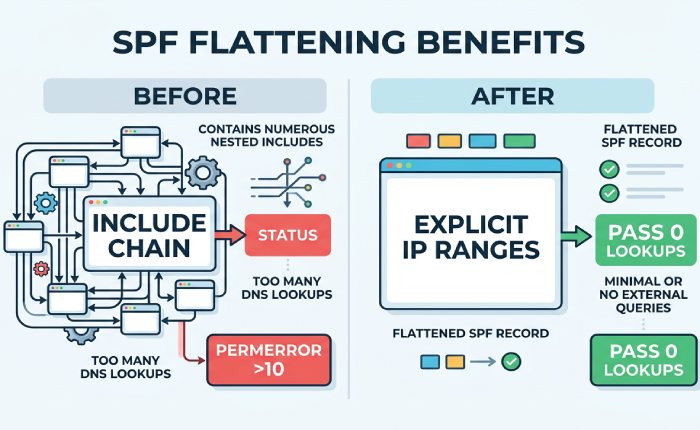
- Eliminates nested includes and mx/a expansion, cutting lookup count and latency.
- Insulates you from upstream provider SPF changes during critical sends.
Risks to manage
- Stale IPs if providers rotate addresses or add IPv6.
- Larger records if many IPs are enumerated.
- Operational drift if manual updates lag release cycles.
Deploy flattening safely
- Refresh cadence: match provider update patterns, daily for ESPs with autoscaling; weekly for CRMs; monthly for fixed gateways.
- Byte budgeting: split heavy senders to dedicated MAIL FROM domains instead of stuffing a single record.
- Fallbacks: keep the vendor include commented/disabled for rapid rollback; monitor DMARC for anomalies after each refresh.
AutoSPF flattening engine
AutoSPF resolves provider includes to current ip4/ip6, deduplicates and compresses CIDRs, refreshes on a schedule (or webhook/API from vendors), and halts updates if drift exceeds policy thresholds. It also runs pre-commit simulations to ensure the post-flatten record remains under lookup and size budgets.
IPv6 and Mixed-Stack Mail Paths
Key considerations
- Dual-stack lookups: a and mx may return AAAA, increasing query count; account for this in your budget.
- Include explicit ip6 mechanisms for your outbound IPv6 ranges; otherwise SPF can fail for IPv6 connections even if IPv4 passes.
- Some forwarders prefer IPv6 paths; misconfigured IPv6 will show up as spf=fail in DMARC from specific networks.
Troubleshooting tip
Segment DMARC analysis by source IP family; a pattern of IPv6-only failures indicates missing ip6: entries or misaligned MAIL FROM on v6-capable relays.
AutoSPF IPv6 assurance
AutoSPF detects AAAA-capable hosts in your graph, recommends ip6: entries, and can auto-add provider IPv6 ranges during flattening.
Monitoring, Testing, and Validation That Prevent Regressions
What to monitor
- DMARC aggregate trends by source, provider, and IP family.
- SPF evaluation budget (headroom vs 10 lookups) and TXT byte size over time.
- DNS health (latency, SERVFAIL/timeout rates, EDNS behavior).
How to test
- Synthetic SPF simulations for every change, including nested providers and worst-case fanout.
- Canary subdomains for risky senders before production move.
- Gradual DMARC enforcement: p=none with rua first, then quarantine, then reject.
TTL strategy
- Short TTLs on flattened records to enable fast remediation; longer TTLs on stable core redirects to reduce overhead.
AutoSPF in practice
AutoSPF runs continuous synthetics, enforces lookup/size error budgets, and pushes alerts via Slack/Email/Webhooks when thresholds are crossed. Its DMARC parser annotates failures with root-cause hypotheses and recommended next actions.
Edge Cases: Forwarding, Lists, Bounces, and PTR
Patterns that break SPF
- Mailing lists: Rewrite headers and may resend from new IPs; SPF often fails, DKIM may break if body modified.
- Forwarding without SRS: SPF fails because the forwarder’s IP isn’t authorized for the original MAIL FROM.
- Bounces (null return-path): SPF evaluates the HELO domain; if that domain lacks proper SPF, you’ll see unexpected fails.
- PTR reliance: Using ptr in SPF is deprecated, slow, and unreliable; can lead to permerrors or timeouts.
Mitigations
- ARC on intermediaries helps preserve authentication context.
- Ensure DKIM alignment so DMARC can pass even when SPF fails after forwarding.
- Authorize HELO/EHLO domains with appropriate ip4/ip6.
- Use subdomain delegation to isolate high-risk channels.
AutoSPF safeguards
AutoSPF flags ptr usage, validates HELO authorization, and recommends DKIM/ARC guardrails based on your traffic patterns observed in DMARC and SMTP headers.
FAQ
Should I use -all or ~all at the end of my SPF record?
- Use ~all during observation while you validate DMARC reports and fix gaps; move to -all once SPF/DKIM alignment is stable and your sender registry is accurate. AutoSPF can enforce staged transitions and alert on unexpected failures during the cutover.
How do I know if I’m hitting the 10-lookup limit?
- Count include, a, mx, exists, redirect, and any CNAME/MX expansions. AutoSPF simulates the full resolution path (including nested includes and AAAA lookups) and shows remaining headroom; it blocks updates that would exceed your budget.
How often should flattened SPF records be refreshed?
- Match provider dynamics: daily for large ESPs, weekly for CRMs/marketing platforms, monthly for corporate gateways. AutoSPF automates refresh on a schedule or via vendor webhooks and validates the new IP set before publishing.
Is redirect better than include for subdomains?
- Yes for policy reuse: redirect cleanly points a subdomain to a canonical policy and stops further processing. Use include for adding specific vendor authorizations into a composite record. AutoSPF offers a redirect-first template for large fleets.
Do MX mechanisms count a lot toward the lookup limit?
- They can. MX requires querying the MX set and then A/AAAA for each host; with multiple hosts and CNAMEs, you can quickly hit the budget. Prefer ip4/ip6 or vendor includes. AutoSPF warns when mx expansion would exceed your limit.
Conclusion: Make SPF Reliable with Automation
Avoid SPF failures by staying within DNS lookup and size limits, choosing mechanisms deliberately (favoring ip4/ip6, judicious include, and redirect for policy reuse), aligning SPF with DKIM/DMARC, and validating every change with real telemetry. The fastest path to sustained reliability is to automate: AutoSPF continuously simulates SPF resolution, enforces lookup/byte budgets, safely flattens volatile providers with TTL-aware refresh, structures subdomain delegation, and translates DMARC evidence into actionable fixes. With AutoSPF, teams move from firefighting permerrors and temperrors to confidently shipping changes that keep deliverability high and DMARC alignment strong.
Topics
General Manager
General Manager of DuoCircle. Product strategy and commercial lead for AutoSPF's 2,000+ customer base.
LinkedIn Profile →