Why Google Workspace DKIM Passes but DMARC Fails

Quick Answer
Google Workspace DKIM can pass while DMARC fails when the authenticated domain does not align with the visible From address. Learn how to identify DKIM alignment issues, troubleshoot SPF and DMARC configurations, and ensure reliable email authentication and deliverability.
Try Our Free DMARC Checker
Validate your DMARC policy, check alignment settings, and verify reporting configuration.
Check DMARC Record →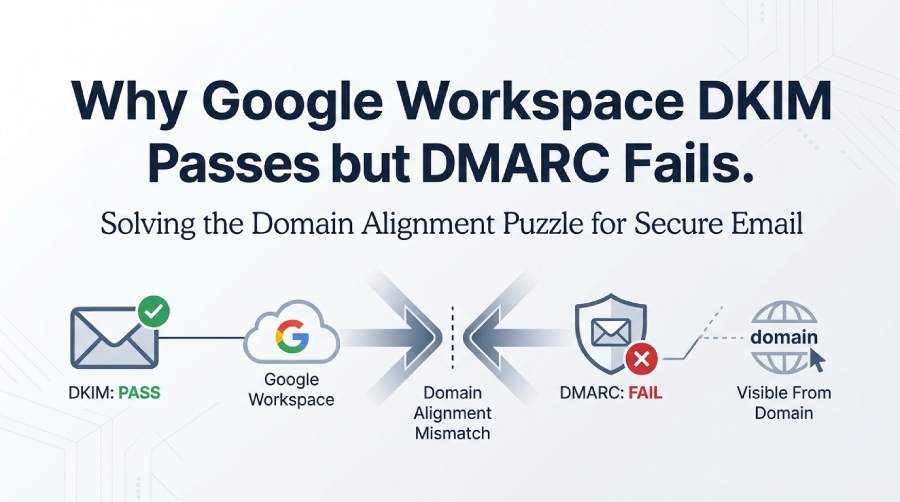
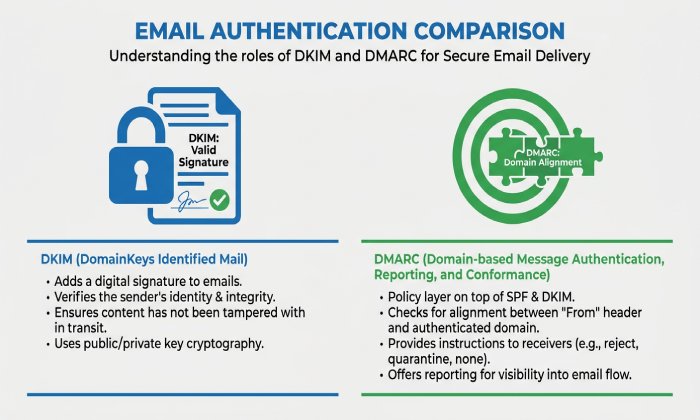
In Google Workspace, DKIM and DMARC solve related but different parts of email authentication. DKIM proves that an email was signed by an authorized system and that key parts of the message were not changed in transit. DMARC checks whether that authenticated identity aligns with the visible From address that users see in Gmail or another recipient inbox.
When a Google Workspace administrator configures DKIM setup, Google creates a DKIM key pair: a public DKIM key published in DNS and a private key retained by Google. The private key is used by Googles email server to create the DKIM signature on outgoing messages, while receiving systems retrieve the public DKIM key from the domains DNS TXT record to validate the signature.
The basic Google Workspace DKIM flow
A typical Google Workspace DKIM configuration works like this:
- In the Google Admin console, the Gmail administrator goes to Menu → Apps → Google Workspace → Gmail.
- From the Authenticate email page, the admin chooses the domain and uses the generate DKIM key workflow.
- Google provides a TXT record name and TXT record value.
- The admin publishes the DNS TXT record at the domain provider, domain host, or domain registrar.
- After DNS records propagate, the admin returns to the Admin console to verify DKIM and turn on DKIM.
- Google begins signing outgoing messages with a DKIM-Signature header.
This process may involve Squarespace, Tucows, NS1, a website host, or another domain provider, depending on where the domains name servers are managed. If a Google partner manages the organizations DNS, the Google Workspace administrator may need to provide the domain sign-in information or ask the partner to add TXT record details and save changes.
What It Means When Google Workspace DKIM Passes
When Google Workspace DKIM passes, the receiving email server has confirmed that the DKIM signature is cryptographically valid. In authentication results, you may see values such as DKIM=pass, DKIM=OK, or a similar DKIM authentication result in the message header.
A passing DKIM result means the recipient server found the public DKIM key in DNS, used it to validate the DKIM signature, and confirmed that the signed portions of the email were not altered after Google signed the message. This is a strong signal for email authentication, especially when combined with SPF, DMARC, and potentially BIMI.
What DKIM pass does”and does not”prove
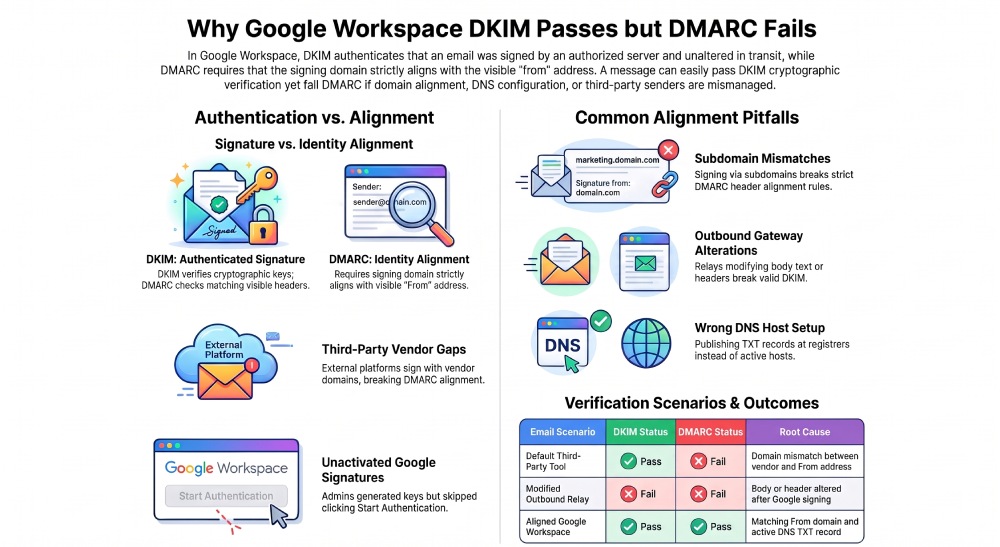
A valid DKIM signature proves that the signing domain authorized the message. It does not automatically prove that the signing domain matches the visible From domain required by DMARC. That distinction is the most common reason Google Workspace DKIM passes but DMARC fails.
Why DMARC Can Still Fail Despite a Valid DKIM Signature
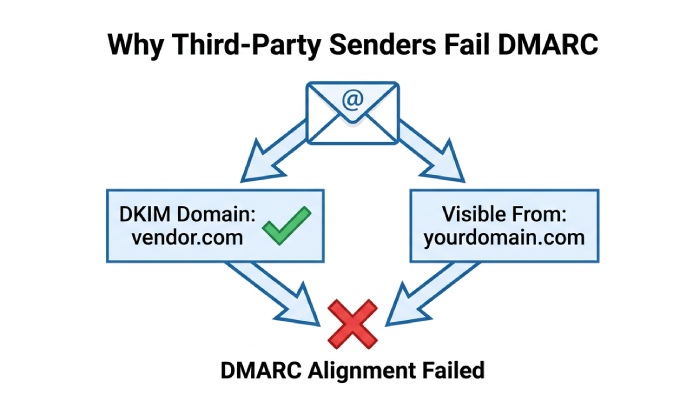
DMARC evaluates whether at least one authentication method passes and aligns with the domain in the visible From header. A message can have DKIM=pass but still fail DMARC if the DKIM signing domain does not align with the From domain and SPF either fails or passes without alignment. If either DKIM or SPF passes with proper alignment, DMARC passes.
Common reasons DKIM passes but DMARC fails
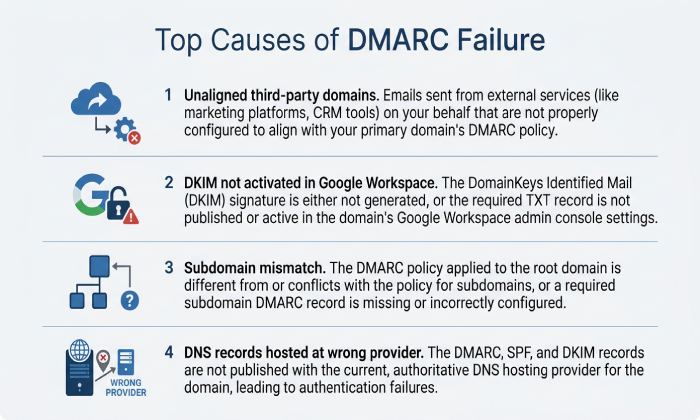
The most frequent causes include:
- The DKIM signature uses a different domain than the From address.
- A third-party platform signs with its own domain instead of your domain.
- SPF passes for the sender’s email server, but the SPF domain does not align.
- Google Workspace outbound gateways rewrite headers or relay mail through another email server.
- Subdomains are used inconsistently, such as signing with mail.example.com while sending from example.com.
- The domain has a malformed DKIM record or outdated public DKIM key.
- The DNS TXT record was added to the wrong TXT record name.
- The TXT record value was truncated because of TXT record length limits.
- The admin forgot to start authentication after publishing DNS records.
Google’s sender guidelines require senders delivering more than 5,000 messages per day to personal Gmail accounts to configure SPF, DKIM, and DMARC. For direct email, the visible From domain must align with either the authenticated SPF domain or DKIM signing domain to satisfy DMARC alignment requirements.
Where outbound gateways create alignment problems
Outbound gateways are a common source of confusion. If Google Workspace sends mail through an outgoing gateway, the gateway may modify the body or headers after Gmail applies the DKIM signature. If the modification affects signed content, the DKIM signature can break. In other cases, the gateway may apply its own DKIM signature using a different domain.
Outbound gateways can be legitimate, but they must be configured carefully. If the outgoing gateway signs with gatewayvendor.com while the visible From domain is yourdomain.com, DKIM may pass for the vendor but fail DMARC alignment for your domain.
DKIM Alignment vs. DKIM Authentication: The Key Difference
DKIM authentication and DKIM alignment are not the same. DKIM authentication checks whether the DKIM signature is valid using the public DKIM key. DKIM alignment checks whether the domain in the DKIM d= tag aligns with the visible From domain.
In Google Workspace, the Admin console helps you generate DKIM key records for your selected domain. When you generate DKIM key settings, Google creates a DKIM key pair with a public DKIM key and private key. Google retains the private key used to sign outgoing messages, while the corresponding public key is published in DNS so receiving mail servers can verify the signature.
Common Google Workspace Domain Alignment Issues
Most Google Workspace DKIM pass but DMARC fail cases come down to domain alignment. The technical signature is valid, but the authenticated identity does not match the organizational identity users see.
Issue 1: Using third-party platforms without aligned DKIM
Many organizations send through systems outside Google Workspace: fundraising tools, newsletter platforms, invoicing systems, CRMs, or help desks. These platforms may authenticate email with their own DKIM signature, but not with the organizations domain.
For example, if a third-party platform signs an email using d=vendor.com while the visible From address uses dsact.org, DKIM authentication may pass for vendor.com but fail DMARC alignment for dsact.org. To resolve this, configure the platform to sign messages using an aligned domain associated with dsact.org. Also verify that SPF passes with an aligned envelope-sender domain.
Issue 2: Google Workspace DKIM was generated but not activated
Generating a DKIM key and publishing its corresponding DNS TXT record does not automatically activate DKIM signing in Google Workspace. After the DNS record is available, the administrator must return to the Gmail Authenticate email settings in the Google Admin console and select Start authentication. Until this step is completed, outgoing messages might not carry the expected Google Workspace DKIM signature.
To troubleshoot DKIM issues, confirm that the account has Gmail Settings administrator privilege, open the Admin console, go to Gmail authentication settings, select the domain, and check DKIM status. If the record is found, use start authentication. Then send a test email to an external organization such as a personal Gmail account and inspect the original message header.
Issue 3: The wrong domain or subdomain is authenticated
A common mistake is setting up DKIM for example.com while sending from mail.example.com, or vice versa. DMARC alignment can pass with relaxed alignment in some subdomain cases, but strict alignment requires an exact match.
If your Google Workspace environment includes subdomains, aliases, or multiple domains, each sending domain should have proper DKIM setup. You may need to generate DKIM key records separately, add DKIM key information for each domain, and authenticate email for each one in the Admin console.
Issue 4: DNS records are hosted somewhere unexpected
Many organizations assume their DNS is managed where they bought the domain, but the active name servers may point elsewhere. A domain registrar such as Tucows may not be the active DNS host if the name servers point to Squarespace, NS1, or a website host.
Before you add TXT record data, check the authoritative DNS provider. Publishing the public DKIM key at the wrong domain provider will not help Google Workspace authenticate email. The DNS TXT record must exist at the active domain host, with the exact TXT record name and TXT record value provided by the Google Admin console.
Issue 5: Old keys, rotated keys, or inconsistent records
If an admin uses generate DKIM key more than once, the DKIM key pair can change. The public DKIM key in DNS must match the private key currently used by Google Workspace. If the public DKIM key is old while the private key is new, DKIM authentication fails. If another valid DKIM signature passes from a different service, the message may still show DKIM=pass while DMARC fails due to alignment. AutoSPF helps businesses simplify SPF record management, improve email deliverability, and strengthen email authentication.
For reliable email authentication, document each domain, selector, key length, DNS TXT record, and service that sends mail. Then test Gmail, outbound gateways, third-party tools, and bulk senders separately to confirm that each system can authenticate email with aligned DKIM and pass DMARC.
General Manager
General Manager of DuoCircle. Product strategy and commercial lead for AutoSPF's 2,000+ customer base.
LinkedIn Profile →