Why Every Domain Migration Should Start with a CAA Checker

Quick Answer
A CAA checker verifies which certificate authorities are authorized to issue SSL/TLS certificates for your domain. Running it before a domain migration helps prevent certificate issuance failures, validates DNS CAA records, and ensures a secure, uninterrupted transition.
What a CAA Checker Does and Why It Matters in Domain Migration
A CAA checker validates the certificate authority authorization policy published in DNS for a domain name. In practical terms, it performs a CAA lookup to determine which certificate authority is allowed to issue a TLS/SSL certificate or S/MIME certificate for that domain. During a migration—whether you are moving DNS providers, changing hosting platforms, consolidating brands, or shifting certificate workflows—this check is essential because the wrong DNS CAA record can silently block certificate issuance.
A CAA record is a DNS security control defined originally in RFC 6844 and later updated by RFC 9495. It is formally a CAA resource record, and it tells public certification authorities such as DigiCert, Thawte, GeoTrust, RapidSSL, and other CA brands whether they are permitted to issue certificates for a domain. The CAB Forum, through requirements such as Ballot 125 and Ballot 219, made CAA checking part of the certificate issuance process.
That means a CAA checker is not just another DNS checker. It is a migration risk-control tool. A standard DNS lookup may show A, AAAA, MX, TXT, SOA, DNSKEY, and other DNS records, but a dedicated CAA record lookup focuses on whether your CAA policy aligns with your certificate provider, automation platform, and operational timeline.
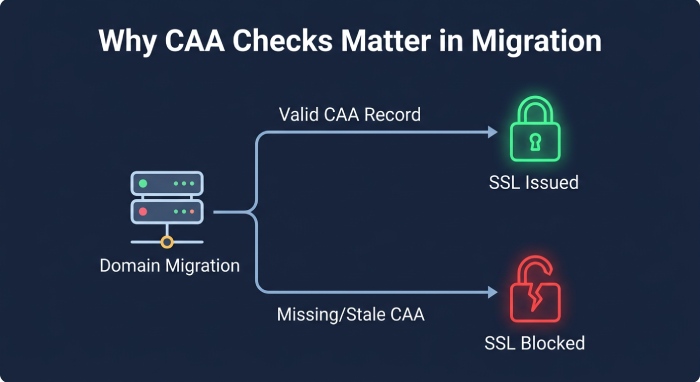 For example, if a company migrates
 example.com from one DNS platform to another but forgets to copy its DNS CAA record, a certificate authority may refuse ssl certificate issuance. Conversely, if stale CAA data remains in place, an unauthorized CA could still be allowed under an old security policy. A DNS CAA resource record check helps the domain owner confirm the active policy before the move creates production impact.
Tools such as whatsmydns.net, nslookup.io, SSL Labs, sslmate, and provider portals like DigiCert CertCentral can help verify CAA behavior. A broader DNS checker is useful, but a purpose-built CAA checker gives clearer visibility into record type, record values, record flag, record tag, and TTL.
How CAA Records Affect SSL/TLS Certificate Issuance During a Move
A CAA record controls which CA may issue a TLS/SSL certificate for a domain. The most common record tag is the issue tag, which authorizes a CA for standard TLS certificates. A typical CAA record example might look like this:
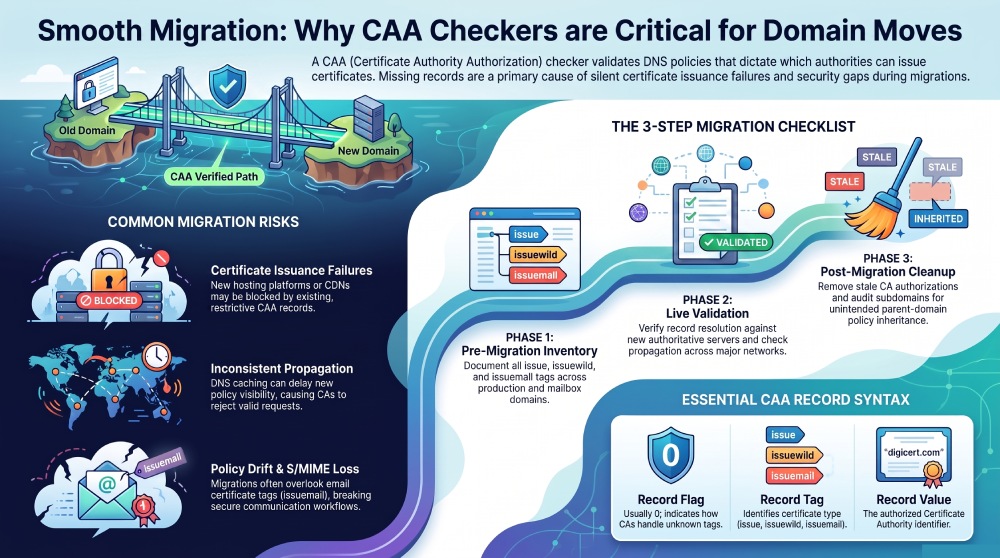
example.com. 3600 IN CAA 0 issue "digicert.com"In this CAA record syntax, 0 is the record flag, issue is the record tag, and "digicert.com" is the authorized certificate authority value. If the organization wants wildcard certificates, it may use the issuewild tag. If the organization issues email certificates, the issuemail tag can define which CA may issue an S/MIME certificate for a mailbox domain.
This matters during migration because every public CA must perform validation checks, including domain control validation and CAA evaluation, before issuing a TLS/SSL certificate or S/MIME certificate. If the CA performing the request is not listed in the DNS CAA record, the request can fail even when all other DNS and ownership checks succeed.
A CAA lookup also evaluates inheritance. If there is no CAA resource record on a subdomain, the CA may look up the DNS tree to find a parent-domain policy. This can create an umbrella policy where the parent domain controls issuance for multiple subdomains. During migration, this is helpful when intentional and dangerous when misunderstood.
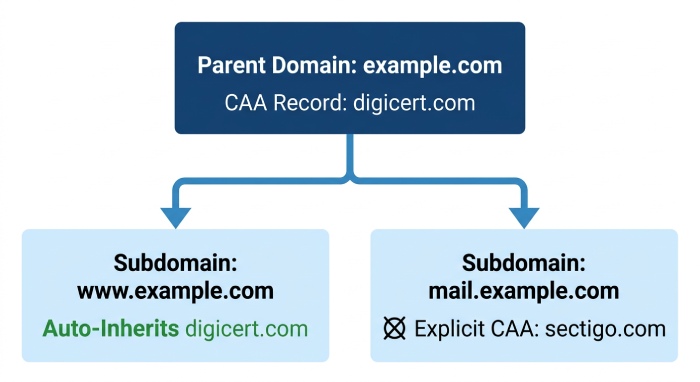 For instance,
 www.example.com may inherit CAA from example.com. Large domains such as yahoo.com or bilibili.com may have complex DNS zones, multiple subdomains, delegated zones, and different certificate workflows. Without a CAA checker, teams may not notice that a subdomain is inheriting a restrictive DNS CAA resource record from the parent zone.
A DNS CAA record tester can reveal this inheritance behavior before certificate renewal windows become urgent. It also confirms whether the organization needs to authorize certificate authority values such as digicert.com, sectigo.com, or another CA identifier used by the certificate provider.
Common Migration Risks a CAA Checker Helps Prevent
The first major risk is certificate issuance failure. If your new hosting platform, CDN, or certificate automation system uses a different certificate authority than your old provider, the existing CAA record may block the new CA. A CAA checker identifies that mismatch before the cutover.
The second risk is inconsistent CAA record propagation. After you update a DNS CAA record, DNS caching, authoritative DNS servers, and resolver behavior can delay visibility. A propagation checker or DNS propagation checker can show whether the new policy has reached major networks. Checking only one DNS resolver may produce a false sense of readiness.
The third risk is losing email certificate authorization. Many migration plans focus on web certificates and forget S/MIME. If an organization uses an S/MIME certificate for secure email, the issuemail tag must remain correct. A CAA checker that supports certificate authority authorization for both TLS and S/MIME can prevent mailbox-related certificate failures.
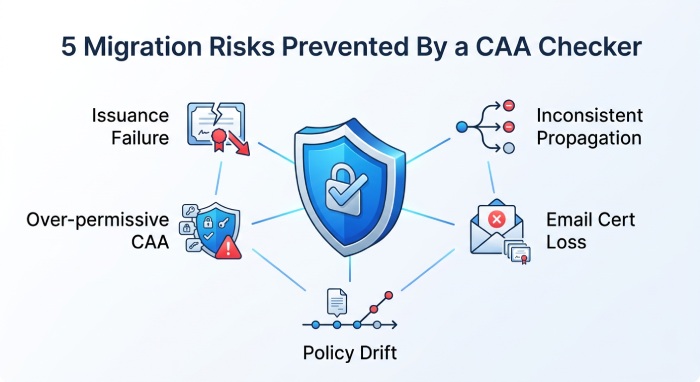 The fourth risk is policy drift. A migration often involves many parallel changes: registrar updates, nameserver changes, DNS zone imports, CDN onboarding, web server ssl config, and third-party SaaS validation. In that chaos, CAA record management may b overlooked. A DNS checker may confirm that the site resolves, but only a CAA lookup confirms whether the correct ca authorization policy is active.
Finally, there is the risk of over-permissive CAA. Some teams remove CAA temporarily to “make issuance work.” That may solve an immediate problem but weakens the domain’s security policy. A better approach is to use a CAA checker to precisely authorize the required CA and remove obsolete values.
Step-by-Step: Using a CAA Checker Before, During, and After Migration
Before Migration: Inventory Current CAA Policy
Start by running a CAA lookup for every production domain, important subdomain, and mailbox domain. Document all CAA records for domain assets, including the issue tag, issuewild tag, and issuemail tag. Record the current TTL, authorized CA values, and whether each CAA resource record exists directly on the hostname or is inherited from a parent.
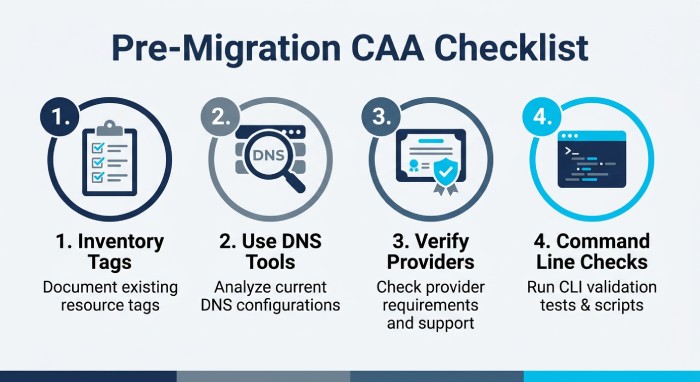 Use more than one tool. A browser-based CAA checker is fast, while a general DNS checker can confirm surrounding DNS records such as SOA, DNSKEY, MX, TXT, and CNAME data. Services such as whatsmydns.net and nslookup.io are useful for external visibility, while SSL Labs can help validate the broader SSL config and certificate chain after issuance.
Also compare the CAA policy to your intended certificate providers. If you are moving to DigiCert CertCentral, confirm that the DNS CAA record authorizes DigiCert. If the legacy environment used Thawte, GeoTrust, or RapidSSL, verify whether those brands map correctly under your selected certificate authority. Some organizations use automation from hosting providers that issue through a different CA than expected.
Command-line verification examples
From a terminal, technical teams can run a dig command such as:
dig CAA example.comOn Windows, use Powershell:
Resolve-DnsName example.com \-Type CAAOn Mac OS or Linux, the terminal is usually built in. On Windows, engineers may also use WSL. Some Linux desktop users open the launcher with the Super (Linux key) and search for Terminal. These command-line checks complement a visual DNS CAA record tester and help confirm the exact record type returned by authoritative DNS servers.
During Migration: Validate Live Resolution and CA Compatibility
During the cutover, repeat the CAA record lookup against both old and new DNS infrastructure where possible. Confirm that the migrated zone includes the same or improved DNS CAA resource record policy. If nameservers changed, verify the new authoritative DNS servers are serving the expected CAA record and that the SOA serial reflects the updated zone.
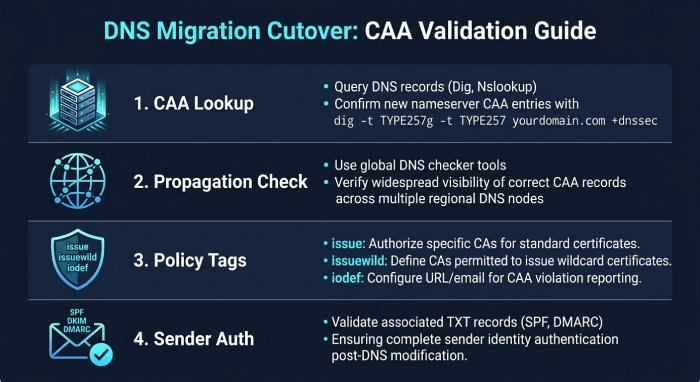 Next, test from multiple networks with a propagation checker. CAA record propagation is especially important when the certificate order will be placed immediately after migration. A CA may query a resolver that still sees old CAA data. If the old policy does not authorize the new certificate authority, SSL certificate issuance can fail.
At this stage, avoid broad or temporary weakening of the policy. Instead, update record values deliberately. For example, if the new platform issues through DigiCert, add the appropriate issue tag value. If wildcard certificates are needed, add or confirm the issuewild tag. If S/MIME is used, confirm the issuemail tag for the relevant mailbox domain. A reliable CAA checker should show all three.
This is also the right time to confirm that related sender-authentication records survived the migration. SPF, DKIM, and DMARC are separate from certificate authority authorization, but they often move in the same DNS project. Tools such as AutoSPF can help teams manage SPF complexity while the CAA checker handles CAA-specific validation. Run our SPF syntax validator to confirm the record survived the move intact. If the migration means rotating keys, generate a fresh signing key with our DKIM generator.
After Migration: Recheck Issuance, Inheritance, and Monitoring
After the migration, perform a final CAA lookup for each critical domain and subdomain. Confirm the effective CAA policy matches the approved post-migration design. If a DNS CAA record is missing where one was expected, determine whether inheritance is intentional. If a parent-domain CAA resource record is functioning as an umbrella policy, document it clearly.
Then run certificate tests. Confirm the new TLS/SSL certificate is issued by the expected CA and that renewals are configured correctly. If your organization uses an S/MIME certificate, verify that the email certificate provider can still pass CA checks under the issuemail tag. A CAA checker should be part of this operational verification, not just a one-time pre-migration task.
You should also check whether any stale CA values remain. If the old migration environment used a provider you no longer trust or need, remove that authorization. Good CAA record management means keeping the CAA policy narrow enough to reduce risk but flexible enough to support real issuance workflows.
Best Practices for CAA Record Management After the Migration
Keep CAA ownership clear. The domain owner, DNS administrator, PKI team, and security team should agree on who can modify a DNS CAA record. Treat every CAA record as part of your formal security policy, not as an incidental DNS setting.
Standardize naming and documentation. Maintain a registry of approved certification authorities, their CAA identifiers, supported use cases, and whether they are authorized for TLS, wildcard TLS, or S/MIME. This avoids confusion when teams need to authorize certificate authority entries quickly during incident response or platform onboarding.
Use least privilege. Only include the CA values required for active certificate workflows. If your organization uses DigiCert for public TLS and a separate CA for S/MIME, define those policies explicitly with the correct issue tag and issuemail tag. Do not authorize every provider simply to avoid troubleshooting later.
Monitor continuously. Schedule a recurring DNS CAA resource record check with a trusted CAA checker, and pair it with a broader DNS checker for zone health; if your brand publishes a logo record, confirm it with a BIMI checker too. Track changes to TTL, delegated zones, parent-domain inheritance, and subdomain exceptions. When new applications are launched, require a CAA lookup before production certificate requests.
Finally, include CAA in every migration runbook. The runbook should define the approved CAA record syntax, include at least one CAA record example, identify the correct certificate authority authorization values, and specify when to run a DNS CAA record tester. This ensures that each future migration protects certificate issuance, preserves the TLS/SSL certificate lifecycle, and maintains reliable S/MIME certificate issuance without weakening DNS security.
General Manager
General Manager of DuoCircle. Product strategy and commercial lead for AutoSPF's 2,000+ customer base.
LinkedIn Profile →