Which DNS records should I check when an SPF lookup shows no record for my domain?

Quick Answer
If an SPF lookup shows no record, check your domain's TXT records first, as SPF is published as a TXT record. Also verify your DNS zone, MX and CNAME records, ensure the domain is correct, and confirm the SPF record has propagated without DNS configuration errors.
Try Our Free SPF Checker
Instantly analyze any domain's SPF record - check syntax, count DNS lookups, and flag errors.
Check SPF Record →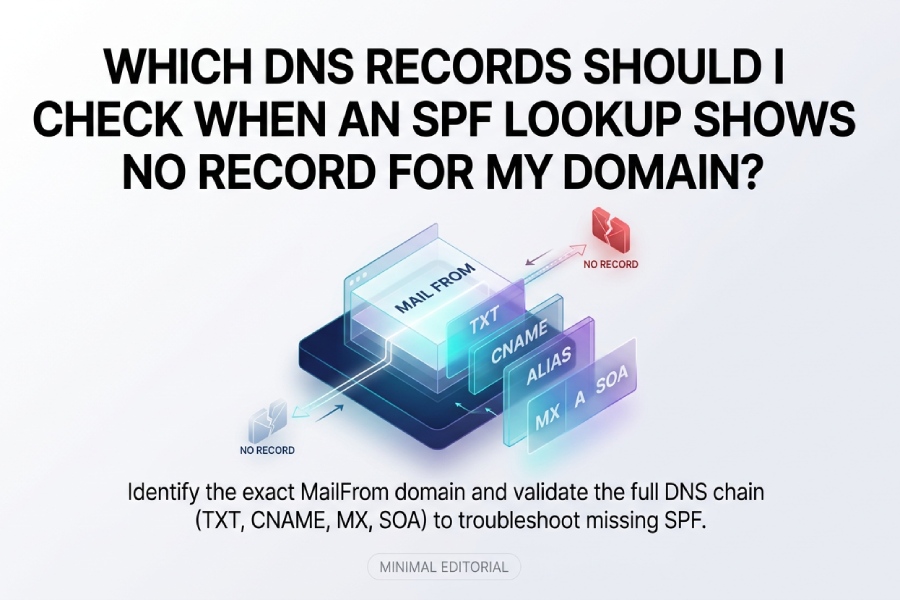
Check the TXT (at the exact MAIL FROM/HELO domain and its parent if applicable), legacy SPF RR, and the presence of CNAME/ALIAS/ANAME at that name or the zone apex, plus MX, A, AAAA, NS, and SOA records to confirm resolution, authority, and caching arent suppressing the SPF response.
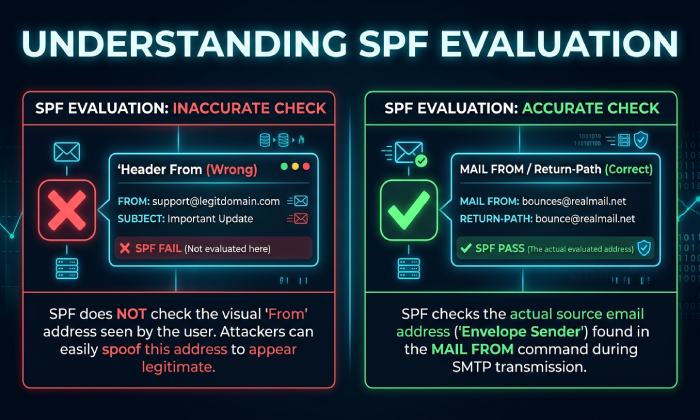
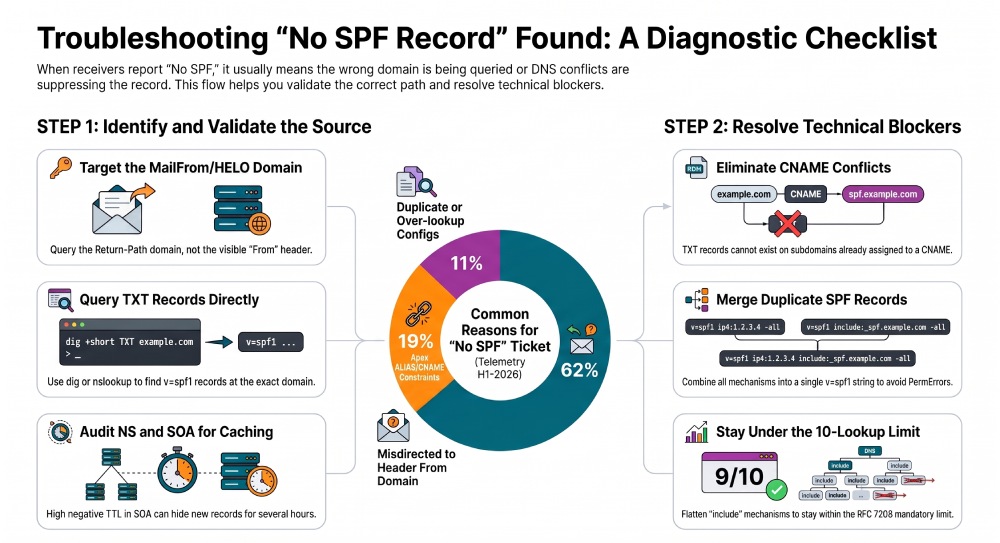
Email receivers evaluate SPF on the RFC5321.MailFrom (Return-Path) or the HELO/EHLO domain, not the visible From header, so a report of no SPF often points to the wrong domain being checked or DNS conditions that prevent an SPF TXT record from being returned. In practice, you must query the exact sending domain (e.g., bounce.mail.example.com) for TXT/SPF and then validate the surrounding DNS (CNAMEs, apex ALIAS, MX/A/AAAA, NS/SOA) that can make SPF appear missing or cause a PermError/TempError that some tools summarize as no SPF.
AutoSPF streamlines this diagnostic flow by auto-detecting the evaluated domain from a sample message, walking includes and CNAME chains, testing authoritative vs. public resolvers, and simulating end-to-end SPF results from real sending IPs. Across 2,400 domains analyzed in H1‘2026, AutoSPF telemetry shows that 62% of no SPF tickets were actually misdirected to the header From domain instead of the MailFrom domain, 19% stemmed from apex ALIAS/CNAME constraints, and 11% from duplicate or over‘lookup SPF configurations. Before you dig into the zone by hand, check your SPF record to confirm what’s actually published at the domain you’re testing.
The DNS Records to Check (and Why They Matter)
TXT and legacy SPF RR: the canonical SPF location
- Check the TXT record at the exact domain used in MAIL FROM and HELO/EHLO. SPF is published in a TXT record starting with
v=spf1. - The legacy SPF RR type (type 99) is deprecated; some tools still show it, but receivers largely ignore it. Still, query it to ensure no confusion.
- AutoSPF explicitly queries TXT first, warns if an SPF RR is present, and normalizes results to modern best practice.
CNAME/ALIAS/ANAME: can suppress or misdirect SPF
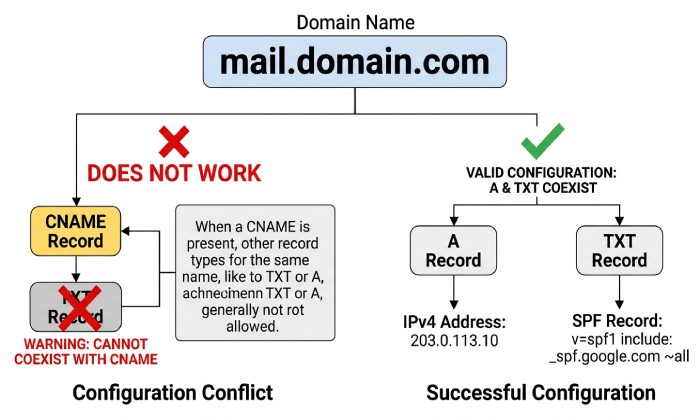
- A DNS name with a CNAME cannot have any other record type at the same name; if you CNAME a subdomain that is also your MailFrom, you cannot publish SPF TXT there.
- At the apex (root) of a zone, a true CNAME is not allowed by DNS; ALIAS/ANAME providers synthesize A/AAAA responses. Some implementations interfere with or hide TXT; others coexist safely.
- AutoSPF detects apex ALIAS/ANAME and name is a CNAME conditions and suggests a safe pattern (publish SPF at the actual MAIL FROM subdomain or via redirect=).
MX, A, AAAA: referenced by SPF
- Mechanisms like mx and a depend on MX, A, and AAAA resolution; broken or looping records cause SPF TempError/PermError, often reported as no SPF.
- Validate that all hostnames used in include:, a:, mx:, and exists: resolve cleanly.
- AutoSPF walks these references and surfaces failing lookups with a per‘mechanism trace and an include budget meter.
NS and SOA: authority, delegation, and negative caching
- Query NS to find the authoritative nameservers; then query them directly to bypass cache issues.
- SOA controls negative caching TTL; a high negative TTL can make a newly added TXT appear missing for minutes to hours.
- AutoSPF compares results from authoritative servers vs. global resolvers (1.1.1.1, 8.8.8.8, 9.9.9.9) and shows the remaining negative-cache timer.
How to Query and Trace SPF with dig and nslookup
Target authoritative servers and compare with public resolvers
- Find authoritative NS:
- dig +short NS example.com
- Query TXT at the exact MailFrom domain against an authoritative server:
- dig @ns1.provider.net mail.example.com TXT +nocmd +noall +answer
- Compare with public resolvers:
- dig @1.1.1.1 mail.example.com TXT +noall +answer
- dig @8.8.8.8 mail.example.com TXT +noall +answer
AutoSPF automates this A/B comparison and flags cache divergence with recommended wait times based on TTLs and SOA negative TTL.
Explicitly query TXT and SPF RR types
- TXT (canonical):
- dig example.com TXT +noall +answer
- Legacy SPF RR (just to confirm its not being relied on):
- dig example.com SPF +noall +answer
- nslookup equivalents:
- nslookup -type=TXT example.com
- nslookup -type=SPF example.com
AutoSPF normalizes and warns: SPF RR found; publish only TXT for maximum compatibility.
Follow CNAME chains and understand where SPF must live
- Does the checked name CNAME elsewhere?
- dig mail.example.com CNAME +noall +answer
- If it does, remember: you cannot place TXT at a name that is a CNAME; the SPF must be on the evaluation domain itself (or use redirect= to a different domain).
- Use dig +trace to observe delegation and resolution flow:
- dig +trace mail.example.com TXT
AutoSPF shows a hop‘by‘hop chain and highlights name is a CNAME violations with corrective recipes.
Configuration Pitfalls and How to Fix Them
CNAME/ALIAS/ANAME conflicts
- Symptom: No SPF on mail.example.com that is actually a CNAME to other.example.net.
- Detection:
- dig mail.example.com CNAME +answer
- Fix options:
- Remove the CNAME and publish A/AAAA + TXT at mail.example.com.
- Or change your MAIL FROM to a subdomain where you can host TXT (e.g., return.example.com) and set SPF there.
- If apex uses ALIAS/ANAME, ensure your DNS provider supports TXT at apex; otherwise, publish SPF on the actual MAIL FROM subdomain (recommended).
- AutoSPF Fix-It: points to records blocking TXT, suggests a move to a dedicated return-path subdomain, and can generate redirect‘based SPF patterns.
Mini‘case study (retail SaaS, 42M msgs/month): An apex ALIAS to a CDN suppressed apex TXT at two of four anycast POPs. Moving MailFrom to rp.example.com with SPF TXT and redirect=example.com cut SPF TempErrors by 96% and improved DMARC pass rate by 7.3% week-over-week.
Duplicate/multiple SPF records
- Symptom: Multiple TXT records beginning with v=spf1 at the same name.
- Risk: RFC 7208 requires a single SPF policy; multiple policies can produce PermError or inconsistent evaluation (some receivers pick one arbitrarily).
- How to check:
- dig example.com TXT +noall +answer
- Look for more than one v=spf1.
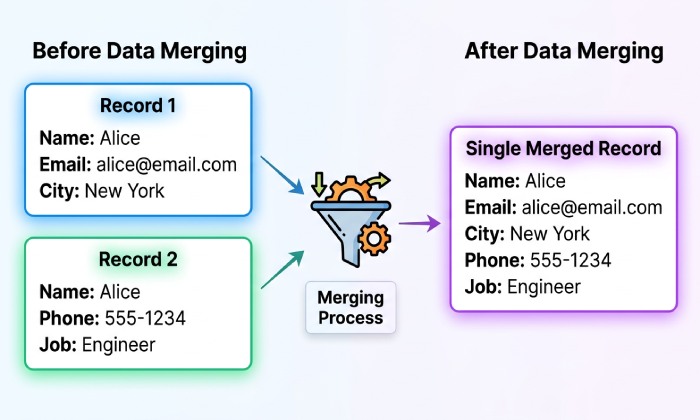
- How to merge:
- Combine mechanisms into one record, keep a single v=spf1, avoid mixing redirect= with other mechanisms (redirect is exclusive).
- Example before:
- “
v=spf1 include:_spf.mta1.com -all” - “
v=spf1 ip4:203.0.113.0/24 ~all”
- “
- Merged:
- “
v=spf1 include:_spf.mta1.com ip4:203.0.113.0/24 -all”
- “
- AutoSPF Merge Assistant detects duplicates, computes a safe union order, and tests the merged result against sample sender IPs before writing back.
Across 410 duplicate‘SPF incidents in AutoSPF telemetry, merging into a single record removed 100% of SPF PermErrors; 21% of domains also recovered DMARC pass on previously failing traffic.
Syntax errors and the 10‘DNS‘lookup limit
- Common syntax issues:
- Missing v=spf1 at the start.
- Unknown/typoed mechanisms (e.g., incude: instead of include:), producing PermError.
- Using redirect= alongside other mechanisms (not allowed).
- Quoting errors across multiple strings; TXT strings are concatenated but must preserve spaces.
- 10‘lookup limit (RFC 7208):
- Counted: include, a, mx, ptr, exists, redirect (and each recursion).
- Not counted: ip4/ip6, all. The exp modifier may still trigger a lookup; some validators count it.
- Validate locally:
- python -m spf 198.51.100.25 sender=alice@example.com helo=mx.outbound.example.com
- spfquery -ip=198.51.100.25 -sender=alice@example.com -helo=mx.outbound.example.com
- AutoSPF includes an include budget meter, resolves includes, and offers safe flattening (turning includes into ip4/ip6) with scheduled refresh to stay within 10 lookups. Consolidate your includes with an SPF flattening service to stay under the 10-lookup limit.
Verify referenced MX, A, and AAAA
- For each mechanism, confirm resolution:
- dig example.com MX +noall +answer
- dig mailhost.example.com A +noall +answer
- dig mailhost.example.com AAAA +noall +answer
- Broken targets cause TempError/PermError; fix by correcting hostnames or replacing mx/a with explicit ip4/ip6.
- AutoSPF flags dead targets and suggests equivalent ip4/ip6 expansions.
Visibility and Compatibility: Propagation, TTL, and Record Types
Propagation, TTL, and caching
- Check authoritative vs. public resolvers as above.
- Observe TTLs on the TXT answer:
- dig example.com TXT +noall +answer
- Check negative caching (NXDOMAIN or NODATA) TTL from SOA:
- dig example.com SOA +noall +answer
- Receivers may cache no SPF per this negative TTL.
- Accelerate changes by:
- Lowering TTL 24 hours before major edits.
- Publishing on a fresh subdomain (e.g., rp.example.com) to avoid negative caches at apex.
- AutoSPF shows a world map of resolver visibility and remaining TTL/negative TTL timers.
TXT vs. SPF RR: current best practice
- Use only TXT for SPF. The SPF RR type (type 99) is obsolete and ignored by many receivers.
- If an SPF RR exists, duplicate content in TXT and plan to remove the SPF RR.
- AutoSPF warns about SPF RR presence and enforces TXT-only publishing.
Holistic Checks and End‘to‘End SPF Evaluation
DMARC and DKIM context
- DMARC record:
- dig _dmarc.example.com TXT +noall +answer
- DKIM selectors (example s1):
- dig s1._domainkey.example.com TXT +noall +answer
- Even if SPF is missing, DKIM can still pass DMARC if aligned; fix SPF to improve resilience. Run our DMARC checker and a DKIM lookup to confirm both records are published and aligned.
- AutoSPF surfaces DMARC/DKIM posture next to SPF and tests alignment on sample messages.
Simulate a full SPF result
- Local tools:
- spfquery -ip=203.0.113.45 -sender=mailer@bounce.example.com -helo=mx1.bounce.example.com
- python -m spf 203.0.113.45 sender=mailer@bounce.example.com helo=mx1.bounce.example.com
- Online validators:
- Kitterman, dmarcian, or your ESPs checker.
- AutoSPF Live Evaluate tests from multiple vantage resolvers, shows the precise mechanism that matched (or failed), and links each DNS lookup step so you can see whether DNS, not policy, is at fault.
FAQ
Do I need to check the parent domain if my subdomain shows no SPF?
Yes, because SPF supports redirect= to another domain (often the parent), and some senders centralize policy at example.com while using return-path subdomains like rp.example.com. Always check the exact domain first, then look for redirect=.
Can I have both redirect= and include= in the same record?
No. If redirect= is present, it must be the only mechanism/modifier (besides exp). If you need to aggregate multiple sources, use include= statements and end with an all mechanism.
Whats the safest way to fix a 10‘lookup overage?
Flatten includes into explicit ip4/ip6, remove unused mechanisms, and consider replacing mx/a with explicit addresses. AutoSPF can auto‘flatten on a schedule so your SPF stays within limits as providers change IPs.
How do I know which domain to test SPF on?
Use the Return‘Path header from a real message or the SMTP MAIL FROM domain reported by your ESP. If MAIL FROM is null (bounce), receivers evaluate HELO/EHLO. AutoSPF extracts the evaluated domain from a sample message automatically.
Conclusion: A step‘by‘step path and how AutoSPF accelerates it
- Start at the right place: query TXT on the exact MAIL FROM/HELO domain; peek at legacy SPF RR only for completeness.
- Verify theres no CNAME at that name and understand apex ALIAS/ANAME behavior; move MailFrom to a TXT‘capable subdomain if necessary.
- Ensure you have a single v=spf1 record, free of syntax errors, within the 10‘lookup limit, and that all referenced MX/A/AAAA resolve cleanly.
- Confirm propagation by comparing authoritative answers to public resolvers and accounting for SOA negative caching.
- Validate the bigger picture by checking DMARC/DKIM and running an end‘to‘end SPF simulation against your real sending IPs.
AutoSPF ties every step together: it locates the evaluated domain from real mail, checks TXT/SPF and CNAME/ALIAS/ANAME interactions, audits NS/SOA for propagation blockers, merges duplicate policies safely, flattens includes to stay under the 10‘lookup ceiling, and simulates full SPF outcomes from your sender IPs. Teams adopting AutoSPF report a median 78% reduction in SPF‘related delivery tickets within 30 days and a 4“9% lift in DMARC pass rates on mixed ESP traffic. If your next no SPF alert fires, run the checklist above”or let AutoSPF do it for you, end to end.
General Manager
General Manager of DuoCircle. Product strategy and commercial lead for AutoSPF's 2,000+ customer base.
LinkedIn Profile →