What Is DNS Forwarding? How It Works and Its Top 5 Benefits

Quick Answer
DNS forwarding is the process of sending unresolved DNS queries from one DNS server to another (a forwarder) for resolution. It improves DNS performance, centralizes query management, enhances security, reduces external traffic, and supports hybrid and enterprise network environments.

What Is DNS Forwarding? A Clear Definition
DNS forwarding is a DNS configuration in which one DNS server sends DNS queries it cannot answer locally to another DNS server, known as a forwarder. Instead of using root hints immediately to contact root servers and traverse the DNS domain namespace tree, the local DNS server forwards the request to an upstream resolver that performs the resolution on its behalf.
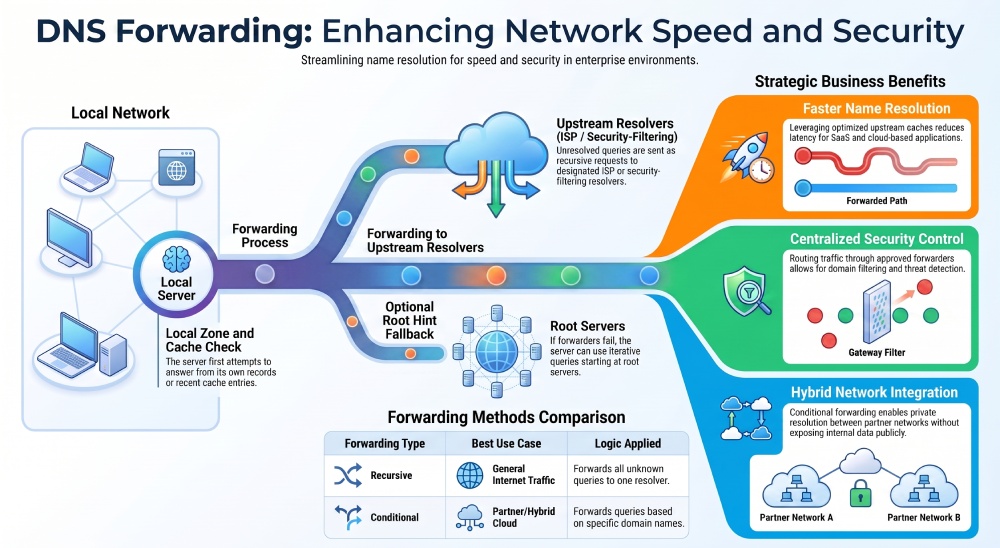
In practical terms, a DNS client asks its configured DNS server to resolve a DNS domain name into an IP address. If the DNS server hosts the relevant primary zone or secondary zone, it can answer from authoritative resource records. If it has cache data from a previous lookup, it may answer from cache. If not, DNS forwarding tells the server where to send the DNS query next.
This forwarding operation is common in Windows Server, Microsoft DNS, AWS environments, Cloudflare-integrated networks, hybrid cloud architectures, and enterprise DNS service designs. Organizations use dns forwarding to improve name resolution, reduce external traffic, protect internal DNS information, and control how external dns names are resolved.
For example, an internal DNS server for .contoso.com may handle intranet name resolution for north.contoso.com and south.contoso.com while forwarding unknown external dns names to a secure Internet resolver. A business using DigiCert CertCentral, Trust Lifecycle Manager, Private CA, Quantum Central, Device Trust Manager, Software Trust Manager, Content Trust, or Messaging Trust still depends on reliable DNS queries and predictable name resolution for certificate enrollment, device identity, application trust, and secure communications.
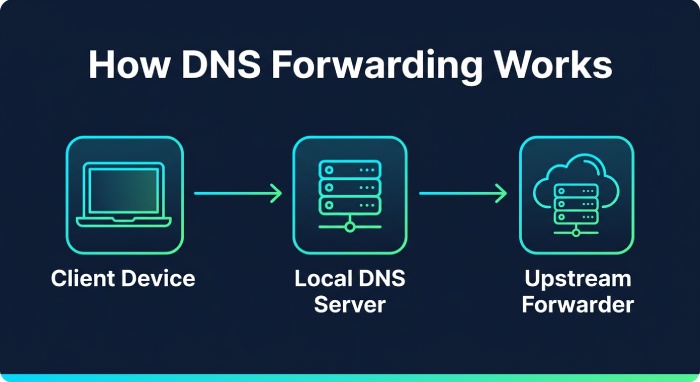
How DNS Forwarding Works Step by Step
A typical dns forwarding process begins when a DNS client sends a recursive query to its preferred DNS server. A recursive query asks the DNS server to return a final answer, such as an IP address, an NXDOMAIN response, or another definitive result.
1. The DNS server checks local zones and cache
First, the DNS server checks whether it is authoritative for the requested zone. If the query is for an internal name such as app.north.contoso.com, the server may answer from the primary zone or a secondary zone. If the requested record was resolved recently, the DNS server may answer using cache data, improving response time and reducing repeated DNS queries.
If there is no local answer and no useful cache entry, the server examines its dns forwarding behavior. At this point, the server configuration determines whether the query is sent to a forwarder, matched to a conditional forwarder, or resolved using root hints.
2. The query is sent to a forwarder
When standard dns forwarding is enabled, the DNS server sends the recursive query to one or more upstream DNS servers. These upstream servers may be ISP resolvers, Cloudflare resolvers, AWS Route 53 Resolver endpoints, security-filtering resolvers, or another enterprise DNS server.
The forwarder then performs name resolution. It may answer from its own cache, contact an authoritative DNS server, or use an iterative query process through the hierarchy of root servers, top-level domains, and delegated zones. In many environments, this design reduces the burden on internal DNS servers and centralizes external DNS control.
Windows Server supports forwarder management through the DNS Manager console and PowerShell. For instance, administrators can use `Set-DnsServerForwarder` to define a dynamic list of forwarders, configure a time-out setting, and adjust forwarding behavior. Some implementations also support dynamic forwarder reordering, where DNS servers prioritize forwarders based on measured response time and avoid those causing a slow response.
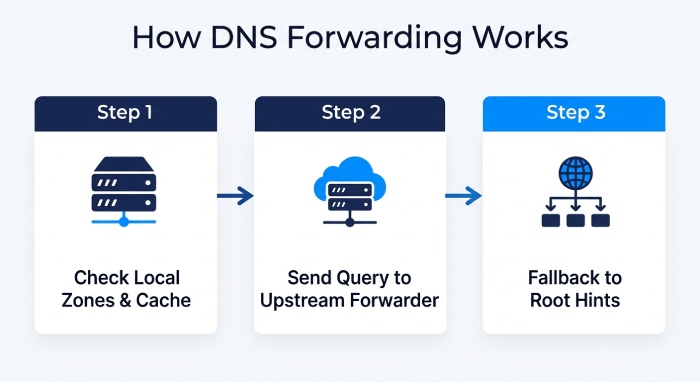
3. If forwarding fails, root hints may be used
If the forwarder does not respond, a DNS server may fall back to root hints, depending on its configuration. Root hints are references to root server addresses that allow the server to begin an iterative query at the top of the DNS namespace.
With root hints, the DNS server contacts a root server, receives a referral to the correct top-level domains server, follows delegation information to the parent zone, and eventually reaches the authoritative DNS server for the requested dns domain name. This iterative query path is different from a recursive query because each server provides a referral rather than resolving the entire request.
Some organizations disable root hints to force all external dns names through approved forwarders. Others keep root hints as a backup path to preserve resolution if the forwarding operation fails.
Types of DNS Forwarding: Conditional vs. Recursive Forwarding
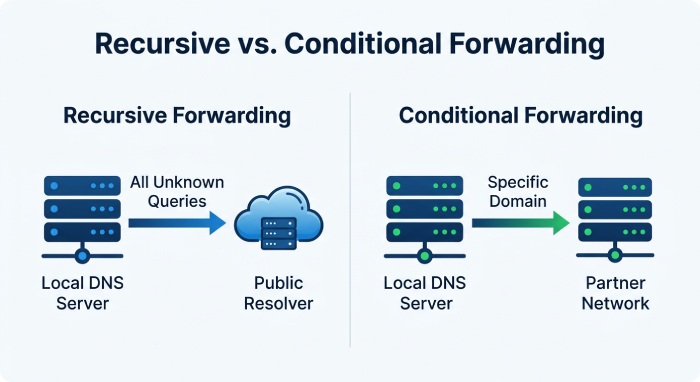
DNS forwarding is usually discussed in two major forms: general recursive forwarding and conditional forwarding. Both are useful, but they solve different name resolution problems.
Recursive forwarding
Recursive forwarding sends unresolved DNS queries from an internal DNS server to a general-purpose forwarder. This is the most common model for resolving external dns names on the Internet.
For example, a branch office DNS server may forward all unknown DNS queries to a corporate resolver, Cloudflare, an AWS resolver, or a security platform. The DNS client sends a recursive query to the local DNS server, and the local DNS server sends another recursive query to the forwarder. If the forwarder cannot answer from cache, it may perform iterative query steps using root hints, root servers, and authoritative DNS server referrals.
Recursive forwarding is useful when a business wants consistent policy enforcement for internet traffic and external traffic. It also simplifies DNS configuration because internal DNS servers do not need to perform every iterative query themselves.
Conditional forwarding
A conditional forwarder sends DNS queries to specific forwarders based on the requested DNS domain name. Instead of forwarding every unknown query to the same upstream resolver, a conditional forwarder applies rules for particular domains or zones.
For example, Contoso may configure a conditional forwarder for outdoor.tailspintoys.com that points to DNS servers managed by Tailspin Toys. When a user queries a host in outdoor.tailspintoys.com, the Contoso DNS server sends that conditional query to the Tailspin Toys DNS server rather than to a public external DNS resolver.
This is especially valuable for mergers, partner networks, hybrid cloud, and private DNS namespace designs. Conditional forwarding helps preserve internal DNS information while allowing trusted resolution across organizations. In Microsoft environments, a conditional forwarder can be stored in Active Directory and replicated to DNS servers across the forest, depending on the zone and server configuration.
A conditional forwarder differs from delegation. With delegation, a parent zone contains a delegation record pointing to DNS servers authoritative for a child zone. With a conditional forwarder, the DNS server is not necessarily delegating authority; it is simply forwarding matching DNS queries to designated resolvers.
Top 5 Benefits of DNS Forwarding for Networks and Businesses
1. Faster and more efficient name resolution
DNS forwarding can improve name resolution by using forwarders with strong cache performance, optimized routing, and reliable recursive infrastructure. When a forwarder already has cache data for common external dns names, the response time is often faster than starting a fresh iterative query from root hints.
This matters for SaaS applications, Microsoft Intune enrollment, F5 application delivery, AWS workloads, and services that rely on frequent DNS queries. Better resolution performance reduces user-visible latency and avoids slow response patterns.
2. Centralized control over DNS queries
With dns forwarding, organizations can centralize how DNS queries are handled. Instead of allowing every DNS server to contact root servers independently, administrators can route traffic through approved forwarders with logging, filtering, and policy enforcement.
This is useful for compliance, threat detection, and auditing. Centralized forwarder infrastructure can detect suspicious external dns names, block known malicious domains, and maintain contact information for operational ownership.
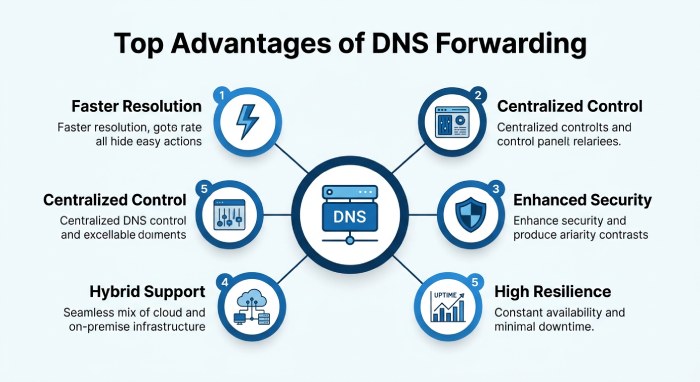
3. Reduced external traffic and improved security
Forwarding reduces unnecessary external traffic by allowing internal DNS servers to rely on shared caches and controlled resolvers. It also prevents exposure of internal dns namespace patterns to the broader Internet.
For email security and domain authentication, tools like AutoSPF help organizations manage accurate SPF records and DMARC policies, while DNS forwarding ensures efficient DNS query resolution. An SPF flattening service can consolidate those records so they stay within SPF’s 10-lookup limit. See how AutoSPF works to keep these records lean automatically.
4. Better support for hybrid and partner networks
Conditional forwarding is ideal when businesses need controlled name resolution between private networks. Contoso can resolve Tailspin Toys names without publishing private records publicly. Likewise, AWS private hosted zones, on-premises Windows Server DNS, and partner DNS servers can be connected through conditional forwarder rules.
This approach supports private dns namespace integration while avoiding unnecessary delegation complexity. It also helps preserve separation between internal and external DNS.
5. More resilient DNS service design
A well-designed forwarding architecture can include multiple forwarders, fallback logic, monitoring, and root hints where appropriate. A dynamic list of forwarders can improve availability, while dynamic forwarder reordering can favor the fastest resolver.
Administrators should test recursive query and iterative query behavior, confirm NXDOMAIN handling, and verify whether root hints are enabled or disabled. Resilient dns forwarding ensures that DNS client requests continue to resolve even when a forwarder, root server path, or upstream DNS service is temporarily unavailable.
Best Practices for Setting Up and Managing DNS Forwarding
Use clear policies for when to use a forwarder, a conditional forwarder, delegation, or root hints. General external dns names are often best handled by recursive forwarding to approved resolvers, while partner domains and private cloud zones are better suited for conditional forwarding.
Document every DNS server, forwarder IP address, zone relationship, and conditional forwarder rule. In Windows Server, use PowerShell and Set-DnsServerForwarder to standardize configuration across DNS servers. Review time-out setting values, monitor response time, and verify cache behavior regularly.
Avoid forwarding loops. A DNS server should not forward DNS queries to another DNS server that forwards the same query back. Test both recursive query and iterative query outcomes, especially after changing root hints, parent zone delegation, or conditional query rules.
Finally, protect internal DNS information. Keep internal resource records, private DNS namespace data, and intranet name resolution separate from public DNS. Whether your environment uses Microsoft DNS, Cloudflare, AWS, DigiCert trust platforms, or enterprise DNS service integrations, effective dns forwarding depends on disciplined configuration, monitoring, and operational ownership. And if you also manage email authentication, our common SPF questions page covers the essentials.
General Manager
General Manager of DuoCircle. Product strategy and commercial lead for AutoSPF's 2,000+ customer base.
LinkedIn Profile →