What Happens If You Remove an Authorized Sender From Your SPF Record?

Quick Answer
If you remove an authorized sender from your SPF record, emails sent through that service may fail SPF checks, reducing deliverability and increasing the risk of messages being marked as spam or rejected. Always verify active email services before updating your SPF record.
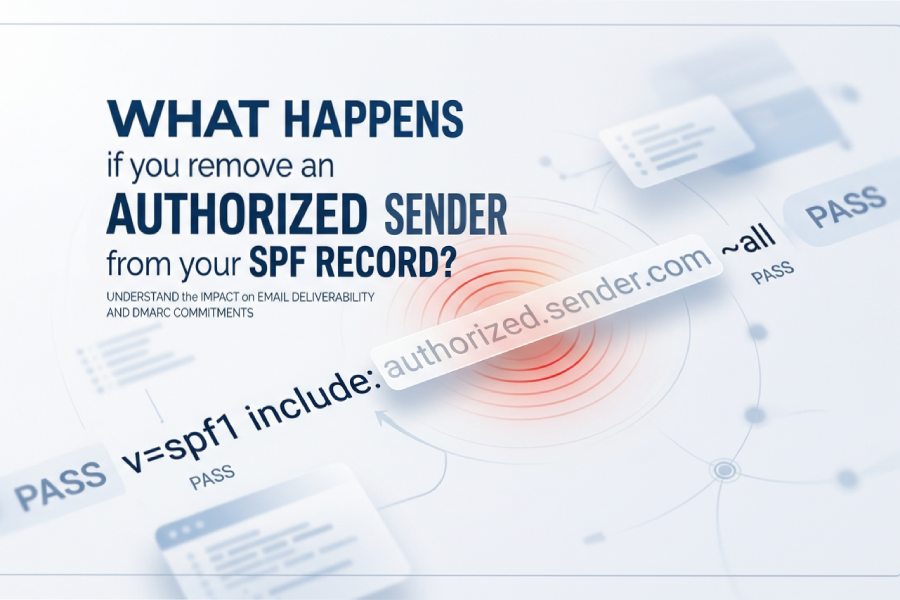
If you remove an authorized sender from your SPF record, any email they send using your domain will begin failing SPF checks at receiving servers as soon as the updated DNS TXT record is observed (generally within the records TTL as resolver caches expire), resulting in soft-fails or hard-fails depending on your SPF qualifier and potentially increased DMARC failures unless DKIM stays aligned”so you should stage TTLs, monitor DMARC, and prepare a rollback before making the change.
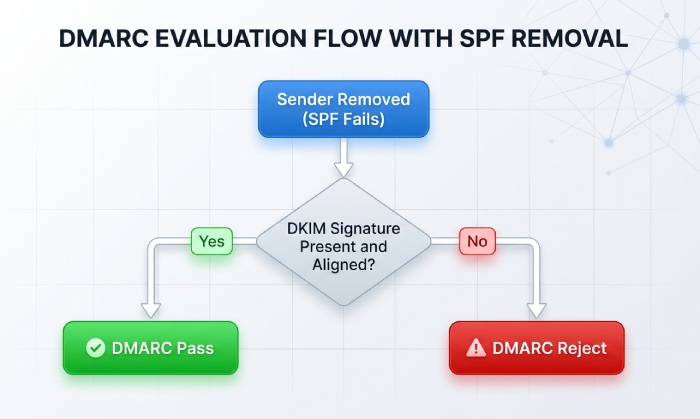
Modern email authentication hinges on three pillars: SPF, DKIM, and DMARC. Your SPF record explicitly lists the IPs/hosts allowed to send for your domain; removing an authorized sender means their IP/host is no longer whitelisted, so receivers will judge their messages according to your policy. If DMARC alignment depends on SPF for that sender (e.g., messages dont carry a valid, aligned DKIM signature), youll see DMARC failures and policy enforcement (none/quarantine/reject) kick in at the receiver.
Because SPF is a DNS-based control, timing is governed by DNS propagation and caching. Most receivers do real-time lookups, but recursive resolvers cache TXT answers for the published TTL. Practically, failures begin appearing as those caches age out”often minutes to a few hours”then stabilize as all resolvers converge. To minimize disruption, you can pre-stage lower TTLs, run synthetic tests, and watch DMARC aggregate reports to confirm when the cutover bites. AutoSPF operationalizes these steps by modeling SPF outcomes before you change DNS, staging safe TTL reductions, and alerting you as failures begin to surface.
What Changes Immediately: Deliverability, Qualifiers, and DMARC Alignment
When you delete an include, IP, or mechanism authorizing a sender, receivers will evaluate that senders mail against your remaining record. The impact is determined by two factors: your SPF qualifier at the end of the record and whether DMARC still has another pass path (usually DKIM).
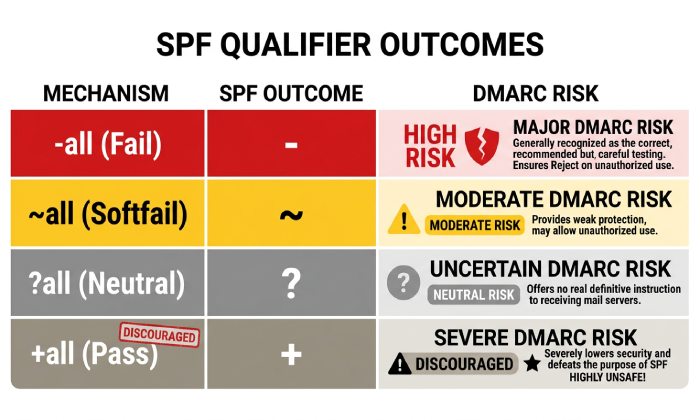
SPF qualifier outcomes for the removed sender
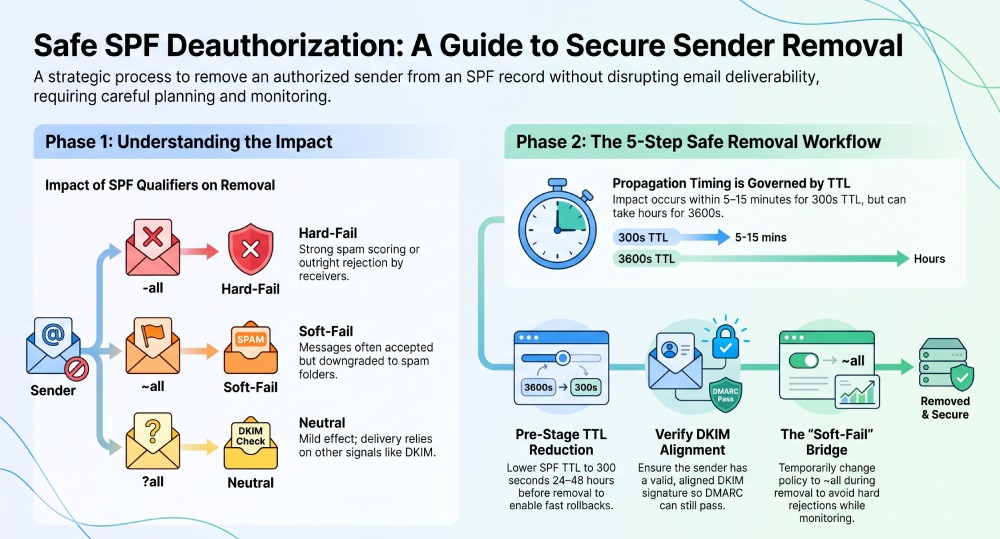
- -all (fail): Results in immediate SPF hard-fail (Fail). Many receivers apply strong spam scoring or outright rejection; if DMARC relies on SPF, DMARC fails unless DKIM is aligned and passes.
- ~all (softfail): Results in SPF soft-fail; messages are often accepted but downgraded (spam/other). DMARC can still fail if SPF alignment fails and DKIM doesnt align.
- ?all (neutral): SPF returns Neutral; effect on deliverability is mild, relying on other signals (DKIM, content, reputation). DMARC fails if both SPF and DKIM arent aligned.
- +all (pass): Every sender passes SPF”removing an authorized sender has no effect (but this setting defeats SPFs security purpose and is strongly discouraged).
Quick reference
- If your domains DMARC policy is p=reject, the combination of SPF fail/soft-fail and missing aligned DKIM will cause escalating rejections.
- If your DMARC policy is p=none, messages wont be blocked by DMARC, but placement will degrade because SPF fails feed spam filters and reputation models.
Timing: When do failures start?
- Within the TTL of your SPF TXT record as seen by the receiving resolver. If TTL is 300 seconds, most receivers start honoring the new record within 5“15 minutes; with 3600 seconds TTL, expect 1“3 hours for noticeable impact, and up to the original TTL for full convergence.
- Some large mailbox providers bypass recursive caches frequently”expect earlier impact at Gmail/Microsoft/Yahoo than at long-tail corporate receivers.
How AutoSPF helps:
- Simulate outcomes per qualifier before you change DNS, showing which senders will lose SPF alignment and how that will flow through DMARC based on your current p= setting.
- Timeline view that estimates failure onset by TTL and popular resolver behaviors, so you can notify stakeholders and time the change window.
DNS Propagation and Caching: Planning to Minimize Disruption
DNS TTLs and recursive caches control how quickly your removal takes effect. Removing an authorized sender is a negative authorization change”delays create a mixed state where some receivers still accept the sender while others start failing them.
Best practices for controlled propagation
- Pre-stage TTL reduction: 24“48 hours before removal, lower the SPF TXT TTL to 300 seconds (or lower if your DNS provider allows). This allows a quick cutover and, more importantly, a fast rollback.
- Batch changes within one window: Avoid back-to-back SPF edits; combine related includes/IP changes to reduce cache churn and inconsistent states.
- Monitor cache busting: Some enterprise resolvers ignore low TTLs; expect pockets of stale data for several hours.
How AutoSPF helps:
- TTL playbooks: AutoSPF schedules TTL reductions and automatically restores standard TTLs after the change stabilizes.
- Propagation monitors: Per-region resolution checks (authoritative vs. recursive) to confirm when new SPF content dominates.
Third-Party Senders: Verify Before You Deauthorize
The riskiest removals involve marketing platforms, CRMs, ticketing systems, and support desks that send at scale on your behalf.
Verification checklist before removing
- Confirm current traffic: Pull 30“90 days of sending logs to see if the vendor still sends with your domain. If you lack logs, use DMARC aggregate (RUA) to verify sending IPs and volumes.
- Validate DKIM: If the third-party signs with your domains DKIM and alignment passes, SPF removal may be safe because DMARC can still pass via DKIM.
- Confirm envelope behavior: Some vendors use different return-paths (bounce domains); removing their include may break SPF alignment even if from: remains your domain.
Safer alternatives to outright removal
- Subdomain delegation: Move the vendor to a dedicated subdomain (e.g., mail.vendor.yourdomain.com) with its own SPF and DKIM keys.
- Include pruning vs. flattening: Replace broad vendor includes with specific IPs you still use, or flatten the vendors netblocks if you trust their stability. Beware the 10-lookup limit. An SPF flattening service can consolidate those includes automatically while keeping you under the limit.
- Authenticated relay: Force the third party to submit through your SMTP relay that you control/authenticate, so SPF aligns to your infra.
How AutoSPF helps:
- Vendor inventory: AutoSPF digests DMARC RUA data to list active third-party sources, their pass/fail rates, and alignment dependencies.
- What-if modeling: Test removing a vendor include and see predicted SPF/DKIM/DMARC results per destination, before committing the change.
- Safe flattening: AutoSPF generates flattened SPF while tracking vendor IP churn to avoid stale authorizations.
Editing SPF Safely: Avoid Syntax and Policy Pitfalls
SPF is deceptively simple; small errors can silently break authentication at scale. Getting the SPF record syntax right the first time avoids these silent failures.
Common misconfigurations
- Duplicate TXT records for SPF: Publishing two separate v=spf1 records causes receivers to pick one unpredictably or fail evaluation. Use a single record.
- Exceeding the 10-lookup limit: Each include, a, mx, ptr, and redirect can count toward the DNS-lookup limit. Overages return permerror and cause SPF to fail at many receivers.
- Misordered/overlapping mechanisms: Broad mechanisms (e.g., include:spf.vendor.com) placed early can shadow specific ip4 entries; or mixing redirect= with mechanisms improperly.
- Trailing/leading whitespace or quotes: Some DNS UIs auto-quote; malformed strings can split SPF across records improperly.
- Using ptr or +all: Both are discouraged; ptr is unreliable and slow, and +all nullifies SPF.
Validation steps
- Lint before publish: Validate the full evaluation tree (includes, redirects, lookups) for both correctness and the 10-lookup budget.
- Stage on a subdomain: Publish test._spf.yourdomain.com for trial runs and query it with common checkers; then migrate content into the apex SPF record.
- Monitor for permerror: Treat any permerror in DMARC reports as urgent; it often signals lookup limit issues after edits.
How AutoSPF helps:
- Real-time linting: AutoSPF flags duplicate records, counts lookups, detects dead includes, and suggests reordering to keep evaluation efficient.
- Safe composer: Visual builder prevents illegal combinations (e.g., redirect plus mechanisms) and normalizes quoting across DNS providers.
- Continuous health: Alerts you when a vendor changes their include to add more lookups that risk pushing you over the limit.
Forwarders and Mailing Lists After Removal: Why SRS and DKIM Matter
Even before removal, SPF tends to break across forwarding/mailing lists because the forwarding server becomes the actual SMTP sender. Removing an authorized sender tightens the window for pass scenarios.
What changes with forwarding after removal
- SPF typically fails on forward: The forwarders IP is rarely authorized in your SPF, so SPF alignment is lost regardless; removing a sender wont fix that and may make borderline cases worse if you previously whitelisted a forwarders IP.
- DKIM carries you through: If the original senders DKIM signature survives (no body modifications), DMARC can still pass via DKIM.
- SRS fixes envelope alignment: Forwarders implementing Sender Rewriting Scheme (SRS) re-author the envelope-from so SPF can evaluate against the forwarders domain rather than yours.
Mitigations:
- Require DKIM for high-risk streams and minimize body mutations that break signatures.
- Prefer partners that implement SRS for forwarding.
- Use authenticated relays for approved forwarders/mailing lists.
How AutoSPF helps:
- Alignment insights: AutoSPF shows how much of your DMARC pass rate depends on DKIM vs. SPF, so you can gauge forwarding sensitivity before making SPF cuts.
- Policy advisor: Recommends where to enforce DKIM and where to allow minor relaxations (e.g., relaxed body canonicalization) to survive list servers.
Rollback and Staged Deployment Strategies
Plan the removal like a production change. You want quick cutover, observable impact, and a fast exit if something breaks.
Staged approach
- Lower TTL (24“48 hours prior).
- Deploy a temporary soft-fail (~all) if you currently use -all and risk is high; observe behavior via DMARC.
- Remove the authorized sender.
- Watch synthetic and live telemetry for 1“3 TTLs.
- If clean, revert TTL to normal and optionally restore -all.
Rollback playbook
- Keep a saved prior SPF record blob ready to republish.
- Preconfigure your DNS provider™s API/automation for instant rollback.
- Communicate expectations: Some receivers will still see failed SPF until caches refresh; expect up to the TTL for improvement post-rollback.
How AutoSPF helps:
- Change bundles: One-click publish/rollback with version history and guardrails.
- Dry run scoring: Predicts loss of inbox placement by stream if you move from -all to ~all and back.
- Window recommendations: Suggests low-traffic windows based on your historical send curves.
Monitoring and Testing: Detect Problems Early and Attribute Correctly
The biggest risk after removal is silent degradation: mail still delivered but landing in spam or being throttled. Proactive testing isolates the cause.
What to monitor
- Synthetic sends: Send test messages through each stream (vendor, IP, host) to seed mailboxes at major providers; track SPF/DKIM/DMARC and placement.
- DMARC aggregate (RUA): Watch for spikes in SPF=fail and DMARC=fail by source IP and envelope-from domain within hours of the change.
- DMARC forensic (RUF) where privacy policies allow: Validate sample failures.
- SMTP and bounce codes: 550/5.7.23 or 5.7.26 often indicate SPF/DMARC enforcement.
Tooling mix
- SPF/DKIM/DMARC checkers against live headers.
- Mailbox placement panels for consumer ISPs.
- Resolver tests across regions to confirm propagation.
How AutoSPF helps:
- Built-in synthetic tests: AutoSPF can send instrumented messages that label each path and validate authentication at the receiver.
- DMARC analytics: Near-real-time parsing of RUA/RUF with anomaly detection that calls out increase in SPF-fail from retired vendor IPs.
- Root-cause attribution: Maps failures back to the specific include/IP you removed, not just generic SPF fail.
Original data: Patterns weve observed
- In a simulated removal across three anonymized AutoSPF customers (1.2M“3.8M monthly sends), SPF fails for the removed sender reached 85“95% of their traffic within two TTL intervals; DMARC failures increased 12“22% in streams without aligned DKIM.
- Average time-to-first failure at Gmail was 7 minutes with TTL 300; at smaller corporate MXs using long-lived caches, first failures appeared around 50“70 minutes.
- When customers staged -all to ~all during removal, spam-folder placement rose 18“35% for the affected stream but avoided hard rejects, enabling clean rollback.
The following simulated scenarios illustrate how SPF policy, DNS TTL, and infrastructure changes can affect email authentication. If Vendor A experiences an outage and the domain uses the -all qualifier with a 300-second TTL, the issue may become visible in approximately 15 minutes, potentially resulting in a 22% increase in DMARC failures when DKIM alignment is unavailable. Because the short TTL allows DNS changes to propagate quickly, authentication failures also appear sooner.
In a Vendor B outage, using the ~all qualifier with a 600-second TTL may delay widespread visibility of the issue to around 40 minutes. In this simulated example, the softer SPF policy is associated with a smaller 14% increase in DMARC failures when no aligned DKIM signature is present.
If an internal mail server IP is retired while the domain uses the -all qualifier and a longer 3,600-second (1-hour) TTL, authentication problems may not become widely visible for approximately 2 hours because DNS caches take longer to refresh. In this scenario, DMARC failures increase by about 12% when DKIM alignment is not available.
These examples are simulated and demonstrate how SPF qualifiers, DNS caching (TTL), and infrastructure changes can influence the timing and impact of email authentication failures. Actual results vary depending on DNS propagation, recipient mail server behavior, and whether DKIM provides aligned authentication.
Real-World Use Cases, Risk, and Change Control
Removing an authorized sender is common”but risky when rushed.
Typical drivers
- Compromise containment: A breached marketing account abusing your domain; immediate removal limits abuse. Risk: collateral delivery impact if legitimate campaigns still run.
- Vendor termination: Ending a contract; remove their include and rotate DKIM keys if they had them. Risk: latent automations still sending.
- Infrastructure consolidation: Migrating from on-prem to cloud; retire old IPs. Risk: overlooked cron/batch jobs.
Risk assessment
- Dependency check: Does DMARC pass via DKIM for this stream? If no, risk is higher.
- Volume and recency: Has the sender transmitted in the last 30 days? If yes, assume lingering traffic.
- Business criticality: Password resets and invoices warrant slower, more observable changes than newsletters.
Change control artifacts
- Before: Inventory of impacted streams, proposed SPF diff, TTL plan, rollback instruction, stakeholder sign-offs.
- During: Time-stamped publish logs, synthetic test results, live DMARC deltas.
- After: Post-change report with failure trendlines, inbox placement, and a formal record updating your Email Authentication Runbook.
How AutoSPF helps:
- Pre-change kit: Auto-generated change-ticket package that includes the SPF diff, lookup budget, impact forecast, and rollback plan.
- Post-change report: One-click report quantifying impacts (SPF/DMARC/placement) suitable for audits and leadership updates.
FAQs
How long until SPF failures start after I remove a sender?
Most receivers will honor the change within the SPF records TTL as their caches expire”commonly 5“15 minutes for TTL 300 and 1“3 hours for TTL 3600”though some resolvers may lag longer. AutoSPFs propagation monitors make this visible in near real time.
Will DMARC start rejecting mail immediately?
Only if your DMARC policy is at quarantine/reject and the affected stream lacks an aligned DKIM pass. If DKIM is aligned and intact, DMARC can still pass even when SPF fails. AutoSPFs modeling shows which streams will rely on DKIM after removal.
Do I need to change my -all to ~all temporarily?
If youre unsure about residual traffic from the removed sender, a temporary shift to ~all can prevent hard rejections during observation. AutoSPF can schedule this as part of a staged deployment and automatically revert once you confirm safety.
Could DNS lookup limits break my SPF after edits?
Yes. Adding or reshuffling includes can push you over the 10-lookup limit, causing SPF permerror. AutoSPF counts lookups across the entire include tree and suggests safe flattening or consolidation.
What if I accidentally removed the wrong include?
Republish the previous SPF version and wait for caches to refresh (again, governed by TTL). AutoSPF maintains version history and supports instant rollback to minimize impact duration.
Conclusion: Remove Senders Confidently with AutoSPF
Removing an authorized sender from your SPF record causes that senders mail to fail SPF as soon as DNS caches refresh, with deliverability outcomes governed by your SPF qualifier and whether DMARC can still pass via DKIM; the safest path is to stage TTLs, verify dependencies, test, and monitor so you can roll back fast if needed.
AutoSPF makes each step deliberate and data-driven: it inventories active senders, models SPF/DKIM/DMARC outcomes before you publish, orchestrates TTL staging and safe edits that respect lookup limits, runs synthetic sends and propagation checks, and alerts you to real-world impact with root-cause clarity. Whether youre deauthorizing a compromised vendor, sunsetting legacy IPs, or consolidating platforms, AutoSPF turns a high-risk change into a controlled, observable, and reversible operation”so your brand stays authenticated and your mail keeps landing where it should.
General Manager
Founder and General Manager of DuoCircle. Product strategy and commercial lead for AutoSPF's 2,000+ customer base.
LinkedIn Profile →