Squarespace SPF Record: How to Set It Up and Avoid Common Errors

Quick Answer
A Squarespace SPF record helps verify that emails sent from your domain are authorized, reducing spoofing and improving email deliverability. Learn how to correctly set up an SPF record for Squarespace, avoid common configuration mistakes, and validate your DNS settings for reliable email authentication.
An SPF record”Sender Policy Framework”is a DNS-based email authentication rule that tells receiving mail servers which servers are allowed to send email for your domain. In practical terms, an SPF record helps protect your Squarespace domain from spoofing, phishing, spam, and unauthorized bulk email sent in your name.
For example, if your domain is example.com and you use Google Workspace for email, your SPF record authorizes Googles mail servers to send messages from addresses like hello@example.com. Without the correct SPF record in your DNS records, legitimate email may fail authentication, land in spam folders, or be rejected by the recipients server.
This matters for any Squarespace website that uses a custom domain name, especially businesses that depend on email for customer communication, ecommerce notifications, Acuity scheduling messages, Squarespace Payments notices, or contact form follow-ups. Squarespace is widely known for web hosting and website building, but email delivery depends on your DNS, your email provider, and your domain configuration”not just your site content.
SPF also supports broader internet trust. It helps reduce email abuse, phishing, report spam incidents, and report phishing cases connected to false sender identities. It does not prevent every type of attack, but it is a foundational email support control alongside DKIM and DMARC. Businesses should prioritize email security to safeguard confidential communications and maintain customer trust. Keeping up with the future of SPF helps you stay protected.
How Squarespace Handles DNS and Email Authentication
Squarespace can host your website, manage your domain, and provide access to DNS records through the account dashboard. If your domain is registered through Squarespace, the platform often acts as both your web hosting provider and DNS provider. Depending on when and where your domain was registered, the registrar entity may be Squarespace Domains LLC, Squarespace Domains II LLC, or another Squarespace Registrar Entity. Searches for squarepace domains llc usually refer to Squarespace Domains LLC.
Squarespace domains can be managed at Domains.squarespace.com or inside the Squarespace account dashboard. Older sites, such as Squarespace 5 projects, may have different management paths, so the Squarespace Help Center and Support Guides are useful for confirming where your DNS records live.
Squarespace does not automatically create every SPF record for every third-party email service. If you connect Google Workspace through Squarespace, some DNS records may be added or guided during setup. However, if you use another email support provider, CRM, newsletter service, help desk, transactional email server, or marketing platform, you may need to manually add or update the SPF record.

DNS, registrar, and WHOIS responsibilities
Your DNS provider stores the records that control your domain’s email authentication. If your domain uses Squarespace DNS, you can add or edit your SPF TXT record from the Squarespace dashboard. If your DNS is hosted by another provider, update the SPF record there instead. Before making changes, confirm you’re editing the authoritative DNS zone for your domain.
When You Need an SPF Record for a Squarespace Website
You need an SPF record when your Squarespace domain sends email through a third-party email platform. Common examples include:
- Google Workspace email for your custom domain
- Email marketing platforms that send newsletters or bulk email
- Help desk tools that send support replies from your domain
- Ecommerce or booking tools that send confirmations
- Transactional email services with a dedicated server or sending IP address
- CRM systems that send sales or onboarding messages
If your website only displays content and does not send email from your domain, an SPF record may not be urgent. However, most businesses eventually use email connected to their domain, so setting up an SPF record early is a good deliverability and security practice.
SPF is especially important if your organization sends customer-facing email, password reset messages, invoices, appointment confirmations, or promotional campaigns. Under laws and frameworks such as the CAN-SPAM Act, you are responsible for legitimate email practices, unsubscribe handling, and avoiding deceptive headers. SPF does not guarantee legal compliance, but it supports trusted service authentication and reduces the chance that your domain is misused for spam. Understanding why SPF lookups matter helps you keep records valid.
SPF, IP address authorization, and email support
An SPF record can authorize sending sources by domain, include mechanism, server, or IP address. For example, your provider may give you a value that includes an IP address, such as ip4:192.0.2.10, or a provider include, such as include:_spf.google.com.
If you are unsure which SPF record to use, contact your email support provider first. Squarespace support can help you locate DNS records and explain how to edit DNS, but the correct SPF value usually comes from the email service that sends messages for you. The Squarespace Help Center, live chat, email support, webinars, and Forum.squarespace.com can help with navigation, while provider documentation gives the exact SPF record syntax.
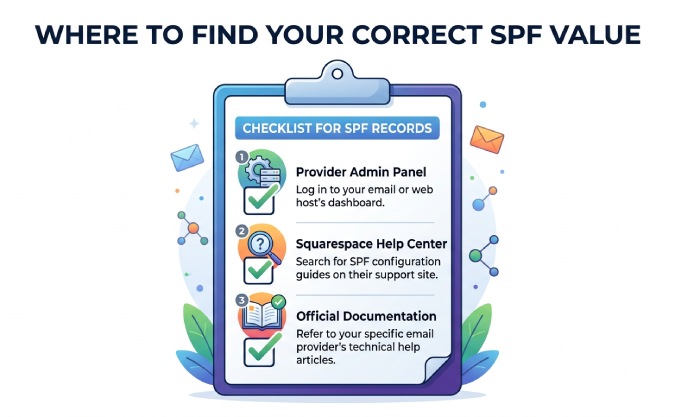
Finding the Correct SPF Value for Your Email Provider
The correct SPF record depends on your email provider. For Google Workspace, the standard SPF value is commonly:
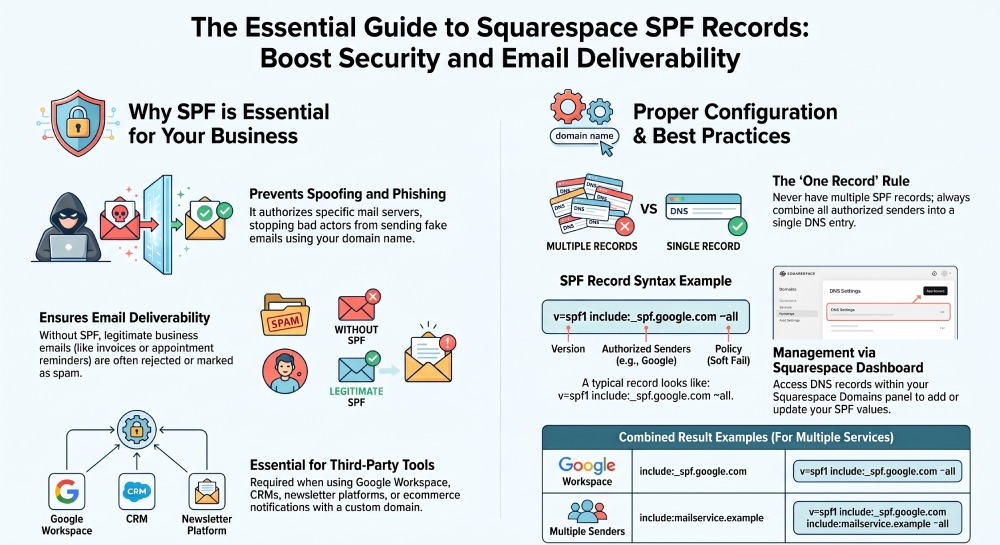
v=spf1 include:_spf.google.com ~all
However, you should always confirm the latest value in Google Workspace documentation or the Squarespace Help Center if you purchased Google Workspace through Squarespace.
If you use multiple senders”such as Google Workspace, a newsletter provider, and a support tool”you should combine them into one SPF record. A domain should not have multiple SPF records. Multiple SPF records are one of the most common DNS records errors and can cause authentication failures. They can also trigger SPF PermError and TempError results. Our free SPF record generator can merge multiple senders into one valid record.
For example, a combined SPF record might look like:
v=spf1 include:_spf.google.com include:mailservice.example ~all
Do not copy SPF values blindly from old tutorials, webinars, or unrelated support guide articles. Your email provider may use different sending infrastructure, different IP address ranges, or a different include domain. If you recently changed registrar, migrated web hosting, or transferred a domain to Squarespace, verify that your DNS records did not change during the move.
Common sources for SPF values
Check these places before editing DNS:
- Your email providers admin panel
- Google Workspace setup instructions
- Squarespace Help Center articles
- Learning.squarespace.com webinars and training material
- Forum.squarespace.com discussions for similar DNS records issues
- Your providers live chat, email support, or Contact Us page
- Your internal IT documentation or support guide
Always use the SPF record provided by your email service provider. Using outdated or incorrect SPF values can cause authentication failures and reduce email deliverability.
General Manager
Founder and General Manager of DuoCircle. Product strategy and commercial lead for AutoSPF's 2,000+ customer base.
LinkedIn Profile →