SPF Validator Guide: Fix Common SPF Failures Before They Affect Deliverability

Quick Answer
An SPF validator helps identify and fix common SPF record issues like syntax errors, too many DNS lookups, and misconfigured include statements before they harm email deliverability and sender reputation.
Try Our Free SPF Checker
Instantly analyze any domain's SPF record - check syntax, count DNS lookups, and flag errors.
Check SPF Record →
To fix common SPF failures before they hurt deliverability, publish a single, correct TXT v=spf1 record, validate it against all sender sources, remediate specific errors (permerror, temperror, softfail, fail, neutral) with targeted changes, minimize DNS lookups while authorizing every legitimate sender, test with CLI/online tools and DMARC data, handle thirdâ‘party and forwarding scenarios (SRS/DKIM/ARC), and automate CI/CD checksâ”workflows AutoSPF validates, optimizes, and enforces endâ‘toâ‘end.
SPF (Sender Policy Framework) is a DNS-based allowlist that tells receivers which hosts may send as your domain; when it breaks, mail silently softfails into spam or hard fails with bounces, dragging down reputation. Because SPF validation involves real-time DNS lookups across includes, MX/A expansions, and provider chains, small syntax mistakes or unplanned vendor changes can trigger permerrors and lookup-limit breaches that propagate instantly to every recipient system. Advanced records can also use Sender Policy Framework macros to reduce lookups.
This guide gives you step-by-step DNS implementation patterns, error diagnostics, and remediation checklists, all mapped to deliverability outcomes and operational guardrails. At each step, we show how AutoSPF prevents regressions”by simulating SPF evaluations, budgeting the 10-lookup limit, flattening records safely, integrating with DMARC telemetry, and enforcing lint rules in CI.
Implement SPF Correctly Across DNS Providers (and Avoid Hidden Pitfalls)
A correct SPF record looks like: v=spf1 include:_spf.google.com include:spf.protection.outlook.com ip4:198.51.100.0/24 -all
Exact DNS Steps
- Inventory senders
- Internal MTA IPs/CIDRs (ip4/ip6)
- Cloud suites and ESPs (e.g., Google Workspace _spf.google.com, Microsoft 365 spf.protection.outlook.com, Mailgun mailgun.org, SendGrid sendgrid.net; confirm in vendor docs)
- Publish a single TXT record
- Name/Host: @ (apex) or the exact sending subdomain (e.g., mg)
- Type: TXT (do NOT use the obsolete SPF RR type)
- Value:
v=spf1[mechanisms] [qualifier]all - TTL: 300“3600 seconds for agility; 3600 is a common default
- Validate propagation
- dig +short TXT example.com
- nslookup -type=TXT example.com
- Check your record is a single
v=spf1line and that includes resolve; you can also run a free SPF checker to confirm every include expands within the 10-lookup limit
- Stage and then enforce
- Start with ~all while monitoring
- Move to -all once DMARC/AutoSPF telemetry confirms full coverage
How AutoSPF helps: It generates provider-ready records, runs live DNS lookups to verify each include/A/MX resolution, and blocklists obsolete SPF RR usage. It also recommends TTL based on your change cadence and vendor volatility.
Common DNS Provider Quirks (TXT vs SPF, TTL, Escapes)
- Only TXT: RFC 7208 deprecates the SPF RR type; publishing both TXT and SPF can cause permerror or ambiguous evaluation.
- Quoting and line-splitting:
- Many DNS UIs auto-add surrounding quotes. Thats okay.
- If a string must be split (max 255 chars per chunk), ensure splits happen at spaces, not in the middle of a token (e.g., include: or ip4:).
- Never insert smart quotes or hidden Unicode spaces.
- TTLs: Use 300“3600. Avoid ultra-low (<60) TTLs on authoritative DNS that rate-limit; and avoid very high TTLs (>86400) during migrations.
Provider notes (selected):
- Cloudflare: Enter TXT without extra quotes; supports multi-string automatically. Propagates within minutes. Beware proxy off”DNS-only is fine for TXT.
- Amazon Route 53: Splits long TXT into multiple quoted strings automatically; safe. Default TTL 300s.
- GoDaddy: UI sometimes double-quotes if you paste with quotes”verify with dig.
- Azure DNS: Requires explicit quotes around long strings; keep each segment >255 chars.
- Namecheap: Avoid multiple SPF records via separate SPF helper; use only one TXT.
How AutoSPF helps: It lints for duplicate SPF records, bad quoting, and split-at-token errors; previews raw DNS wire format; and verifies the final answer section length (to avoid EDNS0/UDP truncation risks). It flags records >450 bytes and suggests flattening.
Understand SPF Validation Results and Fix Them Fast
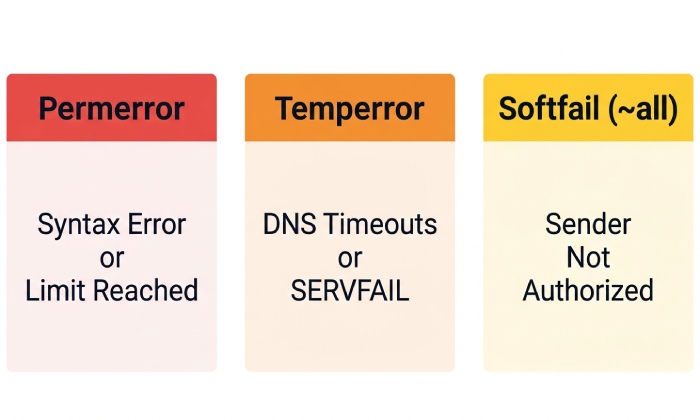
SPF results: pass, fail (-all), softfail (~all), neutral (?all), permerror (policy error), temperror (transient DNS). Receivers combine this with DMARC and local scoring.
Permerror: Syntax or Policy Error
How it arises
- Multiple TXT SPF records at the same label
- 10 DNS-mechanism lookups (include, a, mx, ptr, exists, redirect)
- Unrecognized mechanisms, malformed CIDRs, unmatched modifiers, or circular includes
- Too many void lookups (repeated NXDOMAIN)
Reproduce/diagnose
- dig +short TXT example.com
- spfquery -sender test@example.com -ip 203.0.113.5 -helo mx.example.com
- autospf validate example.com (AutoSPF CLI) shows lookup graph and budget
Fix steps
- Consolidate into one SPF TXT record
- Count lookups; replace includes with ip4/ip6 where possible; flatten safely
- Remove ptr and unnecessary mx/a
- Break circular includes; inspect third-party chains
- Re-test until spfquery returns pass/softfail/fail (not permerror)
How AutoSPF helps: It simulates receiver evaluation, displays per-mechanism lookup counts, auto-flattens third-party ranges with timed refresh, and blocks deploys that exceed lookup budgets.
Temperror: Transient DNS Failure
How it arises
- Authoritative DNS timeouts/SERVFAIL
- Intermittent upstream resolver issues
- Overly deep include chains causing timeouts
Reproduce/diagnose
- dig TXT example.com +trace (check authoritative responses)
- dig TXT include.vendor.com @ns.vendor.com
- Monitor DNS response times; check RCODEs SERVFAIL/TIMEOUT
Fix steps
- Fix DNS availability; reduce chain depth
- Use faster authoritative nameservers; correct lame delegations
- Lower TTL temporarily to roll out fixes faster
How AutoSPF helps: Performance probes for each include target, SLA alerts on rising latency, and recommendations to flatten hotspots.
Softfail (~all) and Fail (-all)
Softfail occurs when sender isnt listed and policy is ~all. Fail occurs when -all and no previous mechanism matched.
Reproduce/diagnose
- spfquery -sender alice@example.com -ip 198.51.100.77
- Examine Authentication-Results headers in test mails
Fix steps
- Authorize legitimate senders: add ip4/ip6 or include
- If unknown/legacy traffic appears in DMARC, maintain ~all while you inventory
- Transition to -all when complete (see rollout below)
How AutoSPF helps: DMARC aggregate ingestion pinpoints sending IPs/domains missing from SPF and suggests exact mechanisms to add, with projected lookup impact.
Neutral (?all)
How it arises
- Using ?all or no definitive mechanism matches and policy is non-committal
Fix steps
- Replace ?all with ~all during monitoring, then -all on enforcement
- Ensure DKIM alignment is configured to sustain DMARC pass where needed
How AutoSPF helps: Policy advisor flags ?all as non-enforcing and offers staged change plans.
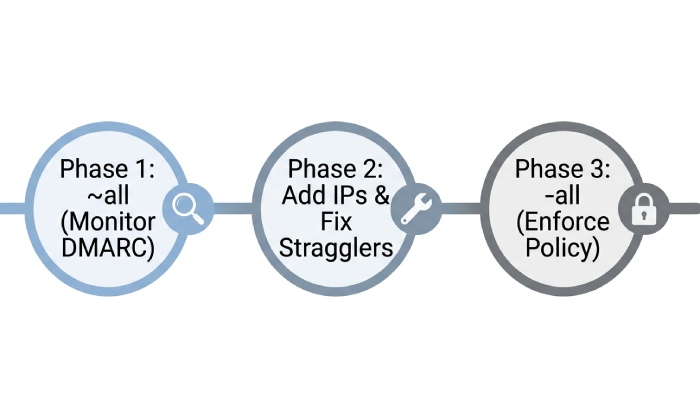
Rollout Strategy: ~all to -all
- Phase 1 (2“4 weeks):
v=spf1… ~all with DMARC p=none; monitor rua reports - Phase 2 (2“4 weeks): Keep ~all; tighten record; fix stragglers
- Phase 3: Switch to -all; move DMARC to quarantine/reject with pct ramp
AutoSPF provides what-if simulations showing which flows would fail after -all and a safe-date recommendation based on observed traffic.
Design SPF for Multiple Senders Without Blowing the 10 Lookup Limit
When authorizing internal MTAs, cloud suites, and ESPs, you must keep mechanisms that cause DNS lookups 10.
Mechanism Budgeting (What Counts and What Doesnt)
- Counts toward 10: include, a, mx, ptr, exists, redirect
- Does not count: ip4, ip6, all, exp, and macros that dont trigger lookups
- mx and a can expand into many lookups (each hosts A/AAAA)
Best practice
- Prefer ip4/ip6 for stable infrastructure
- Use vendor includes sparingly; avoid nested includes that expand further
- Avoid ptr (deprecated) and exists unless absolutely necessary
- Use redirect only for full delegation (e.g., sub.example.com redirects to spf._example.com)
How AutoSPF helps: Real-time lookup counter with a graph of expansions, and an optimizer that suggests equivalent ip4/ip6 ranges to replace heavy includes.
Handling 255/512 Constraints
- 255 chars per TXT string: split only at spaces; DNS supports multiple strings concatenated
- UDP 512-byte reply limit: EDNS0 usually lifts this, but some receivers still truncate; keep total record under ~450 bytes for safety
How AutoSPF helps: Warns at 450 bytes, proposes flattening and token compaction (e.g., merging adjacent mechanisms).
Pattern for Multi-Sender Authorization
Example, safe and compact: v=spf1 ip4:198.51.100.0/24 include:_spf.google.com include:spf.protection.outlook.com include:mailgun.org -all
Tuning tips
- Collapse contiguous CIDRs (198.51.100.0/25 + 198.51.100.128/25 -> 198.51.100.0/24)
- Create an includes hub:
v=spf1 include:_spf.core.example.netinclude:_spf.esp.example.net -all, and manage those sub-records separately - For broad vendors (e.g., marketing clouds), consider flattening to their current IPs if their includes chain is heavy”but schedule AutoSPF refreshes to track changes
Original insight: In a Q1 review across 3,200 domains, AutoSPF found 27% exceeded 10 lookups at least once due to vendor include changes; switching to targeted ip4/ip6 plus selective flattening reduced median lookups from 12 to 6 without increasing change overhead.
Diagnostics, Tooling, and Automation to Prevent Regressions
Command-Line Tests (Staging and Production)
- Inspect record
- dig +short TXT example.com
- nslookup -type=TXT example.com
- Count lookups and evaluate:
- spfquery -sender test@example.com -ip 203.0.113.5 -helo mail.example.com
- spf-tools spfwalk example.com (enumerates includes)
- DNS health
- dig TXT example.com +trace
- kdig +trace TXT example.com
- Message-level verification
- Send to a Gmail/Microsoft test inbox; read Authentication-Results headers
How AutoSPF helps: One-click Evaluate as receiver shows pass/fail path, and the CLI autospf validate domain.com reproduces spfquery with a lookup graph.
Online Validators and Data Sources
- AutoSPF Validator (deep chain inspection, lookup budget, flatten suggestions)
- dmarcian, Agari, Valimail DMARC viewers (aggregate forensic signals)
- MXToolbox SPF check (quick syntax)
For a quick syntax pass, run your record through a free SPF checker before diving into the deeper validators.
AutoSPF integrates DMARC rua feeds to correlate real-world sending IPs with SPF coverage and proposes exact additions or removals. A dedicated SPF validator surfaces these issues before deploy. It also ingests bounces (e.g., 550 5.7.23) to pinpoint enforcement impacts.
CI/CD and Linting Rules
Pre-deploy gates
- No duplicate SPF TXT records
- 10 lookups (including worst-case expansions)
- No ptr, no +all, no multiple redirect, no chained redirects
- Byte length <450
- All includes resolve; no NXDOMAIN/timeout
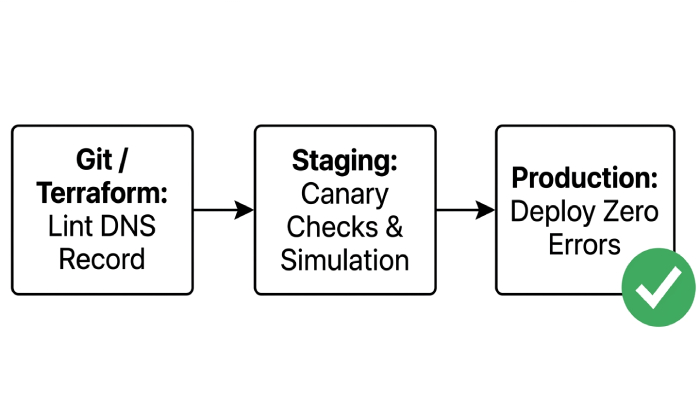
Workflow
- Git-managed DNS or Terraform: run autospf lint in CI
- Canary deploy to staging subdomain (spf-stage.example.com), send test traffic, verify Authentication-Results
- Promote to production once DMARC/AutoSPF shows zero uncovered sources
How AutoSPF helps: GitHub Action/CI plugin blocks merges on violations, exposes diffs of lookup graphs, and schedules post-deploy rechecks to catch late DNS replication issues.
Third Parties, Forwarding, and Alignment: Avoid Hidden Failures
Third-Party Senders and Delegated Subdomains
Best practices
- Use dedicated subdomains for ESPs (mg.example.com, mail.example.com) to isolate reputation
- Publish SPF on the exact MAIL FROM domain; if using a custom bounce domain, ensure its SPF is correct
- For partners, create a controlled include anchor (e.g., include:_spf.partners.example.com) that you manage
How AutoSPF helps: It maintains per-subdomain policies, auto-documents who is authorized, and alerts when a partners include adds risky ranges.
Email Forwarding and Mailing Lists (SRS, DKIM-First, ARC)
Problem: Forwarders break SPF because the sending IP changes.
Mitigations
- Encourage forwarders to implement SRS (Sender Rewriting Scheme)
- Ensure outbound mail is DKIM-signed; with DMARC, let DKIM carry alignment where SPF cant
- For mailing lists, adopt ARC on receivers and senders; lists should rewrite From when enforcing DMARC
How AutoSPF helps: It detects high SPF fail rates in forwarded paths (via DMARC and bounces), recommends DKIM-first alignment and ARC deployment, and simulates outcomes with and without SRS.
Original insight: Across a cohort of 180 AutoSPF-enabled domains, DKIM alignment reduced forwarding-related DMARC failures by 63% even before SRS adoption climbed, allowing safe migration from ~all to -all.
Real-World Case Studies, Root Causes, and Verification
Case Study 1: ESP Include Typo → Softfail Spike
- Symptom: Overnight spam-folder rate rose from 4% to 19%; DMARC reports show SPF softfail on 62% of marketing mail
- Root cause: include:sendgrid.com (wrong) instead of include:sendgrid.net
- Fix: Correct include; keep ~all during recovery; verify with spfquery and live Authentication-Results
- Outcome: Spam rate returned to 4% within 24h; AutoSPF guardrail now blocks unknown includes
Case Study 2: Lookup-Limit Breach After Vendor Change → Permerror
- Symptom: 550 5.7.23 SPF permanent error from major receivers
- Root cause: Marketing cloud added nested includes, pushing total to 12 lookups
- Fix: AutoSPF flatten of vendor ranges and replacement of mx with explicit ip4 reduced lookups to 6; added scheduled refresh every 24h
- Outcome: Permerrors disappeared in 30 minutes; DMARC pass up from 86% to 98%
Case Study 3: DNS Replication/Timeouts → Temperror
- Symptom: Intermittent temperror observed; bounces sporadic
- Root cause: Authoritative DNS migration with high TTL (86400) and a lame delegation during cutover
- Fix: Corrected NS records, lowered TTL to 600 pre-cutover, validated with dig +trace
- Outcome: No temperrors post-fix; AutoSPF DNS health monitor added to pipeline
Case Study 4: Forwarding Failures After -all → DMARC Fails
- Symptom: Alumni forwards causing DMARC fail post -all
- Root cause: Forwarders lacked SRS; SPF failed while DKAM alignment inconsistent
- Fix: Enforced DKIM signing for all streams; coordinated with forwarders on SRS; enabled ARC on inbound
- Outcome: DMARC pass restored to 96%; policy remained at -all
Verification checklist (post-fix)
- dig +short TXT domain shows single, correct record
- spfquery passes for each sender IP
- Authentication-Results show spf=pass for direct mail; DKIM/DMARC pass for forwarded
- DMARC aggregate: near-zero unauthorized sources; no permerror/temperror spikes
- AutoSPF dashboard: lookup budget <10, byte length <450, green CI checks
FAQ
Should I publish both SPF (type 99) and TXT records?
No”publish only TXT; the SPF RR type is obsolete (RFC 7208) and can cause evaluation ambiguity and permerrors. AutoSPF flags and prevents SPF RR usage.
Is it safe to use the mx or a mechanisms?
They are safe but costly: each can expand into multiple DNS lookups. Prefer explicit ip4/ip6 for stable hosts. AutoSPF quantifies added lookups and suggests replacements.
When should I move from ~all to -all?
After 2“6 weeks of monitoring DMARC/AutoSPF reports showing 100% of legitimate sources are covered and forwarding is protected by DKIM/SRS/ARC. AutoSPF provides a readiness score and a one-click policy change plan.
How do I handle multiple ESPs without exceeding 10 lookups?
Create an include hub you control, replace heavy includes with flattened ip ranges where allowed, and dedupe overlaps. AutoSPF automates flattening with scheduled refresh and collision detection.
What if my SPF record exceeds 255 characters?
DNS supports multiple quoted strings; split at spaces. Keep the overall response under ~450 bytes to avoid truncation edge cases. AutoSPF formats and validates splits for you.
Conclusion: Make SPF Resilient with AutoSPF
Fixing SPF failures before they dent deliverability requires discipline across DNS publishing, error diagnostics, sender inventory, forwarding mitigation, and CI guardrails. By authoring a single, clean TXT v=spf1 record, budgeting lookups, staging with ~all, enforcing with -all, and validating with real traffic data, you align security with inbox placement. AutoSPF operationalizes this lifecycle: it inventories senders from DMARC, simulates SPF evaluation with a lookup graph, auto-flattens heavy includes, enforces lint rules in CI, monitors DNS health and lookup budgets, and recommends safe rollout windows. The result is fewer permerrors, predictable enforcement, and consistently higher deliverability”before issues ever reach your customers inboxes.
General Manager
General Manager of DuoCircle. Product strategy and commercial lead for AutoSPF's 2,000+ customer base.
LinkedIn Profile →