SPF SoftFail vs HardFail vs Neutral: A Complete Guide For Beginners

Quick Answer
Most people set up SPF once and then forget about it until something goes wrong. Emails start going to spam, some don’t get delivered, or, even worse, your own emails get blocked. That is usually when terms like SoftFail, HardFail, and Neutral start to matter.

 AutoSPF, Automatic SPF flattening SPF SoftFail vs HardFail vs Neutral: A complete guide for beginners Play Episode Pause Episode
Mute/Unmute Episode Rewind 10 Seconds 1x Fast Forward 30 seconds 00:00 / 1:55
Subscribe Share
RSS Feed Share Link Embed
Download file | Play in new window | Duration: 1:55 | Recorded on April 29, 2026
Most people set up SPF once and then forget about it until something goes wrong. Emails start going to spam, some don’t get delivered, or, even worse, your own emails get blocked. That is usually when terms like SoftFail, HardFail, and Neutral start to matter.
The problem is these settings sound technical, but they are actually simple. They just tell email servers how strict you want to be. If you become too strict too early, you can block your own emails. If you stay too relaxed, you leave room for misuse.
This is where beginners get confused. What should you start with? When should you switch? And what really changes between these options?
In this guide, we will break everything down in very simple words so you can set up SPF properly without affecting your email delivery.
What is an SPF result?
An SPF result is what a receiving mail server decides after checking a domain’s SPF record to see if an email is sent from an allowed source. It helps the server understand whether the email can be trusted or not. Comparing it against an example SPF record makes the process clearer.
In the case of HardFail, the sender is not allowed at all, so the email is usually rejected. With SoftFail, the sender is probably not allowed, but the email may still be accepted with a warning. Neutral means the domain hasn’t set clear rules, so the server doesn’t make a strong decision.
In simple words, an SPF result is like a trust signal that helps email servers decide what to do with incoming emails.
What is SPF SoftFail (~all)?
SPF SoftFail means an email comes from a source that isn’t on the approved sender list, but the domain owner hasn’t blocked it completely. Instead of stopping the email, the receiving server is told to handle it carefully.
You’ll usually see this written as ~all in the SPF record, for example:
v=spf1 include:_spf.google.com ~allSoftFail is commonly used when SPF is still being set up or adjusted. It helps you spot missing or incorrect email sources without risking important emails getting blocked.
When an email gets a SoftFail result, it usually still reaches the recipient. But it may end up in the spam folder, be marked as suspicious, or be checked more closely using tools like DKIM or DMARC.
What is SPF HardFail (-all)
SPF HardFail happens when an email is sent from a source that is not listed in the domain’s SPF record, and the domain owner has clearly said to block such emails. It is a strict rule that tells receiving servers to reject anything that isn’t authorized.
You can identify HardFail by the -all in the SPF record, like:
v=spf1 include:_spf.google.com -all
When an email gets a HardFail result, it is usually rejected or not delivered at all. In some cases, it may still be accepted but sent straight to spam.
HardFail is used when you are confident that your SPF record includes all valid email sources. It gives stronger protection against spoofing, but if not set up correctly, it can block legitimate emails too.
What is SPF Neutral (?all)
SPF Neutral is used when a domain doesn’t want to take a strong stand on who can send emails on its behalf. It neither approves nor rejects the sender. So, if an email doesn’t match the SPF record, the receiving server is basically instructed not to judge the email based on SPF.
You’ll see this setup with ?all in the SPF record, for example:
v=spf1 include:_spf.google.com ?allIn simple words, it means the domain is not giving any clear instructions. Because of that, SPF doesn’t play a big role in deciding what happens to the email.
Most of the time, emails with a Neutral result are still delivered normally. But their final placement (like inbox or spam) depends on other checks, such as DKIM or DMARC.
Neutral isn’t a strong security setting. It’s usually used when SPF is still incomplete or when the domain owner hasn’t finalized their email setup yet.
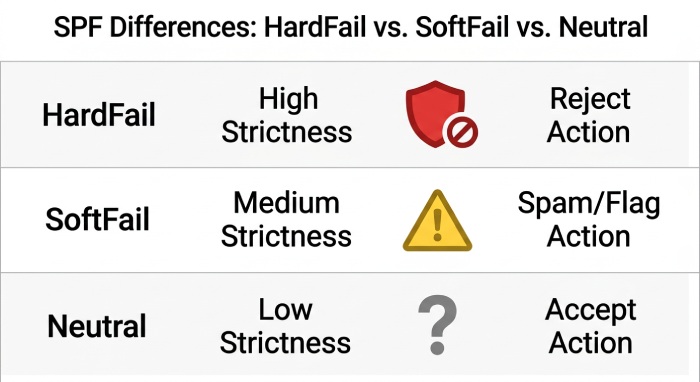
Key differences between SPF SoftFail, HardFail, and Neutral
The main difference between SPF SoftFail, HardFail, and Neutral comes down to how strict the domain is and how receiving servers treat emails that don’t match the SPF record.
-
SPF HardFail is the strictest option. It clearly tells receiving servers that only the listed senders are allowed to send emails. If an email comes from any other source, it should be rejected or blocked. This makes HardFail the most secure option, but it also requires a fully accurate SPF record. If you miss a valid sender, even genuine emails can get blocked.
-
SPF SoftFail is more flexible. It still points out that a sender is not authorized, but instead of blocking the email, it asks the receiving server to be cautious. These emails are usually accepted but may be marked as suspicious or sent to spam. SoftFail is often used during the setup phase because it helps identify issues without affecting email delivery.
-
SPF Neutral is the least strict and provides no clear guidance. It neither confirms nor denies whether a sender is allowed. Because of this, receiving servers don’t rely on SPF to make a decision. Emails are usually accepted, and other checks like DKIM or DMARC take over.
Which policy is the best for your domain
If you’re just starting out, don’t try to be perfect from day one. Most people begin with SoftFail so they can see what’s going on without breaking anything. It’s like a safe starting point where you can watch and learn.
Once you’ve checked everything and you’re sure all your email sources are added properly, then you can switch to HardFail. But only do this when you’re confident; otherwise, you might block your own emails.
Neutral is rarely used in practice. It may only make sense for a short time if your setup is incomplete or still being worked on.
In real-world scenarios, SPF is not something you fix in one go. It’s a gradual process. You start loose, monitor carefully, fix gaps, and then slowly move to a stricter setup for better control and reliability.
How to Move from SoftFail to HardFail (Without Breaking Your Emails)
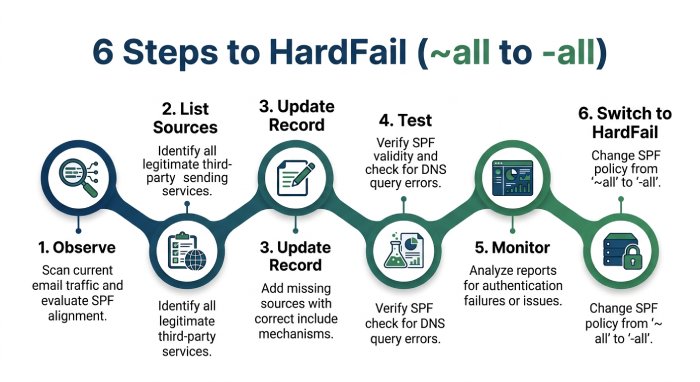
Switching from SoftFail to HardFail sounds scary, but if you do it step by step, nothing breaks.
Step 1: Stay on SoftFail and observe
Keep your SPF record on ~all for some time, and don’t rush to make it strict. Just let things run normally and see how your emails are behaving. Notice which emails are passing and if anything looks off. Right now, your job is only to understand what’s happening, not fix everything. This step makes sure you don’t make silly mistakes later.
Step 2: List all your sending sources
Now start noting down every service that sends emails from your domain. This includes your main email provider, marketing tools, CRM systems, and even website forms. Many people forget smaller tools, which later causes issues. Take your time and double-check everything. Missing even one source can create problems when you move to HardFail.
Step 3: Update your SPF record
Once you have your list ready, add all these sources properly to your SPF record. Use include statements or IP addresses wherever needed. Make sure the record is clean and not too long or messy. For very long records, SPF macros offer another way to stay compact. If your SPF record has errors, it can fail even for valid emails. So keep things accurate and simple.
Step 4: Test before switching
Before making any strict changes, test your setup properly. Send emails from all your tools and check the SPF result. You should see “pass” for every valid source. If something fails, go back and fix it first. A free SPF checker confirms your record is valid before you send those tests. Testing saves you from breaking your email flow later.
Step 5: Monitor for a few days
Even after testing, don’t switch immediately. Let things run for a few days and keep an eye on the results. Check if any emails are failing or going to spam unexpectedly. This extra buffer helps catch hidden issues. It’s better to be slow here than regret it later.
Step 6: Switch to HardFail (-all)
Once you’re fully sure everything is working fine, update your SPF record from ~all to -all. This makes your policy strict and blocks unauthorized senders. At this point, your setup should be clean and complete. If you’ve followed all steps properly, you won’t face deliverability issues. Now your SPF is doing its job properly.
Common mistakes to avoid
When setting up SPF, small mistakes can quietly mess up your email delivery. Most of these don’t show obvious errors at first, but they can slowly hurt your sender reputation and inbox placement. Here are some common ones you should watch out for:
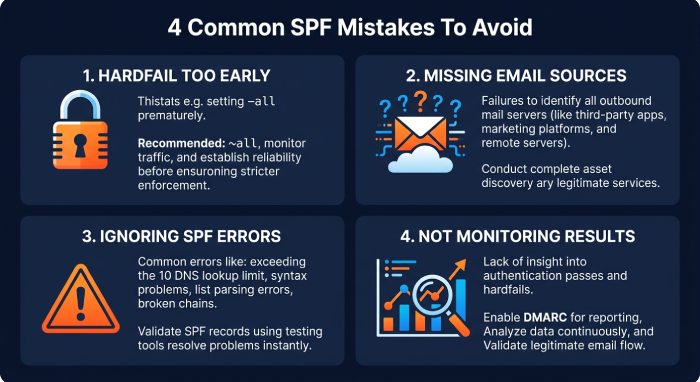
Moving to HardFail too early
Switching to -all too soon can backfire. If your SPF record is not complete, your own valid emails can get blocked. This can affect important things like client communication, OTPs, or campaigns. Many people rush into this thinking that stricter is better, but that’s not always true. You should only move to HardFail when you are 100% sure nothing is missing.
Missing email sources
It’s easy to forget all the tools that send emails from your domain. Apart from your main email provider, tools like CRMs, contact forms, support systems, and marketing platforms also send emails. Even one missing source can cause SPF failures. These failures may not always be obvious, but they can hurt deliverability. Always double-check and update your list regularly.
Ignoring SPF errors
Errors, such as exceeding the 10 DNS lookups limit, can break your SPF record. Knowing how to fix SPF PermError gets you back on track. Even if your setup looks correct, these technical limits can cause failures. Many people ignore warnings and assume everything is fine. But once the record breaks, all emails can start failing SPF. Keeping your record optimized and clean is very important.
Not monitoring results
SPF is not something you set once and forget. You need to keep an eye on how your emails are performing. Without monitoring, you won’t know if something starts failing. Issues can go unnoticed for a long time, affecting your reputation. Regular checks help you stay in control and fix problems early.
SPF SoftFail vs HardFail vs Neutral: understand how each impacts email authentication and strengthen your email security with AutoSPF.
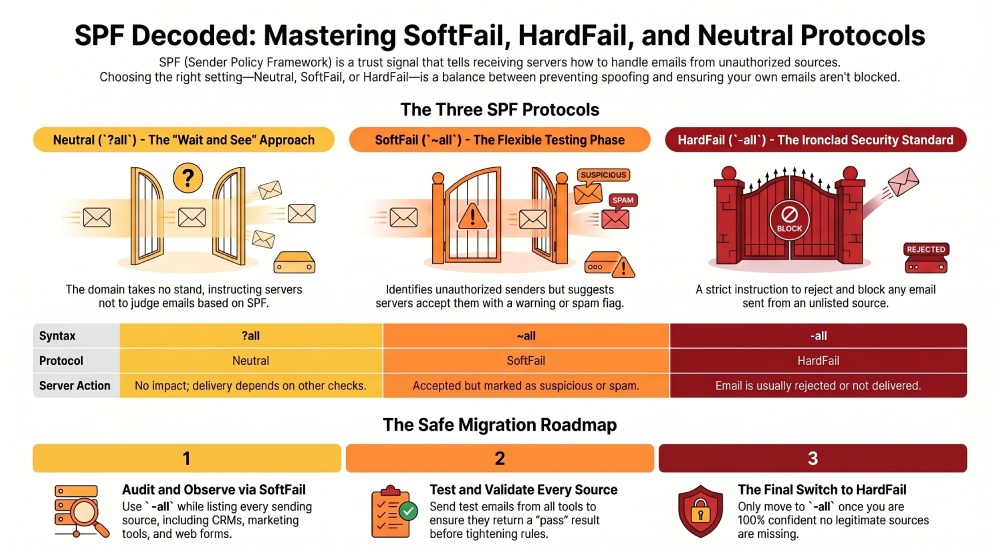
Key takeaways
SPF SoftFail, HardFail, and Neutral are simply different ways of controlling who can send emails from your domain. The key is not choosing the strictest option immediately, but choosing the right one at the right time. Start with a flexible setup, understand your email flow, and then move to a stricter policy once everything is clear. Rushing this process can break your email delivery, while doing it step by step keeps everything safe. In the end, a well-set SPF record means better trust, better deliverability, and fewer chances of your emails being misused.
Topics
General Manager
Founder and General Manager of DuoCircle. Product strategy and commercial lead for AutoSPF's 2,000+ customer base.
LinkedIn Profile →