SPF Softfail Troubleshooting: Domain Does Not Designate Permitted Sender Hosts

Quick Answer
An SPF softfail occurs when the sending server is not listed in the domain’s SPF record, causing the message to fail authentication without being rejected. To fix it, identify unauthorized sending sources and update the SPF record to include all legitimate mail servers.
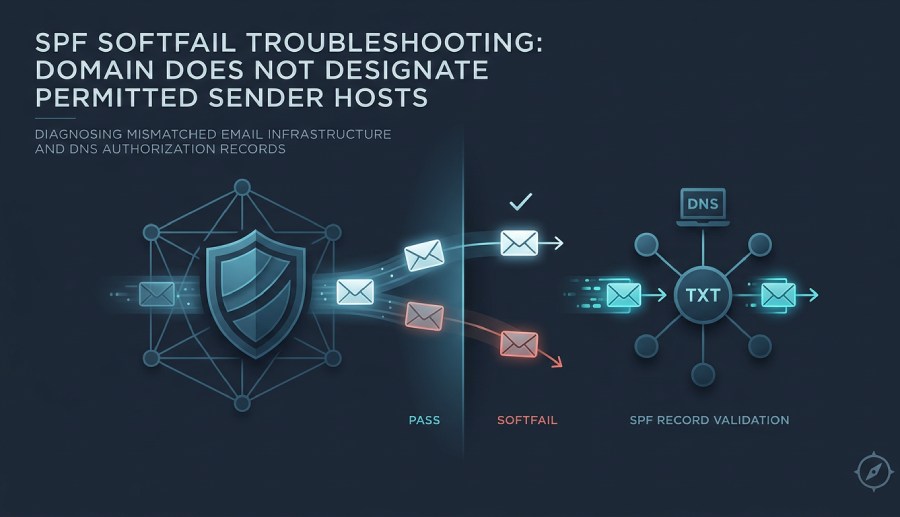
An SPF softfail occurs when a receiving mail server performs an SPF check and determines that the sending host is not clearly authorized by the sender’s SPF record, but the policy is not strict enough to reject the message outright. The typical wording is “domain does not designate permitted sender hosts”, meaning the sending IP address is not listed as a permitted sender for that domain.
SPF, or sender policy framework, is an email authentication mechanism that lets a domain publish which mail servers are allowed to send email on its behalf. During SPF authentication, the receiving system evaluates the connecting client-ip against the sending domain’s DNS-based SPF record. If the IP matches, the result is usually spf=pass. If no SPF record exists, the result may be spf=none. If the SPF record exists but does not authorize the source, the result may be softfail, often represented in the received-spf or authentication-results section of the message header.
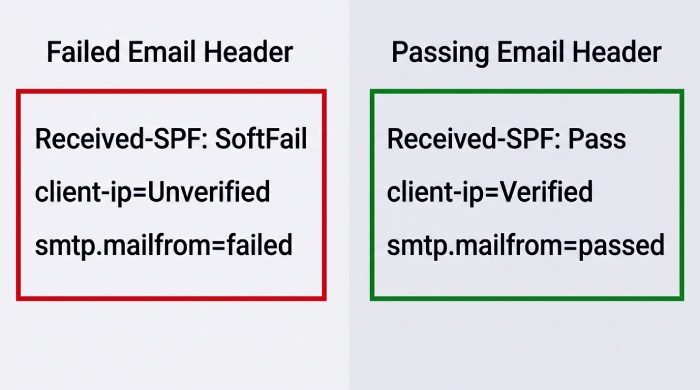
For example, an email header from Outlook.com, Gmail, or another provider may include lines like:
Received-SPF: SoftFail (protection.outlook.com: domain of transitioning cfao.com does not designate permitted sender hosts) Authentication-Results: mx.google.com; spf=softfail smtp.mailfrom=cfao.com
This does not necessarily mean the message is malicious. It means the SPF check found a mismatch between the sending infrastructure and the published SPF record. A message sent through Exchange Online, an Exchange Server relay, smtp.gmail.com, Exclaimer, or a hosted signature management platform may fail SPF authentication if the domain configuration does not include the correct sender hosts.
The phrase “does not designate permitted sender hosts” is especially common in Microsoft and Google diagnostics. Microsoft systems, such as protection.outlook.com, mail-eopbgr50095.outbound.protection.outlook.com, or EUR03-VE1-obe.outbound.protection.outlook.com may stamp the result in the email header. Google systems, such as mx.google.com or Gmail, may show similar SPF authentication results. In both cases, the mail server is saying the domain does not designate permitted sender hosts that include the observed sending IP.
How SPF Records Designate Permitted Sender Hosts
An SPF record is a TXT record published in DNS. It starts with v=spf1 and uses mechanisms such as ip4, ip6, a, mx, and include to identify each permitted sender. In simple terms, the SPF record designates the sender hosts that are allowed to send on behalf of the domain.
A basic SPF record may look like this:
v=spf1 include:spf.protection.outlook.com include:_spf.google.com -all
This SPF record authorizes Microsoft 365 / Office 365 through Exchange Online and Google Workspace through Google. If a user sends through smtp.gmail.com, Google’s SPF infrastructure may return spf=pass when the SPF check evaluates smtp.mailfrom correctly. If the same domain also sends through Exclaimer, a marketing platform, or a Microsoft SMTP Server on-premises, those systems must also be represented in the SPF record.
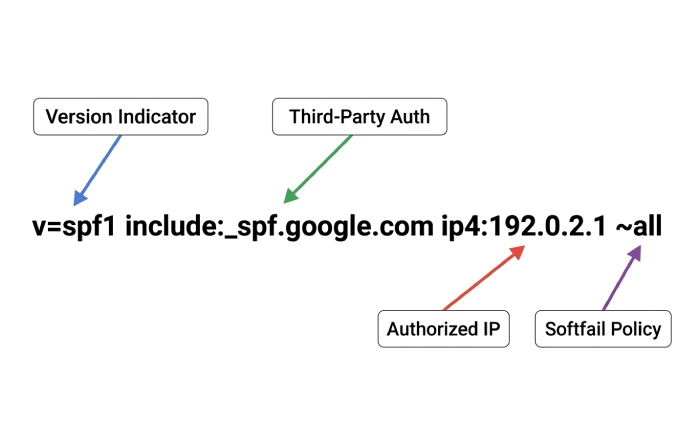
A more complex sender policy framework setup might involve:
- include:spf.protection.outlook.com for Office 365 and Exchange Online
- include:
_spf.google.comfor Google and Gmail - Dedicated ip4 mechanisms for an on-premises Exchange Server or hybrid mail flow
- Vendor-specific includes for Exclaimer Hosted, signature management, CRM tools, or ticketing platforms
- mx when the domain’s MX hosts are also valid sender hosts
When the SPF record omits one of those systems, the result may not designate permitted sender hosts. If the SPF record is missing entirely, receivers may show spf=none. If the SPF record authorizes the IP, the result becomes spf=pass. If the SPF record exists but only partially authorizes the mail path, SPF authentication may softfail even when DKIM and DMARC are correctly configured.
Common Causes: Missing IPs, Third-Party Senders, and Misconfigured Includes
The most common cause of “domain does not designate permitted sender hosts” is a missing IP address or a missing include mechanism in the SPF record. This often happens when an organization adds a new mail service but forgets to update DNS. For example, a company using cfao.com or za.cfao.com might send from Exchange Online, then later add Exclaimer Hosted for email signatures. If Exclaimer reroutes mail flow and its sender hosts are not included, SPF authentication can produce a softfail.
Another common scenario involves hybrid deployments. In a Hybrid Microsoft environment, outbound mail may originate from Exchange Online, an on-premises Exchange Server, a secure relay, or a Microsoft SMTP Server. The visible smtp.mailfrom domain may be cfao.com, while the actual client-ip belongs to an on-premises relay. If that relay is missing from the SPF record, the receiving mail server may report that the domain does not designate permitted sender hosts.
Misconfigured includes are also frequent. SPF has a DNS lookup limit of 10. If a domain includes too many third-party services, the SPF check can fail because the record exceeds the lookup limit. Our SPF PermError guide walks through the fix. In other cases, administrators use the wrong include value, such as authorizing Google incorrectly, forgetting spf.protection.outlook.com, or adding a vendor’s tracking domain rather than its actual SPF include.
Message routing can complicate diagnosis. A message may contain a DKIM-Signature with selector2, header.i, header.from, and dkdomain values that align properly, while SPF fails because the envelope sender differs from the visible From address. DMARC evaluates SPF alignment against header.from, so SPF authentication can fail while DKIM passes. Headers may also include ARC, ARC-Seal, and ARC-Authentication-Results, such as arc-20160816 or arcselector9901, which preserve authentication information through forwarding services.
A real-world email header may reference systems such as:
Received: from DB8P190MB0730.EURP190.PROD.OUTLOOK.COM Received: from mail-eopbgr50095.outbound.protection.outlook.com Authentication-Results: mx.google.com; spf=softfail smtp.mailfrom=cfao.com; dkim=pass [header.i=@cfao.com](mailto:header.i=@cfao.com); dmarc=pass header.from=cfao.com
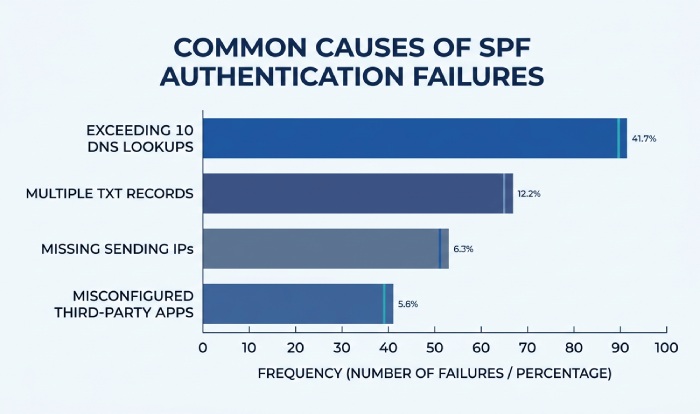
Additional fields, such as delivered-to, x-originating-ip, Thread-Topic, and Thread-Index, can help determine the actual path. Discussions in the Microsoft Tech Community, including troubleshooting examples associated with practitioners such as Navishkar Sadheo, often show that the root issue is not SPF itself but inconsistent mail flow across Hosted, Hybrid, and third-party systems.
Step-by-Step Troubleshooting and SPF Record Validation
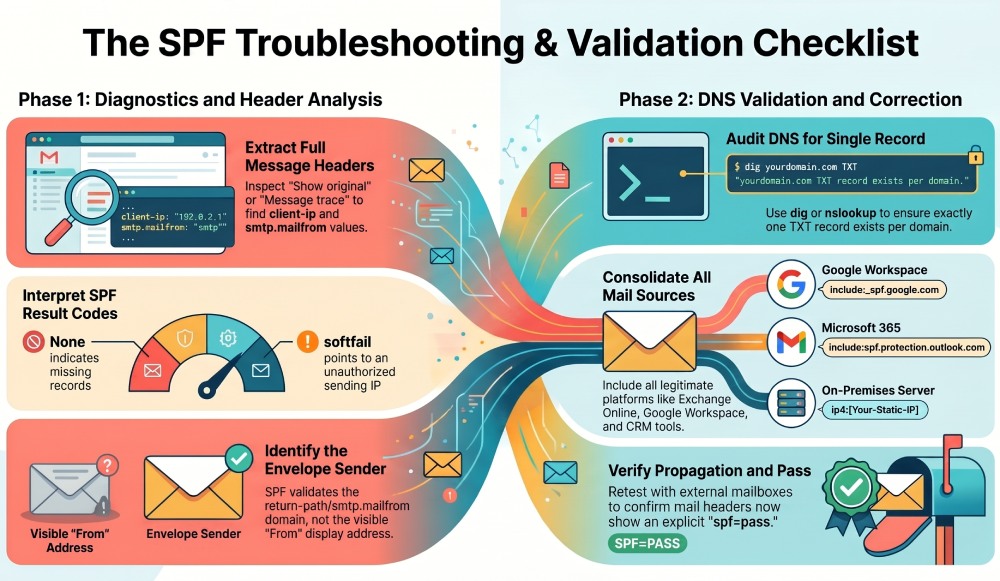
Start by collecting the full message header, not just the visible From address. The email header contains the received-spf, authentication-results, smtp.mailfrom, client-ip, and sometimes x-originating-ip values required for accurate diagnosis. If the message was delivered to Gmail, inspect the “Show original” output from gmail.com. If it was delivered to Outlook.com or Office 365, review Microsoft header details from the mailbox or message trace.
Look for these indicators:
received-spf: softfail spf=none spf=pass smtp.mailfrom=example.com client-ip=203.0.113.10
If you see spf=none, the sending domain may not have an SPF record at all, or DNS resolution may be failing. If you see spf=pass, the permitted sender matched successfully. If you see a softfail and the phrase “does not designate permitted sender hosts”, the SPF check found an SPF record, but the client-ip was not authorized.
Next, identify the envelope sender. SPF does not validate the display From address; it validates the return-path or smtp.mailfrom domain. This distinction matters when messages are sent by hosted tools, marketing systems, Exclaimer, Microsoft 365, or Google. A message may show From: user@cfao.com, but SPF authentication checks smtp.mailfrom=vendor.example or smtp.mailfrom=cfao.com, depending on the service.
Then query DNS for the current SPF record. Utilities like AutoSPF can assist in streamlining the validation of SPF records, pinpointing absent sender hosts, and uncovering configuration problems that could result in softfail outcomes.
dig TXT cfao.com nslookup -type=TXT cfao.com
Confirm that there is only one SPF record. Multiple SPF records cause SPF authentication to fail. A valid SPF record should consolidate all permitted sender sources into a single sender policy framework entry. Validate it with a free SPF checker.
Review whether the SPF record includes every legitimate mail server:
- Exchange Online:
include:spf.protection.outlook.com - Google Workspace or Gmail:
include:_spf.google.com - On-premises Exchange Server or Microsoft SMTP Server:
ip4:x.x.x.x - Exclaimer or signature management provider: vendor-supplied SPF include
- Other hosted platforms: CRM, ticketing, invoicing, security gateways
If the organization uses MX-based sending, verify that the MX mechanism points to hosts that actually send outbound email and that those hosts resolve correctly. However, relying too heavily on MX can be less precise than explicit IPs or includes.
Validate the Result After DNS Changes
After updating the SPF record, wait for DNS propagation and retest with live mail. Send messages to Outlook.com, Gmail, and an external mailbox if possible. Confirm that the new headers show received-spf with spf=pass, not spf=none or softfail. Also, verify authentication results from both Microsoft and Google, because protection.outlook.com and mx.google.com may expose slightly different diagnostic language.
A healthy result may look like:
Received-SPF: Pass (protection.outlook.com: domain of cfao.com designates 40.107.x.x as permitted sender) Authentication-Results: mx.google.com; spf=pass smtp.mailfrom=cfao.com; dkim=pass header.i=@cfao.com; dmarc=pass header.from=cfao.com
This confirms that the SPF record designates the sending host as a permitted sender and that the SPF check completed successfully.
Best Practices to Prevent Future SPF Softfail Issues
Maintain an inventory of every service that sends email for the domain. Include Microsoft 365, Exchange Online, Exchange Server, Google, Gmail, Exclaimer, smtp.gmail.com, marketing platforms, scanners, application servers, and any hosted or hybrid mail flow components. Each permitted sender should map to a documented SPF record mechanism. Learn how to handle multiple SPF includes efficiently.
Keep the SPF record concise and avoid unnecessary includes. The sender policy framework limit of 10 DNS lookups is strict, and exceeding it can cause SPF authentication failures even when the syntax appears correct. Brushing up on SPF lookup basics makes this easier to manage. Flattening SPF records can help in limited cases, but it creates maintenance risk when providers change IP ranges.
Align SPF with DKIM and DMARC. SPF alone is not enough for modern email security and email deliverability. Configure DKIM with stable selectors, such as selector2 where applicable, and ensure the DKIM-Signature aligns with header.from. Publish a DMARC policy that reflects your enforcement goals after confirming that SPF and DKIM both pass consistently.
Finally, test mail flow whenever you add or change a sender. Before enabling a new platform, verify whether it sends directly, relays through Office 365, uses Exclaimer signature management, or routes through a security gateway. If a future message header says “does not designate permitted sender hosts”, compare the client-ip and smtp.mailfrom against your documented SPF record, confirm whether the result is spf=none, softfail, or spf=pass, and update the permitted sender list before the issue affects email deliverability.
General Manager
Founder and General Manager of DuoCircle. Product strategy and commercial lead for AutoSPF's 2,000+ customer base.
LinkedIn Profile →