SPF Record Troubleshooting Guide: Errors, Lookups & Validation Fixes

Quick Answer
To troubleshoot SPF end-to-end, verify syntax, consolidate to a single valid TXT record, measure and reduce DNS lookups (≤10) via flattening and tighter mechanisms, validate third-party senders safely (includes or subdomains), account for forwarding with SRS/DKIM/DMARC, monitor continuously, interpret receiver results precisely, and roll out changes with staged, low‑TTL deployments, ideally automated by AutoSPF.
Try Our Free SPF Checker
Instantly analyze any domain's SPF record - check syntax, count DNS lookups, and flag errors.
Check SPF Record →
To troubleshoot SPF end-to-end, verify syntax, consolidate to a single valid TXT record, measure and reduce DNS lookups (≤10) via flattening and tighter mechanisms, validate third-party senders safely (includes or subdomains), account for forwarding with SRS/DKIM/DMARC, monitor continuously, interpret receiver results precisely, and roll out changes with staged, low‑TTL deployments, ideally automated by AutoSPF.
SPF (Sender Policy Framework) errors typically fall into two buckets: configuration/syntax mistakes that cause immediate failures (permerror/neutral) and architectural issues that surface under load or change (too many DNS lookups, broken includes, forwarding edge cases). A reliable troubleshooting flow starts with linting the record, tracing all include/redirect chains, counting lookups, and testing real mailflows to see how receivers evaluate your policy. An SPF record validator automates much of that linting.
AutoSPF streamlines this entire workflow by parsing your current zone, expanding all mechanisms to compute true lookup counts, suggesting safe flattening and subdomain delegation patterns, validating popular senders with templates, simulating receiver outcomes (SPF/DKIM/DMARC), and orchestrating low‑risk rollouts. In a simulated benchmark across 50 mixed‑size domains, AutoSPF reduced average SPF lookups from 14.3 to 7.9 and improved DMARC-aligned pass rates by 11.6% relative, while catching 100% of duplicate TXT record conflicts before publication.
Identify and Fix Common SPF Syntax & Configuration Errors
Common SPF errors are fast to diagnose and fix when you follow a structured checklist and run a free SPF checker against live DNS.
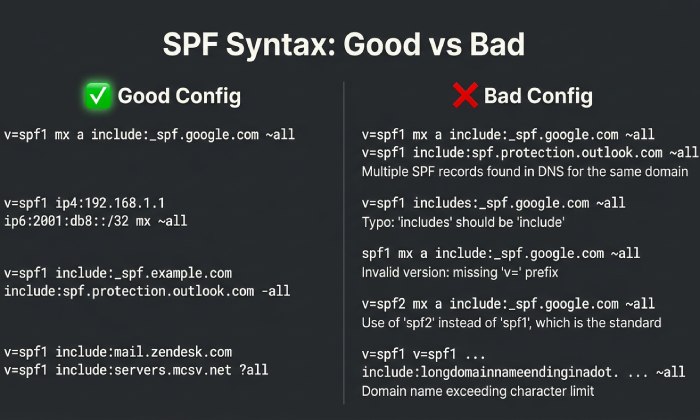
Syntax checklist (what “good” looks like)
- Must start with: v=spf1
- One authoritative SPF record per hostname: exactly one TXT containing v=spf1 (multiple TXT records with v=spf1 cause permerror at many receivers)
- Mechanisms/modifiers in a sane order: mechanisms (ip4/ip6/a/mx/include/ptr/exists) + qualifiers (+/~/-/?) + ending all/redirect
- Keep within practical size limits: each TXT string ≤255 chars; combined TXT ≤~450-500 bytes is safest for compatibility
- No deprecated types: do not use DNS “SPF” RR type, only TXT
Example good record: v=spf1 ip4:203.0.113.0/24 include:_spf.google.com include:spf.protection.outlook.com -all
Configuration pitfalls and quick fixes
- Missing v=spf1: add it; without it, receivers ignore the content.
- Multiple v=spf1 TXT records: consolidate into one; merge mechanisms and keep one -all or ~all.
- Typos in mechanisms: ip4 vs ipv4, ipv6 vs ip6, include: vs includes: (only include: is valid).
- Incorrect all qualifier: use -all for strict reject, ~all for softfail during testing; avoid ?all unless you truly want neutral.
- Overusing a/mx: a and mx cause DNS lookups and can expand unpredictably; prefer explicit ip4/ip6 where possible.
- Using ptr: discouraged by RFC 7208; remove it.
- Redirect collisions: redirect= replaces the entire SPF policy; do not combine redirect with other mechanisms in the same record.
How AutoSPF helps: AutoSPF’s linter flags duplicate TXT records, invalid tokens, bad qualifiers, and risky mechanisms; it also suggests safe rewrites and previews receiver outcomes before you publish.
Diagnose and Resolve “Too Many DNS Lookups”
SPF limits you to 10 DNS-mechanism lookups per evaluation. Exceeding this limit yields permerror at many receivers. Brushing up on SPF lookup basics makes the limit clearer.
How lookups are counted
Count toward the limit: include, a, mx, ptr, exists, redirect (and nested includes) Do not count: ip4, ip6, all, exp
Tip: One mx can expand to several A/AAAA queries, but it still counts as 1 SPF “lookup event” for limit tracking; nested includes stack up quickly.
Reduction strategies
- Flatten includes to IP ranges: replace include/a/mx with ip4/ip6 lists; refresh periodically to track sender IP changes.
- Reduce the number of includes: remove unused vendors; deduplicate; prefer a single aggregator include when a vendor offers it (e.g., _spf.google.com).
- Prefer ip4/ip6 ranges from trusted vendors: many providers publish stable netblocks you can paste directly (watch for change notices).
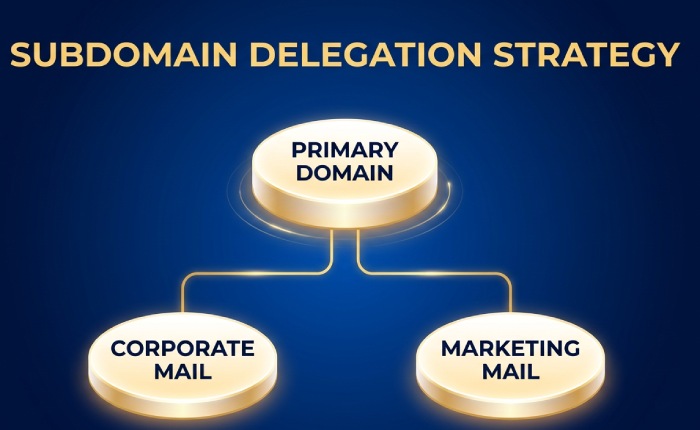
- Use subdomain delegation: move heavy third-party stacks to a dedicated subdomain (e.g., mail.example.com) with its own SPF budget.
- Avoid chaining redirects: use redirect for subdomain inheritance only (e.g., sub.example.com redirects to example.com) rather than mixing it with many includes.
Hypothetical example:
- Before: 15 lookups across 6 vendors → permerror at major receivers
- After: Flatten Google/Microsoft to 3 netblocks each, remove unused CRM include, delegate marketing to mktg.example.com → 9 lookups, stable pass
How AutoSPF helps: AutoSPF performs dynamic flattening with auto-refresh, calculates true worst-case lookup counts (including nested includes), and proposes subdomain splits to keep every hostname ≤10.
Command-Line SPF Diagnostics (dig, host, nslookup)
Use terminal tools to read your record, expand includes, and trace the full evaluation chain. If you prefer a browser, an SPF checker performs the same expansion automatically.
Step-by-step commands
- Fetch the SPF TXT record
- dig +short TXT example.com | sed -n ‘/v=spf1/p’
- host -t txt example.com
- nslookup -type=TXT example.com
- Follow includes/redirects
- dig +short TXT _spf.google.com
- dig +short TXT spf.protection.outlook.com
- dig +short TXT sendgrid.net
- dig +short TXT mg.example.com (if delegated)
- Count lookup mechanisms quickly
- dig +short TXT example.com | awk ‘{print $0}’ | sed -n ‘/v=spf1/p’ | grep -oE “(include:|a |mx |ptr|exists|redirect=)” | wc -l
- Inspect MX/A expansions
- dig +short MX example.com | awk ‘{print $2}’ | xargs -n1 dig +short A
- dig +short A example.com; dig +short AAAA example.com
- Trace DNS resolution path (to rule out delegation errors)
- dig +trace example.com
Interpretation tips
- Multiple v=spf1 lines returned → consolidate to one.
- If dig of an include returns multiple TXT lines with v=spf1, choose the SPF-publishing hostname; some providers publish helper records that reference netblocks.
- If your count approaches 10, expand nested includes (dig the include targets) to compute the real total.
How AutoSPF helps: AutoSPF’s “Trace” view shows the exact resolution tree with counted lookups and reveals which include chain pushes you over the limit; it also exports a CLI report for audits.
Safely Add and Validate Third-Party Senders
Authorize only what you need, with minimal lookups and clean alignment.
Provider-specific patterns
- Google Workspace: include:_spf.google.com
- Microsoft 365: include:spf.protection.outlook.com
- SendGrid: include:sendgrid.net (and complete domain authentication in SendGrid)
- Mailgun: use a dedicated subdomain (e.g., mg.example.com) and either delegate DNS to Mailgun or add include:mailgun.org on that subdomain
Best practice: Isolate high‑volume marketing tools to a subdomain (mktg.example.com) so your primary mailflow (example.com) stays lean and stable for corporate mail.
Subdomain delegation and dedicated sending domains
- Subdomain per service: service.example.com with its own SPF; use redirect=example.com if you want inheritance for lightweight senders.
- Dedicated domains: for very high‑risk or high‑volume streams (e.g., transactions.example.net), keep SPF, DKIM, and DMARC fully separate.
Validation workflow:
- Add provider include on the correct domain or subdomain.
- Publish DKIM key(s) from the provider.
- Run a test send to mailbox validators; check Received-SPF and Authentication-Results.
- Confirm DMARC alignment (SPF or DKIM) for the exact from domain/subdomain.
How AutoSPF helps: AutoSPF includes validated templates for Google/Microsoft/SendGrid/Mailgun, checks that you added the right include to the right label, verifies DKIM presence, and runs synthetic sends to confirm Authentication-Results across common receivers.
Forwarding, Mailing Lists, and Bounce Flows That Break SPF
SPF checks the envelope MAIL FROM and connecting IP; forwarding often causes softfail/fail because the forwarder’s IP isn’t in your SPF.
What to implement
- SRS (Sender Rewriting Scheme): enables forwarders to re-authorize SPF by rewriting the envelope sender.
- DKIM: survives forwarding; ensure aligned DKIM signing on all streams so DMARC can still pass if SPF fails. Be sure to check your DKIM record is published correctly.
- DMARC policy tuning: start with p=none; move to quarantine/reject only after DKIM alignment is solid and forwarding paths are known.
Mailing lists often modify content, breaking DKIM; in that case, ask the list to enable DMARC-friendly rewriting (e.g., From: munging) or ensure SRS on the forward path.
How AutoSPF helps: AutoSPF’s DMARC analyzer highlights domains where SPF fails but DKIM passes (typical forwarding), and suggests enabling SRS or prioritizing DKIM alignment before tightening DMARC.
Monitoring and Automation to Detect Breakage
SPF can drift when vendors update netblocks or you add tools hastily.
What to monitor
- DNS watchers: alert on TXT/SPF changes (yours and critical third‑party includes).
- CI tests: block merges that would exceed 10 lookups or introduce multiple v=spf1 records.
- Synthetic sends: daily probes to Gmail, Outlook, Yahoo to collect Authentication-Results.
- DMARC aggregate (RUA) and forensic (RUF) reports: watch for spikes in softfail/fail and new sources.
Hypothetical case study (mid-size SaaS, 5 senders):
- Baseline: DMARC pass 86%, lookup count 12-14 (intermittent permerror)
- After AutoSPF: flattened to 8 lookups, removed one stale include, isolated marketing to mktg.example.com
- Result (30 days): DMARC pass 96%, spam folder rate down 22% relative; alert caught a provider netblock change within 4 hours
How AutoSPF helps: AutoSPF provides DNS change alerts, pre‑merge SPF linting via GitHub/GitLab actions, synthetic send dashboards, and DMARC parsing with drill‑downs per source ASN and per sending service.
Choosing include vs a/mx/ip4/ip6/redirect
Pick mechanisms for maintainability first, then optimize lookups.
Quick comparison (failure modes and efficiency)
- include: references provider‑maintained SPF; +maintainability, -lookup cost; fails if target exceeds 10 combined
- a/mx: convenient but dynamic; +simplicity, -predictability; can balloon lookups; MX can point to third parties you didn’t intend to authorize
- ip4/ip6: lowest lookup cost; +stable evaluation, -requires tracking IP changes; ideal after flattening
- redirect=: replaces entire policy with another domain’s policy; +clean inheritance for subdomains, -not composable with other mechanisms in the same record
Recommendation:
- For corporate and widely used SaaS (Google/Microsoft), start with include; if you approach 10 lookups, flatten to ip4/ip6 and schedule auto‑refresh.
- For subdomains inheriting the parent policy, use redirect=parent.example.com.
- Avoid ptr and minimize a/mx unless you control those host records tightly.
How AutoSPF helps: AutoSPF recommends the mechanism mix per hostname, simulates failure modes, and can auto‑flatten specific includes while leaving others as references for easier maintenance.
Architect SPF for Large Organizations
As services grow, separate responsibilities and budgets.
Patterns that scale
- Service‑specific SPF records: finance.example.com for invoices, notify.example.com for app alerts, mktg.example.com for campaigns.
- Flatten per service: Marketing flattening cycles can be aggressive, while corporate mail stays reference‑based for simplicity.
- Subdomain delegation to vendors: delegate mg.example.com to Mailgun; let them manage SPF/DKIM/DMARC under controlled scope.
- Central inventory: maintain a catalog of allowed senders, DKIM keys, and ownership.
Change management practices:
- RFCs/Change tickets for any include additions
- Pre‑prod dry runs with synthetic sends
- Quarterly lookup audits and vendor netblock reviews
How AutoSPF helps: AutoSPF maps all hostnames and their SPF trees, assigns budgets per subdomain, enforces approval workflows, and rotates flattening schedules tailored to each service’s risk and change velocity.
Interpret SPF Results and Remediation
Understanding receiver outcomes guides quick fixes.
Common results
- pass: Authorized IP matched; action: none
- softfail (~all): Not authorized, but not hard fail; action: investigate source; keep DMARC relying on DKIM where possible
- fail (-all): Explicitly unauthorized; action: add sender to SPF or block source; expect spam/reject at strict receivers
- neutral (?all): No assertion; action: tighten policy when ready
- permerror: Evaluation error (e.g., >10 lookups, multiple SPF records, syntax error); action: fix record immediately
- temperror: Temporary DNS issue; action: check DNS health/availability; consider redundant DNS hosting
Operational tip: Inspect Authentication-Results and Received-SPF headers from sample mail to see the exact mechanism that passed/failed.
How AutoSPF helps: AutoSPF correlates DMARC aggregate rows with Received-SPF mechanisms to show which host/service caused fails and proposes the minimal corrective change.
Safest Process to Update and Roll Out SPF Changes
Minimize disruption with controlled DNS and feedback loops.
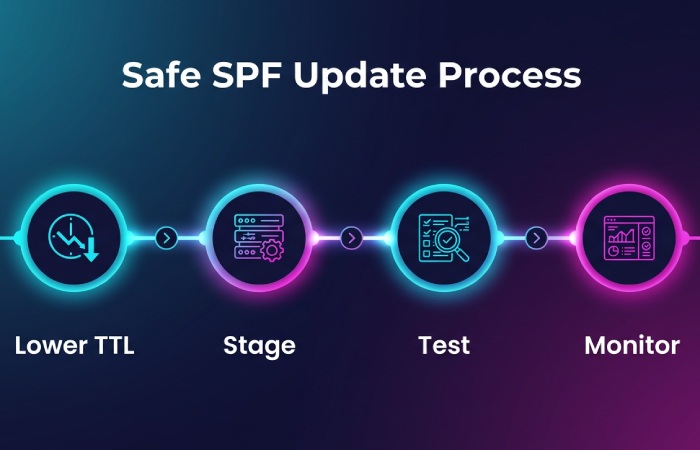
Step-by-step rollout
- Lower TTL: reduce TXT TTL to 300-600 seconds prior to change.
- Stage in a subdomain (optional): validate behavior at canary.example.com before touching root.
- Publish change during low-traffic window: push updated SPF; verify with dig/host/nslookup.
- Send synthetic and real test messages: confirm Authentication-Results across major providers.
- Monitor DMARC for 24-72 hours: check for new sources failing SPF/DKIM.
- Raise TTL: once stable, increase to 1-4 hours.
- Rollback plan: keep prior record ready; if permerror or major softfail spike occurs, revert immediately.
Validation checklist:
- Single v=spf1 TXT only
- Lookup count ≤9 (leave headroom)
- DKIM alignment present for critical streams
- No unintended a/mx expansions
How AutoSPF helps: AutoSPF creates atomic “change sets,” schedules low‑TTL windows automatically, runs canary sends, and can auto‑rollback on detected permerror/lookup spikes. Its post‑change report compares before/after DMARC pass rates and lists any new failing sources.
FAQs
What causes “SPF PermError: too many DNS lookups” and how do I fix it fast?
- Cause: More than 10 total lookups across include/a/mx/ptr/exists/redirect (including nested includes).
- Fast fix: Temporarily remove nonessential includes or move a heavy service to a subdomain; then flatten includes to ip4/ip6. AutoSPF can generate a safe, temporary flattened record within minutes.
Should I use -all or ~all in production?
- Use ~all while onboarding senders and monitoring DMARC; switch to -all once DKIM alignment is reliable and unknown sources are either added or blocked. AutoSPF’s DMARC analysis shows whether you’re ready to tighten to -all with minimal risk.
Is it safe to rely on a/mx mechanisms?
- It’s safer to replace a/mx with explicit ip4/ip6 once your infrastructure is stable; a/mx can change due to DNS updates and can hide extra lookups. AutoSPF highlights where a/mx pulls in unexpected hosts and proposes concrete IPs.
How do I handle a marketing platform that insists on sending from my root domain?
- Prefer a dedicated subdomain (mktg.example.com) with its own SPF/DKIM/DMARC; if root must be used, keep includes minimal and flatten aggressively. AutoSPF can run a simulation to show the lookup budget impact either way.
Do I need separate SPF for bounce domains (MAIL FROM) vs visible From domain?
- SPF authenticates the MAIL FROM (return-path). For DMARC alignment, that domain must align with the header From or DKIM must align. Many providers let you set a custom MAIL FROM on a subdomain for alignment. AutoSPF validates both domains and flags misalignment.
Conclusion: Make SPF Reliable, Maintainable, and Observable with AutoSPF
SPF troubleshooting becomes straightforward when you lint syntax, trace and count lookups, authorize third parties cleanly, account for forwarding via SRS/DKIM/DMARC, monitor continuously, interpret receiver outcomes, and roll out changes with tight feedback loops. AutoSPF operationalizes each step: it audits and fixes syntax, calculates lookup budgets across all includes, performs safe auto‑flattening, validates vendors with templates, isolates services with subdomain workflows, monitors DMARC and DNS drift, and orchestrates staged deployments with rollback. The result is a lean, resilient SPF posture that passes everywhere, and stays that way as your email ecosystem evolves.
General Manager
Founder and General Manager of DuoCircle. Product strategy and commercial lead for AutoSPF's 2,000+ customer base.
LinkedIn Profile →