The Smart Way to Audit DNS Records with a CNAME Lookup Tool

Quick Answer
A CNAME lookup tool checks whether a domain or subdomain correctly points to its canonical hostname. It helps identify broken aliases, DNS misconfigurations, long CNAME chains, and resolution issues, improving DNS reliability, uptime, and website performance.
What a CNAME Lookup Tool Does and Why It Matters
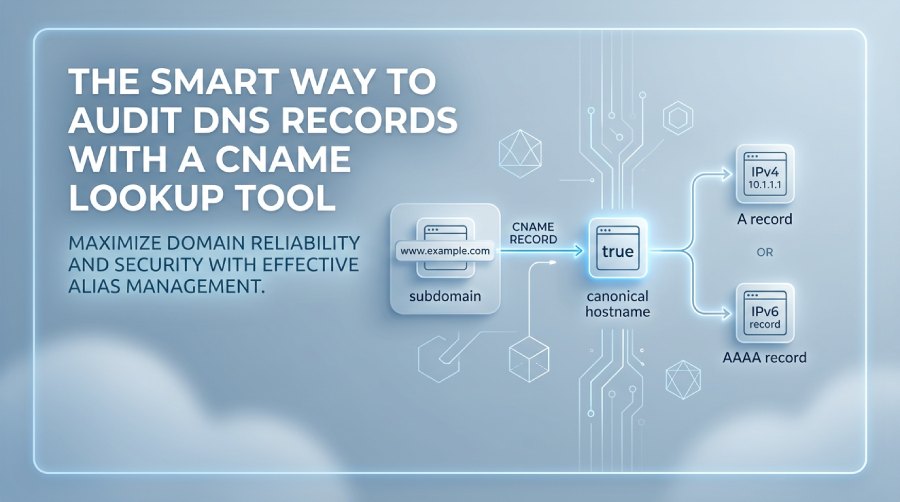
A CNAME lookup tool checks whether a domain name or subdomain points to another hostname through a CNAME record. In DNS terminology, a CNAME record maps an alias to a canonical name, which is the “true” destination that should eventually resolve to an A record for IPv4 or an AAAA record for IPv6. This makes the CNAME record an important DNS record type for routing services such as CDN endpoints, SaaS platforms, hosted apps, and branded login portals.
A CNAME lookup matters because a bad alias record can silently break websites, email-related services, domain verification, and integrations with a third-party service. If a subdomain such as www.example.com points to the wrong canonical name, users may be sent to an outdated service, a decommissioned platform, or no valid IP address at all.
How a CNAME Lookup Follows the DNS Query Path
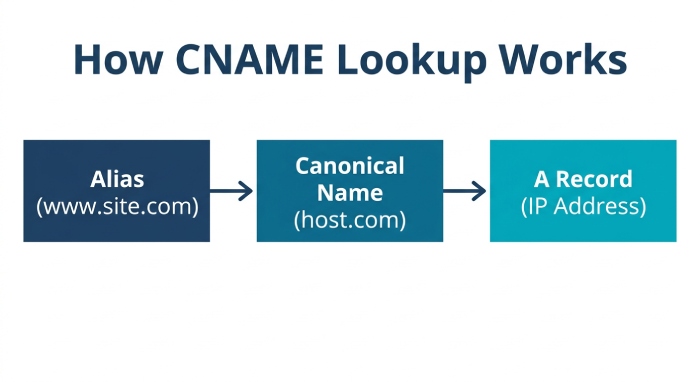
When you run a DNS query for a CNAME record, the resolver asks a DNS server for the requested domain name. If the queried subdomain is an alias, the DNS server returns the alias record and its canonical name. The resolver then continues the DNS query chain until it reaches an A record or AAAA record.
In a typical lookup path, a public recursive resolver such as Google DNS, Cloudflare DNS, OpenDNS, Quad9, or Yandex DNS may query the appropriate authoritative name server. The final answer should come from the authoritative DNS servers responsible for the zone. This distinction matters because cached data from a resolver may differ from the live answer on the authoritative DNS server, especially after recent DNS configuration changes.
Why CNAME Audits Are Essential for Reliable DNS
A CNAME record is convenient, but it also adds dependency. Your domain name may be healthy, but if the canonical name belongs to a vendor that changes infrastructure, expires a hostname, or removes your tenant, the alias breaks. Regular CNAME lookup checks help confirm that each subdomain still points to the correct destination and that the final resolution produces a valid A record or AAAA record.
Standards such as RFC 1034 and RFC 2181 define important DNS behavior around aliases and canonical naming. For example, a CNAME record generally should not coexist with other records at the same name. Understanding these rules helps prevent invalid DNS records before they cause outages.
Common DNS Issues a CNAME Lookup Can Reveal
A well-run CNAME lookup can expose configuration errors that are hard to spot in a basic control panel. Many teams only review visible DNS records during migrations, but an automated CNAME checker or broader DNS record lookup can reveal deeper routing problems.
Mispointed Aliases, Dead Targets, and CNAME Chains
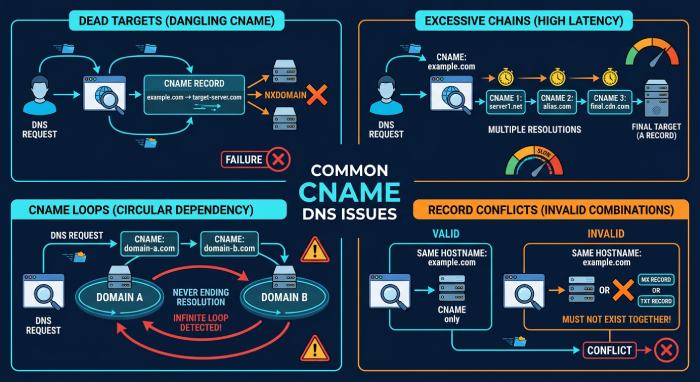
One common issue is a CNAME alias pointing to an obsolete canonical name. For example, a shop subdomain may still point to an old e-commerce platform after migration. The CNAME record exists, but the final A record or AAAA record may be missing.
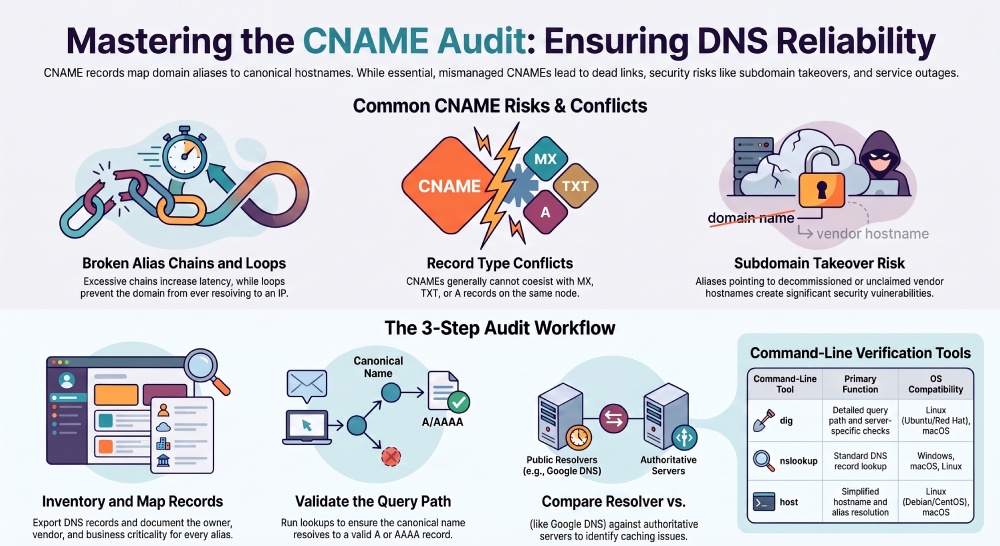
A CNAME lookup can also reveal excessive CNAME chains. A subdomain may point to one alias record, which points to another alias record, which eventually resolves to a hostname with an A record. While this can work, long chains increase latency and create more points of failure in the DNS query process.
Another risk is a CNAME loop, where aliases point back to each other. In that case, the DNS server cannot reach a final A record or AAAA record, and the domain name becomes unreachable.
Conflicts with Other DNS Records and Security Records
CNAME conflicts are also common. A name with a CNAME record should not also have an MX record, TXT record, A record, AAAA record, or another record type at the same node. This becomes especially important during domain verification, where services like Google Apps may ask for a TXT record while a hosting provider asks for a CNAME record on the same hostname.
A CNAME lookup should be part of a wider review that includes the SOA record, NS record, MX record, TXT record, and DNSSEC-related records. If DNSSEC is enabled, verify records such as RRSIG, DNSKEY, DS record, NSEC, and NSEC3PARAM. These records—also commonly referenced as DS, NSEC, and NSEC3PARAM in DNS tools—help protect DNS responses but can also cause validation failures if delegation or signing is misconfigured.
Step-by-Step Process for Auditing CNAME Records
A structured audit prevents guesswork. Instead of checking one domain name at a time, build a repeatable workflow that reviews every critical subdomain, alias record, and canonical name.
Practical Workflow for a CNAME Record Audit
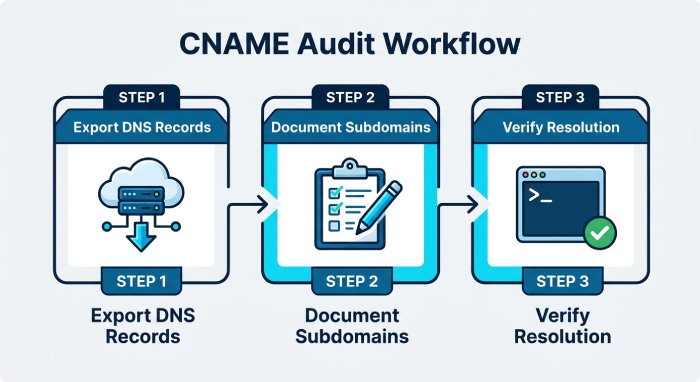
Start by exporting all DNS records from your DNS provider. Many cloud DNS providers such as Google Cloud DNS, Cloudflare, AWS Route 53, and Azure DNS allow zone file exports or API-based inventory. Include the DNS Start of Authority (SOA), NS record, A record, AAAA record, MX record, TXT record, and each CNAME record.
Next, identify every subdomain that uses a CNAME record. For each alias record, document:
- Source hostname or subdomain
- Target canonical name
- Owning team or application
- Vendor or third-party service
- Expected A record or AAAA record result
- TTL (time to live) value
- Business criticality
Then run a CNAME lookup against each hostname. Confirm that the DNS query returns the expected CNAME record and that the canonical name resolves to a valid A record or AAAA record. If the final destination does not return an IP address, investigate immediately.
Verify Propagation and Authoritative Answers
Do not rely on one DNS server. Query both a public recursive resolver and the authoritative name server. Resolver cache can hide problems, while the authoritative DNS server shows the source-of-truth configuration.
Command-Line Checks on Major Operating Systems
Technical teams can use the nslookup command, dig command, or host command. These DNS tools are commonly available on Ubuntu, Debian, CentOS, Red Hat, Windows, Mac OS X, and modern macOS systems.
Examples include:
dig CNAME www.example.com
nslookup -type=CNAME www.example.com
host -t CNAME www.example.com
For deeper checks, query a specific DNS server:
dig @8.8.8.8 CNAME www.example.com
dig @1.1.1.1 CNAME www.example.com
dig @authoritative-ns.example.com CNAME www.example.com
This helps compare Google DNS, Cloudflare DNS, and the authoritative name server response.
Web-Based Checks for Faster Review
For non-command-line workflows, an online tool such as MxToolbox, DNS Checker, nslookup.io, or WhatsMyDNS can run a CNAME lookup from multiple locations. A Domain Health Checker or broader domain health checker can also flag delegation problems, missing records, inconsistent DNS server answers, or DNSSEC validation issues.
Best Practices for Managing CNAME Records Safely
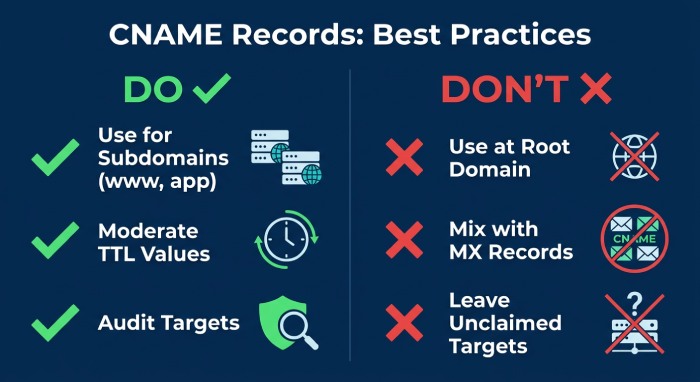 The safest CNAME record strategy is to keep aliases intentional, documented, and compliant with DNS rules. Avoid creating a CNAME record at the root domain unless your DNS provider offers a supported flattening or ALIAS-style feature. Traditional DNS has CNAME restrictions at the DNS zone apex, because the apex must usually hold the SOA record and NS record.
Use CNAME records for service-specific subdomain routing, such as www, app, login, cdn, or status. If the hostname needs to receive mail, avoid placing a CNAME record where an MX record must exist. If the same subdomain needs TXT record-based domain verification, confirm whether the third-party service supports an alternate hostname or verification method.
Keep TTL (time to live) values moderate. A low TTL is useful during migrations, but permanently low TTL values can increase DNS query volume. A high TTL improves caching but slows rollback when a canonical name changes.
For email authentication, remember that CNAME records often exist alongside TXT-based SPF, DKIM, and DMARC management across different hostnames. Tools such as AutoSPF can help teams manage SPF-related TXT record complexity while the DNS administrator separately audits CNAME record behavior. Run an SPF checker to confirm those TXT records resolve correctly. You can likewise run a DMARC checker and a DKIM checker to verify the rest of your email authentication records.
Also maintain ownership data. If a CNAME alias points to Github Pages, a SaaS platform, a CDN, or a discontinued vendor, verify that the destination is still claimed. Unclaimed CNAME targets can create subdomain takeover risk.
Choosing the Right CNAME Lookup Tool for Ongoing DNS Monitoring
The right CNAME lookup tool depends on how often your DNS changes, how many zones you manage, and whether you need alerting. A lightweight CNAME checker is enough for a one-time review, but production environments benefit from continuous DNS monitoring.
Look for DNS tools that can:
- Query multiple DNS server locations
- Compare public recursive resolver answers with authoritative DNS servers
- Detect CNAME record changes
- Follow the canonical name chain to the final A record or AAAA record
- Flag invalid alias record conflicts
- Report DNSSEC records such as RRSIG, DNSKEY, DS record, NSEC, and NSEC3PARAM
- Monitor SOA record serial changes and NS record delegation
- Export audit history for compliance
For quick manual checks, MxToolbox, DNS Checker, nslookup.io, and WhatsMyDNS are practical options. For operational monitoring, choose a platform that supports scheduled DNS record lookup, alerts for changed DNS configuration, and domain health checker reporting.
A smart CNAME lookup process should not only confirm that a CNAME record exists. It should validate the full DNS query path, confirm the canonical name, check the final A record or AAAA record, compare answers across DNS server networks, and ensure every subdomain remains aligned with the intended business service.
General Manager
General Manager of DuoCircle. Product strategy and commercial lead for AutoSPF's 2,000+ customer base.
LinkedIn Profile →