Shopify DMARC Setup: How to Meet Google and Yahoo Email Sender Requirements

Quick Answer
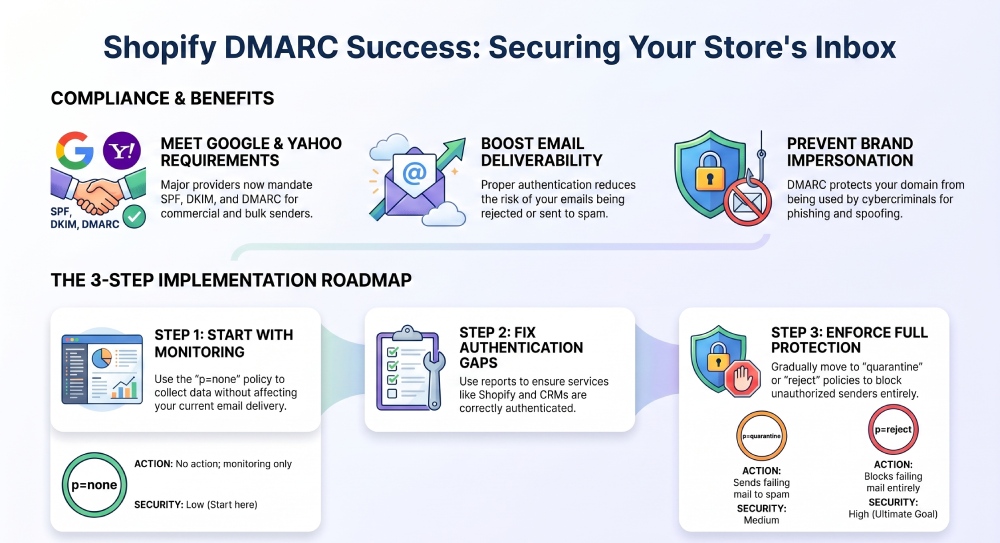
To meet Google and Yahoo email sender requirements, Shopify store owners should set up a DMARC record alongside SPF and DKIM. Proper DMARC configuration improves email authentication, protects your domain from spoofing, and helps ensure reliable email delivery.
Try Our Free DMARC Checker
Validate your DMARC policy, check alignment settings, and verify reporting configuration.
Check DMARC Record →
Email remains one of the most effective ways for Shopify store owners to connect with customers, promote products, and drive repeat purchases. However, major email providers such as Gmail and Yahoo have introduced stricter sender requirements to reduce spam, phishing, and email fraud. Businesses that fail to authenticate their emails properly may experience lower deliverability rates, increased spam folder placement, or rejected messages.
One of the most important authentication standards for Shopify merchants is DMARC (Domain-based Message Authentication, Reporting, and Conformance). Implementing DMARC helps verify that emails sent from your domain are legitimate while protecting your brand from impersonation attacks.
This guide explains how DMARC works, why it matters for Shopify stores, and how to configure it to comply with modern email authentication requirements.
Understanding DMARC
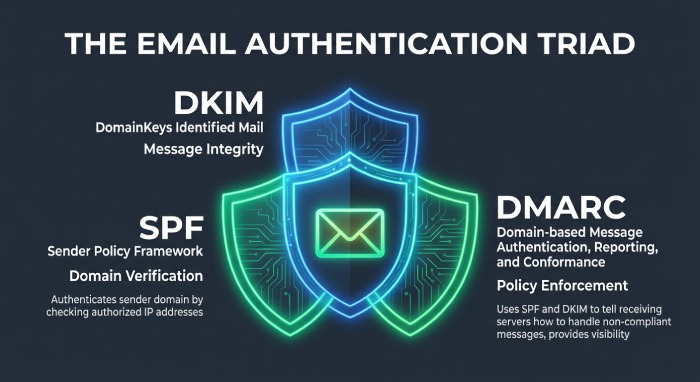
DMARC is an email authentication protocol that builds upon SPF (Sender Policy Framework) and DKIM (DomainKeys Identified Mail). It allows domain owners to define how receiving mail servers should handle messages that fail authentication checks.
By publishing a DMARC policy in your DNS records, you can:
- Protect your domain from spoofing attempts
- Improve email trust and credibility
- Gain visibility into email authentication activity
- Strengthen email deliverability
- Meet email provider compliance requirementsDMARC acts as a layer of protection that helps receiving servers determine whether incoming emails claiming to originate from your domain are authentic.
Why Shopify Store Owners Need DMARC
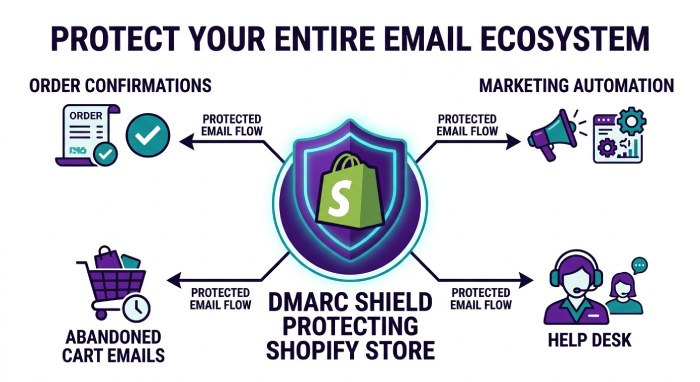
Many Shopify merchants use email for order confirmations, shipping updates, marketing campaigns, abandoned cart reminders, and customer support communications. Because these messages often contain sensitive customer information, they can become targets for phishing attacks.
Without proper authentication, cybercriminals may attempt to send fraudulent emails using your domain name. These attacks can damage your reputation, reduce customer trust, and negatively impact deliverability.
Implementing DMARC helps prevent unauthorized senders from abusing your domain while demonstrating to mailbox providers that your emails are legitimate.
Google and Yahoo Sender Expectations
Major mailbox providers have introduced stricter authentication standards for bulk and commercial email senders. While exact requirements may evolve over time, businesses are generally expected to:
- Authenticate outgoing emails with SPF or DKIM
- Align domain authentication with the visible From address
- Publish a DMARC record
- Maintain low spam complaint rates
- Provide clear unsubscribe options
- Follow recognized email-sending best practices
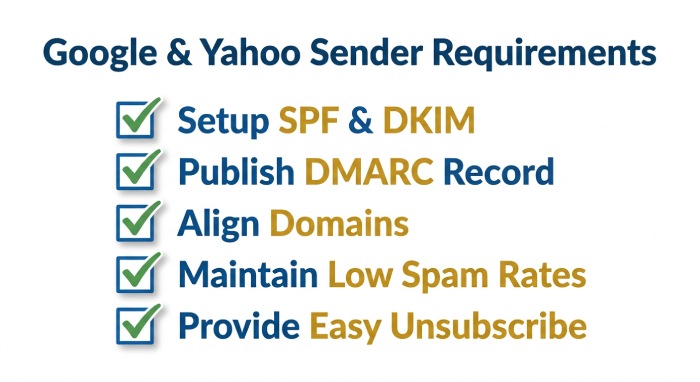 A properly configured DMARC policy helps satisfy a key component of these authentication expectations.
Prerequisites Before Setting Up DMARC
Before creating a DMARC record, verify that SPF and DKIM are already configured correctly.
SPF Setup
SPF identifies which mail servers are authorized to send emails on behalf of your domain. The SPF record is published within your DNS settings and helps receiving servers verify sender legitimacy. If you haven’t set one up yet, follow our guide on how to create an SPF record.
DKIM Setup
DKIM adds a cryptographic signature to outgoing emails. Receiving servers validate the signature using a public key stored in DNS, helping confirm that the message has not been altered during transmission. You can create a signing key with our DKIM generator.
Since DMARC relies on SPF and DKIM authentication, both should be functioning correctly before proceeding.
Creating a DMARC Record for Shopify
A DMARC record is added as a TXT record in your domain’s DNS zone.
A basic monitoring policy may look like:
v=DMARC1; p=none; rua=mailto:dmarc@yourdomain.comThis configuration allows you to collect reports without affecting mail delivery.
Understanding Common DMARC Tags
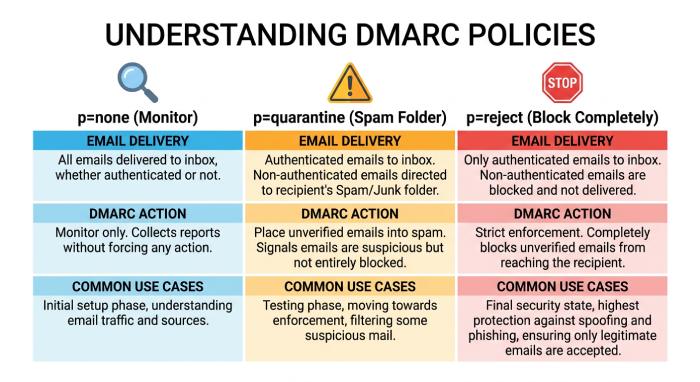
- v=DMARC1 Specifies the DMARC protocol version.
- p=none Monitoring mode that takes no enforcement action.
- p=quarantine Requests that failing messages be sent to spam or junk folders.
- p=reject Requests that failing messages be blocked entirely.
- rua= Defines where aggregate DMARC reports should be delivered.
- pct= Specifies the percentage of emails affected by the policy.
Recommended DMARC Deployment Process
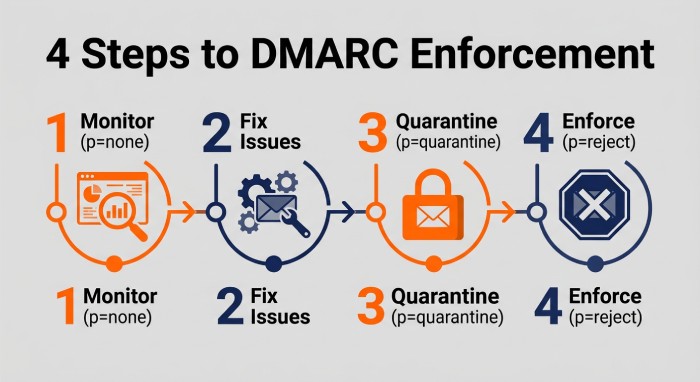
Step 1: Begin With Monitoring
Start with a monitoring policy to gather authentication data without disrupting legitimate email traffic.
Example:
v=DMARC1; p=none; rua=mailto:dmarc@yourdomain.comReview reports to identify authorized and unauthorized senders. Our DMARC report analyzer makes those reports easy to read.
Step 2: Fix Authentication Issues
Analyze SPF and DKIM alignment problems uncovered in reports. Ensure all legitimate email services are properly authenticated.
Common sources include:
- Shopify notifications
- Marketing automation platforms
- Customer service systems
- CRM platforms
- Third-party email tools
Step 3: Move to Quarantine
Once authentication issues are resolved, increase protection by applying a quarantine policy.
Example:
v=DMARC1; p=quarantine; ru=mailto:dmarc@yourdomain.comThis helps reduce the impact of unauthorized messages while allowing continued monitoring.
Step 4: Enforce Full Protection
When you are confident that all legitimate senders are aligned correctly, implement a reject policy.
Example:
v=DMARC1; p=reject; rua=mailto:dmarc@yourdomain.comThis offers the strongest defense against domain spoofing.
Verifying Your DMARC Configuration
After publishing your DMARC record, allow DNS changes time to propagate.
You should then verify that:
- The DMARC record is published correctly
- SPF authentication passes
- DKIM authentication passes
- Domain alignment requirements are met
- Reports are being received successfully
Regular monitoring helps ensure your authentication setup remains effective as new email services are added.
Common Shopify DMARC Challenges
- Multiple Email Providers: Many businesses use several platforms for transactional and marketing emails. Each sender must be configured properly to avoid authentication failures.
- SPF Record Limitations: SPF records have DNS lookup limits. Excessive includes may cause validation problems and require optimization. Rebuild a clean record with our SPF generator.
- Missing DKIM Configuration: Some sending platforms require manual DKIM activation. Failure to configure DKIM may reduce DMARC effectiveness.
- Authentication Misalignment: Even when SPF or DKIM passes, domain alignment issues can cause DMARC failures. Proper alignment should be verified during implementation.
Benefits of DMARC for Ecommerce Businesses
A successful DMARC deployment offers several advantages:
- Better protection against phishing attacks
- Increased customer confidence
- Improved sender reputation
- Enhanced email deliverability
- Greater visibility into email activity
- Reduced risk of domain abuse
- Compliance with modern email authentication expectations
For online stores that depend on email communications, these benefits can significantly impact customer engagement and revenue.
Best Practices for Long-Term Success
 To maintain a healthy email authentication posture:
- Monitor DMARC reports regularly
- Review new email services before deployment
- Keep SPF records updated
- Ensure DKIM remains active across all platforms
- Gradually increase DMARC enforcement
- Track deliverability metrics
- Investigate authentication failures promptly
Ongoing maintenance helps ensure your domain remains protected as your email ecosystem evolves.
Conclusion
DMARC has become an essential component of modern email security for Shopify businesses. By combining SPF, DKIM, and DMARC, store owners can protect their domains from impersonation, improve email deliverability, and align with the authentication expectations of major mailbox providers.
A phased approach—starting with monitoring, resolving authentication issues, and eventually enforcing stricter policies—allows businesses to strengthen email security while minimizing disruptions. As email providers continue prioritizing authenticated mail, implementing DMARC is no longer optional for organizations that rely on email communication and customer trust.
General Manager
General Manager of DuoCircle. Product strategy and commercial lead for AutoSPF's 2,000+ customer base.
LinkedIn Profile →