Safe Email Marketing: 8 Email Authentication Best Practices

Quick Answer
Email authentication makes email marketing safer by verifying legitimate senders and reducing spoofing, phishing, and delivery issues. Using SPF, DKIM, DMARC, BIMI, domain monitoring, and regular testing can improve deliverability, protect sender reputation, and build customer trust.
Why Email Authentication Matters for Safe Email Marketing
Email authentication is the technical foundation of safe email marketing. It verifies that the sender is authorized to use a domain, helping mailbox providers distinguish legitimate email campaign activity from phishing, spoofing, and fraud. Without authentication, even a strong digital marketing program can suffer lower open rates, weaker click-through rates.
Email has been a key part of business communication for decades, evolving from a simple messaging system into a powerful channel for marketing and customer engagement. Today, email marketing is more regulated, automated, and measurable than ever, with businesses relying on technology and authentication practices to improve deliverability. However, one fundamental requirement remains unchanged: recipients and inbox providers need confidence that messages come from legitimate and trustworthy senders.
For a Marketing team, authentication supports:
- Better email deliverability and fewer blocks by spam filters
- A stronger sender reputation across mailbox providers
- More reliable performance metrics, including open rates, click-through rates
- Safer marketing automation across welcome emails, confirmation emails, promotional emails, dedicated emails, invite emails, and transactional emails
- Stronger brand awareness, relationship building
Best Practice 1: Treat Authentication as Part of Your Marketing Strategy
Authentication should not be viewed as an IT-only task. It belongs inside the broader marketing strategy because it affects lead generation, subscriber list quality, and digital marketing performance.
Best Practice 2: Align Authentication With Consent and Compliance
Safe email marketing combines technical identity with permission-based sending. That means using opt-in or double opt-in processes, honoring unsubscribe requests, protecting Customer and Subscriber data, and maintaining accurate SPF, DKIM, and DMARC authentication to help legitimate emails reach recipients reliably. .
A clean, consent-based subscriber list improves sender reputation and helps marketing automation perform better. It also reduces email fatigue, especially when segmentation is used to match messages to the target audience based on customer behavior, lifecycle stage, or purchase history.
Build a Domain Inventory Before You Send
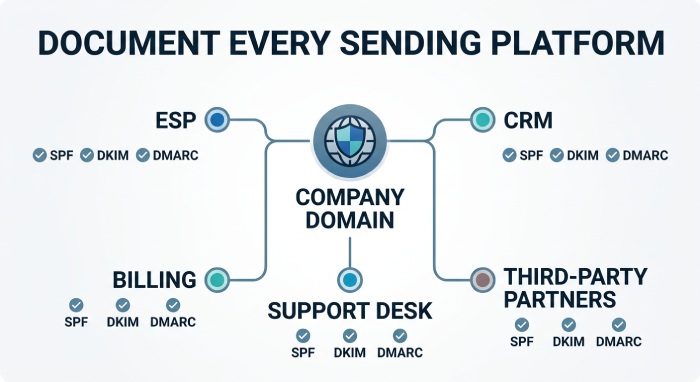
Before a team improves email authentication, it needs a complete view of the domains, subdomains, and tools involved in sending. Many deliverability problems begin when a department launches a new platform without updating DNS records or informing the people responsible for sender reputation.
A domain inventory gives the Marketing team, IT team, and compliance stakeholders one shared source of truth. It should include every active sending domain, the purpose of each mail stream, the responsible owner, and the authentication status for SPF, DKIM, and DMARC.
Identify Every Platform That Sends Mail
Document every system that sends email on behalf of the business. This includes the primary Email Service Provider, marketing automation tools, CRM notifications, ecommerce platforms, support desks, webinar platforms, billing systems, and internal communication tools.
Even small or occasional senders matter. A forgotten survey platform or event registration tool can create authentication failures that damage email deliverability during an important email campaign.
Include Third-Party and Offline-Connected Services
Some marketing operations connect email with offline fulfillment, direct mail, or shipping updates. For example, a company may coordinate email notifications with postal communications or delivery services when sending product samples, account documents, customer loyalty packs, or event invitations.
These workflows should still be included in authentication planning. If a third-party partner triggers branded emails, confirmation messages, or tracking notifications using your domain, their SPF and DKIM setup must be reviewed with the same care as any other email marketing platform.
Set Up SPF and DKIM to Verify Sender Identity
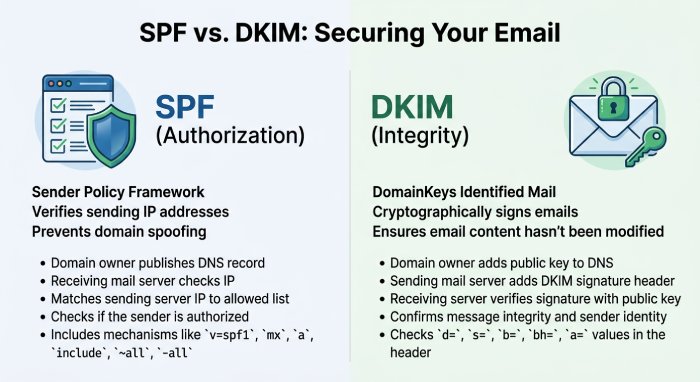
SPF and DKIM are two essential records for authenticating your sending domain. They help an Email Service Provider, such as Mailchimp or another email service provider, prove that your email campaign is authorized and has not been altered in transit.
Best Practice 3: Configure SPF for Every Authorized Sender
Sender Policy Framework, or SPF, tells receiving servers which platforms can send email on behalf of your domain. This may include your marketing automation platform, CRM, customer support system, transactional email provider, and sales outreach tools.
Tools such as AutoSPF can help teams manage SPF records more safely, especially when multiple vendors support email marketing and marketing automation workflows.
Keep SPF Records Lean
Avoid adding unnecessary services to SPF. Bloated records can fail DNS lookup limits, which harms email deliverability. Review SPF whenever your marketing channels change, when an email service provider is replaced, or when automation tools are added.
Best Practice 4: Sign Messages With DKIM
DomainKeys Identified Mail, or DKIM, adds a cryptographic signature to each message. This helps mailbox providers verify that the content was not modified after sending.
DKIM is especially important for:
- Promotional emails with branded email templates
- Confirmation emails and welcome emails
- Transactional emails such as receipts or password resets
- Survey email campaigns and customer reviews requests
- Dedicated emails supporting a product launch or blog announcement
DKIM alignment helps strengthen email authentication and makes open rates and click-through rates more dependable. If messages are altered or unsigned, spam filters may treat them as suspicious.
Use Separate Keys for Major Platforms
When possible, use separate DKIM keys for each major email service provider or marketing automation platform. This makes troubleshooting easier if one email campaign type shows deliverability metrics that differ from others.
Map Email Authentication to the Full Customer Journey
Safe email marketing is not limited to one newsletter or one promotion. A Customer may receive welcome emails, educational content, abandoned cart reminders, account alerts, shipping updates, loyalty messages, and reactivation campaigns over many months or years.
Authentication should be mapped to that full journey. When every stage uses trusted sending infrastructure, subscribers experience the brand as consistent and reliable, not fragmented or risky.
Connect Welcome, Nurture, and Win-Back Flows
Welcome emails often create the first inbox impression after opt-in, so they should be authenticated and branded carefully. Nurture emails then build relationship value through personalized messages, segmentation, and useful content.
Win-back campaigns also need strong authentication because they often reach less engaged subscribers. If authentication is weak, those messages are more likely to be filtered, which makes it harder to recover inactive contacts
Implement DMARC with the Right Policy and Reporting
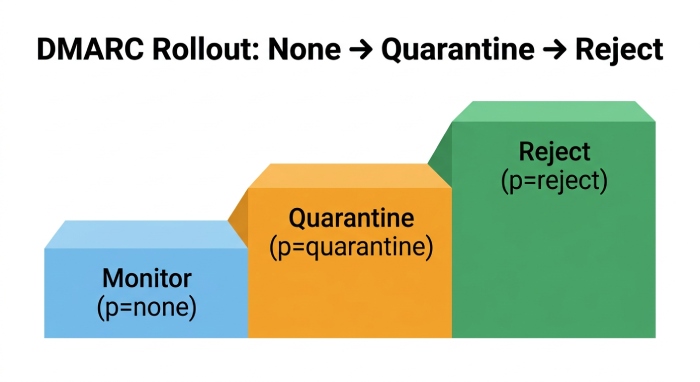 DMARC builds on SPF and DKIM by telling mailbox providers what to do when authentication fails. It also provides reporting that helps identify abuse, configuration errors, and unauthorized senders.
Best Practice 5: Start DMARC in Monitoring Mode
A common safe path is to begin with a DMARC policy of p=none. This allows the Marketing team and IT team to collect reports before rejecting messages. During this stage, review legitimate sources such as email marketing platforms, transactional email systems, sales tools, and customer support platforms.
DMARC monitoring helps protect brand awareness because it reveals whether attackers are spoofing your domain. It also supports digital marketing analytics by ensuring performance reports reflect authentic traffic, not fraudulent activity.
Move Gradually Toward Enforcement
After validating SPF and DKIM alignment, move to stricter policies such as quarantine and eventually reject. This helps prevent spoofed emails from reaching the Customer while improving sender reputation over time.
Best Practice 6: Use DMARC Reports for Deliverability Intelligence
DMARC reports are not just security logs. They are valuable deliverability metrics. They help explain why a subscriber list may experience drops in open rates, click-through rates.
A sudden authentication failure can affect a major email campaign, disrupt marketing automation sequences, or reduce email deliverability. Reviewing authentication reports alongside performance metrics and testing results helps distinguish technical issues from campaign-related factors.
Strengthen Authentication for Transactional and Operational Messages
Transactional emails are often more urgent than promotional emails. Receipts, password resets, booking confirmations, delivery updates, and account notices carry important information that the Customer expects to receive immediately.
Because these messages are closely tied to trust, they should never be treated as secondary to marketing campaigns. A poorly authenticated transactional email can create support tickets, lost sales, account confusion, and privacy concerns.
Keep Transactional Mail Fast and Trusted
Use dedicated subdomains, properly aligned DKIM signatures, and carefully controlled vendor access for transactional emails. These messages should also be monitored separately from promotional mail so that a seasonal email campaign does not interfere with essential service notifications.
If transactional mail fails authentication, the business impact can be immediate. Customers may miss order confirmations, reset links, or security alerts, which harms relationship building and weakens the overall brand experience.
Protect Your Sending Domain with BIMI, Subdomain Strategy, and Monitoring
Once SPF, DKIM, and DMARC are in place, mature programs add brand visibility and risk isolation through BIMI, subdomains, and continuous monitoring.
Best Practice 7: Adopt BIMI for Brand Recognition
Brand Indicators for Message Identification, or BIMI, allows authenticated brands to display a verified logo in supported inboxes. BIMI depends on strong DMARC enforcement, so it rewards disciplined email authentication.
For digital marketing teams, BIMI can reinforce brand awareness and trust. When a Subscriber sees a familiar logo beside an email newsletter, promotional emails, invite emails, or seasonal marketing emails, it can support higher open rates and stronger relationship building.
Pair BIMI With Consistent Branding
Authentication gets the message accepted; branding gets it recognized. Use consistent sender names, subject lines, email templates, responsive design, and call to action placement to make every email campaign feel legitimate.
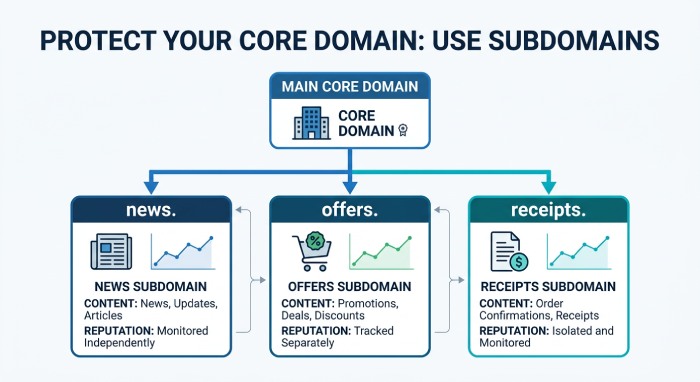
Best Practice 8: Separate Mail Streams With Subdomains
A subdomain strategy protects your core domain and makes performance easier to analyze. For example:
news.example.comfor an email newsletteroffers.example.comfor promotional emailsevents.example.comfor event email marketingreceipts.example.comfor transactional emailssurveys.example.comfor a survey email
This structure allows better segmentation of reputation signals. If one email campaign underperforms because of email fatigue or weak targeting, it does not necessarily damage every other stream.
Match Subdomains to Customer Behavior
Subdomains should reflect how the Customer interacts with your brand. Marketing automation can then use customer behavior to send personalized messages to the right target audience while preserving deliverability.
Coordinate Authentication Across Global and Local Markets
Organizations that send email across countries or regions need authentication practices that support both global consistency and local compliance. A centralized policy helps maintain brand protection, while regional teams may need flexibility for language, timing, sender names, and legal requirements.
Global coordination is especially important when teams operate in the European Union, the United States, Canada, and the U.K. at the same time. Each market may have different expectations for consent, privacy notices, unsubscribe wording, and Customer data handling.
Localize Compliance and Sender Expectations
Localization should go beyond translation. The email sender name, reply-to address, footer details, and preference center should make sense to the target audience in that region.
For example, a U.K. campaign may need to coordinate email messaging with delivery updates, service notices, or postal communications. In that case, authentication helps recipients identify which messages are genuinely from the brand and which are not.
Improve Inbox Placement With Content and Reputation Signals
 Authentication helps prove identity, but inbox placement also depends on engagement, content quality, list health, and complaint behavior. Mailbox providers look at whether subscribers open, click, reply, delete, ignore, or mark messages as spam.
A technically authenticated campaign can still underperform if it sends too often, uses misleading subject lines, or targets the wrong audience. Safe email marketing requires both trustworthy infrastructure and relevant content.
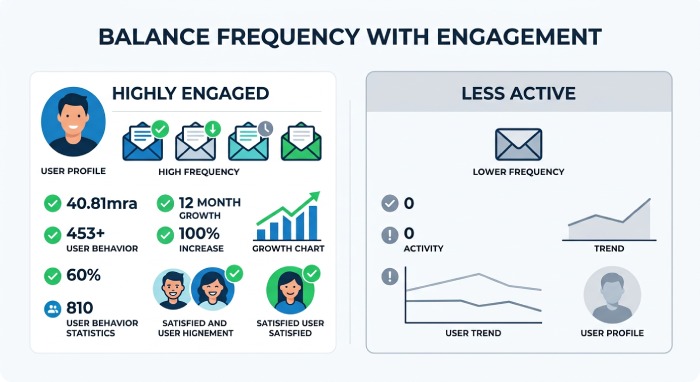
Balance Frequency With Engagement
Email fatigue can weaken even a strong sender reputation. Use segmentation and engagement data to decide how often each Subscriber should receive promotional emails, newsletters, or lifecycle messages.
Highly engaged customers may welcome frequent updates, while less active contacts may need a slower cadence. Matching frequency to customer behavior improves open rates, click-through rates, and long-term deliverability.
Use Testing and QA Before Every Major Campaign
Major email campaigns should go through a structured quality assurance process before launch. This is especially true for product launch announcements, seasonal marketing emails, event invitations, and dedicated emails sent to large segments of a subscriber list.
Testing helps catch problems before they affect sender reputation. A broken tracking link or missing DKIM signature can reduce conversions just as quickly as weak creative.
Test DNS, Rendering, and Link Tracking
Before sending, confirm that SPF, DKIM, and DMARC alignment are working for the selected sender domain or subdomain. Then test rendering across common email clients, mobile devices, and dark mode where relevant.
Create a Pre-Launch Authentication Checklist
A simple checklist can prevent avoidable mistakes. Include DNS validation, DKIM signature checks, DMARC alignment, sender name review, reply-to testing, suppression list confirmation, and approval of the final email template.
For larger teams, make this checklist part of the marketing automation workflow. That keeps authentication visible even when deadlines are tight or multiple teams are contributing to the same email campaign.
Maintain Ongoing Authentication Hygiene to Improve Deliverability and Trust
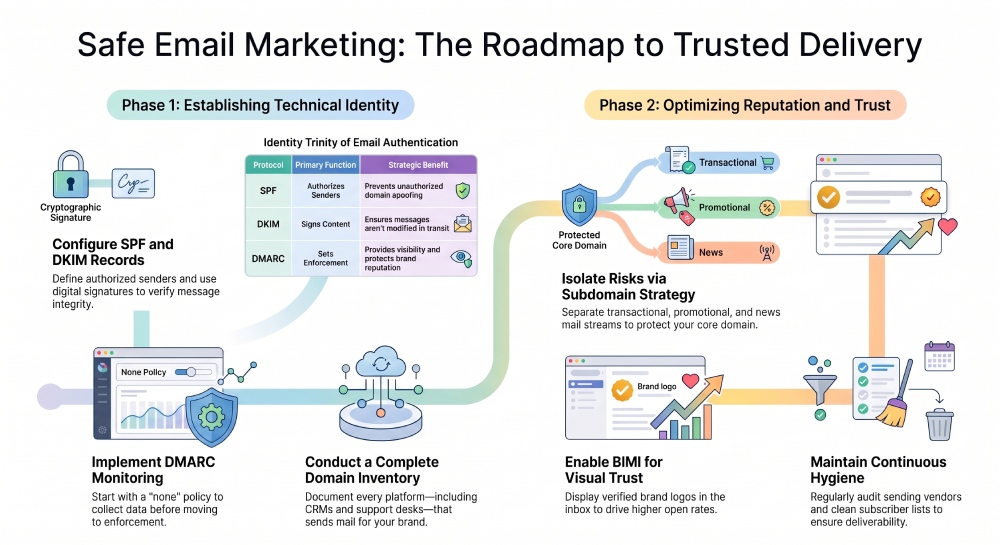 Email authentication is not a one-time setup. It requires ongoing governance, especially as digital marketing programs expand across marketing channels, vendors, regions, and automation workflows.
Keep Your Subscriber List Clean
List cleaning is essential for safe email marketing. A stale subscriber list can reduce open rates, lower click-through rates, and increase spam complaints. Remove hard bounces, suppress inactive contacts, and use segmentation to re-engage subscribers before they become a risk.
Audit Vendors and Access Regularly
Every new email service provider, marketing automation platform, CRM, or analytics tool can affect SPF, DKIM, and DMARC. Audit vendors whenever your marketing strategy changes.
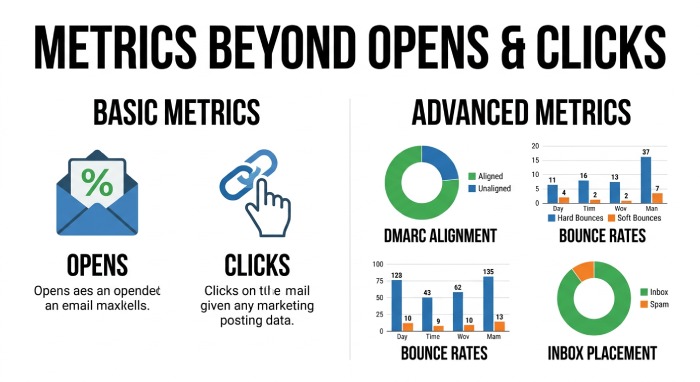
Monitor Metrics Beyond Opens and Clicks
Open rates and click-through rates matter, but authentication hygiene requires deeper analytics. Review:
- DMARC alignment results
- Bounce rates and complaint rates
- Inbox placement and spam filters feedback
- Deliverability metrics by subdomain
- A/B testing results for subject lines and content
- Performance reports from your Email Service Provider
When authentication data is reviewed with marketing automation reports, a Marketing manager can separate creative problems from technical problems. For example, low click-through rates may point to a weak call to action, while sudden email deliverability issues may indicate an SPF, DKIM, or DMARC failure.
Build Trust Into Every Campaign
Safe email marketing is ultimately about trust. Authentication protects the domain, consent protects the Subscriber, and relevant content protects the relationship. When your digital marketing program combines data protection, privacy laws compliance, clear unsubscribe process management, personalized messages, responsive design, and reliable authentication, every email campaign becomes more credible.
That credibility improves open rates, click-through rates, and long-term marketing strategy performance across newsletters, blog updates, customer reviews requests, product launch announcements, and automated lifecycle messaging.
Document Ownership, Change Control, and Incident Response
Good authentication governance depends on clear ownership. DNS records, email templates, vendor permissions, and DMARC policies often involve different teams, so everyone needs to know who can approve changes and who must be informed before a launch.
Without documentation, small changes can create large deliverability issues. A vendor migration, expired DKIM key, or rushed domain update may disrupt email marketing just when a campaign is most important.
Assign Clear Owners for DNS and Vendor Changes
Assign named owners for SPF, DKIM, DMARC, BIMI, and subdomain management. These owners should review requests from marketing, sales, support, ecommerce, and operations before new sending tools go live.
This process does not need to slow marketing down. In fact, clear ownership usually helps a Marketing team move faster because approvals, testing, and troubleshooting become predictable.
Prepare a Spoofing or Failure Response Plan
If DMARC reports reveal spoofing, or if a legitimate campaign suddenly fails authentication, the team should know what to do. A response plan may include pausing affected campaigns, contacting the Email Service Provider, reviewing DNS changes, and informing support teams.
For serious spoofing attempts, coordinate with security and legal stakeholders. Quick action protects the Customer, reduces brand confusion, and limits damage to sender reputation.
Train Marketing Teams on Safe Sending Habits
Authentication works best when marketers understand why it matters. A team that sees authentication as part of performance will make better decisions about vendors, segmentation, content, and send frequency.
Training should be practical, not overly technical. Marketers do not need to become DNS experts, but they should understand how sending domains, consent, reputation, and deliverability connect to campaign results.
Teach Teams How Authentication Affects Campaign Results
Show how SPF, DKIM, and DMARC influence inbox placement, open rates, click-through rates. When marketers understand the connection, they are more likely to involve technical owners before changing platforms or launching new campaigns.
This also helps creative teams interpret results more accurately. Not every poor campaign result comes from subject lines or design; some performance drops are caused by authentication, reputation, or spam filters.
Set Safe Defaults for New Campaigns
Create default settings for sender domains, templates, unsubscribe language, tracking parameters, and approval workflows. Safe defaults reduce errors and help new team members follow established deliverability practices.
These defaults are especially useful for recurring newsletters, automated nurture flows, and seasonal promotions. They create consistency while still allowing room for A/B testing and creative improvement.
Measure the Business Impact of Authentication
Email authentication is often discussed as a security requirement, but it also has measurable business value. Strong authentication supports more reliable inbox placement, cleaner analytics, better campaign attribution.
When leadership understands the business impact, it becomes easier to secure resources for monitoring tools, vendor audits, training, and ongoing deliverability support.
Tie Authentication to Revenue and Retention
Connect authentication performance to email campaign outcomes such as revenue per send, conversion rate, repeat purchase behavior, lead quality, and renewal activity. This helps show that authentication is not just a technical control; it is part of the marketing strategy.
Review Performance by Segment and Mail Stream
Evaluate performance by subdomain, audience segment, campaign type, and lifecycle stage. A newsletter audience may behave differently from a transactional email audience or an event email marketing list.
This level of analysis helps identify where authentication is strong and where reputation signals need improvement. It also supports smarter segmentation, better targeting, and more meaningful performance reports.
Turn Reporting Into Continuous Improvement
The safest email marketing programs use reporting to guide ongoing improvements. DMARC reports, deliverability metrics, A/B testing, complaint rates, and unsubscribe trends should all feed into regular reviews.
Over time, these insights help the Marketing manager refine sender strategy, protect brand awareness, improve relationship building, and create a more dependable experience for every Subscriber and Customer.
General Manager
Founder and General Manager of DuoCircle. Product strategy and commercial lead for AutoSPF's 2,000+ customer base.
LinkedIn Profile →