How to Resolve the SPF Softfail “Domain Does Not Designate IP as Permitted Sender” Error

Quick Answer
The SPF Softfail “Domain Does Not Designate IP as Permitted Sender” error occurs when an email is sent from an IP address not authorized in the domain’s SPF record. Fix it by adding legitimate sending IPs, including trusted email providers, and aligning SPF with DKIM and DMARC.
Email authentication plays a critical role in protecting domains from spoofing, phishing, and unauthorized use. One of the common issues administrators encounter when reviewing email headers is the SPF softfail message:
“Domain does not designate IP as permitted sender.”
This warning indicates that the email originated from a server that is not authorized in the sender domain’s SPF record. If left unresolved, the issue can negatively affect email deliverability and increase the likelihood of messages being marked as suspicious.
Understanding SPF Softfail
Sender Policy Framework (SPF) is an email authentication protocol that specifies which mail servers are allowed to send emails on behalf of a domain.
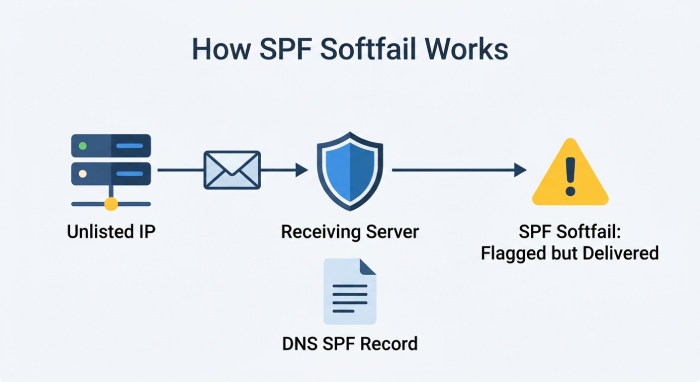
When a receiving mail server checks an incoming message, it compares the sending server’s IP address against the SPF record published in the sender’s DNS settings. If the IP address is not listed, the authentication check may return a softfail result.
A softfail does not always cause immediate rejection of the email, but it signals that the sender could not be fully verified.
What Causes This Error?
Several situations can trigger an SPF softfail:
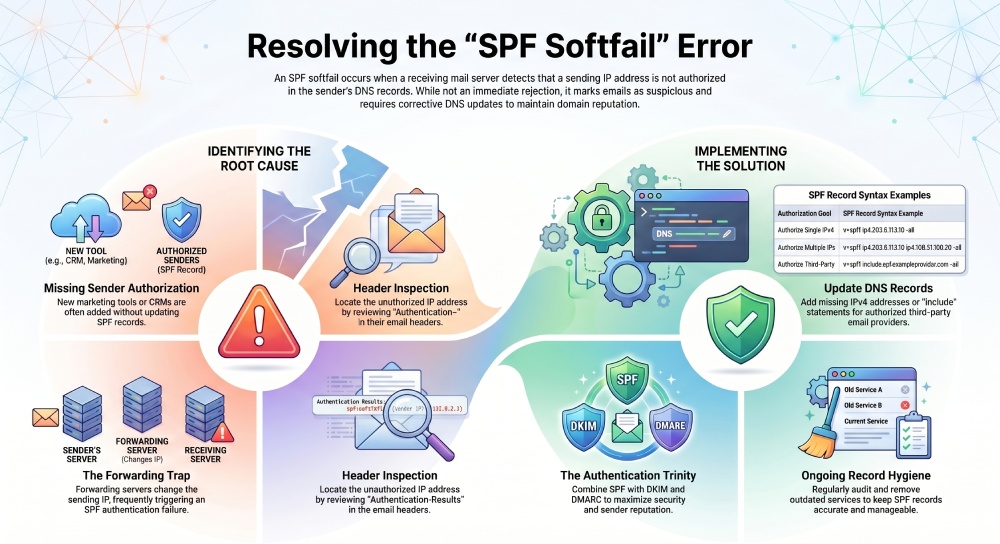
- Missing Sending IP Addresses: The most common cause is that the sending server’s IP address has not been included in the domain’s SPF record.
- New Email Services: Organizations often add marketing platforms, CRM systems, help desk software, or newsletter providers without updating SPF records accordingly.
- Incorrect SPF Configuration: Syntax mistakes, outdated records, or missing include statements can prevent SPF from recognizing legitimate senders.
- Email Forwarding: Forwarded emails frequently fail SPF checks because the forwarding server sends the message from a different IP address than the original sender.
How to Identify the Problem
To troubleshoot the issue:
- Send a test email to a mailbox you can access.
- Open the message headers or original message source.
- Locate the SPF authentication results.
- Identify the IP address mentioned in the softfail message.
- Compare that IP address with the entries in your domain’s SPF record.
If the IP is absent from the record, it must be added if it represents a legitimate email source.
Fixing the SPF Softfail Error
Add Authorized IP Addresses
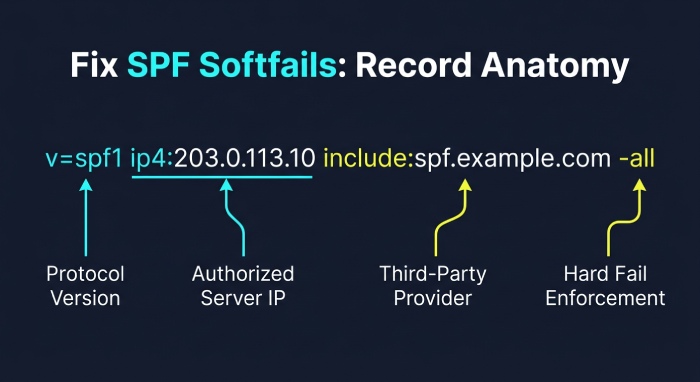
If your organization sends email from a dedicated mail server, include its IP address in the SPF record.
Example:
v=spf1 ip4:203.0.113.10 -all
This authorizes that specific IPv4 address to send mail for the domain.
Authorize Multiple Mail Servers
If several servers send email on behalf of the domain, list each authorized IP address.
Example:
v=spf1 ip4:203.0.113.10 ip4:198.51.100.20 -all
Include Third-Party Email Providers
Many email services publish SPF records that can be referenced using the include mechanism.
Example:
v=spf1 include:spf.exampleprovider.com -all
This allows all approved servers used by the provider to send messages for your domain.
Review Existing SPF Entries
Check for outdated services that are no longer in use and remove unnecessary entries to keep the record accurate and manageable.
The Relationship Between SPF, DKIM, and DMARC
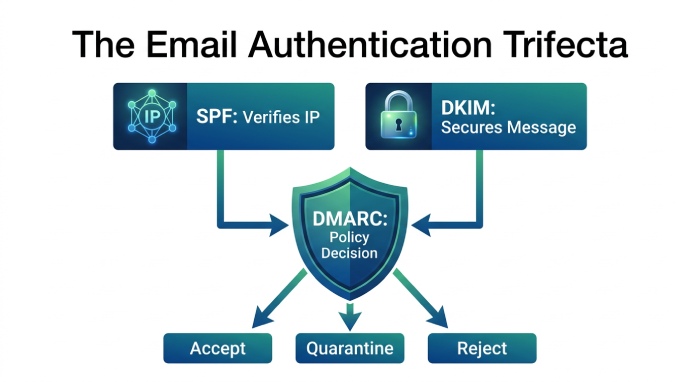 SPF is only one component of email authentication.
- SPF: Verifies whether the sending IP address is authorized.
- DKIM: Uses cryptographic signatures to confirm that a message has not been altered during transmission.
- DMARC: Combines SPF and DKIM results to determine whether a message should be accepted, quarantined, or rejected.
When SPF softfails and DKIM also fails, DMARC authentication may fail as well, increasing the chance that the email will be filtered or blocked.
Special Considerations for Email Forwarding
Email forwarding presents a unique challenge for SPF.
When a message is forwarded, the forwarding server sends the email using its own IP address. Since this IP is often not listed in the original sender’s SPF record, SPF checks may fail even though the email is legitimate.
Fortunately, DKIM signatures typically remain valid during forwarding if the message content is not modified. This is one reason why implementing both SPF and DKIM is considered a best practice.
Best Practices for Preventing SPF Softfails
- Maintain an Inventory of Email Senders: Keep track of every service and platform that sends email on behalf of your domain.
- Update SPF Records Regularly: Review DNS records whenever new email systems are added or removed.
- Enable DKIM Authentication: DKIM provides an additional layer of protection and improves authentication success rates.
- Implement DMARC: DMARC policies help domain owners monitor authentication performance and protect against spoofing attempts.
- Test Configuration Changes: Always verify SPF updates using email authentication testing tools before deploying them in production.
Conclusion
The “SPF Softfail: Domain Does Not Designate IP as Permitted Sender” message usually indicates that a legitimate sending source has not been properly authorized in the domain’s SPF record. By identifying authorized sending IP addresses, maintaining accurate SPF records, and aligning SPF with DKIM and DMARC, organizations can strengthen email security, improve email deliverability, and reduce the risk of spoofing and phishing attacks.
General Manager
Founder and General Manager of DuoCircle. Product strategy and commercial lead for AutoSPF's 2,000+ customer base.
LinkedIn Profile →