Pobox SPF Setup Guide: How To Configure Your SPF Record

Quick Answer
To configure a Pobox SPF record, add the correct SPF TXT record to your domain's DNS settings, including the official Pobox SPF mechanism. Verify the record after updating to ensure proper email authentication, improve deliverability, and reduce the risk of email spoofing.
SPF, or Sender Policy Framework, is an email authentication protocol that tells receiving systems which SMTP servers are allowed to send mail for your domain. A properly configured SPF record helps ISPs and mailbox providers decide whether a message is legitimate email or whether it may be spoofed, forged, or spam. For Pobox users, a correct Pobox SPF setup is especially important because Pobox can be involved in sending mail, receiving mail, mail forwarding, and personal domain routing.
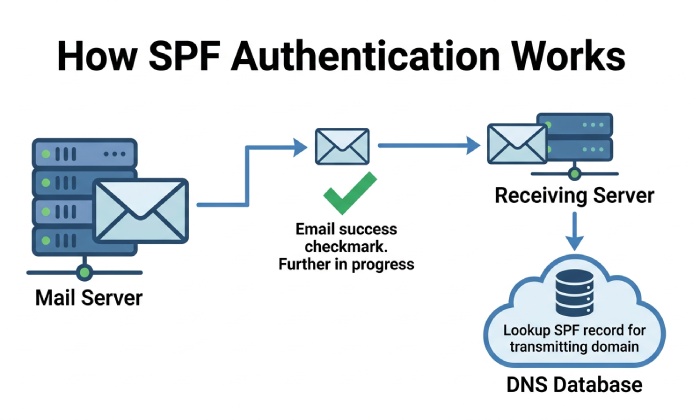
An SPF record is published as a DNS record on your domain. When a recipient receives a message claiming to come from your email address, the recipients mail server checks DNS to see whether the sending mail server is authorized. If the server is listed in the SPF record, the message is more likely to pass email authentication. If not, the message may be rejected, filtered as spam, or returned as bounced mail.
SPF was originally proposed by Meng Weng Wong and has become a core part of modern email authentication alongside DKIM and DMARC. While DKIM signs the message content, SPF focuses on the envelope sender and the IP address of the mail server that delivers the message. This distinction matters because the visible “From†address in Gmail, Outlook, Thunderbird, Mac Mail, Windows Mail, Windows 10 Mail, Mailbird, Entourage, Outlook Express, Outlook 2013, Outlook 2016, Yahoo Mail, iPhone, iPad, Android, Samsung, or Blackberry may not be the same identity checked by SPF. If terms like envelope sender are unfamiliar, our SPF glossary defines them.
For Pobox users with personal domains, the goal of Pobox SPF is simple: publish an SPF record that authorizes Pobox SMTP servers to send mail for your domain. Our guide to set up an SPF record covers the fundamentals if you’re new to DNS. Without the correct setup, ISPs may distrust your messages, recipients may never see them, and you may experience bounced mail even when your password, mail application, and default settings are correct.
Why SPF Affects Deliverability
A missing or incorrect SPF record can interrupt mail flow. The recipients ISP may see a message from your personal domain but find that the sending SMTP servers are not authorized in DNS. That mismatch can cause a bounce, spam-folder placement, or silent filtering.
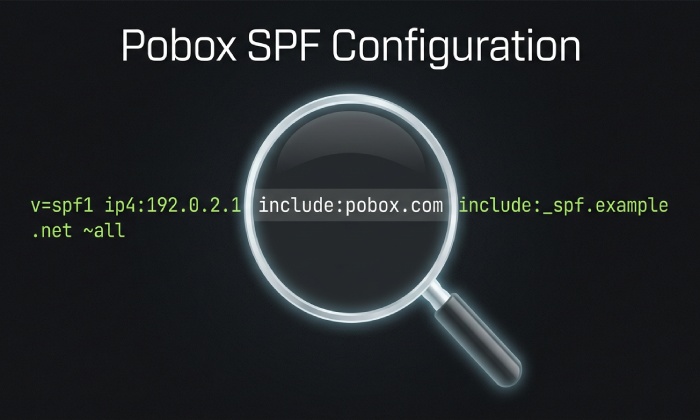
This is particularly important if you use Pobox Outbound SMTP, a script, a program, a website contact form, Postfix, ssmtp, Mutt, or another host to send messages. Each mail server involved in sending mail must be accounted for. If you send through Pobox, your Pobox SPF record should include include:*pobox*.com. If you also send through an email marketing provider such as Constant Contact, that email marketing provider must provide its own SPF setup details, and your SPF record may need to include that service as well.
SPF Is Not a Standalone Security Control
SPF improves email authentication, but it does not replace account security. You should still use two-step verification, 2FA, a YubiKey where supported, app-specific passwords for older clients, and a strong password for MyPobox and connected mailstore accounts. These controls protect access, while the SPF record protects domain-level sending authorization.
How Pobox Handles Email Sending, Forwarding, and Domain Authentication
Pobox can handle several parts of your mail system: receiving mail for your domain, mail forwarding, mail claiming, and sending mail through Pobox SMTP servers. Depending on your account type and configuration, Pobox may forward messages to Gmail, Outlook, Yahoo Mail, or another mailbox, or it may deliver mail into Mailstore accounts. This flexibility makes it essential to understand which system is sending and which system is receiving mail.
When Pobox sends mail for your personal domain using its Outbound SMTP service, the recipients mail server checks whether Pobox SMTP servers are permitted by your SPF record. That is the core of a Pobox SPF setup. The DNS record does not live inside your mail application; it lives with your DNS host or DNS services provider.
Mail forwarding is more complicated. If Pobox receives a message and forwards it to another recipient mailbox, the forwarded message may still carry the original envelope sender. Some ISPs enforce SPF strictly and may see the forwarding mail server as unauthorized for the original senders domain. Pobox has systems designed to preserve reliable mail flow, but SPF alignment can still be affected by forwarding behavior. This is why SPF, DKIM, and broader email authentication policies should be reviewed together.
Sending Through Pobox Versus Other SMTP Servers
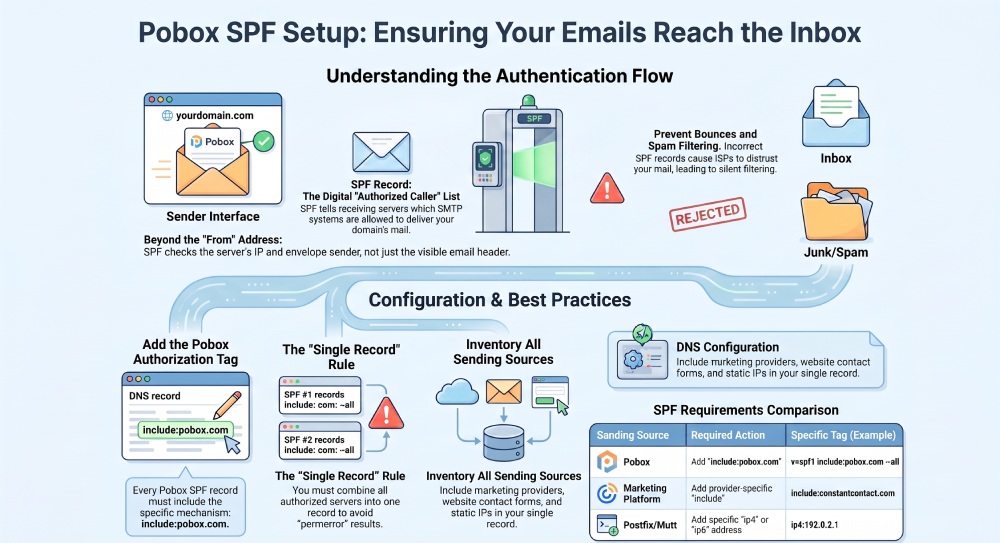
If every message from your domain is sent through Pobox Outbound SMTP, your SPF record can usually be simple. The key mechanism is include:*pobox*.com, which authorizes the appropriate Pobox SMTP servers. However, if your domain also sends through Gmail, Microsoft 365, an email marketing provider, a website host, a CRM, or a custom mail server with a static IP address, your SPF record must reflect those sources.
For example, if your website sends order notifications from your domain using a local mail server, you may need to authorize the website host or a specific static IP address. If your newsletter is sent by an email marketing provider, that providerâs SPF include must be added. If a legacy server such as Postfix, ssmtp, or Mutt sends directly from a static IP address, that static IP address may need an ip4: or ip6: mechanism.
Avoiding Multiple SPF Records
A domain must not publish multiple SPF records. Multiple SPF records can cause SPF permerror results, which may lead to bounced mail or spam filtering. Instead, combine all authorized SMTP servers, mail server IPs, and include mechanisms into one SPF record. Our SPF record generator can help you build that single record correctly. Email security is essential for safeguarding sensitive data and ensuring trusted communication.
Prerequisites Before Creating a Pobox SPF Record
Before you create or edit a Pobox SPF record, gather the setup details for every service that sends mail using your domain. Start with these items:
- Your domain name and the exact email address patterns you use.
- Access to your DNS host, DNS services panel, registrar, or hosting provider.
- Current MX records and NS records, so you understand where DNS is managed and where receiving mail is routed.
- Confirmation that Pobox is used for Outbound SMTP, mail forwarding, Mailstore, or another service.
- A list of every mail server and email marketing provider authorized for sending mail.
- Any static IP address used by a script, program, website, or self-hosted SMTP server.
- Any existing DKIM, SPF, and DMARC records connected to email authentication.
If you are unsure where your DNS is managed, check your NS records. The authoritative DNS host is where you must publish the SPF record. In MyPobox or the Pobox Help Center, you may find setup instructions for common clients and services, but the final DNS change must be made by the domain owner or someone with access to the DNS host.
You should also verify your client setup. Pobox users may send mail from webmail, Outlook, Gmail, Thunderbird, Mac Mail, Windows Mail, Windows 10 Mail, Mailbird, Entourage, iPhone, iPad, Android, Blackberry, Samsung mail apps, or Yahoo Mail collection workflows. These mail application choices do not replace SPF. They simply determine how mail is submitted to SMTP. The recipient still relies on DNS and the SPF record to evaluate the sending mail server.
When to Open a Support Ticket
If you cannot identify your DNS host, are seeing bounced mail, or do not know whether Pobox SMTP servers are being used, open a Support Ticket with Pobox. Include the domain, the email address affected, bounce text, setup details, and whether you use an email marketing provider, a static IP address, or another mail server. This helps support diagnose whether the issue is SPF, DKIM, forwarding, password authentication, 2FA, app-specific passwords, or general account security.
General Manager
Founder and General Manager of DuoCircle. Product strategy and commercial lead for AutoSPF's 2,000+ customer base.
LinkedIn Profile →