MessageLabs SPF Setup: How To Configure SPF Records Correctly

Quick Answer
To configure MessageLabs SPF records correctly, add the authorized MessageLabs SPF include statement to your domain’s DNS record and verify it. A properly configured SPF record helps prevent email spoofing, improves authentication, and supports better email deliverability.

MessageLabs, later known as Symantec Email Security.cloud and associated with Symantec Corporation before the Broadcom-Symantec transition, has long been used as a cloud-based service for filtering inbound and outbound email. Organizations adopted MessageLabs for email security because it helped detect malware, phishing, ransomware, malicious attachments, spear phishing, and business email compromise before those threats reached users or customers. Today, some Symantec customers still operate legacy Symantec email services, while others evaluate a MessageLabs replacement such as Mimecast, Mimecast SaaS, or other SaaS-based services after the Symantec sale to Broadcom.
SPF, or Sender Policy Framework, is a DNS-based sender authentication method that tells receiving mail servers which systems are authorized to send email for your domain. If your organization sends outbound mail through MessageLabs, your SPF record must authorize the MessageLabs sending infrastructure. Without the correct SPF include mechanism, legitimate messages may fail SPF checks, reducing deliverability and weakening email security controls.
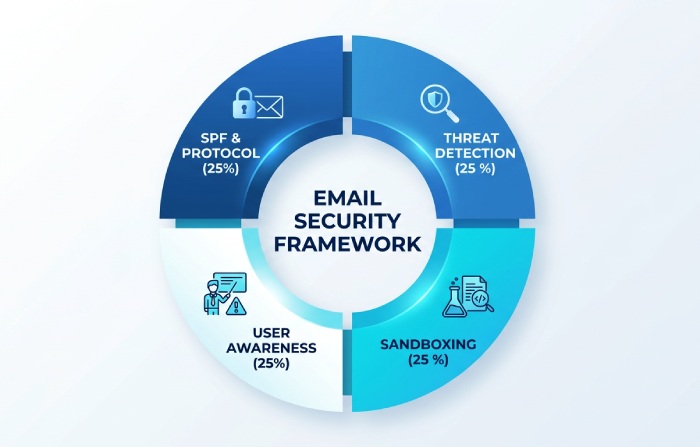
For a CISO, IT Director, or messaging administrator, SPF is not a complete email security strategy on its own. It does not stop all phishing, spear phishing, ransomware, or business email compromise. However, it is a foundational control for sender authentication, compliance, corporate data protection, and broader cyber resiliency. When combined with DKIM, DMARC, sandboxing, click-time URL protection, web browser isolation, static file analysis, outbound monitoring, analytics, and advanced detection technologies, SPF contributes to comprehensive defense against email threats.
MessageLabs historically operated as a cloud-based service rather than a purely on-premises solution. Some organizations also used related products such as Symantec Messaging Gateway, which could be deployed as a messaging gateway, virtual appliance, or hybrid control point. In modern enterprise messaging security, platforms such as Symantec Enterprise Cloud, Email Threat Detection Response, and Mimecast emphasize threat detection, automated remediation, attack response, data protection, archiving, backup, continuity solutions, redundancy, and recovery solutions. SPF configuration remains relevant across all of these architectures because every authorized outbound sender must be represented correctly in DNS.
Finding the Correct MessageLabs SPF Include Mechanism for Your Domain
For most MessageLabs outbound email configurations, the SPF include mechanism commonly used is:
include:spf.MessageLabs.comA simple MessageLabs-only SPF record may look like this:
v=spf1 include:spf.MessageLabs.com -allHowever, you should verify the exact include mechanism in your MessageLabs and Symantec Email Security.cloud, Broadcom, or customer support documentation before publishing changes. Large enterprises may have custom routing, dedicated outbound pools, regional configurations, IMS Events integrations, PGP Encryption Service dependencies, or Professional Services-led designs that require validation. If your organization is planning customer migration or transition services to a MessageLabs replacement, confirm whether both old and new sending platforms must be authorized during coexistence.
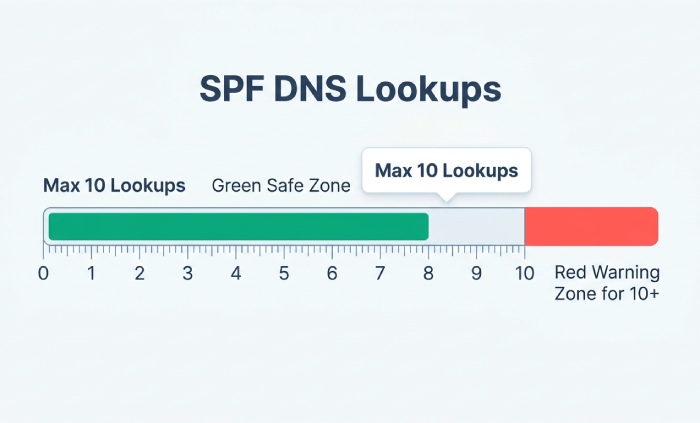
Many domains send mail from more than one source. For example, an organization may use MessageLabs for filtering, Office 365 for mailboxes, Google Apps for collaboration, a CRM platform for marketing email, and a ticketing system for support notifications. In that case, the SPF record must include every legitimate sender without exceeding SPF’s 10-DNS-lookup limit.
A combined record might look like this:
v=spf1 include:spf.MessageLabs.com include:spf.protection.outlook.com include:_spf.google.com -allThis example supports MessageLabs, Office 365 integration, and Google Apps integration. Before using it, check whether your domain actually sends through all three services. Over-authorizing senders can weaken email security and increase exposure to targeted attacks, phishing, spear phishing, and business email compromise.
Organizations researching alternatives may encounter references from Radicati, KuppingerCole, Marketwatch, SearchSecurity, SDxCentral, Cybersecurity Experts, and industry leader comparisons involving Mimecast, Broadcom, CA Technologies, and Symantec. Those evaluations often focus on email threat detection response, malware prevention, ransomware protection, continuity, archiving, user awareness, and cyber resiliency. SPF should be reviewed during any MessageLabs replacement project, because sender authentication failures are common during platform transitions.
How to Create or Update Your SPF TXT Record in DNS
To configure MessageLabs SPF correctly, first identify where your public DNS is hosted. This may be your domain registrar, cloud DNS provider, managed service provider, or internal DNS administration team. You will create or update a TXT record at the root of your sending domain, such as example.com. Our free SPF record generator can help you assemble the record.
Follow this process:
-
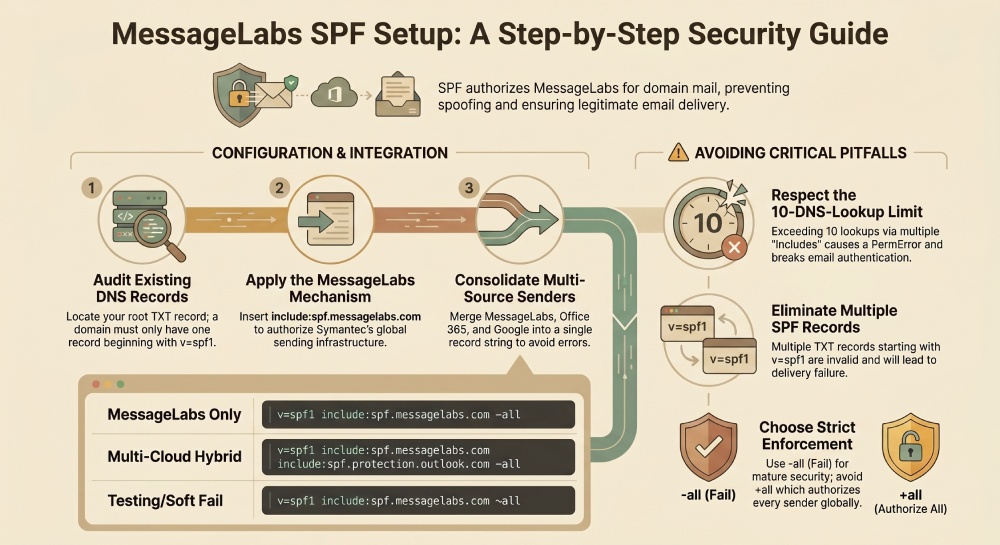
Check for an existing SPF record. Use a DNS lookup tool to query TXT records for your domain. You can run an SPF lookup to see the current record. If you already see a record beginning with
v=spf1, you must update that record rather than create a second one. -
Add the MessageLabs include mechanism. Insert
include:spf.MessageLabs.cominto the existing SPF record. For example:v=spf1 include:spf.MessageLabs.com include:spf.protection.outlook.com -all -
Include other authorized senders. Add only legitimate systems used for outbound mail, such as Office 365, Google Apps, marketing automation tools, or approved messaging gateway infrastructure.
-
Choose the correct enforcement qualifier. The
-allmechanism tells receivers to reject mail from unauthorized sources. The~allmechanism is a soft fail and is often used during testing. Mature email security programs generally move toward stricter alignment after validation. -
Save the TXT record and allow DNS propagation. Propagation can take minutes or hours, depending on TTL values and DNS provider behavior.
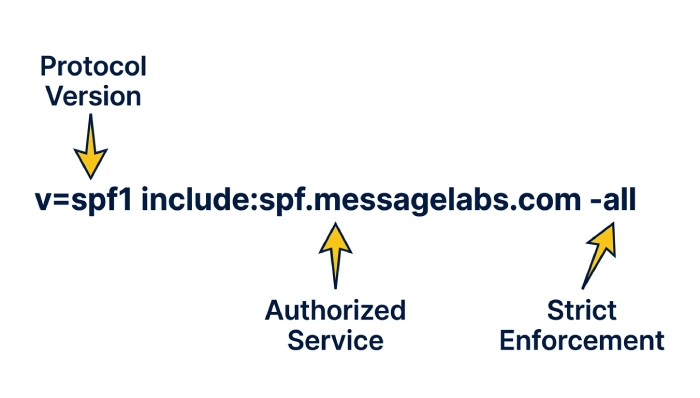
A well-formed SPF record supports sender authentication and improves resilience against spoofing, phishing, spear phishing, and business email compromise. It also supports data protection, compliance, and cyber resiliency by reducing the chance that attackers can impersonate your domain during ransomware campaigns or malware delivery attempts.
Common MessageLabs SPF Setup Mistakes and How to Avoid Them
The most common mistake is publishing multiple SPF records for the same domain. A domain must have only one TXT record beginning with v=spf1. Multiple SPF records cause permanent errors and can break legitimate delivery, even when MessageLabs itself is configured correctly.
Another frequent issue is forgetting that SPF has a 10-DNS-lookup limit. Each include, a, mx, exists, or redirect mechanism may count toward that limit. Organizations with complex email security stacks, cloud-based service dependencies, Office 365 integration, Google Apps integration, and third-party SaaS-based services can exceed the limit quickly. If that happens, SPF may return PermError, undermining threat detection workflows and sender authentication.
Administrators also sometimes copy old documentation during a MessageLabs replacement or migration from Symantec Email Security.cloud to Mimecast. During a Mimecast Bridge Program, Broadcom-Symantec migration, or other transition services effort, make sure SPF authorizes both platforms only for the required coexistence period. Leaving obsolete include mechanisms in place after customer migration can create unnecessary risk.
Other mistakes include:
- Using
+all, which authorizes everyone and defeats SPF. - Adding IP addresses that are not owned or controlled by your organization.
- Forgetting subdomains that send mail, such as news.example.com. Managing subdomain SPF records separately prevents these gaps.
- Failing to coordinate with customer support, Professional Services, or the team managing Symantec Messaging Gateway.
- Assuming SPF alone blocks malware, ransomware, phishing, spear phishing, malicious attachments, and business email compromise.
SPF is important, but it must work alongside threat detection, sandboxing, user education, security awareness training, user awareness campaigns, global intelligence network insights, automated remediation, click-time URL protection, web browser isolation, and attack response processes. This layered approach improves cyber resiliency and supports a stronger email security posture.
Testing, Validating, and Maintaining Your MessageLabs SPF Record
After publishing the record, validate it with SPF lookup tools and by sending test messages through MessageLabs. Review message headers to confirm SPF passes for mail routed through the cloud-based service. If you use Office 365, Google Apps, Symantec Enterprise Cloud, Symantec Messaging Gateway, or Mimecast SaaS alongside MessageLabs, test each outbound path separately.
Maintenance is just as important as initial setup. Review the SPF record whenever you add cybersecurity software, change email routing, adopt a MessageLabs replacement, deploy new continuity solutions, update archiving systems, change backup workflows, or modify recovery solutions. Monitor outbound mail with analytics and outbound monitoring to identify unauthorized senders, spoofing attempts, phishing campaigns, spear phishing attempts, ransomware lures, malware delivery, and business email compromise patterns.
A mature email security program treats SPF as one control within a larger enterprise messaging security framework. That framework should combine sender authentication, advanced detection technologies, email threat detection response, sandboxing, static file analysis, global intelligence network telemetry, automated remediation, and user education. It should also account for compliance, redundancy, resilience, corporate data protection, and operational cyber resiliency.
For legacy Symantec customers, the key is accuracy: authorize the correct MessageLabs infrastructure, remove outdated senders, validate DNS regularly, and reassess SPF during any Broadcom, Symantec, Mimecast, or MessageLabs replacement initiative. Done correctly, SPF strengthens email security, supports threat detection, and reduces the risk of domain abuse in malware, phishing, ransomware, spear phishing, and business email compromise attacks.
General Manager
General Manager of DuoCircle. Product strategy and commercial lead for AutoSPF's 2,000+ customer base.
LinkedIn Profile →