Key Features to Look for in an MTA-STS Monitoring Tool

Quick Answer
An MTA-STS monitoring tool helps protect email communication by tracking policy status, detecting configuration errors, monitoring TLS connections, alerting administrators to issues, and ensuring consistent email security and reliable message delivery.
Try Our Free MTA-STS Checker
Validate the MTA-STS DNS record and policy file for any domain.
Check MTA-STS Policy →
An MTA-STS monitoring tool should validate your MTA-STS policy, MTA-STS record, DNS TXT record, and policy file, monitor TLS and STARTTLS failures in real time, integrate TLS reporting, automate changes across domains, and provide clear evidence of secure email delivery, email security, and policy compliance.
TL;DR: Look for a tool that can validate policy syntax, confirm the _mta-sts DNS TXT record, fetch the mta-sts.YOURDOMAIN policy file over HTTPS, verify MX records and MX hosts, monitor certificate renewal, detect STARTTLS and TLS failures, parse SMTP TLS Reporting data, and alert your team before an insecure connection, downgrade attack, or man-in-the-middle attack affects email delivery.
MTA-STS, short for Mail Transfer Agent Strict Transport Security, is a recipient-domain policy that tells a sending server to deliver mail only over a valid encrypted connection using TLS after STARTTLS is negotiated. In practice, an MTA-STS setup depends on two key publication points: the MTA-STS record in DNS and the hosted policy file over HTTPS. A monitoring tool must continuously check both.
A credible MTA-STS monitoring platform should work like a specialized MTA-STS checker, MTA-STS validator, and operational alerting system combined. It should not merely say whether a domain has MTA-STS; it should verify the DNS configuration, detect misconfiguration, validate the policy file, correlate TLS reports, and help teams move safely from testing mode to enforcement mode.
Comprehensive MTA-STS Policy Validation and Configuration Checks
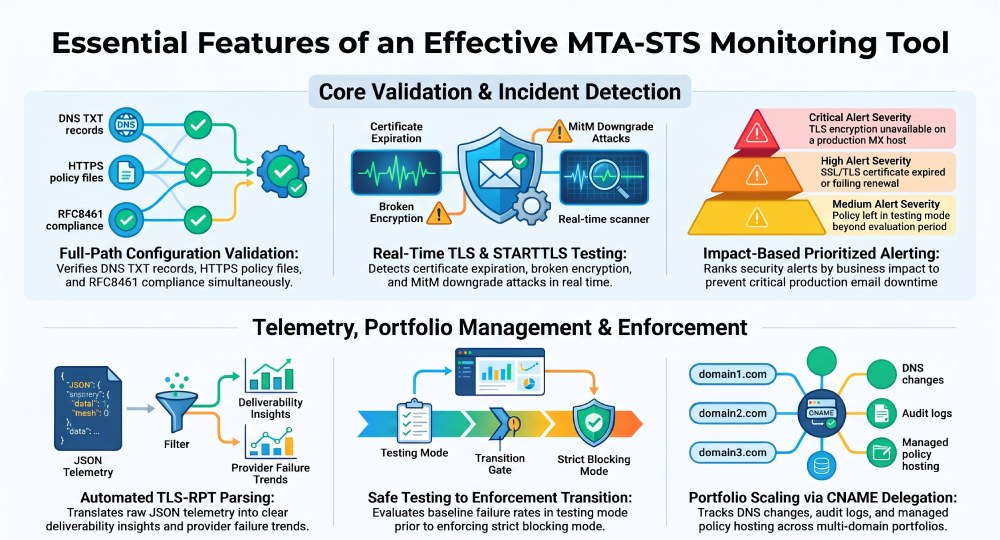
A strong tool must provide comprehensive MTA-STS policy validation across DNS, HTTPS, SMTP, and certificate layers because secure email delivery depends on every component working together.
Validate the MTA-STS Record and DNS TXT Record
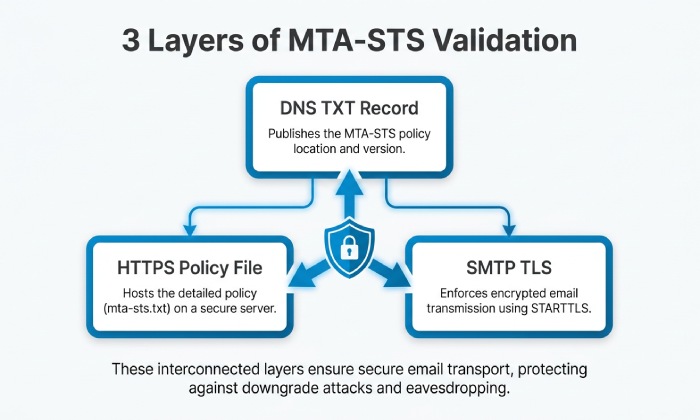
The tool should inspect the _mta-sts DNS TXT record and confirm that the MTA-STS record follows RFC8461 requirements. The DNS TXT record usually contains a version and ID value, such as v=STSv1; id=2024030101, which tells senders that the MTA-STS policy may have changed.
What the Tool Should Check
A high-quality MTA-STS validator should confirm:
- Presence of the MTA-STS record at _mta-sts.example.com
- Correct DNS TXT record format and version
- Valid ID changes after policy publication
- No conflicting TXT values or malformed entries
- Correct linkage between DNS and the hosted policy file
Edge Case: Stale DNS TXT Record IDs
If the policy file changes but the DNS TXT record ID remains unchanged, sending servers may continue using a previously cached policy until its cache period expires. A good MTA-STS monitoring tool should check whether the DNS TXT record ID is updated whenever the policy changes.
Validate the HTTPS Policy File
The tool must fetch the policy file from https://mta-sts.YOURDOMAIN/.well-known/mta-sts.txt and confirm that it is served over valid HTTPS. This policy file defines the MTA-STS policy, including mode, max age, and accepted MX hosts.
Policy Syntax and RFC8461 Compliance
The policy syntax should be checked against RFC8461. The tool should identify:
- Invalid version: STSv1
- Missing mode
- Unsupported testing mode or enforcement mode values
- Incorrect mx patterns
- Invalid max_age
- HTTPS or certificate errors
Edge Case: MX Host Mismatch
If your MX records point to mx1.mail.example.com but the MTA-STS policy does not include a matching MX pattern, sending servers enforcing the policy may treat the MX host as invalid for MTA-STS delivery. This can cause message delivery delays or failures.
Continuous Monitoring, Alerts, and Incident Detection
Effective monitoring should detect MTA-STS failures as they happen, not after users report lost inbound email.
Continuous STARTTLS and TLS Checks
The tool should regularly test whether each mail server supports STARTTLS, presents a valid certificate, and completes TLS negotiation. Because STARTTLS upgrades SMTP from plaintext to an encrypted session, failures can expose messages to an insecure connection.
Alert Quality Matters
A useful dashboard should prioritize alerts by business impact, such as:
- Critical: TLS unavailable on a production MX
- High: Certificate expired or near certificate renewal
- Medium: MTA-STS policy in testing but expected to enforce
- Low: Non-blocking syntax warning
Edge Case: Intermittent STARTTLS Failure
Some failures occur only from specific regions or providers such as Gmail. A good tool should run distributed checks and show whether STARTTLS, TLS, or encryption issues are isolated or widespread.
Detect Downgrade and Man-in-the-Middle Risk
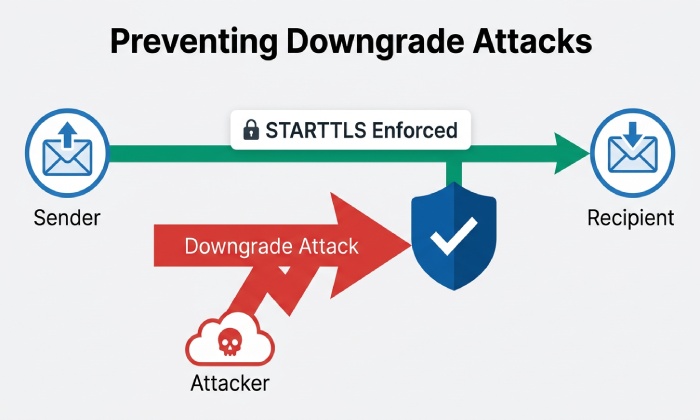
The main value of MTA-STS is reducing exposure to a downgrade attack or man-in-the-middle attack. The tool should detect when a recipient domain advertises an MTA-STS policy but its mail server cannot maintain a valid encrypted connection.
This matters because an attacker who strips STARTTLS can force plaintext SMTP unless MTA-STS policy enforcement blocks the unsafe path.
TLS Reporting Integration and Deliverability Insights
A modern tool should integrate TLS reporting so teams can see where secure email delivery succeeds, fails, or degrades.
Parse SMTP TLS Reporting Data
SMTP TLS Reporting, often called TLS-RPT, provides aggregate TLS reports in JSON format. These reports show whether senders could deliver mail according to your MTA-STS policy and whether failures were caused by certificates, DNS, STARTTLS, or policy errors.
What Deliverability Insights Should Include
The tool should summarize:
MTA-STS monitoring provides valuable insights into email security and delivery performance. The TLS success rate confirms stable encryption and secure email delivery, while policy failures help identify issues with the MTA-STS policy or policy file. Certificate errors can prevent delivery failures caused by expired certificates or problems during certificate renewal. MX mismatches reveal discrepancies between MX record data and the hosts allowed by the MTA-STS policy. Additionally, sender patterns show which email providers, such as Gmail, experience delivery failures, helping administrators identify provider-specific issues and improve overall email security and reliability.
Edge Case: TLS Reports Without Context
Raw TLS reports can be noisy. A useful MTA-STS monitoring platform should organize TLS reporting data into understandable failure categories and connect those findings with relevant DNS, HTTPS, and SMTP checks.
Connect TLS Reporting to Email Security
The tool should translate TLS reporting into clear email security decisions. For example, if a spike in failed TLS sessions appears after a DNS change, the platform should identify the exact misconfiguration and recommend how to validate policy again.
This is where monitoring becomes actionable: it turns TLS telemetry into policy compliance evidence.
Domain Coverage, Automation, and Change Management
A scalable tool must support a full domain portfolio, not just one production domain.
Manage Multiple Domains and MX Providers
Organizations often have many domains, parked domains, sub-brands, and third-party infrastructure. The monitoring tool should show which domains have a valid MTA-STS record, which have a missing DNS TXT record, and which lack a reachable policy file.
Automation Features to Prioritize
Look for:
- Automatic policy publication
- Bulk validation across a domain portfolio
- Support for CNAME and CNAME record delegation
- MX discovery and DNS configuration tracking
- Change logs for auditability
- Safe transition to enforce workflows
Edge Case: Managed MTA-STS via CNAME
Some providers offer Managed MTA-STS, where a customer delegates mta-sts hosting through a CNAME.
Coordinate With Adjacent Email Controls
MTA-STS and SPF address different aspects of email security. MTA-STS helps protect SMTP connections through enforced TLS, while SPF identifies authorized sending servers for a domain. AutoSPF helps administrators manage and troubleshoot SPF records as part of a broader email authentication strategy.
The connection to MTA-STS is operational: every control depends on accurate DNS and disciplined change management.
Usability, Reporting, Security, and Scalability Considerations
The best tool should make MTA-STS, TLS, STARTTLS, and encryption status understandable for both technical teams and leadership.
Dashboard, Reporting, and Evidence
A practical dashboard should provide:
- Domain-level policy compliance
- Current MTA-STS policy status
- Validity of the MTA-STS record
- DNS TXT record health
- Policy file availability
- TLS and STARTTLS test results
- TLS reports summaries
- Certificate and certificate renewal tracking
Security and Access Controls
The platform should include role-based access, audit logs, secure API access, and least-privilege permissions.
Edge Case: Executive Reporting
For leadership, the tool should produce simple reports showing secure email delivery, avoided insecure connection risk, and progress toward enforcement mode. For engineers, it should expose raw SMTP, DNS, HTTPS, and JSON diagnostics.
FAQ
What is the most important feature in an MTA-STS monitoring tool?
The most important feature is end-to-end validation of the MTA-STS record, DNS TXT record, policy file, MX records, TLS, and STARTTLS behavior. Without full-path validation, a tool may miss the exact failure that breaks secure email delivery.
Should you use testing mode before enforcement mode?
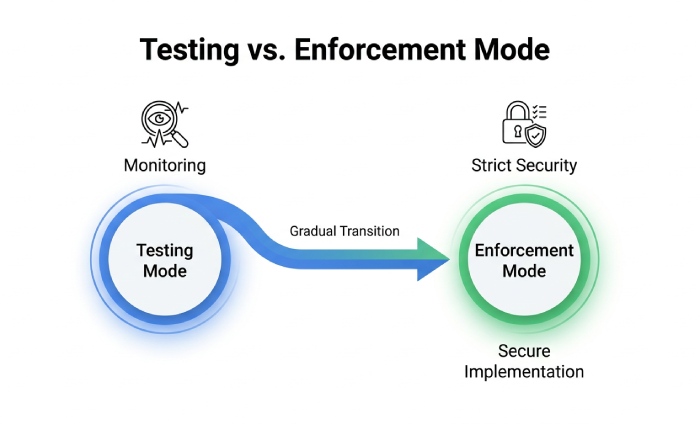
Yes. Testing mode lets you collect TLS reporting data and identify misconfiguration before strict policy enforcement begins. Once the tool confirms stable policy compliance, you can make the transition to enforce with less risk to email delivery.
How often should MTA-STS monitoring run?
For production domains, monitoring should run continuously or at frequent intervals, especially after DNS, MX, HTTPS, or certificate renewal changes. Frequent checks help detect broken encryption, failed STARTTLS, and invalid policy publication before senders reject mail.
Do MTA-STS tools replace TLS-RPT services?
No. An MTA-STS monitoring tool should complement SMTP TLS Reporting, not replace it. The best platforms ingest TLS reports, correlate them with the MTA-STS policy, and show whether each Mail Transfer Agent can maintain compliant TLS delivery to the recipient domain.
General Manager
General Manager of DuoCircle. Product strategy and commercial lead for AutoSPF's 2,000+ customer base.
LinkedIn Profile →