Hubspot SPF Record Setup: How To Configure It Correctly

Quick Answer
Set up a HubSpot SPF record by adding the correct SPF TXT record to your domain's DNS and ensuring it doesn't conflict with existing SPF entries. Proper configuration helps authenticate outgoing emails, improve deliverability, and reduce the risk of spoofing and spam filtering.
A correct HubSpot SPF record is an important part of email authentication, especially if you send marketing emails, sales email, automated workflows, newsletters, or lifecycle campaigns from HubSpot. SPF, DKIM, and DMARC work together to help mailbox providers confirm that HubSpot is permitted to send on behalf of your email sending domain.
For strong email deliverability, your DNS records must be accurate, your TXT record must contain the right SPF include value, and your domain settings inside HubSpot should show an authenticated status. If your SPF configuration is incomplete, partially authenticated, or not authenticated, you may see lower deliverability, SPF failure warnings, or inconsistent inbox placement.
What an SPF Record Is and Why It Matters for HubSpot Email
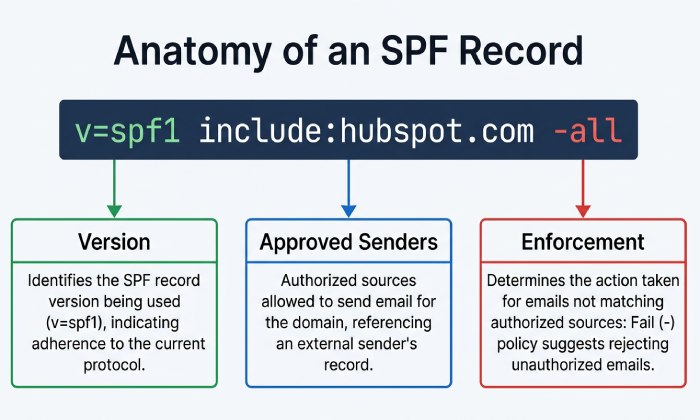
An SPF record, or Sender Policy Framework record, is a DNS-based email authentication mechanism that tells receiving mail servers which services are allowed to send email for your domain. Technically, SPF is published as a TXT record in your DNS records. The SPF version usually begins with:
v=spf1
The SPF string then lists approved senders using mechanisms such as include, IP addresses, or other permitted sources. A typical SPF entry may end with an enforcement mechanism such as the -all flag, which tells receivers to reject senders not listed in the SPF record. You can build a valid record in seconds with our free SPF record generator.
For HubSpot, the SPF record helps confirm that HubSpot is authorized to send marketing emails using your From email address. This is especially important for email marketing, automation, and marketing content sent through the HubSpot Email Marketing Tool. Without proper SPF setup, messages may fail email authentication checks, harming sender reputation, engagement rates, and overall email deliverability. If you are new to this, our guide on how to set up an SPF record covers the basics.
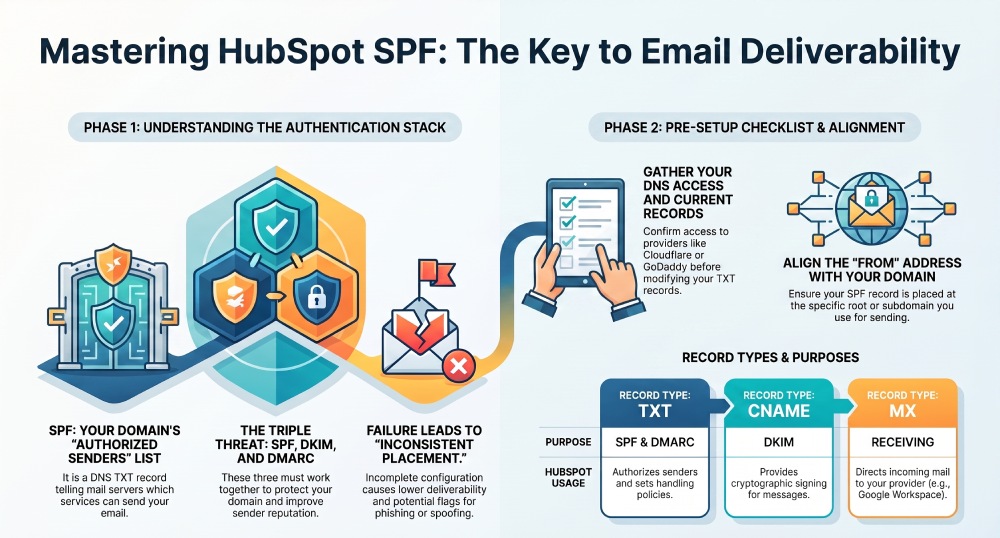
SPF is only one part of the broader email authentication stack. DKIM signs the message cryptographically, while DMARC tells mailbox providers how to handle messages that fail SPF or DKIM alignment. In practice, HubSpot recommends using SPF, DKIM, and DMARC together to protect your domain, improve deliverability, and reduce spoofing risk. Email security protects organizations from phishing attacks, malware, and unauthorized access to sensitive communications.
How HubSpot Uses SPF for Marketing and Sales Email Authentication
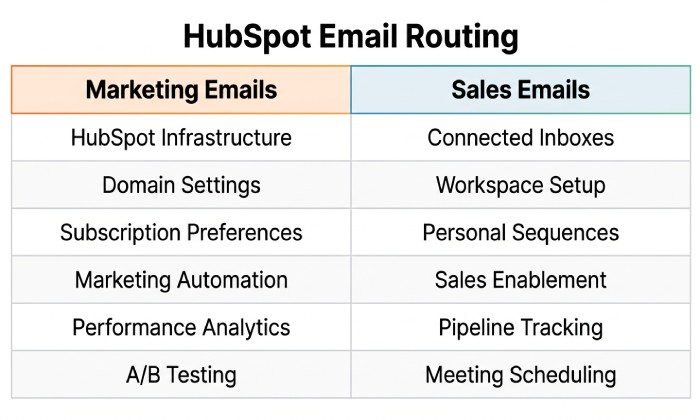
HubSpot uses SPF differently depending on the type of message being sent. Marketing emails sent from HubSpots marketing-email infrastructure typically rely on the connected email sending domain and DNS records configured in your HubSpot account. Sales-email activity may also involve connected inboxes, Google Workspace, Microsoft 365, or other mailbox systems depending on how the users email address is configured.
SPF, DKIM, and DMARC in HubSpot Sending
In HubSpot, email authentication methods usually include SPF, DKIM, and DMARC verification. DKIM is commonly configured with CNAME records provided by HubSpot, while SPF is configured through a TXT record at your DNS provider. DMARC is also published as a TXT record and should align with your SPF and DKIM strategy.
Inside HubSpot, you can review domain settings by going to Settings > Domains & URLs and checking the Email Sending section. This area shows the domain connection status, whether the email sending domain is authenticated, and whether SPF and DMARC verification are passing. If the domain is not authenticated or only partially authenticated, HubSpot may still allow some sending, but email deliverability can suffer.
HubSpots approach is designed to support common sending policies used by mailbox providers such as Google, Yahoo, and Microsoft. As sender requirements have become stricter, SPF, DKIM, and DMARC have become essential best practices rather than optional technical settings.
Marketing Emails vs. Sales Email
For marketing emails, HubSpot relies heavily on your configured email sending domain, the From Name, and the From email address selected in the editor. For sales email, authentication may also depend on the connected inbox, such as Google Workspace, and the users mailbox configuration under User Preferences.
If your team uses a no-reply address, a shared marketing address, or multiple domains for different regions”such as Houston, Atlanta, and Dallas offices”each domain or subdomain should be reviewed individually. A new domain used for a phase announcement campaign should be warmed carefully before replacing an old domain with strong historical engagement rates. Contact list cleanup, subscriber management, and gradual warm up domain practices all support better deliverability.
Before You Start: DNS Access, Sending Domains, and Required Information
Before you setup SPF for HubSpot, confirm that you have access to your DNS provider and the correct HubSpot account. Your DNS provider may be Cloudflare, Google Domains, GoDaddy, Namecheap, or another platform. If your organization uses Google Workspace, remember that Google Workspace may handle MX records for mail receiving, but your SPF record still lives in DNS as a TXT record.
You should gather the required data before changing DNS records:
- The root domain or subdomain you use as the email sending domain.
- The current SPF record, if one already exists.
- The HubSpot SPF include value for your account.
- Access to your DNS provider to add records or update DNS.
- Any existing SPF include values for Google Workspace, Microsoft 365, or other sending platforms.
- Your DMARC TXT record and DKIM CNAME records, if already configured.
Root Domain, Subdomain, and From Address Alignment
HubSpot domain settings may include your root domain, a subdomain, landing page domains, Blog domains, Website & Page Publishing domains, and Content Hub or Marketing & Content Hub assets. For email authentication, focus on the email sending domain that aligns with your From email address.
For example, if your From email address is newsletter@example.com, your SPF record generally belongs at the DNS level for example.com. If you send from updates@mail.example.com, the SPF record may belong on that subdomain, depending on how HubSpot instructs you during domain connection.
Access and DNS Provider Details to Confirm
Before you begin manual setup, check whether HubSpot offers a sign in with provider option for your DNS provider. Some providers support guided connection, while others require manual setup. If using Cloudflare, verify proxy settings for CNAME records because email authentication CNAME records should generally not be proxied. CNAME flattening may affect website records but should be reviewed carefully for HubSpot authentication records.
Also confirm your DNS host field format. Some DNS providers require @ for the root domain, while others require the full domain name. The record type for SPF is TXT, not MX, CNAME, or A. MX is for receiving email, CNAME records are often used for DKIM, and TXT records are used for SPF and DMARC.
General Manager
General Manager of DuoCircle. Product strategy and commercial lead for AutoSPF's 2,000+ customer base.
LinkedIn Profile →