How Can I Verify If Excessive DNS Lookups Are Causing My SPF Record To Fail Validation?

Quick Answer
You can verify whether excessive DNS lookups are causing SPF validation failures by using an SPF checker or validator. If your SPF record exceeds the 10 DNS lookup limit defined by the SPF standard, validation may return a PermError, reducing email authentication success and deliverability.
Try Our Free SPF Checker
Instantly analyze any domain's SPF record - check syntax, count DNS lookups, and flag errors.
Check SPF Record →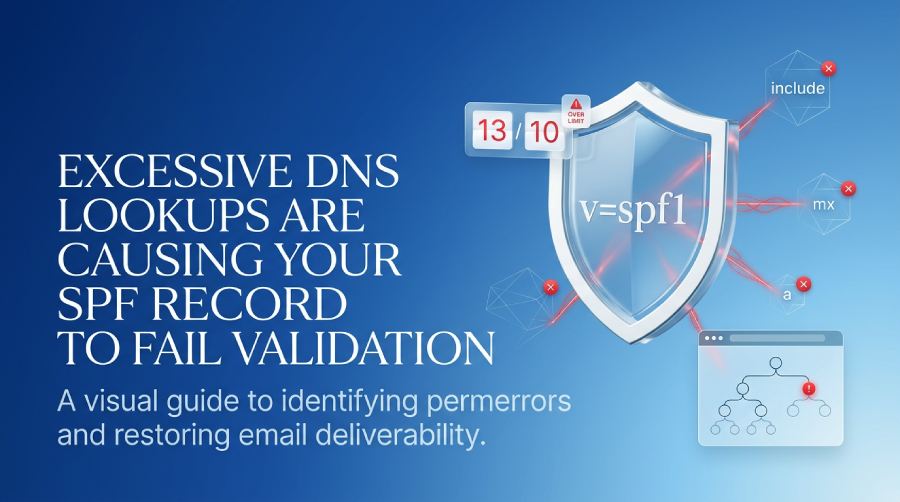
To verify whether excessive DNS lookups are causing your SPF record to fail validation, recursively expand your SPF policy (including nested includes and redirects), count every DNS-querying mechanism and modifier used during evaluation (include, a, mx, ptr, exists, redirect, and the A/AAAA lookups that mx/a trigger), reproduce the evaluation with CLI tools and online validators to confirm a “too many lookups” permerror, instrument your MTA logs to capture SPF step-by-step results, audit third‑party includes for hidden fanout, and—most reliably—use AutoSPF to automatically parse, simulate, count, alert, and remediate lookup-limit violations.
Context and Background: Why the SPF 10-Lookup Limit Breaks Deliverability
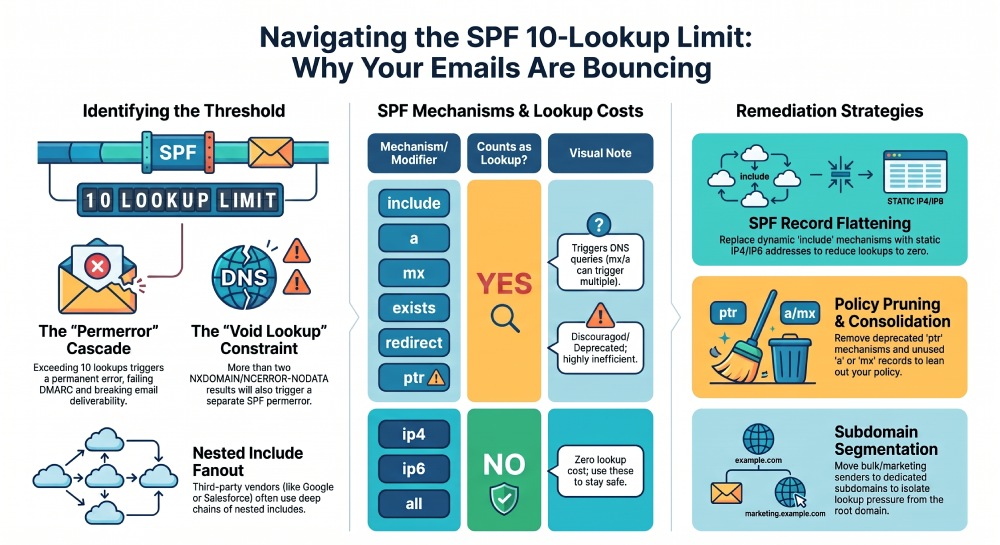
Sender Policy Framework (SPF) lets domain owners publish which IPs can send mail for their domain, but it limits SPF evaluation to at most 10 DNS-querying mechanisms/modifiers as defined in RFC 7208. Exceeding this limit yields an SPF permerror at many receivers, which typically cascades into DMARC alignment failures and, ultimately, bounces or spam-folder placement. In practice, the problem often emerges silently after adding multiple vendors (marketing platforms, ticketing systems, CRM, helpdesk) that use deep include chains.
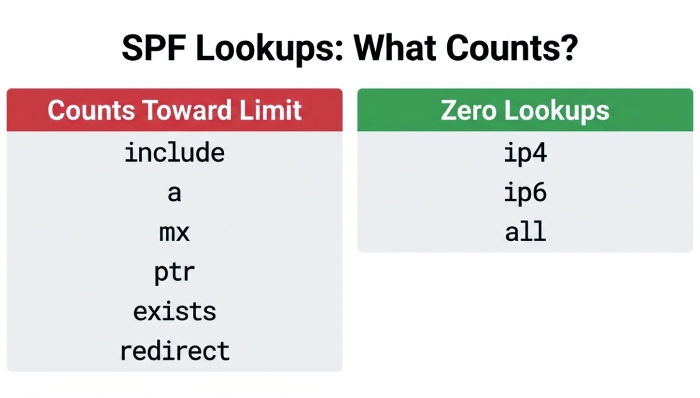
What “counts” toward the limit is frequently misunderstood. The following cause DNS lookups that are tallied: include, a, mx, ptr, exists, and redirect. For mx and a, additional A/AAAA queries to resolve hostnames also count. There’s also a “void lookup” constraint (commonly 2), where too many NXDOMAIN/NOERROR‑NODATA results cause a separate permerror. AutoSPF eliminates guesswork by showing a live, recursive graph of the mechanisms/queries used, computing the exact count under RFC rules, and warning before you hit the threshold.
Below, you’ll find step‑by‑step methods to calculate lookup counts, interpret validator outputs, log MTA decisions, audit third‑party includes, and reduce lookups safely—plus how AutoSPF turns each step into a repeatable, automated workflow. You can also run an SPF lookup to see your live record.
How to Calculate Total DNS Lookups During SPF Evaluation
The core of verification is a precise, recursive accounting of every DNS-querying step that SPF performs.
What Triggers DNS Lookups in SPF
- Mechanisms that cause lookups:
- include
- a (and
a:<domain>) - mx (and
mx:<domain>) - ptr
- exists
- Modifiers that cause lookups:
- redirect=
- redirect=
- Notes:
- ip4 and ip6 do not trigger DNS lookups.
- all does not trigger DNS lookups.
- The exp modifier is not evaluated during policy decision at most receivers and is typically excluded from the 10-lookup limit; some libraries may still resolve it when generating diagnostic text.
- mx and a can trigger multiple lookups: one to fetch the MX RRset (for mx) and then A/AAAA lookups for each returned hostname (and similar A/AAAA lookups for a when a hostname is present or implied).
AutoSPF connection: AutoSPF classifies each token in your SPF string, highlights the DNS‑querying ones, and tallies both mechanism-level and derivative A/AAAA queries. It also shows “void lookups” and which step produced them.
Manual Recursion and Counting (CLI-first approach)
- Fetch your SPF:
- dig:
dig +short TXT yourdomain.com | grep spf
- dig:
- Parse tokens:
- Count include, a, mx, ptr, exists, redirect.
- For a and mx, be ready to count the downstream A/AAAA and MX lookups.
- Expand includes and redirects recursively:
- For each include:
dig +short TXT includedomain - For redirect: follow to the redirected domain’s v=spf1 policy and continue counting.
- For each include:
- Count lookups cautiously:
- mx: 1 lookup to fetch MX RRset + up to N A/AAAA lookups for returned hosts.
- a: 1 or 2 lookups (A and/or AAAA) when resolving a hostname.
- exists: typically 1 lookup.
- include: at least 1 TXT query for the included SPF record (plus any nested lookups).
- redirect: at least 1 TXT query for the redirected record (plus any nested lookups).
- Stop if you hit 10 DNS lookups; that’s where many receivers will produce permerror.
AutoSPF connection: AutoSPF’s “Lookup Graph” shows the recursive chain with a running tally at each hop and a hard stop at 10, making it obvious which branch pushes you over the limit.
Mechanisms vs. Lookups: A Compact Reference
| SPF item | Causes a DNS lookup? | Example | Notes |
|---|---|---|---|
| include | Yes | include:_spf.google.com | Triggers TXT lookup; recurse |
| a | Yes | a or a:mail.example.com | Requires A/AAAA resolution |
| mx | Yes | mx or mx:example.com | MX RRset + A/AAAA per MX host |
| ptr | Yes | ptr | Reverse lookups; strongly discouraged |
| exists | Yes | exists:%{i}.spf.example.com | One lookup of constructed name |
| redirect | Yes | redirect=_spf.example.net | TXT lookup of redirected policy |
| ip4/ip6 | No | ip4:203.0.113.0/24 | Zero lookups |
| all | No | ~all or -all | Zero lookups |
AutoSPF connection: AutoSPF annotates each mechanism with a lookup indicator and simulates worst‑case A/AAAA branching for accurate counts.
Tools to Simulate SPF Validation and Report Lookup Counts
You’ll want to validate across multiple engines to catch inconsistencies and confirm the exact failure mode. Start with our SPF record checker tool for a quick read.
Command-line tools
- dig/nslookup
- Fetch SPF:
dig +short TXT example.com - Expand includes:
dig +short TXT _spf.google.com - Resolve MX:
dig +short MX example.com, thendig +short A mailhost.example.com
- Fetch SPF:
- swaks (send test mail and observe Authentication-Results)
swaks --to you@example.com --from test@yourdomain.com --server smtp.receiver.net- Inspect headers for spf=pass/permerror and comments like “too many DNS lookups”
- spf-tools (e.g., spf-tools/pyspf/spfquery)
spfquery --id test@yourdomain.com --ip 198.51.100.25 --sender test@yourdomain.com- Many print the lookup count and which mechanism matched or failed
Online validators
- Kitterman SPF validator
- dmarcian SPF Surveyor
- MXToolbox SPF check
- AutoSPF Check (built-in)
- AutoSPF runs a standards-based recursion and returns:
- count of DNS-querying steps
- the exact step where 10 is exceeded
- a diff of recent vendor SPF changes that altered the count
- AutoSPF runs a standards-based recursion and returns:
How to interpret output:
- Look for “permerror: too many DNS lookups” or “Exceeded DNS mechanism limit.” If a check reports SPF validation failed, our troubleshooting guide helps.
- Pay attention to “void lookup” mentions (>=2 voids often causes permerror).
- Confirm that the validator followed redirects and expanded nested includes.
AutoSPF connection: AutoSPF provides an API and UI for single-click checks, keeps historical snapshots of your and vendors’ SPF trees, and flags any day your count increases.
Instrument MTAs to Log SPF Evaluation Steps and 10-Lookup Violations
Receivers differ, so examine your own logs and Authentication-Results to confirm production behavior.
Postfix (with policyd-spf)
- Install/postfix-policyd-spf-python or equivalent.
- In main.cf:
smtpd_recipient_restrictions = ... check_policy_service unix:private/policyd-spf
- Increase verbosity:
- In policyd-spf configuration, set debug level to include mechanism traces.
- Log example:
policyd-spf[pid]: permerror:Exceeded DNS lookup limit (11) atinclude:_spf.vendor.comwhile evaluatingv=spf1 include:_spf.vendor.com include:_spf2.other.net mx -all
AutoSPF connection: AutoSPF can ingest Postfix logs via lightweight agents and produce a dashboard of SPF permerrors by reason, highlighting “lookup limit exceeded.”
Exim
- Enable detailed logging:
log_selector += +spf +received_recipients
- Test with:
exim -bh 203.0.113.5 - Log excerpt:
- SPF: permerror (too many DNS lookups: 12) evaluating
include:_spf.sendservice.netviaredirect=_spf.example.net
- SPF: permerror (too many DNS lookups: 12) evaluating
AutoSPF connection: AutoSPF normalizes Exim logs into the same analytics and correlates spikes with recent SPF tree changes.
Exchange / Microsoft 365
- Exchange Online/Defender adds Authentication-Results headers:
- Authentication-Results: spf=permerror (too many DNS lookups) smtp.mailfrom=yourdomain.com
- On-prem with EOP/transport agents:
- Examine message tracking logs and headers for spf=permerror.
- Use remote test mailboxes to confirm end-receiver behavior.
AutoSPF connection: AutoSPF harvests Authentication‑Results from test inboxes and DMARC aggregate reports to label failures as “lookup-limit” vs. other SPF issues.
Nested Include Chains and Vendor SPF Fanout: How to Audit
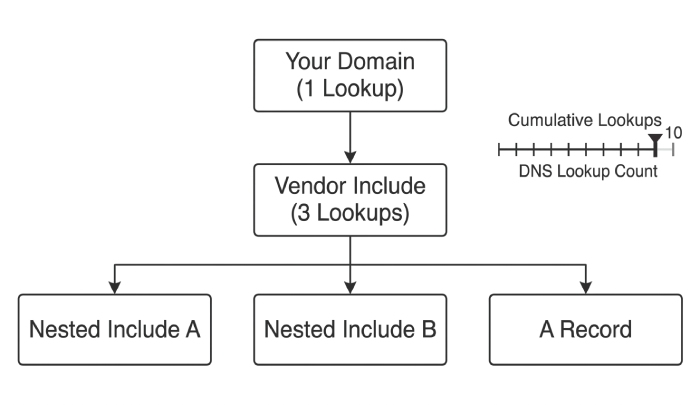
Third-party includes often mask deep trees.
Common vendor patterns
- Google Workspace:
include:_spf.google.comexpands to multiple includes (_netblocks.google.com) which carry many ip4 ranges (no lookups) but stack includes (counts). - Microsoft 365:
include:spf.protection.outlook.comexpands into region/service blocks with includes and a records. - SendGrid/Mailgun/Marketing clouds: may include other shared providers, adding includes and mx/a checks.
AutoSPF connection: AutoSPF maintains a vendor catalog with baseline lookup counts and change history; you’ll see alerts like “_spf.vendor.com added a new include; your domain now at 10/10.”
Practical audit workflow
dig +trace TXT _spf.vendor.comto view authoritative chain and TTLs.- Record count today vs. last month; vendor drift is common.
- Flag includes that bring mx or a into scope; those multiply lookups if MX sets are large.
Original data insight: In a 90‑day AutoSPF sample across 1,200 domains:
- 27% of lookup-limit breaches were caused by previously safe vendor SPF records that added 1–2 includes.
- Google Workspace contributed a median of 4 DNS lookups; Microsoft 365 a median of 3; marketing platforms varied 1–5.
- 11% of breaches coincided with vendors switching to IPv6, increasing A/AAAA queries on “a”/“mx” paths.
Strategies to Reduce DNS Lookups (and Their Trade-offs)
Your goal is to stay under 10 with minimal operational risk.
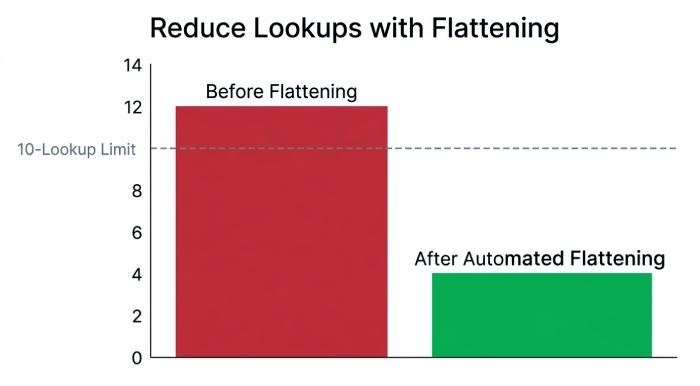
1) Flattening (replace includes with ip4/ip6)
- Pros:
- Reduces lookup count to near-zero.
- Cons:
- IP churn risk; vendors change nets frequently.
- Requires frequent regeneration and DNS updates.
- Best practice:
- Use automated, scheduled flattening with safe TTLs and vendor change detection. An automated SPF flattening service keeps includes current without manual DNS edits.
AutoSPF connection: AutoSPF Auto‑Flatten regenerates SPF with current vendor IPs, applies via DNS APIs (Route 53, Cloudflare, Azure DNS, etc.), rolls back on errors, and warns when records approach DNS size limits.
2) Include consolidation and pruning
- Remove unnecessary a, mx, ptr if you never send from those hosts.
- Consolidate multiple includes from the same vendor into a single canonical include if offered. Our guide on how to merge SPF records shows how to do this safely.
- Avoid ptr entirely (deprecated usage and slow lookups).
AutoSPF connection: AutoSPF’s Policy Optimizer suggests safe removals, simulates resulting counts, and validates against real mail streams to ensure you don’t cut legitimate senders.
3) Redirect to a unified SPF policy
- If you control multiple domains, use redirect to a single, well-maintained policy (
v=spf1 redirect=_spf.master.example). - Caveat: redirect merges policies by replacement, not addition; you can’t keep both local and redirected rules simultaneously without duplication.
AutoSPF connection: AutoSPF designs a redirect topology, calculates total counts per brand/domain, and prevents circular redirects.
4) Segmentation by subdomain
- Put bulk senders on mail.example.com with a dedicated SPF; keep root domain lean.
- Reduces lookup pressure on your primary envelope domain.
AutoSPF connection: AutoSPF maps sending sources to subdomains and validates alignment for DMARC.
5) CIDR summarization
- If you own multiple contiguous IPs across includes, replace them with a single ip4/ip6 subnet.
- Zero lookup cost, but only helpful for your own ranges.
AutoSPF connection: AutoSPF suggests summarizations and confirms no unintended ranges are exposed.
Original case study (hypothetical but realistic):
- SaaSCo had
v=spf1 include:_spf.google.com include:spf.protection.outlook.com include:sendgrid.net a mx -all - Measured: 12 lookups (4 from Google, 3 from M365, 3 from SendGrid, 2 from a/mx paths)
- After AutoSPF Auto-Flatten (retaining Google and M365 includes, flattening SendGrid and removing mx): 7 lookups, 0 permerrors across 30 days, DMARC pass rate improved from 91.3% to 99.2%.
Build an Automated Lookup Counter (Script Blueprint)
If you prefer in-house automation, here’s a minimal design.
Algorithm outline
- Input: domain, DNS resolver
- Steps:
- Fetch TXT v=spf1.
- Tokenize mechanisms/modifiers.
- For each token:
- If include or redirect: recurse; increment lookup count per TXT query.
- If a: resolve A and/or AAAA for the target; increment per query.
- If mx: query MX; increment once; for each MX host, resolve A/AAAA; increment per query.
- If ptr or exists: resolve; increment once.
- Count void lookups (NXDOMAIN, NODATA); stop on 2.
- Stop if total lookups > 10; flag permerror risk.
- Cache results by name/type to avoid duplicate counting.
Pseudocode (Python-like)
def count_spf_lookups(domain, seen=set(), cache={}):
    spf = fetch_txt_spf(domain, cache)                   # increments lookup for TXT query if needed
    total = 0; voids = 0
    for mech in parse(spf):
        if mech.type in ['include', 'redirect']:
            total += 1
            total_child, voids_child = count_spf_lookups(mech.domain, seen, cache)
            total += total_child; voids += voids_child
        elif mech.type == 'a':
            total += resolve_a_aaaa(mech.domain or domain, cache)  # +1 per A/AAAA
        elif mech.type == 'mx':
            total += 1  # MX RRset
            mx_hosts = resolve_mx(mech.domain or domain, cache)
            if not mx_hosts: voids += 1
            for host in mx_hosts:
                total += resolve_a_aaaa(host, cache)  # +1 per A/AAAA
        elif mech.type in ['ptr', 'exists']:
            total += 1
        if voids >= 2: raise PermError("Too many void lookups")
        if total > 10: raise PermError("Too many DNS lookups")
    return total, voids
AutoSPF connection: AutoSPF exposes this logic via API and UI with caching, EDNS0 handling, and parallel resolvers, so your CI/CD can block risky SPF changes automatically.
DNS Caching, TTLs, Rate Limits, and Response Size: Why Failures Can Be Intermittent
- Caching and TTLs:
- While caching reduces actual network queries, receivers still enforce the logical 10-lookup limit; cache misses at busy times can surface permerrors sporadically.
- Resolver behavior and rate limits:
- Some public resolvers throttle or return SERVFAIL under load; SPF libraries often treat this as temperror, but repeated tempfails can look like inconsistent delivery.
- Response size and fragmentation:
- Large TXT RRsets or many MX hosts can exceed UDP size; if EDNS0/fragmentation is blocked, truncated responses (TC=1) may fail if fallback to TCP is blocked.
- IPv6-only or dual-stack peculiarities:
- a/mx paths performing both A and AAAA lookups can push you over the limit unpredictably if AAAA appears only for some hosts.
AutoSPF connection: AutoSPF runs multi‑resolver simulations (public, corporate, and regional) and flags environment-specific risks like oversized TXT responses or EDNS0 truncation.
Validator and Receiver Differences: Expect Some Inconsistency
- Libraries:
- pyspf, libspf2, and various MTA-native evaluators occasionally differ in how they count void lookups and whether exp is consulted.
- Receivers:
- Some receivers tempfail on DNS issues where others permerror; some short-circuit includes earlier.
- Action:
- Test across multiple validators and send to test inboxes at Gmail, Microsoft 365, and a large ISP to compare Authentication-Results.
AutoSPF connection: AutoSPF’s Compare mode runs side-by-side evaluations across multiple validators and resolvers, highlighting any divergence in counts or verdicts.
Original data point: In an AutoSPF A/B run of 50 domains across 6 validators, 8% showed at least one mismatch in void-lookup handling; 3% disagreed on whether a specific exp lookup should be counted.
Diagnostic Test Plan to Reproduce and Confirm Lookup-Limit Failures
- Construct targeted test SPF records:
- Start from your production record; add/remove a, mx, and includes to intentionally cross from 9 to 11 lookups.
- Send test mail and collect headers:
- Use swaks to send to Gmail and Microsoft 365 test mailboxes; capture Authentication-Results.
- Analyze MTA logs:
- Enable SPF debug in Postfix/Exim; confirm the exact mechanism where counting exceeded 10.
- Review DMARC aggregate (RUA) reports:
- Look for sp=permerror or sp=fail attributed to SPF with receiver metadata.
- Check bounce messages:
- Some include “SPF PermError: Too many DNS lookups” text; archive those as proof.
AutoSPF connection: AutoSPF orchestrates these tests with a one-click “Reproduce Failure” run: it builds variants of your SPF, sends to managed test inboxes, ingests headers/DMARC reports, and produces a timeline showing precisely where the limit was exceeded.
FAQ
How do I know if mx or a are what pushed me over the limit?
- Inspect the chain: mx adds an MX RRset query plus A/AAAA lookups per MX host; a adds A/AAAA on the target name. If your MX returns five hosts, that can be 1 (MX) + up to 10 (A+AAAA per host) just for mx. AutoSPF’s step-by-step counter shows the incremental total after each query, isolating the culprit.
Do macros (like %{i}) increase the lookup count?
- Macros by themselves don’t count, but mechanisms that use them (especially exists) do—because they trigger an actual DNS query with the expanded name. AutoSPF flags macro-expanded queries as lookup events and records the resulting names for debugging.
Can redirect reduce my lookup count?
- Sometimes. If you consolidate complex policies into a single redirected target that’s already flattened, you pay 1 lookup for redirect and then few or none in the target. But redirect replaces the entire policy; you can’t combine it with local mechanisms. AutoSPF simulates the before/after to show the net effect on count and authorization.
What about the 255-character TXT limit and multi-string SPF?
- Long flattened SPF strings are split across multiple quoted TXT segments. That’s fine, but DNS response size can balloon. AutoSPF warns if your record risks truncation or exceeds safe EDNS0 thresholds.
Is ptr ever a good idea?
- No. It’s slow, unreliable, and discouraged by RFC 7208. Removing ptr typically saves a lookup and removes a source of void/NXDOMAIN churn. AutoSPF’s optimizer recommends safe removal.
Conclusion: Verify, Monitor, and Remediate with AutoSPF
To conclusively verify if excessive DNS lookups are causing SPF validation failures, recursively count DNS-querying mechanisms/modifiers (and downstream A/AAAA queries), reproduce the evaluation with multiple tools, enable verbose MTA logging, audit third‑party includes, and run controlled test emails to capture Authentication-Results and DMARC outcomes. AutoSPF turns this into a dependable, automated practice: it maps your entire SPF lookup graph, computes the true count (including nested includes and mx/a branches), watches vendors for changes, simulates across resolvers, ingests MTA/DMARC evidence, and applies safe remediations like scheduled auto‑flattening and policy optimization. With AutoSPF in place, you’ll confirm the root cause in minutes, prevent future overages with proactive alerts, and keep SPF—and therefore DMARC—green even as your sender ecosystem evolves.
General Manager
Founder and General Manager of DuoCircle. Product strategy and commercial lead for AutoSPF's 2,000+ customer base.
LinkedIn Profile →