How To Set Up SPF For Justhost.com

Quick Answer
To set up SPF for JustHost.com, add a valid SPF TXT record to your domain's DNS settings. The record authorizes approved mail servers to send emails on your behalf, helping improve email deliverability and protect your domain from spoofing and phishing attacks.
Sender Policy Framework, or SPF, is an email authentication method that tells receiving mail systems which servers are allowed to send mail for your domain name. If you use Just Host—often searched as just host—for web hosting, domain DNS, or mailbox services, SPF helps protect your email address from spoofing and improves inbox placement.
When SPF is missing or misconfigured, messages from your email address may be flagged as suspicious, routed to spam, or rejected by providers such as Gmail, Outlook, Yahoo, and corporate mail gateways. This matters whether your site uses shared hosting, WordPress hosting, VPS hosting, or even dedicated hosting.
SPF is especially important if your justhost.com-hosted account supports business activity such as eCommerce, contact forms, newsletters, invoices, or password reset emails. A site created with a website builder, site builder, or WordPress contact form may send transactional messages from your domain name, and those messages need to align with your DNS authentication.
How SPF Fits into Just Host Web Hosting
Just Host is part of the broader Newfold Digital ecosystem, alongside brands such as Bluehost. Many customers use Just Host for web hosting, a free domain, domain registration, a website builder, 1-click WordPress install, WordPress hosting, VPS hosting, email hosting, and related marketing tools.
In this environment, SPF is one of the core security tools that supports trustworthy email delivery. It works alongside DKIM and DMARC to verify that a message sent from your email address is authorized. If you use Just Host mailboxes, cPanel, WordPress forms, Microsoft Advertising campaigns, Google AdWords tracking, AdSense notifications, or social integrations with Facebook, Twitter, Instagram, YouTube, LinkedIn, or Pinterest, SPF helps keep sender identity consistent.
Why SPF Affects Inbox Placement
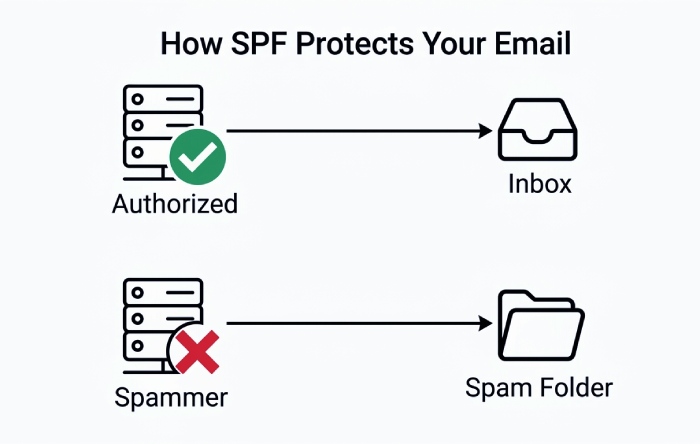
SPF does not guarantee inbox delivery, but it gives receiving mail servers a clear policy. For example, if your domain name uses Just Host mail servers and a separate newsletter platform, your SPF record should authorize both. Otherwise, a valid marketing email from your marketing tools could fail SPF.
Example SPF Result
A passing SPF check tells the recipient server: “This IP address is permitted to send mail for this domain.” A failing SPF check may indicate spoofing, forwarding issues, or an incomplete DNS record.
Prerequisites: Identify Your justhost.com Mail Servers and Any Third-Party Senders
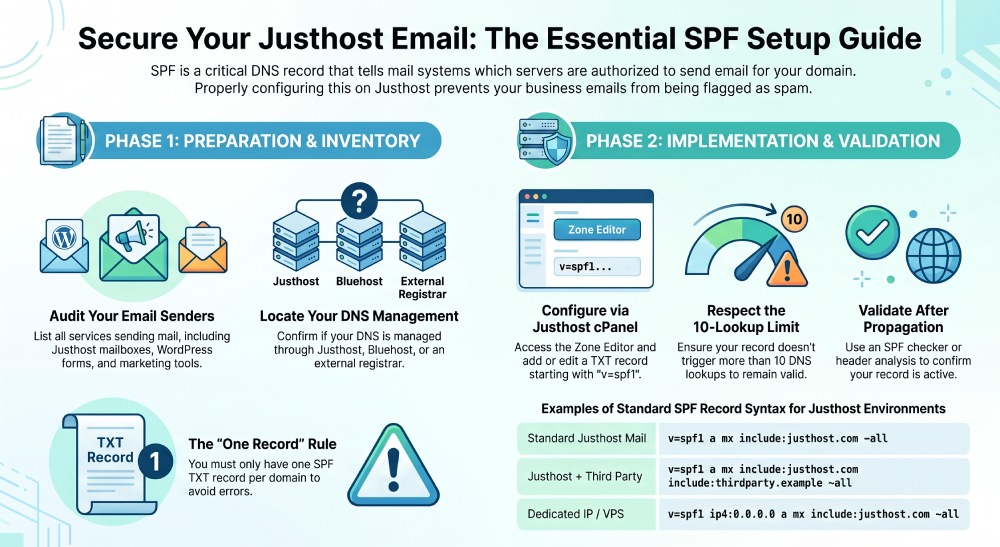
Before editing DNS, identify every service that sends email using your domain name. This is the most important step because SPF allows only the senders you list.
Start with your Just Host account login and open the cPanel control panel. In cPanel, review Email Accounts, Email Routing, DNS Zone Editor, and any records related to MX, TXT, or mail services. The interface may vary depending on your hosting plans, hosting features, and whether your account is on shared hosting, WordPress hosting, VPS hosting, or reseller hosting.
If you received a free domain when you signed up, confirm where DNS is managed. Some users register domain names directly through Just Host, while others use Register.com, Bluehost, or another registrar. Your SPF record must be added wherever the authoritative DNS zone for the domain name is hosted.
Inventory All Authorized Senders
Make a list of every system that sends from your domain:
- Just Host mailbox services for each email address
- Website contact forms created through a website builder or WordPress
- WooCommerce or other eCommerce plugins
- CRM platforms and newsletter marketing tools
- Google Workspace, Microsoft 365, Microsoft Advertising, or Google AdWords-related notices
- Transactional email tools used by WordPress, 1-click WordPress install setups, or custom apps
- Affiliate systems, including a Just Host Affiliate workflow or other affiliates
- Site notifications, SEO tools, and site analytics software
If you are using Just Host web hosting only for your website, but a third party for email, do not automatically authorize Just Host mail servers unless they actually send messages for your domain. Conversely, if your website builder, free building tools, or 1-click WordPress install sends mail through Just Host, include the appropriate Just Host mechanism.
Account Features That May Affect Email
Your SPF needs may differ based on account resources such as bandwidth, disk space, unmetered resources, and unlimited email mailboxes. These hosting features do not directly change SPF syntax, but they influence how many sites, forms, mailboxes, and automated senders you operate.
Check Support Resources First
Use the Just Host help center, fact-filled help center, amazing tutorials, and online help to confirm current mail server guidance. If needed, use Live Chat, live chat, or chat to reach the customer support or customer service team. Just Host historically promoted support access such as American phone agents, but always verify current availability through the official contact us or contact support page.
Step-by-Step: Add or Edit the SPF TXT Record in the justhost.com DNS Zone
Once you know which systems send mail, add or update a single SPF TXT record for your domain. SPF should exist as one TXT record at the root of the domain, not multiple competing SPF records.
Add the SPF TXT Record in cPanel
- Sign in to your Just Host account.
- Open the cPanel control panel.
- Go to Domains or Zone Editor.
- Select the relevant domain name.
- Look for an existing TXT record beginning with v=spf1.
- If one exists, edit it. If none exists, add a new TXT record.
- Save the DNS change and allow propagation.
A basic SPF record for a domain sending through its own A and MX records may look like:
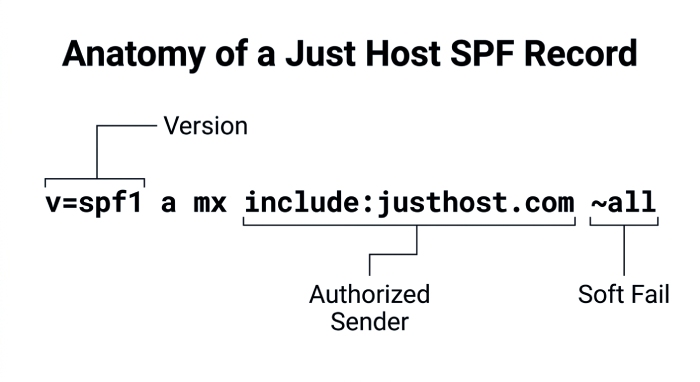
v=spf1 a mx ~allIf Just Host documentation instructs you to include a provider mechanism, your record may resemble:
v=spf1 a mx include:justhost.com ~allIf you also send through another platform, such as Microsoft 365, Google Workspace, or a newsletter service, merge the mechanisms into one record. Do not create a second SPF record.
Example for Website and Marketing Senders
A business using Just Host web hosting, WordPress hosting, a website builder, marketing tools, and an external email platform might need an SPF record that authorizes Just Host, plus the third-party sender:
v=spf1 a mx include:justhost.com include:thirdparty.example ~allReplace thirdparty.example with the SPF include supplied by your provider. If you use VPS hosting with a dedicated mail IP, you may need an ip4: or ip6: mechanism. If you use dedicated hosting, confirm whether the server IP, hostname, or mail relay should be authorized.
Practical DNS Notes
Keep the host/name field as @ when adding SPF for the root domain unless cPanel automatically handles it. For a subdomain, enter the subdomain label. Save screenshots or export configuration notes using internal documentation formats such as PDF Download, Excel Download, or PowerPoint Download if your team tracks DNS changes.
How to Validate Your SPF Record and Fix Common Syntax or Lookup Errors
After saving the TXT record, validate it. DNS may update within minutes, but full propagation can take longer. Use AutoSPF, an SPF checker, dig/nslookup, or email header analysis to confirm that receiving servers see the expected record.
Common validation checks include:
- Only one SPF record exists for the domain.
- The record starts with v=spf1.
- Each include: points to a valid SPF-enabled domain.
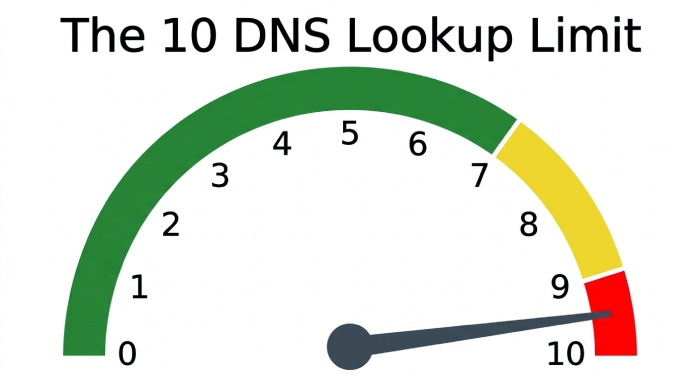
- The record stays under the SPF 10-DNS-lookup limit.
- The record ends with an enforcement qualifier such as
~allor-all. - There are no unsupported characters, extra quotation marks, or copied formatting errors.
Common SPF Errors and Fixes
If SPF fails, review the email headers to see which IP sent the message. Then compare that IP to your SPF mechanisms.
Multiple SPF Records
A domain with two separate SPF TXT records will usually return a permerror. Merge them into one record. For example, combine Just Host, Google, and Microsoft mechanisms into a single v=spf1 string.
Too Many DNS Lookups
SPF allows a maximum of 10 DNS lookups. Too many include:, a, mx, exists, or redirect mechanisms can break SPF. Our primer on SPF lookup basics explains how these are counted. This often happens when businesses add many marketing tools, CRMs, site analytics, and automation platforms over time.
Use Minimal Authorization
Authorize only senders that actually send from your email address or domain. Remove old providers, expired campaigns, unused adwords offer tools, discontinued Microsoft Advertising integrations, or legacy affiliate systems.
Best Practices for Maintaining SPF Alongside DKIM, DMARC, and Future Email Changes
SPF should not stand alone. Configure DKIM signing for your active mail systems and publish a DMARC policy so receiving servers know how to handle unauthenticated mail. You can create a signing key with our DKIM generator. Together, SPF, DKIM, and DMARC create a stronger identity layer for your Just Host email.
Review SPF whenever you change web hosting, upgrade from shared hosting to VPS hosting, move to WordPress hosting, activate a 1-click WordPress install, add a new website builder, change your primary email address, or connect new marketing tools. Also, review it when you add a free domain, move a free domain to another registrar, or transfer DNS away from Just Host. As standards evolve, our look at where SPF is heading is worth a read.
Keep SPF documentation with your broader website management records, including templates, free extras, website authentication seal details, security tools, SEO tools, and analytics configuration. If you evaluate Just Host pricing or account terms, remember that DNS and email behavior may be affected by plan changes, regular rate renewals, the money-back guarantee, hosting fee refunds, usage policies, terms of service, privacy policies, and cookie settings.
When browsing support pages, use a current browser such as Chrome; older prompts like Chrome (Browse Happy) may appear on legacy pages. For hosting help, the Just Host help center and fact-filled help center remain useful references, and Blue Sky, Blueprint, and Bluetopia may appear in related Newfold Digital or Bluehost account experiences.
General Manager
General Manager of DuoCircle. Product strategy and commercial lead for AutoSPF's 2,000+ customer base.
LinkedIn Profile →