How to Set Up SPF for BlueHornet: A Complete Guide

Quick Answer
Learn how to set up SPF for BlueHornet with this complete guide. Discover the correct SPF record format, DNS configuration steps, and best practices to authenticate outgoing emails, reduce spoofing risks, improve email deliverability, and ensure BlueHornet messages reach recipients reliably.
Sender Policy Framework, or SPF, is an email authentication standard that tells receiving mail servers which systems are authorized to send email on behalf of your domain. When you use BlueHornet for email marketing, SPF helps mailbox providers verify that BlueHornet is a legitimate sender for your brands marketing messages rather than an unauthorized source attempting spoofing or phishing.
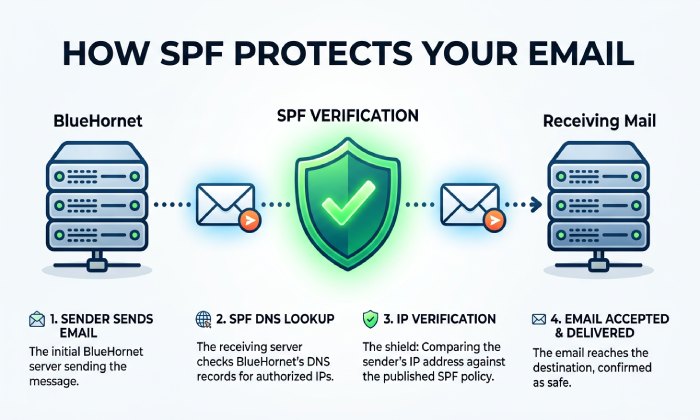
When using BlueHornet to send email from your domain, a correctly configured SPF record helps receiving mail servers verify that BlueHornet is authorised to send on your behalf. A missing, incorrect, or duplicate SPF record can cause authentication failures and may affect email delivery.
BlueHornet is an email marketing platform that can send messages on behalf of your domain. Adding the correct BlueHornet SPF mechanism to your DNS record helps receiving mail servers verify that its sending infrastructure is authorised to send email for your domain.
SPF is not a replacement for DKIM or DMARC, but it is one of the core authentication signals behind modern digital marketing. For a cloud-based platform like BlueHornet, which supports personalized marketing, lifecycle messaging, marketing automation, and campaign optimization, SPF helps protect sender reputation and supports better marketing ROI across customer journeys. Strong email security helps protect businesses from phishing, malware, spam, and other email-based threats.
How BlueHornet Uses Your Domain to Send Marketing Emails
BlueHornet can send email on behalf of your domain using its email delivery infrastructure. Depending on your configuration, the platform may use your sending domain, return-path or bounce domain, and other authenticated sending infrastructure.
To authorise BlueHornet to send email for your domain, you need to add the SPF mechanism provided for your BlueHornet account to the domain’s existing SPF record. If other services also send email from the same domain, their authorised SPF mechanisms must be retained in the same record.
Prerequisites Before Creating or Updating Your SPF Record
Before you create or update your SPF record for BlueHornet, gather the right technical and business information. This prevents accidental disruption to other marketing solutions, corporate partners, or transactional systems that already send email from your domain.
You should have:
- Access to your DNS provider, such as the registrar, hosting company, or managed DNS platform.
- The domain or subdomain BlueHornet will use for email marketing.
- A list of all authorised services and systems that currently send email from your domain, such as email marketing platforms, transactional email providers, CRM systems, support tools, and internal mail servers.
- Confirmation from BlueHornet customer support or full service support that your account should use the standard SPF include mechanism.
- Knowledge of whether you are authenticating the root domain, a subdomain, or a dedicated bounce domain.
- Awareness of SPFs 10-DNS-lookup limit, which is important for SaaS marketing platform stacks using many third-party tools.
Authentication and Data Checks Before Editing DNS
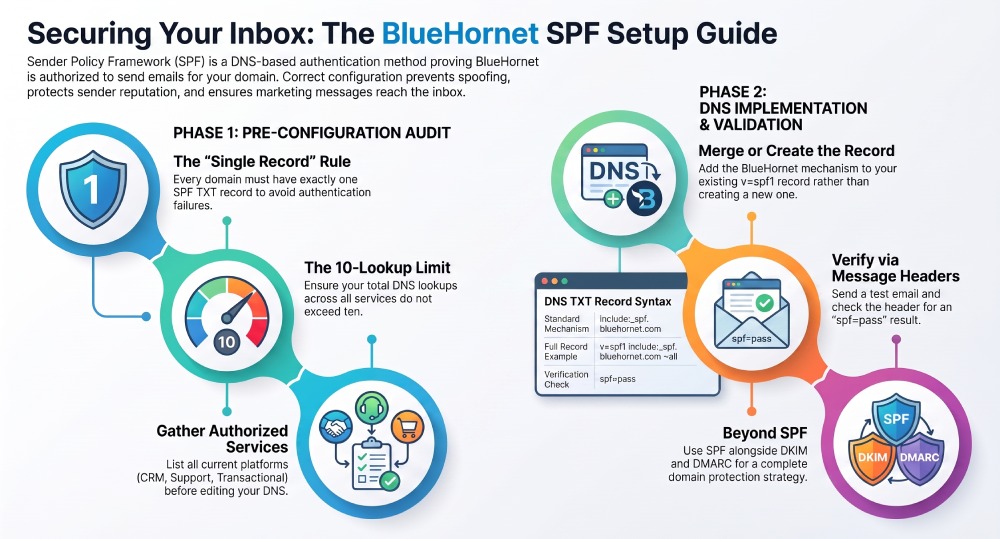
SPF setup should be part of your broader email authentication strategy. Before updating DNS, identify all services authorised to send email from your domain so you can add BlueHornet without removing existing SPF mechanisms or creating multiple SPF records.
If multiple platforms send email from your domain, review your existing SPF record before adding BlueHornet. All authorised sending services should be included in a single SPF record, while DNS management remains under your organisation’s control.
Record-Syntax Guardrails
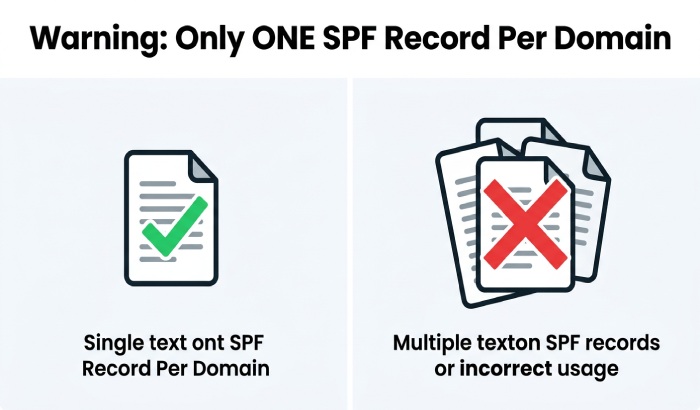
Only one SPF record should exist per domain. It must be published as a TXT record and begin with:
v=spf1
A typical SPF record contains include mechanisms, IP addresses, and an enforcement qualifier such as ~all or -all. For example:
v=spf1 include:_spf.bluehornet.com ~all
Do not create a second SPF TXT record for BlueHornet if one already exists. Instead, merge the BlueHornet include into the existing SPF record. Multiple SPF records can cause SPF permerror results, damaging email delivery, customer experience, lifecycle messaging performance, and marketing ROI.

Finding Your Current SPF Record in DNS and Adding the Correct BlueHornet Include Mechanism
To find your current SPF record, open your DNS management console and look for TXT records on the domain BlueHornet will use. You can also use command-line tools:
dig TXT example.com
or:
nslookup -type=TXT example.com
Look for a TXT value beginning with v=spf1. If no SPF record exists, you can create one. If one already exists, edit it rather than adding another.
For most BlueHornet configurations, the SPF include mechanism is:
include:_spf.bluehornet.com
A simple SPF record authorizing only BlueHornet would look like this:
v=spf1 include:_spf.bluehornet.com ~all
If your domain already authorizes other SaaS or cloud-based platform providers, merge BlueHornet into the existing record:
The exact record depends on your environment. Some organizations use BlueHornet with other marketing platform tools, customer support systems, email API services, or corporate partners. Others may have separate subdomains for email marketing, transactional email, customer outreach, and lifecycle messaging. If BlueHornet customer support provides a tenant-specific SPF value, use that official value instead of assuming a generic include.
After publishing the record, allow DNS propagation, then test SPF using an authentication checker. Send a test campaign from BlueHornet and inspect the message headers for spf=pass. This confirms that receiving mail servers recognize BlueHornet as authorized to send on your behalf.
SPF is one part of a broader email authentication strategy. After configuring SPF for BlueHornet, consider implementing DKIM and DMARC as well. Together, these standards help authenticate legitimate email and protect your domain from spoofing.
General Manager
General Manager of DuoCircle. Product strategy and commercial lead for AutoSPF's 2,000+ customer base.
LinkedIn Profile →