How to Set Up SPF for Accredible, Zendesk, and Infusionsoft: A Step-by-Step Guide

Quick Answer
Learn how to set up SPF for Accredible, Zendesk, and Infusionsoft with this step-by-step guide. Discover the correct SPF records, DNS configuration steps, and best practices to authenticate emails, prevent spoofing, and improve email deliverability.
If your organization uses Accredible for digital certificates or badges, Zendesk for customer support, and Infusionsoft or Keap for CRM, contact management, marketing automation, and campaign management, your email ecosystem depends on trust. Every email sent from these platforms”whether it is a credential notification, a support ticket update, a webform confirmation, or a campaign follow-up”must pass authentication checks to avoid spam placement, spoofing warnings, or outright rejection.
SPF, or Sender Policy Framework,Ticket creation is one of the core DNS-based authentication methods used by receiving mail servers to verify whether a sending server is authorized to send email for your domain. Without the correct SPF record, an Accredible credential email, a Zendesk support ticket reply, or an Infusionsoft campaign management message may fail authentication even if the content is legitimate.
This becomes especially important when organizations use multiple email-sending platforms such as Zendesk, Infusionsoft (now Keap), and Accredible. Each service sends emails on behalf of the domain and must be properly authorized in the SPF record. If SPF is incomplete or incorrectly configured, legitimate emails from these platforms may fail authentication, be marked as suspicious, or experience deliverability issues. Strong email security practices help protect domains from phishing, spoofing, and unauthorized email activity.
Proper SPF configuration helps ensure emails sent through Accredible, Zendesk, and Infusionsoft/Keap are recognized as legitimate by receiving mail servers. This improves deliverability and reduces the chances of legitimate messages being rejected or marked as spam.
Understanding the Roles of Accredible, Zendesk, and Infusionsoft in Your Email Ecosystem
Accredible in Credential and Certificate Email
Accredible is typically responsible for sending credential-related email, such as certificate issue notices, badge claim messages, renewal reminders, and verification links. These messages often follow a Product Purchase, course completion, certification event, or fulfillment milestone. In a purchase flow, Accredible may send email after purchase orders are processed or after a learner reaches a qualifying status.
From an SPF perspective, Accredible is a sending service. That means its servers”or its underlying email provider”must be authorized in your domains SPF TXT record. Do not assume the correct include mechanism; instead, confirm Accredibles current DNS guidance from its documentation or integration support team.
Credential emails may contain information such as recipient names, certificate details, and verification links. Since Accredible sends these messages on behalf of your domain, its sending infrastructure should be properly authorized in your SPF record to help improve email deliverability and prevent authentication failures.
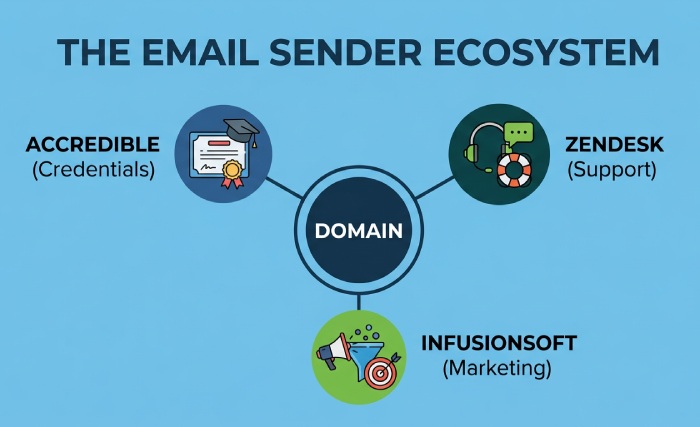
Zendesk, Infusionsoft, and Keap as Email Sending Services
Organizations often use multiple platforms, such as Zendesk, Infusionsoft (now Keap), and Accredible, to send different types of customer communications. These emails may include support notifications, marketing messages, or credential delivery emails.
Because these platforms send emails on behalf of a domain, they should be authorized in the domains SPF record. Adding approved sending services helps receiving mail servers verify that these platforms are permitted to send messages and reduces the risk of SPF failures.
Zendesk may send customer support notifications, while Keap (formerly Infusionsoft) may handle marketing or automated emails. Accredible may send certificate and badge-related messages. Each service should be reviewed separately to confirm its SPF requirements before updating the DNS TXT record.
Example: Authorizing Multiple Email Senders with SPF
Organizations using Accredible, Zendesk, and Keap may send different types of emails, including certificate notifications, support updates, and automated communications. Each platform should be authorized in the domains SPF record to help receiving mail servers verify legitimate email sources. You can assemble all three includes into one record with our free SPF record generator.
What SPF Is and How It Helps Prevent Email Spoofing and Authentication Failures
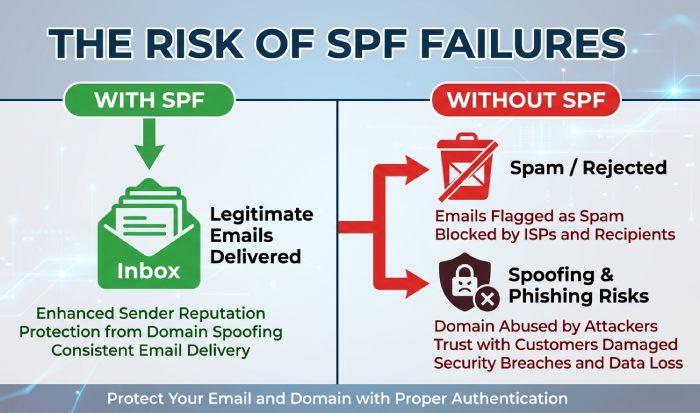
SPF is a DNS TXT record that lists which mail servers are authorized to send email on behalf of your domain. When a recipient mail server receives an email, it checks the visible sending domain against the SPF record. If the sending IP or included service is authorized, SPF can pass. If not, the message may fail authentication.
For organizations using a zendesk infusionsoft integration, SPF helps prevent attackers from pretending to send email from your domain through fake Zendesk, Infusionsoft, or Accredible messages. It also reduces authentication failures when legitimate services send on your behalf.
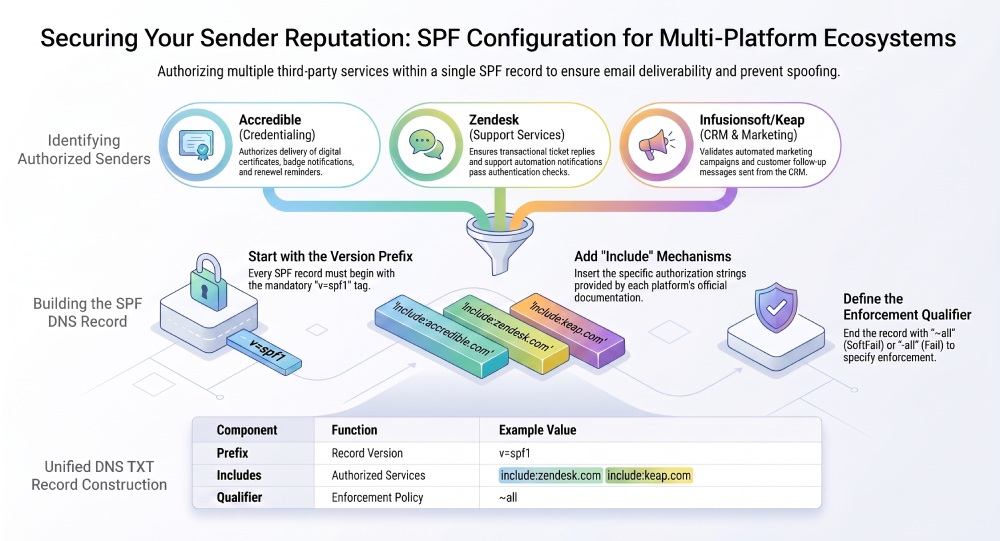
The SPF record usually starts with:
v=spf1
Then it contains mechanisms such as include, ip4, ip6, or a, followed by an enforcement qualifier such as ~all or -all. Our SPF glossary explains each of these mechanisms in plain language.
For example, a domain might authorize multiple services:
v=spf1 include:example-*zendesk*-spf include:example-*keap*-spf include:example-accredible-spf ~all
The exact values must come from Zendesk, Infusionsoft/Keap, and Accredible documentation. Stacking several includes like this can bump against the 10 DNS lookup limit, so keep the record lean. Zendesk may require a Zendesk-specific include for the zendesk integration. Infusionsoft or Keap may require a separate include for the infusionsoft integration. Accredible may use its own sender infrastructure or a third-party email provider.
How SPF Evaluation Works for These Platforms
In practice, SPF supports three connected areas:
- Transactional support email from Zendesk, including support ticket replies and ticket automation notifications.
- Automated and marketing emails from Infusionsoft or Keap, including customer notifications and email campaigns.
- Credential email from Accredible, including certificate delivery and badge notifications.
This is why each email-sending platform should be reviewed when creating or updating your SPF record. If Zendesk sends email notifications using your domain, its authorized sending sources must be included in your SPF record to ensure authentication checks pass. If Infusionsoft sends campaign management follow-ups from the same domain, the Infusionsoft sending service must also be included. With three sending platforms, an SPF flattening service helps keep the record within DNS limits.
SPF does not replace DKIM or DMARC, but it is a critical first layer. For any crm integration involving Zendesk, Infusionsoft, Accredible, MyFusionSolutions servers, or a Web Developer-managed Server, SPF alignment reduces deliverability risk.
General Manager
General Manager of DuoCircle. Product strategy and commercial lead for AutoSPF's 2,000+ customer base.
LinkedIn Profile →