How To Set Up SPF Authentication For Mailhostbox And Endurance International Emails

Quick Answer
To set up SPF authentication for Mailhostbox and Endurance International emails, add the correct SPF TXT record to your domain’s DNS, include all authorized mail servers, and verify the record to improve email delivery and prevent spoofing.

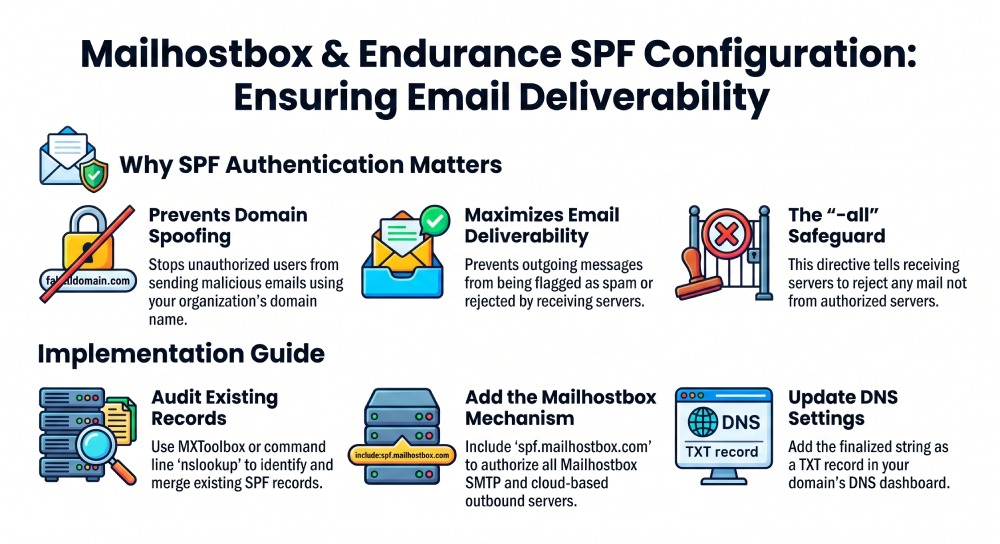
Sender Policy Framework (SPF) authentication plays a central role in email security and deliverability for organizations using mailhostbox, business email, and enterprise email solutions. SPF is a DNS-based standard designed to prevent phishing, email spoofing, and spam by allowing domain owners to specify which servers are permitted to send emails on their behalf.
Without SPF authentication, your outgoing messages”whether sent via webmail, a desktop email client, or a mobile email client”are much more likely to be flagged as spam or rejected by receiving email servers, impacting your organization’s communication reliability. With business email continuity and zero data loss policies at stake, robust SPF records are critical. Understanding why SPF lookups matter helps you keep those records both accurate and efficient.
When SPF is not in place or incorrectly configured in your domains DNS settings, unauthorized users can send malicious emails as though they’re from your domain. This can lead to compromised passwords, phishing attacks, and blacklisting of your domain, despite protections like anti-virus technology and virus protection embedded in your mail infrastructure. For enterprises, where 100% uptime and fail-safe backup systems such as NetApp are essential, SPF configuration deserves careful attention.
Overview of Mailhostbox and Endurance International Email Sending Infrastructure
Before making any DNS configuration changes, it’s important to understand the specific email server infrastructure used by Mailhostbox and Endurance International. These cloud email service providers offer feature-rich solutions, such as business email and enterprise email with robust mail storage options (typically ranging from 5GB storage for Free Email to 30GB accounts for Business Email). Whether using a mobile email client on an Apple iPhone or Android device, webmail mailhostbox, or desktop apps like Microsoft Outlook or Thunderbird, all outgoing mail from your domain will ultimately be routed through the providers outbound server infrastructure.
For Mailhostbox, sending mail typically relies on SMTP services available through hostname configurations like:
smtp.*mailhostbox*.comus2.smtp.*mailhostbox*.comus3.smtp.*mailhostbox*.com
Incoming messages use IMAP or POP services (imap.mailhostbox.com, pop.mailhostbox.com) for flexible email client settings whether you’re managing emails from the Gmail application, Windows Mail App on MacOS, or older platforms like Outlook Express, Eudora, or Entourage 2004.
The providers enterprise-level infrastructure supports strong email security using SSL or STARTTLS for encrypted transmissions, anti-spam policy enforcement, and efficient virus protection. The architecture supports cloud-based backup, tasks, contact group management, file sharing, synced accounts, distribution lists, and auto-responder capabilities that underpin modern business demands.
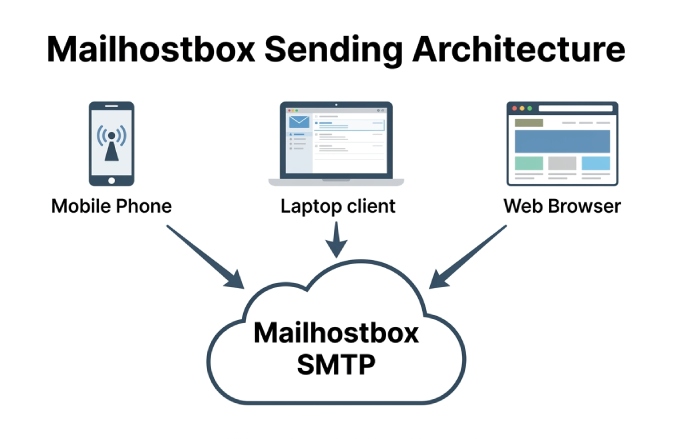
Identifying Your Domains Current SPF Record Before Making Changes
Before you add or update your SPF record to account for Mailhostbox or Endurance International, identify any pre-existing SPF records. An improperly merged record or duplicate entry can break email deliverability across all mail and webmail systems, including those accessed via mobile email clients or desktop email client configurations.
How to Check Your SPF Record
Using Online Tools
Utilize online DNS lookup services such as MXToolbox or DNSstuff. Enter your domain (e.g., yourdomain.com) and review the TXT records. Look for a line similar to:
v=spf1 include:spf.protection.domain.com -all
Using Command Line
If you manage or have access to the domain via a terminal or command prompt, run:
nslookup -type=txt yourdomain.com
If you already use multiple email hosting solutions (Free Email, Business Email, or Enterprise Email hosting), its common to see multiple include mechanisms referencing other third-party mail providers. Too many includes can hit the DNS lookup cap, at which point it helps to flatten your SPF record.
Interpreting Results
Take note if your current SPF record contains references to prior email providers. Be careful not to remove necessary includes related to services such as Google Workspace, Microsoft 365, or any custom outbound server your enterprise email may use. A misstep can inadvertently cut off legitimate email flow for calendar import/export, mailing lists, and contact group notifications.
Finding the Correct SPF Include Mechanisms for Mailhostbox and Endurance International
To validate mail sent via the Mailhostbox SMTP servers, your SPF record must reference their authorized sending hosts. Using incorrect hostnames or omitting required mechanisms will lead to delivery failures for all email account traffic, whether sent via desktop email client, mobile email client, or through the provider’s webmail interface.
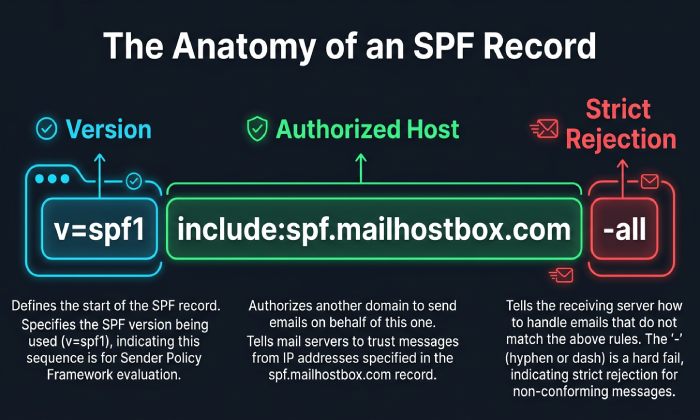
Official SPF Include Mechanism from Mailhostbox
The recommended SPF include for Mailhostbox is:
include:spf.*mailhostbox*.com
This mechanism allows all IP addresses authorized by Mailhostboxs infrastructure (including smtp.*mailhostbox*.com, us2.smtp.*mailhostbox*.com, and us3.smtp.*mailhostbox*.com) to send mail for your domain.
Endurance International SPF Mechanisms
Endurance International generally leverages the Mailhostbox infrastructure for its business email accounts, but if directed otherwise, consult their provider-specific documentation (e.g., support.mailhostbox.com or emailhostbox.com for Emailhostbox). Most domains managed under the Endurance International group benefit from the same SPF mechanism.
Important: Account-Specific Instructions
If your custom branding configuration includes white-labelled URLs or email servers, confirm the correct include by referencing your welcome email, your Email Admin Dashboard, or direct support. Some legacy accounts may require different SPF hostnames.
Creating an SPF Record for Domains Sending Only Through Mailhostbox
If your domain uses Mailhostbox exclusively for all outbound email”whether through business email, enterprise email, or Free Email accounts”its best to design an SPF record that is concise and specific to their infrastructure. Our free SPF record generator can help you build one.
Constructing the Record
Your DNS TXT entry should resemble the following:
v=spf1 include:spf.*mailhostbox*.com -all
This statement:
v=spf1designates this as an SPF record.include:spf.*mailhostbox*.comauthorizes all outbound servers from Mailhostbox, including SMTP relays secured with SSL or STARTTLS.- -all means only servers listed (no others) are allowed to send mail from your domain, improving email security and aligning with anti-spam policy guidelines.
Where to Add the Record
DNS Dashboard Access
Navigate to wherever your DNS zone is managed. This could be:
- The Email Admin Dashboard under your Mailhostbox or Emailhostbox portal
- Your domain registrars DNS management interface (GoDaddy, Namecheap, etc.)
- Enterprise DNS solutions like Route 53 or Cloudflare
Create (or update) a TXT record for your domains root (@):
- Name/Host/Alias:
@or blank (as per provider instructions) - Value:
v=spf1 include:spf.*mailhostbox*.com -all - TTL: Leave default (usually 3600 seconds / 1 hour)
Tips for Ongoing Management
- If you deploy desktop email clients (Microsoft Outlook, Thunderbird, Windows Mail App) or mobile email clients (Android email setup, iOS email setup on Apple iPhone, Gmail application), SPF authentication is invisible to end users but vital for backend email delivery.
- After updates, validate the record using online tools to confirm propagation. SPF changes might take minutes to several hours depending on DNS TTL.
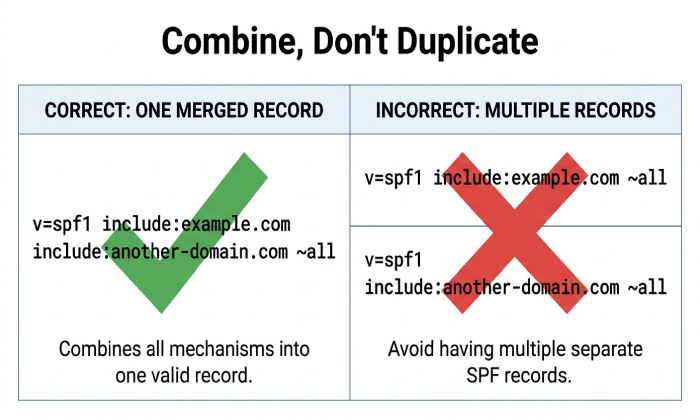
- If you run secondary mail services (e.g., bulk mailing lists, backup notification systems), append additional mechanisms or includes as required”never create multiple SPF records; instead, combine mechanisms within a single record. Watch the SPF too many DNS lookups limit as you add senders.
- For documentation and troubleshooting, refer to support.mailhostbox.com or consult with your DNS administrator.
Correct and timely SPF implementation ensures your business email or enterprise email achieves high deliverability, reduces spam, and strengthens overall email security, benefiting all users across platforms including webmail, desktop, and mobile environments.
General Manager
General Manager of DuoCircle. Product strategy and commercial lead for AutoSPF's 2,000+ customer base.
LinkedIn Profile →