How to Set Up an SPF Record for beget.ru

Quick Answer
Learn how to set up an SPF record for beget.ru to authorize legitimate email senders, prevent domain spoofing, improve email deliverability, and reduce the risk of messages being marked as spam.
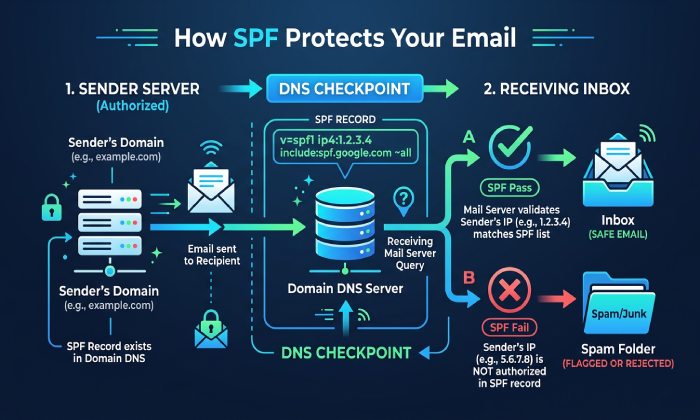
An SPF record, or Sender Policy Framework record, is a DNS TXT record that specifies which servers and services are authorized to send email on behalf of your domain. For Beget users, configuring SPF correctly is important when email is sent through Beget mail services or other authorized email providers. A properly configured SPF record helps receiving mail servers verify legitimate senders and can reduce SPF failures that may affect email delivery.
If your SPF record is missing or incorrect, messages from your .RU domain or .COM domain may be flagged as suspicious, routed to spam, or rejected entirely. This can affect transactional mail, password resets, invoices, contact-form notifications, and corporate correspondence. SPF is not a replacement for DKIM or DMARC, but it is one of the core authentication mechanisms used by modern email systems.
Beget is also used as a broader cloud platform for IT infrastructure, combining cloud hosting, web hosting, cloud services, cloud databases, S3 storage, and Dedicated Servers. In this environment, reliable email authentication supports business continuity, Uptime, brand trust, and deliverability. It also complements other platform-level protections such as DDoS protection, monitoring, antivirus, virus protection, site isolation, automatic backups, and backup routines.
SPF is particularly relevant if your company manages several domains across different domain zones, such as a .RU domain for the Russian Federation market and a .COM domain for international customers. Since domain zones are controlled through DNS, each domain must have its own correct SPF TXT record.
Prerequisites: Domain Access, DNS Control, and Email Sending Sources
Before creating an SPF record for beget.ru hosting or mail services, confirm that you have administrative access to the domain and its DNS zone. You need permission to edit TXT records in the Beget Control Panel or wherever your authoritative DNS is hosted. If your domains are registered with Beget but DNS is delegated elsewhere, you must update SPF in the external DNS control panel instead.
You should also identify every legitimate email sending source. Common sources include:
- Beget mail services used with web hosting or cloud hosting.
- Mail scripts on virtual servers, VPS, VDS, or dedicated servers.
- CRM, billing, newsletter, or helpdesk systems.
- External providers connected through SMTP integration.
- Applications running in Kubernetes clusters or other container orchestration environments.
- Transactional systems using MySQL, PostgreSQL, or Cloud Databases to generate mail events.
This review matters because SPF allows only the systems you specify. If you forget a third-party sender or a mail service running on your cloud platform, legitimate messages may fail SPF checks. On the other hand, adding too many sources weakens the security value of SPF.
For businesses modernizing IT infrastructure through migration, free migration, or project transfer, DNS records should be checked before and after moving services. The Beget Migration Service can simplify hosting relocation, but SPF, DKIM, and MX records should still be validated manually. This is especially true when moving from traditional web hosting to cloud hosting, from shared hosting to virtual servers, or from VPS and VDS environments to dedicated servers.
Begets hosting and server services can support different types of infrastructure, but SPF configuration depends on the email-sending services authorized to send on behalf of your domain. Make sure your DNS records accurately reflect those legitimate email sources.
Identifying the Correct SPF Value for beget.ru Hosting and Mail Services
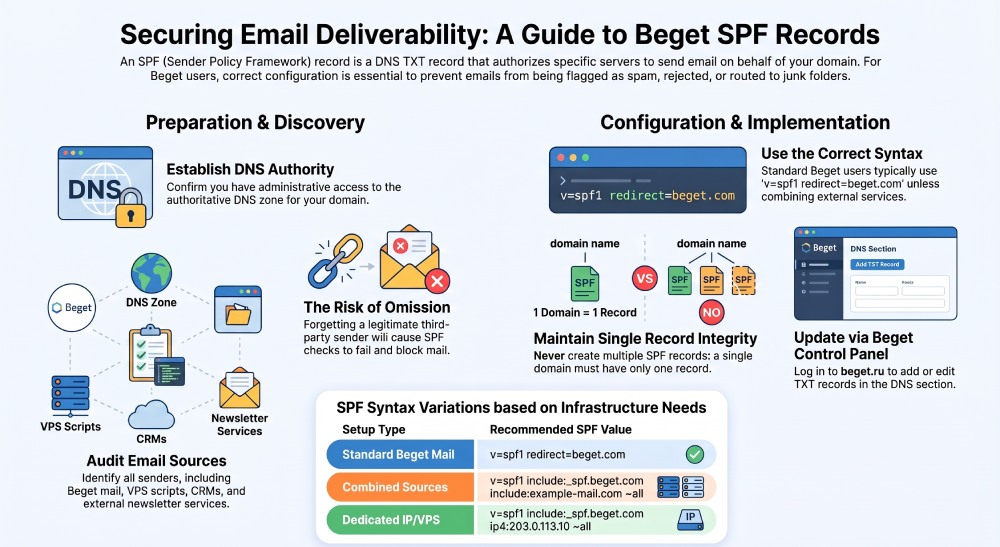
For a domain using Beget mail services, the SPF value is usually provided in the Beget Knowledge Base or displayed in the Beget Control Panel mail/DNS recommendations. A commonly used SPF format is:
v=spf1 redirect=beget.com
However, you should always confirm the current recommended value from Beget documentation or expert support before publishing it. Hosting providers may update mail infrastructure, and the correct include mechanism can change over time. If the Beget Knowledge Base or control panel guide gives a different SPF string, use the official value.
If your domain sends mail only through Beget, the SPF record can be simple. If your .RU domain or .COM domain also sends mail through an external provider, you must combine all approved sources into one SPF record. For example:
v=spf1 include:_spf.beget.com include:example-mailservice.com ~all
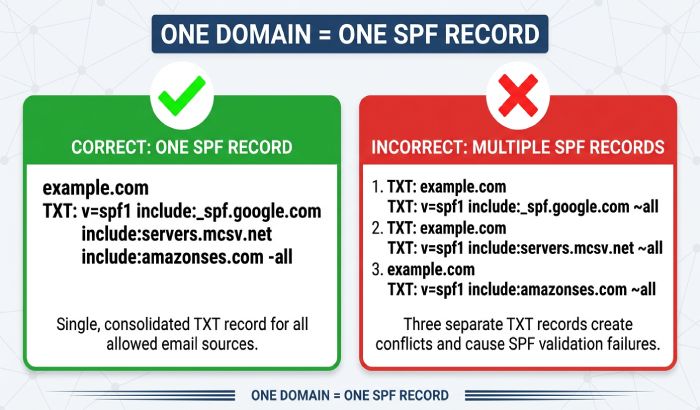
Do not create multiple SPF TXT records for the same hostname. A domain should have one SPF record only. Multiple SPF records can cause SPF PermError results and harm deliverability.
For more advanced IT infrastructure, such as Cloud Servers, Kubernetes, Kubernetes clusters, VPS, VDS, or dedicated servers sending mail directly, you may also need to add IP addresses:
v=spf1 include:_spf.*beget*.com ip4:203.0.113.10 ~all
Use direct IP authorization carefully. If you rely on virtual servers or cloud hosting with changing IPs, SPF should be reviewed during infrastructure scaling, migration, or server replacement. This is one reason DNS planning is important for cloud services, web hosting, and dedicated servers. Strong email security practices help protect your organization from phishing, spoofing, malware, and unauthorized access.
Logging in to the beget.ru Control Panel and Finding DNS Settings
To add or edit an SPF record, sign in to the Beget Control Panel at beget.ru using your account credentials. If you use two-factor authentication or Telegram notifications, complete the required security step. Once inside the control panel, go to the section that manages domains and DNS.
The Beget Control Panel is designed for managing domains, domain zones, web hosting, cloud hosting, virtual servers, VPS, VDS, dedicated servers, Cloud Databases, and other cloud services from a unified interface. This centralized approach is useful when your IT infrastructure includes several projects, multiple domain zones, and different hosting products.
Beget provides domain and DNS management for domains such as .RU and .COM. When managing SPF, make sure the TXT record is updated in the DNS zone that is authoritative for your domain.
General Manager
Founder and General Manager of DuoCircle. Product strategy and commercial lead for AutoSPF's 2,000+ customer base.
LinkedIn Profile →