How to Read a DMARC Aggregate Report Without the Headache

Quick Answer
A DMARC aggregate (RUA) report shows how email sent using your domain performs authentication checks. It helps identify sending sources, analyze SPF and DKIM alignment, detect misconfigurations, and spot potential spoofing attempts.
Try Our Free DMARC Checker
Validate your DMARC policy, check alignment settings, and verify reporting configuration.
Check DMARC Record →
What a DMARC Aggregate (RUA) Report Is and Why It Matters
A DMARC aggregate report is a periodic summary sent by receiving mail servers and mailbox providers, such as Google, Microsoft, Comcast, and other participating email receivers—to tell you how email using your domain is being authenticated. These reports show whether messages passed SPF, DKIM, and DMARC checks, which systems sent mail on your behalf, and whether those systems are aligned with your published DMARC record.
In practical terms, a DMARC aggregate report helps you answer three critical questions:
- Who is sending email using my domain?
- Are those email sources passing email authentication?
- Which systems need to be fixed before DMARC enforcement?
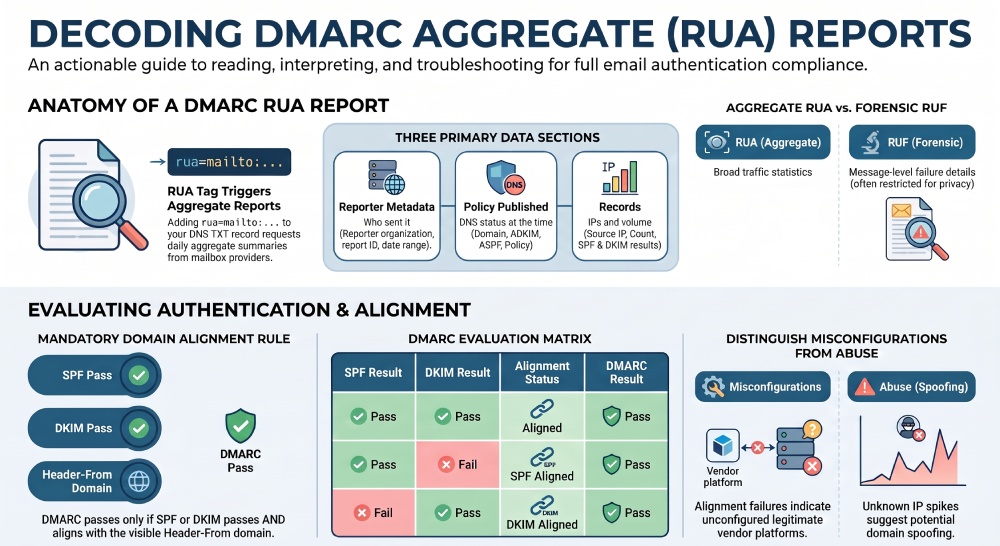
RUA reports are generated because your DMARC record includes a rua tag, such as:
v=DMARC1; p=none; rua=mailto:dmarc-reports@example.comThe rua tag tells receivers where to send aggregate reports.This differs from the ruf tag, which requests failure-related forensic reports when supported by the receiving provider. Unlike aggregate RUA reports, these reports may contain message-level information. However, many providers do not send forensic reports because of privacy considerations. While the rua tag supports broad aggregate report analysis, the ruf tag and RUAF-style reporting are more sensitive because they may include message-level details.
A DMARC aggregate report matters because it gives visibility into your domain infrastructure. Without it, you may not know whether your CRM, billing system, newsletter platform, helpdesk, or internal mail server is passing email authentication. It is also one of the safest ways to start improving DMARC compliance before moving from policy p=none to stricter enforcement such as policy p=reject.
Key Sections of a RUA Report: Metadata, Policy, and Source IPs
Metadata: Who Sent the Report and When**
The metadata section identifies the reporter or reporting ESP that generated the DMARC aggregate report. This could be Google, Microsoft, Comcast, or another mailbox provider. It usually includes:
- Organization name
- Report ID
- Date range or date sent
- Contact information
- Report frequency, usually daily
This metadata is important because different receivers see different parts of your mail flow. For example, Google may report heavy Gmail traffic, while Microsoft may reveal authentication behavior for Outlook and Microsoft 365 recipients.
Policy Published: What Your DMARC Record Says
The policy section shows the receiver’s view of your DMARC record as published in the Domain Name System. Since DMARC is published as a DNS TXT Record, the report reflects the policy discovered through DNS at the time messages were evaluated.
A policy block typically includes:
- The header-from domain
- The active DMARC policy
- SPF and DKIM alignment settings
- Subdomain policy, if configured
- Percentage enforcement, if used
For example, a domain may start with p=none to monitor traffic. After improving DMARC compliance, the organization may move toward quarantine and eventually p=reject. A good configuration guide will recommend this staged approach because premature DMARC enforcement can affect legitimate delivery status if your domain infrastructure is not fully mapped.
Records: Source IPs, Volume, and Disposition
The records section is where the DMARC aggregate report becomes especially useful. Each row usually represents a sender IP address and includes:
- Sending IP
- Message count
- Message disposition
- SPF result
- DKIM result
- DMARC result
- Header-from and sometimes Return-Path details
The sender IP address helps identify which platform sent the mail. A reverse lookup may reveal the ESP, though IP ownership is not always enough for accurate email vendor identification. That is why comparing IPs against known vendors, Return-Path domains, DKIM selectors, and sending patterns is important.
How to Interpret SPF, DKIM, Alignment, and DMARC Pass/Fail Results
A DMARC aggregate report is not just about whether SPF or DKIM passed independently. DMARC depends on both authentication and alignment.
SPF Results and SPF Alignment
SPF checks whether the sending mail server is authorized in the domain’s SPF record. SPF uses the envelope sender, often visible through the Return-Path, rather than the visible Header-from address.
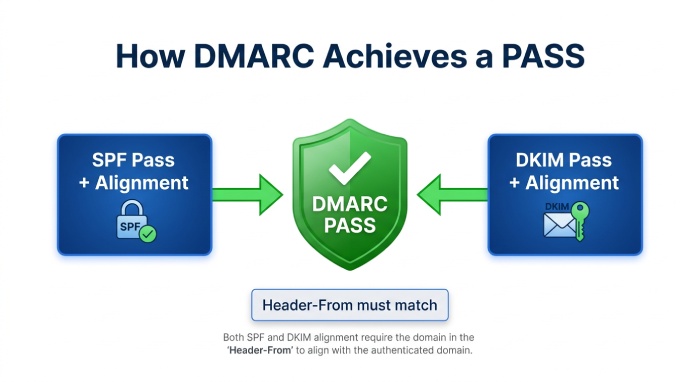
For DMARC, SPF must pass and align. SPF alignment means the authenticated Return-Path domain aligns with the Header-from domain. If SPF passes for a third-party ESP’s bounce domain but does not align with your Header-from domain, DMARC may still fail.
Because SPF records are published in DNS, they can become complex as your domain infrastructure grows. Too many includes may create lookup-limit problems. In larger environments, an SPF flattening tool can help manage SPF complexity while maintaining reliable email authentication.
DKIM Results and DKIM Alignment
DKIM verifies that a message was signed by a domain using cryptographic keys published in DNS. For DMARC, DKIM alignment means the domain in the DKIM signature aligns with the Header-from domain.
DKIM is often more reliable than SPF for forwarded mail because SPF can break during forwarding. If DKIM passes and aligns, DMARC can pass even when SPF fails. For this reason, every major ESP used in your domain infrastructure should be configured with DKIM signing using your domain where possible.
DMARC Pass/Fail and Authentication Status
The DMARC result combines SPF, DKIM, and policy alignment. A message passes DMARC if either SPF or DKIM passes and aligns with the header-from domain.
Common patterns include:
| SPF | DKIM | Alignment | DMARC Result |
|---|---|---|---|
| Pass | Pass | Aligned | Pass |
| Pass | Fail | SPF aligned | Pass |
| Fail | Pass | DKIM aligned | Pass |
| Pass | Pass | Not aligned | Fail |
| Fail | Fail | Not aligned | Fail |
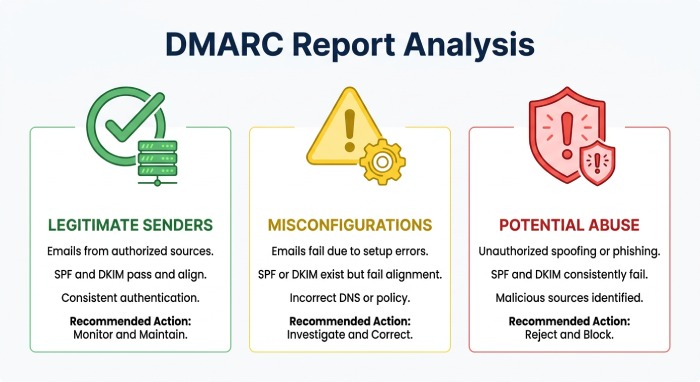
An authentication failure does not always mean abuse. It may indicate a legitimate platform that lacks DKIM setup, an outdated SPF include, incorrect alignment settings, or a vendor sending from a domain not connected to your DMARC record.
Spotting Legitimate Senders, Misconfigurations, and Possible Abuse
The biggest value of a DMARC aggregate report is visibility into email sources. Over time, report filtering and dashboard tabs can help separate compliant sources from non-compliant sources.
Identifying Legitimate Email Sources
Legitimate email sources often include:
- Microsoft 365 or Google Workspace
- Marketing automation platforms
- Transactional email providers
- Billing and invoicing systems
- Support desks
- HR or payroll platforms
- Internal servers and applications
If the sender IP address belongs to a known ESP and the email sending volume matches expected activity, the source is likely legitimate. Still, email vendor identification should be confirmed through DKIM selectors, Return-Path domains, account settings, and vendor documentation.
Finding Misconfigurations
Misconfigurations are common when organizations first publish a DMARC record with a rua tag. Typical issues include:
- SPF passes but SPF alignment fails
- DKIM is missing or signed by the vendor’s domain
- DKIM alignment fails because the wrong domain is used
- The DMARC record has an incorrect rua tag destination
- The ruf tag points to an address not prepared to receive forensic data
- DNS contains outdated SPF includes
- A vendor was never added to SPF or DKIM
A DMARC Checker or Free DMARC Record Generator can help validate syntax, especially for DNS TXT Record errors.
Detecting Abuse and Malicious Emails
A DMARC aggregate report can also reveal suspicious senders. Watch for unknown IPs, unexpected countries, unusual spikes in email sending volume, and repeated failures from sources you do not recognize. These may represent spoofing attempts, phishing campaigns, or other malicious emails using your domain.
However, RUA reports are aggregate, not message-level evidence. If you need more detail, a forensic report using the ruf tag may help, though many receivers limit or do not send ruf data for privacy reasons. Treat DMARC Failure Reports and Forensic Report data carefully, because they may expose sensitive information.
General Manager
General Manager of DuoCircle. Product strategy and commercial lead for AutoSPF's 2,000+ customer base.
LinkedIn Profile →