How to Fix DKIM None Message Not Signed: A Step-by-Step Troubleshooting Guide

Quick Answer
DKIM None Message Not Signed means your email lacks a valid DKIM signature. To fix it, enable DKIM signing, verify your DNS DKIM record and selector, review email headers, and test authentication after DNS propagation to improve deliverability and DMARC alignment.
What “DKIM None: Message Not Signed” Means and Why It Matters
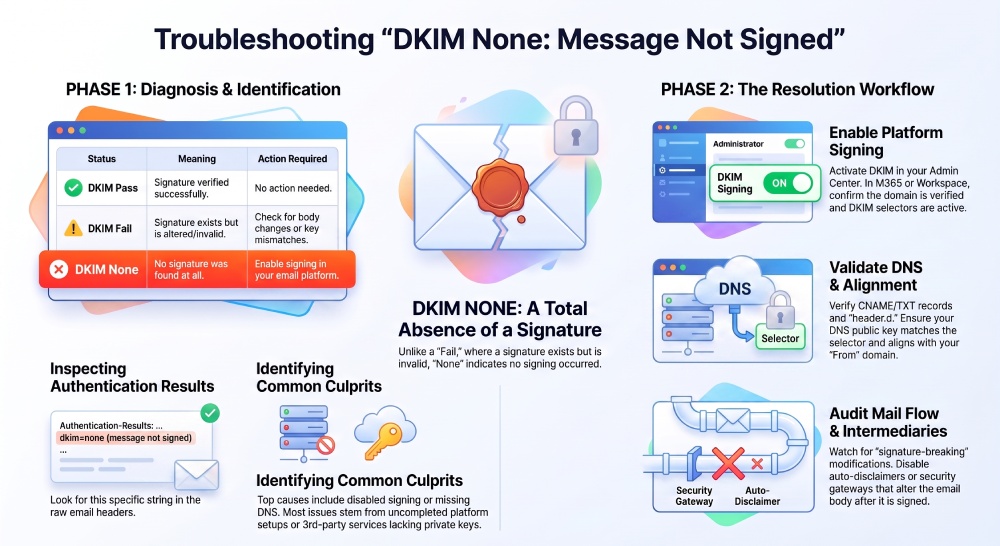
A dkim none result with message not signed means the receiving server did not find a valid dkim signature in the email headers. In practical terms, the message arrived without evidence that the sending domain applied dkim signing before delivery. This is different from dkim fail, where a signature exists but cannot be verified; with dkim none, the message typically has no usable signature at all.
DKIM matters because it allows a receiver to compare the dkim signature in the message with the dkim public key published in DNS. The sending platform uses the dkim private key to sign selected parts of the email message, such as the message-id, subject, mime-version, and content-type. The receiver then performs dkim validation using the public key. If everything aligns, you get dkim pass. If the message is unsigned, you may see dkim none and message not signed in the authentication results.
This affects deliverability, phishing protection, and domain trust. Even if you have spf pass, a missing DKIM signature can weaken email authentication, especially when DMARC is involved. A domain may show dmarc none if the policy is only monitoring, but a stronger policy expects alignment between header.from and authenticated identifiers such as header.d. When DKIM aligns and validates, a receiver may record dmarc pass. Without DKIM, dmarc pass may depend entirely on SPF alignment.
For a deeper overview of secure sending standards, see DKIM, and remember that SPF should work alongside DKIM, not replace it.
Common Causes of DKIM None Results
The most common reason for dkim none and message not signed is that dkim signing is not enabled for the sending domain. This often happens after a new domain is added to Microsoft 365, Office 365, Google Workspace, or another email platform, but the administrator never completes the dkim configuration.
Another common issue is a missing or incorrect dkim dns record. The receiver needs the selector and domain from header.d to locate the correct TXT record. If the dns configuration is wrong, the dkim public key cannot be found. However, this may produce dkim fail instead of dkim none if a signature exists but verification breaks.
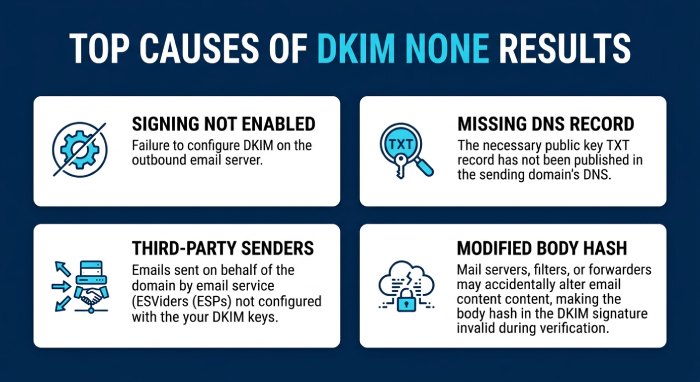 Other causes include:
- A platform sends mail before domain verification is complete.
- A third-party service sends mail without access to the proper dkim private key.
- An email forwarder or security gateway modifies the message and causes signature verification failed.
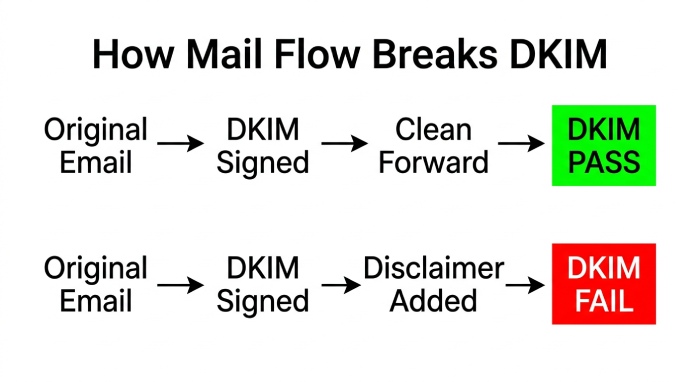
- auto disclaimers or auto signatures are injected after signing, changing the body hash.
- A hybrid environment routes mail between Exchange on-premises and Exchange Online without consistent mail flow rules.
- A sender uses a platform that is not dkim compliant or signs with the wrong selector, such as selector1.
In Microsoft 365 and Office365 environments, dkim none may also appear when a tenant has not been fully hydrated. Admins sometimes see references to enable-organizationcustomization, get-organizationconfig, isdehydrated, or tenant dehydrated when advanced Exchange Online settings are not yet available.
Step 1: Confirm the DKIM Failure in Email Headers
Before changing DNS or policy settings, inspect the full message headers. In Microsoft Outlook, Gmail, or Microsoft Edge-based webmail sessions, open the original message source and look for the authentication header or authentication results line.
Read the Authentication Results Carefully
A typical authentication results entry may include SPF, DKIM, and DMARC outcomes:
Authentication-Results: receiver.example;
spf=pass;
dkim=none (message not signed);
dmarc=none header.from=contoso.com
Here, dkim none confirms that the receiver did not find a usable dkim signature. The phrase message not signed tells you this is not yet a cryptographic mismatch; it is a signing absence. If the result says dkim fail, then the message was signed but failed dkim validation. If it says dkim pass, the signature was verified successfully.
Also review header.from, header.d, header.i, and header.b. The header.from value is the visible sender domain. The header.d value is the DKIM signing domain. The header.i value identifies the signing identity, while header.b contains part of the signature data. If there is no DKIM-Signature header at all, dkim none is expected.
Compare DKIM, SPF, and DMARC Outcomes
Do not evaluate DKIM in isolation. If SPF shows spf pass, but DKIM shows dkim none, the DMARC result may still be dmarc pass if SPF aligns with header.from. However, if SPF does not align and DKIM is missing, DMARC may show dmarc none under a monitoring policy or fail under enforcement.
You may also see arc-authentication-results on a forwarded email. ARC can preserve previous authentication results, but it does not replace proper dkim signing at the original sender. Use a dkim verifier such as mail-tester.com or dkimvalidator.com to run an independent authentication check and compare the results.
Step 2: Verify Whether DKIM Signing Is Enabled in Your Email Platform
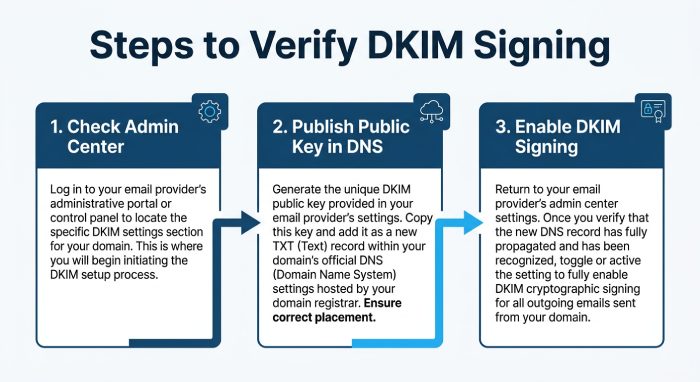 If the headers confirm dkim none and message not signed, check whether dkim signing is enabled where the message originated. The correct fix depends on your provider and exchange environment.
Microsoft 365, Office 365, and Exchange Online
In Microsoft 365, go to the Microsoft Admin Center or the Exchange admin center, then check DKIM settings under Exchange Online Protection. For many tenants, the DKIM records use selectors such as selector1 and selector2. If the domain was newly added, DKIM may not be enabled until the required CNAME or TXT-style records are present and detected.
This applies to organizations using Microsoft Outlook, Microsoft Teams notifications, Dynamics 365, Power Platform, Azure services, or applications that send as the same domain. A Contoso tenant, for example, may have header.from set to contoso.com while header.d shows an onmicrosoft.com domain until custom DKIM is enabled.
If you purchased a domain bought from microsoft, setup may be more automated. For a domain bought from godaddy, GoDaddy DNS must still contain the correct records. If activation fails, check Microsoft Learn, Azure Documentation, the Microsoft Support Community, Q&A threads, or open a support ticket / Support Ticket through Microsoft Support.
Watch for tenant and customization issues
In some Exchange Online tenants, especially older or lightly configured ones, DKIM options may be unavailable until organization customization is enabled. Administrators may need to check get-organizationconfig and the isdehydrated value, then run enable-organizationcustomization if Microsoft guidance allows it. If the Tenant remains restricted, open a Service Request and use any available Diagnostics Tool in the Admin Center.
Third-Party Senders and Applications
For platforms outside Microsoft, such as CRMs, marketing tools, Student Hub systems, Educator Center portals, Labs environments, Career Paths platforms, Microsoft Copilot Training pages, or FAQ mailers, confirm that each application has its own dkim configuration. Microsoft Copilot, Power Platform Training, and Microsoft Build-related services may send through different systems depending on configuration.
The sending service must possess the correct dkim private key. You should never publish the private key in DNS; only the public key belongs in DNS. If a vendor cannot sign mail with your domain or provide a proper selector, messages may remain dkim none and message not signed.
Step 3: Check Your DKIM DNS TXT Record for Errors
Once dkim signing is enabled, validate the dkim dns record. A bad dns record can prevent dkim validation, cause dkim fail, or stop a provider from activating DKIM at all.
Validate the Selector, Public Key, and Syntax
A DKIM record usually contains a selector, a domain, and a key value. For example, a selector lookup may resemble:
selector1._domainkey.contoso.comThe TXT value contains the dkim public key, often beginning with v=DKIM1; k=rsa; p=.... The platform signs with the matching dkim private key, commonly using rsa-sha256 and canonicalization such as relaxed/relaxed. If the dkim public key is truncated, split incorrectly, or published under the wrong selector, dkim validation will not return dkim pass.
Check that header.d matches the domain where the selector is published. Also confirm that header.from alignment supports DMARC. If header.d is a vendor domain while header.from is your domain, you may get dkim pass but not necessarily dmarc pass. If your DMARC policy is dmarc none, this may only appear in reports; with enforcement, it can affect delivery.
Test With External DKIM Tools
Send a test message to mail-tester.com and dkimvalidator.com. These services show the raw authentication results, whether the message has a dkim signature, and whether the body hash matches. They also identify each signed field, which helps you see whether later processing changed the message.
If you use an Email Security Gateway, compare the message before and after the gateway. Some gateways, disclaimers, and transport rules alter content after signing, leading to dkim fail rather than dkim none. If no signature appears at all, return to the sending platform and recheck the dkim configuration.
Finally, treat DKIM as one part of a broader email security and email policy program. Tools such as AutoSPF can help maintain SPF records, while DKIM and DMARC should be monitored together. The goal is consistent dkim pass, reliable dmarc pass, clean authentication results, and no recurring dkim none or message not signed findings.
Step 4: Validate the DKIM Selector and Domain Alignment
A common cause of dkim none is selector or domain mismatch. DKIM depends on three pieces matching correctly: the selector in the dkim signature, the domain in header.d, and the sending identity in header.from. If the receiving server cannot find the matching dkim public key, the result may show message not signed, dkim fail, or simply dkim none in the authentication results.
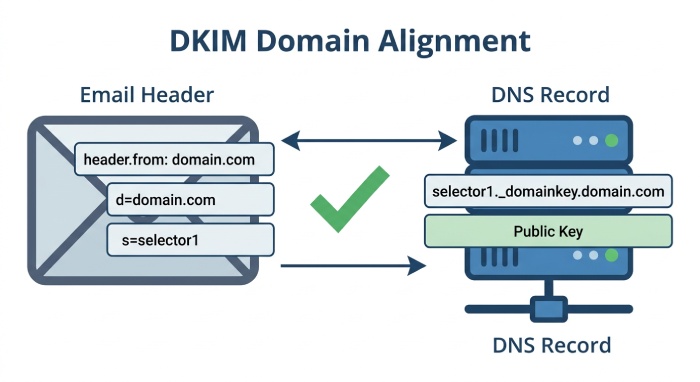
Confirm selector, header.d, and header.from alignment
Start by reviewing the message headers in Microsoft Outlook, Microsoft 365, or a header analysis tool. Look for the DKIM-Signature header and confirm these fields:
d=value, also known as header.ds=selector, such as selector1i=identity, also known as header.ib=signature value, also known as header.b- Signed header list, including values such as message-id, subject, mime-version, and content-type
If header.d is contoso.com but header.from is marketing.contoso.com, DKIM may still pass cryptographically, but DMARC alignment may not. That can produce dmarc none, dmarc pass, or DMARC alignment issues depending on the policy and organizational domain. A clean dkim pass usually requires the dkim signature to validate and align with header.from under DMARC rules.
For Microsoft 365 and Exchange Online, the selector in the dkim dns record must match what Exchange Online expects. If the DNS entry points to the wrong Microsoft 365 tenant, an old Tenant, or a previous Exchange Environment, dkim validation may fail even when the record appears to exist.
Verify the public key and private key relationship
DKIM works because the sender signs the email with a dkim private key, while the receiver verifies it using the dkim public key published in DNS. You never publish the private key; only the public key belongs in the TXT or CNAME-based dns record.
In Microsoft 365, the dkim private key is controlled by Exchange Online, while your DNS publishes a CNAME that resolves to Microsoft’s hosted dkim public key. If you are using a third-party platform, such as a CRM, Email Security Gateway, or campaign system, that platform may generate its own dkim private key and ask you to publish a separate dkim public key.
For deeper background on how DKIM works with domain authentication, review the relationship between dkim signing, dkim validation, and DNS publishing before changing production records.
Step 5: Review Mail Flow, Forwarding, and Third-Party Senders
Even when your dkim configuration is correct, mail flow can break DKIM. If an email is modified after dkim signing, the recipient may see signature verification failed, dkim fail, or dkim none. This is especially common in a hybrid environment, where mail moves between on-premises Exchange, Exchange Online Protection, a security gateway, and external platforms.
Check forwarding and intermediate systems
A standard email forwarder can preserve the original dkim signature, but if it rewrites the body or subject, the body hash no longer matches. The receiving dkim verifier then marks the authentication check as failed. In some cases, the message may look like message not signed because the intermediary stripped the authentication header or rewrote the message.
Review arc-authentication-results when available. ARC can help preserve prior authentication results across forwarding hops, but it does not guarantee dkim pass. A forwarded email can still produce dkim fail if the signed content changes.
Mail systems that add auto disclaimers, auto signatures, tracking pixels, or rewritten URLs can also invalidate DKIM. If your organization uses Microsoft Defender, Exchange Online Protection, or a third-party Email Security Gateway, confirm whether it modifies the email message before or after dkim signing.
Identify third-party platforms using your domain
Many organizations send mail through Microsoft 365, Dynamics 365, Power Platform apps, Azure services, marketing tools, ticketing systems, and learning portals such as Student Hub, Educator Center, Labs, Career Paths, or Microsoft Copilot Training environments. Each platform must be dkim compliant and must have its own approved dkim configuration.
If a vendor sends as your domain but does not sign with an aligned header.d, recipients may report dkim none, message not signed, or dmarc none. If the vendor signs with its own domain, you may see dkim pass but still not get dmarc pass because header.d does not align with header.from.
Also confirm SPF. A valid spf pass helps authentication, but SPF alone is not enough for resilient email authentication, especially when forwarding is involved. Tools such as AutoSPF can help manage complex SPF records, and this guide to SPF explains why SPF remains important alongside DKIM and DMARC.
Step 6: Test DKIM Signing After DNS Propagation
After updating the dns configuration, allow time for DNS propagation. Depending on TTL and provider behavior, a new dns record may become visible quickly or take several hours. If the domain was a domain bought from microsoft, the Microsoft Admin Center may simplify setup. If it was a domain bought from godaddy, GoDaddy DNS changes must still match Microsoft 365 expectations exactly.
Use external DKIM validation tools
Send a fresh test message to mail-tester.com and dkimvalidator.com. These tools display authentication results, including dkim pass, dkim fail, dmarc pass, dmarc none, and whether the message was message not signed. They also expose the selector, header.d, header.from, and the canonicalization method, often relaxed/relaxed with rsa-sha256.
If the result is dkim none, check whether the message contains a dkim signature at all. If it does not, the issue is usually disabled dkim signing, the wrong sending path, or a missing rule in your email policy. If the dkim signature exists but dkim validation fails, compare the selector, the dkim public key, and whether a gateway modified the signed field list.
Validate Microsoft 365 tenant readiness
In some older Office365 tenants, DKIM or other Exchange Online features may require organization customization. Administrators can use PowerShell commands such as get-organizationconfig and check isdehydrated status. If the tenant dehydrated state blocks configuration, Microsoft documentation may reference enable-organizationcustomization.
Use the admin center, Microsoft Admin Center, or Exchange Admin Center to confirm domain verification, DKIM status, and accepted domains. If Exchange Online still shows DKIM as unavailable after domain verification, open a support ticket or Service Request with Microsoft Support. The Microsoft Support Community, Microsoft Learn, Q&A, Azure Documentation, and posts from a Microsoft Community Moderator can also provide troubleshooting context, though production outages should go through an official Support Ticket.
How to Prevent DKIM None Errors in the Future
 The best prevention strategy is governance. Treat dkim configuration as part of your broader email security program, not as a one-time DNS task. Every new sender, application, or department workflow should go through an authentication check before it sends from your domain.
Maintain an inventory of all systems that send mail as your organization, including Microsoft 365, Exchange Online, on-premises Exchange, Microsoft Teams notifications, Microsoft Copilot, Dynamics 365, Power Platform, Azure apps, and third-party platforms. For each sender, document the selector, dkim dns record, dkim public key, ownership of the dkim private key, and expected header.d alignment with header.from.
Use monitoring to track authentication results over time. If you suddenly see more dkim none, message not signed, or dkim fail, review recent changes to mail flow, gateways, transport rules, branding systems, and auto signatures. Likewise, if dmarc none appears where you expect dmarc pass, verify whether DKIM or SPF is aligned with header.from.
Avoid legacy assumptions such as relying on dkim atps or SPF-only controls. Modern office 365 security and Microsoft 365 authentication should combine DKIM, SPF, DMARC, and appropriate reporting. Teams preparing for Microsoft Build, Microsoft Copilot Training, Power Platform Training, or internal FAQ updates should include DKIM ownership in operational documentation.
Final DKIM Troubleshooting Checklist
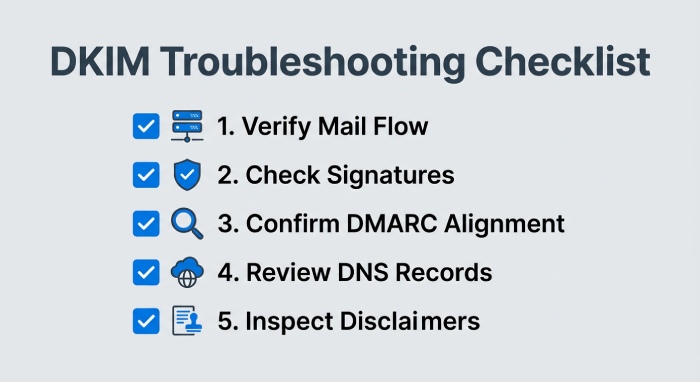
Use this checklist when dkim validation does not produce the expected dkim pass:
- Confirm the email is actually being sent through the expected mail flow path.
- Check whether the message has a dkim signature or shows message not signed.
- Compare header.from and header.d for DMARC alignment.
- Verify the selector, such as selector1, matches the published dkim public key.
- Confirm the dkim private key belongs to the active sending service.
- Review the dkim dns record for typos, stale CNAMEs, or wrong tenant references.
- Test with mail-tester.com and dkimvalidator.com after DNS propagation.
- Inspect authentication results and arc-authentication-results for forwarding clues.
- Check for signature verification failed caused by body changes, disclaimers, or a security gateway.
- Confirm whether the result is dkim none, dkim fail, dkim pass, dmarc none, or dmarc pass.
- Validate Microsoft 365 settings in the microsoft admin center and Exchange Online.
- For unresolved issues, collect headers, screenshots, and DNS data before contacting microsoft support.
Microsoft Edge can be useful for accessing Admin Center diagnostics, Microsoft Learn, and the Diagnostics Tool while comparing DNS records in another tab. In larger organizations, assign ownership to a specific messaging or security team so DKIM changes do not get lost between Microsoft 365, Azure, GoDaddy, Exchange, and third-party application owners.
FAQs
Why does DKIM show dkim none even when my DNS record exists?
dkim none usually means the receiving server did not find a usable dkim signature on the message. The DNS record may exist, but if dkim signing is disabled, the wrong selector is used, or mail bypasses the configured sender, the result can still be message not signed.
What is the difference between dkim fail and dkim none?
dkim fail means a DKIM signature was present but could not be verified, often because the body hash changed or the dkim public key did not match. dkim none means there was no valid DKIM signature available for the receiver to check.
Can DKIM pass while DMARC fails?
Yes. dkim pass confirms cryptographic validation, but DMARC also checks alignment between header.d and header.from. If those domains do not align, you may not get dmarc pass.
How long should I wait after changing DKIM DNS records?
Wait at least the TTL value configured on the DNS record, though some DNS providers may take longer. After propagation, send a new message and review the authentication results using a DKIM verifier such as mail-tester.com or dkimvalidator.com.
Does forwarding break DKIM?
Forwarding does not always break DKIM, but it can if the forwarded email is modified. Added footers, rewritten subjects, URL rewriting, or auto disclaimers can change signed content and cause dkim fail.
Should I open a Microsoft support ticket for DKIM issues?
Open a support ticket if your Microsoft 365 or Exchange Online DKIM controls are unavailable, domain verification is complete, and DNS is correct. Include full headers, screenshots from the admin center, DNS output, and examples showing dkim none, dkim fail, or failed DMARC alignment.
Key Takeaways
- dkim none usually indicates missing or inactive DKIM signing, not just a DNS problem.
- Always verify selector, header.d, header.from, and the published dkim public key together.
- Forwarders, disclaimers, security gateways, and third-party senders can turn dkim pass into dkim fail.
- Microsoft 365 DKIM troubleshooting should include DNS, tenant status, mail flow, and authentication results.
- Test after DNS propagation with external tools before escalating to Microsoft Support.
General Manager
Founder and General Manager of DuoCircle. Product strategy and commercial lead for AutoSPF's 2,000+ customer base.
LinkedIn Profile →