How to Configure SPF for elastic email.com Email Sending?

Quick Answer
Learn how to configure an SPF record for Elastic Email.com to authenticate your sending domain, improve email deliverability, prevent spoofing, and reduce the risk of legitimate emails being marked as spam.
SPF, or Sender Policy Framework, is an email authentication method that tells receiving mail servers which servers and email services are authorised to send messages on behalf of your domain. When you use Elastic Email for email marketing, SMTP relay delivery, API-based sending, or transactional email, SPF helps receiving servers verify that Elastic Email is authorised to send emails using your domain.
A correctly configured SPF record can improve email deliverability and reduce the risk of legitimate messages being rejected or treated as suspicious. If SPF is missing or incorrectly configured, receiving mail servers may fail SPF authentication, which can negatively affect how your emails are handled.
If you already use other email services to send messages from the same domain, such as Google Workspace or Microsoft 365, you should add Elastic Email to your existing SPF record rather than create a separate SPF record. A domain should have only one SPF record, and multiple SPF records can result in SPF errors.
In this guide, you’ll learn how to configure SPF for Elastic Email, add its authorised sending service to your existing SPF record, avoid common SPF configuration errors, and verify that your record is working correctly. Email security helps protect businesses from phishing, spoofing, malware, and other email-based threats.
Understanding How Elastic Email Uses SPF to Authenticate Your Domain
When Elastic Email sends a message through its SMTP relay or email API, the receiving server checks the sending infrastructure against your domains DNS records. SPF works by publishing a TXT record in your DNS zone. This TXT record contains an include mechanism that authorizes Elastic Emails sending servers.
A typical SPF record for Elastic Email includes:
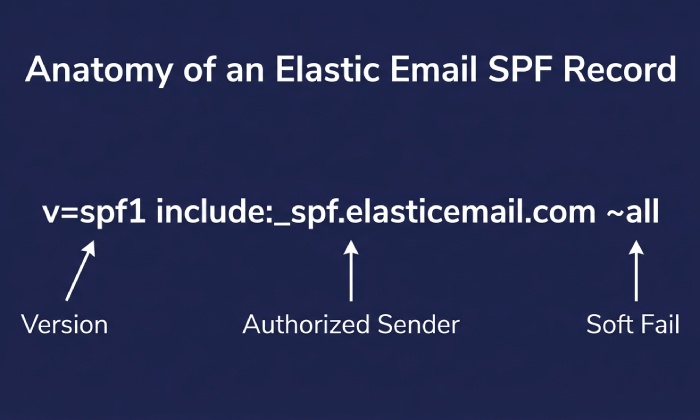
v=spf1 a mx include:_spf.elasticemail.com ~all
The include:_spf.elasticemail.com mechanism authorizes Elastic Email’s sending infrastructure to send email on behalf of your domain. The a and mx mechanisms also authorize servers associated with your domain’s A and MX records. The ~all mechanism applies a soft fail to other sending sources that are not authorized by the record. Learning why SPF lookups matter helps you understand how receivers evaluate each mechanism.
However, you should not automatically replace an existing SPF record with this value. If your domain already has an SPF record, add include:_spf.elasticemail.com to the existing record instead. Your domain should have only one SPF record. You can build the merged record with our free SPF record generator.
Elastic Email may be used in several ways:
- As an SMTP relay for applications, CRMs, ecommerce platforms, and other systems.
- Through the Elastic Email REST API for transactional emails and application-based email sending.
- For bulk email campaigns, newsletters, and other marketing emails.
Regardless of how you send email through Elastic Email, your sending domain should be properly authenticated. Configuring SPF helps receiving mail servers identify Elastic Email as an authorised sending source for your domain.
SPF is especially important for transactional emails such as password resets, invoices, purchase confirmations, and account notifications. Proper authentication helps receiving servers verify the sending source and supports reliable email delivery.
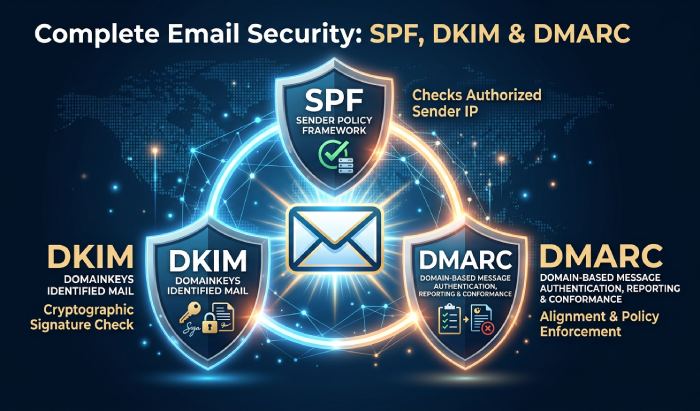
SPF alone is not enough, however. You should also configure DKIM and DMARC. DKIM adds a cryptographic signature to messages, while DMARC tells receivers how to handle authentication failures and can align SPF and DKIM with your visible From domain. Together, SPF, DKIM, and DMARC help authenticate legitimate email, reduce domain spoofing, and give receiving mail servers stronger signals for evaluating messages.
Prerequisites Before Configuring SPF for elastic email.com
Before adding or updating SPF for Elastic Email, confirm that you have access to your domains DNS management area. This may be with your domain registrar, hosting provider, DNS provider, or a platform such as Cloudflare. You also need an active Elastic Email account, even if you are starting with a free trial, monthly pricing plan, or pay-as-you-go sending model.
You should also know how Elastic Email fits into your sending stack. Many companies use multiple platforms: for example, Elastic Email for SMTP relay and email API delivery, Mailchimp or MailerLite for email marketing, Amazon SES for application notifications, HubSpot or Salesforce for CRM integration, WordPress with MailPoet for site emails, and Zapier for automation. If you send from multiple services, your SPF record must include all authorized senders without creating duplicate SPF records.
Before editing DNS, review the following:
- Your sending domain or subdomain, especially if using custom domains.
- Whether you use a dedicated IP or shared Elastic Email infrastructure.
- Whether you need IP warmup before sending high-volume bulk email.
- Existing SPF, DKIM, and DMARC records.
- Current unsubscribe management, subscription management, suppression lists, and list hygiene processes.
- Compliance requirements such as GDPR compliance and CAN-SPAM.
- Email verification procedures for contact import and email list management.
- Bounce management rules for soft bounce and hard bounce handling.
- Feedback loops for spam complaints where available.
- Subuser accounts, multi-user access, branding customization, or white labeling requirements.
- Third-party integrations such as Zapier integration, WordPress integration, ecommerce tools, and CRM integration.
SPF is an important part of email authentication, but it works alongside other email security measures. For stronger domain protection and deliverability, configure SPF together with DKIM and DMARC, and regularly verify that your authorised email-sending services are correctly configured. Planning for the future of SPF helps you keep pace with evolving authentication requirements.
For teams managing complex campaign management workflows, Elastic Email features such as email templates, drag and drop editor tools, email scheduling, autoresponders, webhooks, analytics dashboard reporting, and campaign reports should be paired with proper authentication. Email preview and email testing should be completed before large bulk email sends, especially when launching new email automation or marketing automation sequences.
Finding the Correct SPF Include Mechanism for Elastic Email
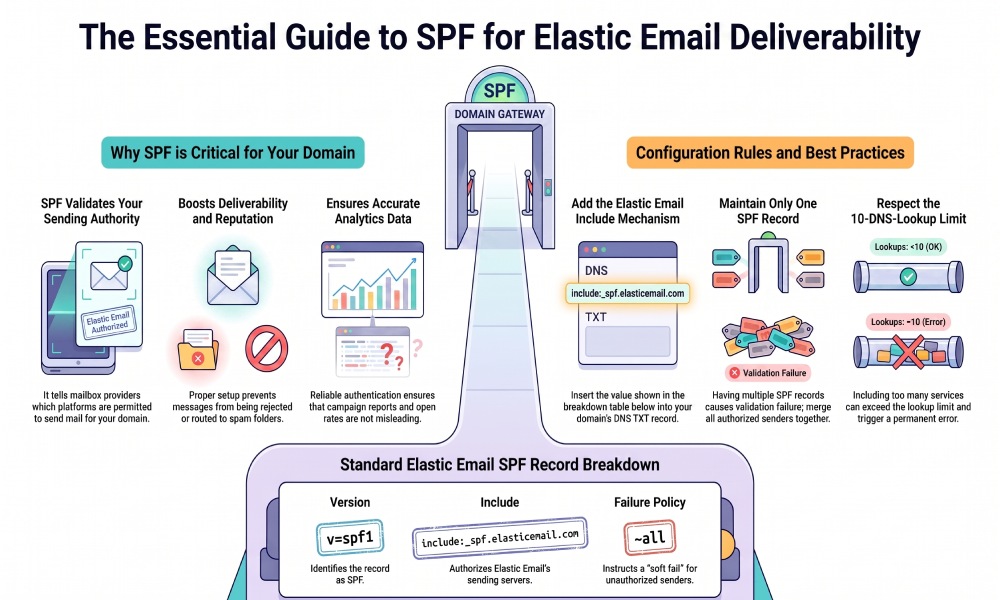
The standard SPF include mechanism for Elastic Email is commonly published as:
include:_spf.elasticemail.com
In a full SPF record, it usually appears like this:
v=spf1 include:_spf.elasticemail.com ~all
However, you should always check the latest Elastic Email API documentation or account verification instructions because providers may update authentication guidance over time. If you are using Elastic Email through an SMTP relay, an email API integration, or custom domains, the dashboard may display domain-specific authentication records.
If your domain already has an SPF record, do not create a second one. A domain should have only one SPF TXT record. Multiple SPF records can cause SPF validation to fail, damaging deliverability for transactional emails, bulk email, and email marketing campaigns.
For example, if you already authorize Google Workspace and Elastic Email, your SPF record may look like:
v=spf1 include:_spf.google.com include:_spf.elasticemail.com ~all
If you also use SendGrid, Mailgun, Amazon SES, or SMTP.com, their include mechanisms must be merged into the same SPF record. Be careful, though: SPF has a 10-DNS-lookup limit. Too many includes from platforms such as Mailjet, SparkPost, Postmark, Pepipost, Mandrill, ActiveCampaign, Campaign Monitor, GetResponse, AWeber, or Constant Contact can exceed that limit. If this happens, mailbox providers may return a permerror, hurting deliverability and email reputation. AutoSPF can flatten these includes automatically so you stay under the 10-lookup limit.
Elastic Email users who rely on email automation, campaign management, email analytics, contact segmentation, email templates, and A/B testing should treat SPF as a foundation. Accurate authentication keeps data cleaner: open rates, email analytics, A/B testing results, and campaign reports are more useful when emails are not silently rejected by spam filters.
General Manager
General Manager of DuoCircle. Product strategy and commercial lead for AutoSPF's 2,000+ customer base.
LinkedIn Profile →