How to Check if Your Domain Is on an Email Blocklist

Quick Answer
To check if your domain is on an email blocklist, use a reputable blocklist checker to scan your domain or IP address across major DNS-based blocklists. If listed, identify the cause, resolve the issue, and request delisting.
An email domain blocklist is a reputation-based database used by mailbox providers, security gateways, and spam filters to identify domains associated with unwanted email, phishing, malware distribution, or other abusive behavior. Unlike simple keyword filters, a domain blocklist focuses on the domain itself”such as the sending domain, links inside a message, or domains referenced in authentication and routing data.
One of the most widely known examples is the Spamhaus Domain Blocklist, commonly called the DBL. The Spamhaus DBL is a type of DNS blocklist that helps identify malicious domains, compromised websites, domains used in spam campaigns, and domains connected to phishing or malware distribution. Mail systems can query a domain DNSBL in real time during the email filtering process to decide whether to reject, quarantine, or score a message.
Domain-based reputation matters because modern email security does not rely only on IP addresses. A domain with poor reputation can affect deliverability even if the sending server has a clean IP. If your domain appears on a domain blocklist, messages may land in spam, be deferred, or be rejected entirely. This is especially damaging for organizations that depend on bulk email, transactional messages, newsletters, or customer notifications.
How domain blocklists are used in email filtering
A DNS blocklist, including a domain DNSBL, is often checked during an smtp transaction. These checks can happen at the pre-data phase, before the full message is accepted, or later during content inspection. Security systems may evaluate the HELO string, the Mail From domain, visible sender domains, mail headers, and mail body URLs.
For example, a receiving mail server may perform a dns query against a real-time DNSBL such as Spamhaus DBL. If the queried domain has a negative result in the reputation database, the receiving systems rules engine may increase the spam score or reject the message. This gives organizations real time protection against malicious domains and improves spam detection without relying solely on IP-based filtering.
Common Reasons Domains Get Added to Blocklists
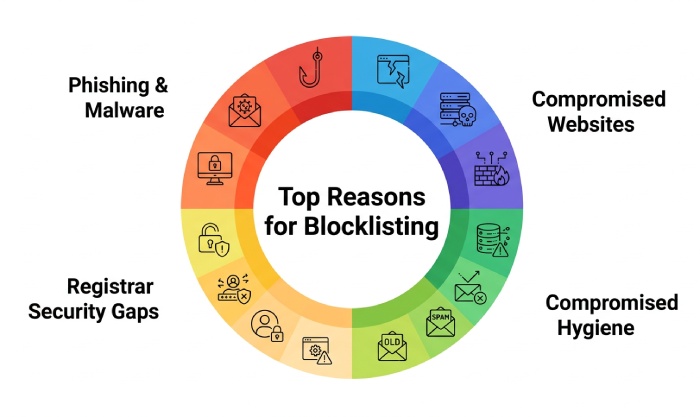
Domains are typically listed because a blocklist operator or automated system detects patterns linked to abuse, compromise, or risky sending behavior. A domain blocklist is not always a sign that the domain owner intentionally sent spam; it can also indicate account compromise, website infection, or poor controls around email and infrastructure.
Phishing, malware, and compromised websites
A domain may be added to a DBL or other domain DNSBL if it hosts pages used for phishing, credential theft, fake login forms, or malware distribution. Cybercriminals often compromise legitimate sites and use them as landing pages in email campaigns. Once threat researchers or threat intelligence feeds identify these malicious domains, an automated listing may occur.
Spamhaus maintains several reputation and threat-intelligence blocklists used to help identify abusive infrastructure and malicious activity. These datasets include lists focused primarily on IP addresses as well as the Spamhaus Domain Blocklist (DBL), which focuses on domains associated with threats such as spam, phishing, malware, and other abusive activity. Because domain-based and IP-based blocklists evaluate different indicators, checking both can provide a more complete view of an organization’s email and infrastructure reputation.
Poor sending practices and bulk email abuse
Domains can also develop poor reputation when they are used for aggressive bulk email, poor list hygiene, or campaigns that trigger complaints. Sending to old lists, purchased contacts, or addresses that include spam traps can quickly damage domain reputation. Lack of opt-in verification is another common cause.
Poor email authentication and infrastructure misconfigurations can contribute to deliverability problems, although they do not automatically cause a domain to be blocklisted. Organizations should review their SPF, DKIM, and DMARC configuration alongside their SMTP server settings, reverse DNS, PTR records, and hostname configuration. Reverse DNS and PTR records are primarily relevant to sending IP reputation, while authentication helps receiving systems verify whether messages are authorized and aligned with the sender’s domain. Reviewing these factors together can help identify configuration issues that may contribute to broader email delivery problems.
Security gaps at the registrar or DNS level
Weak account security at the Registrar can allow attackers to alter DNS records, redirect domains, or create malicious subdomains. Strong registrar security, including MFA and Registry Lock, helps reduce the chance of domain hijacking. A hijacked domain can quickly be associated with phishing, malware distribution, and malicious domains, increasing security incident risk and triggering blocklist policies.
Warning Signs Your Domain May Be Blocklisted
The most obvious sign of a domain blocklist issue is a sudden decline in email deliverability. However, not all symptoms are immediate. Some systems silently quarantine messages, while others apply higher spam scores based on email filtering logic.
Deliverability and rejection symptoms
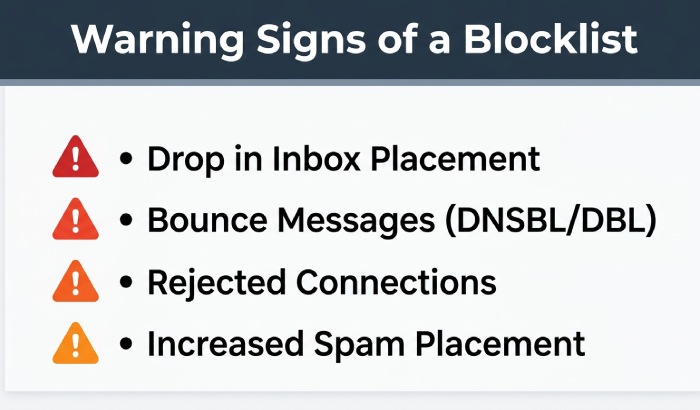
Common warning signs include:
- A sharp drop in inbox placement for normal or bulk email
- Bounce messages mentioning blocklists, listings, DNSBL, DBL, or policy rejection
- Messages being rejected during connection checks or after content scanning
- Increased spam-folder placement across major mailbox providers
- Customers reporting that password resets or invoices never arrived
- Security tools flagging your website URLs in mail body URLs
If a domain has poor reputation, messages may pass authentication but still fail reputation checks. This is where a domain reputation checker or blocklist tester becomes useful. Reviewing DMARC reports can also help identify unauthorized sources sending mail using your domain.
False positives and temporary listings
Not every listing means your organization is actively malicious. False positives can happen, particularly when domains are shared across platforms, used by third-party service providers, or referenced in compromised web content. Some blocklists also support domain listing expiration, where entries age out after risk signals disappear.
That said, you should treat every listing seriously. A domain blocklist entry can indicate a live compromise, abused web form, infected CMS, or risky marketing practice. The right response is to investigate first, fix the cause, and only then begin the removal process or submit a removal request.
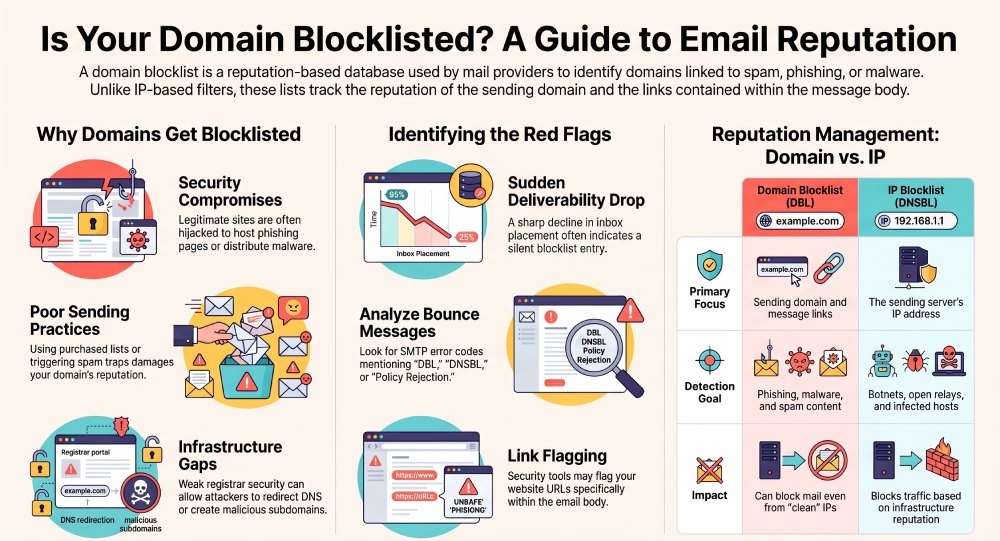
How Domain Blocklists Differ from IP Blocklists
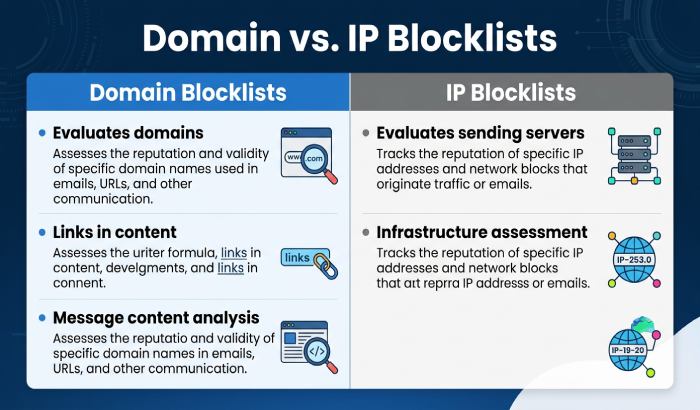
A domain blocklist evaluates domains. IP blocklists evaluate IP addresses. Both are important, but they serve different purposes in email security and spam detection.
Domain reputation vs. IP reputation
IP-based filtering looks at the sending servers IP address. This is useful for identifying botnets, open relays, infected hosts, and abusive infrastructure. For example, Spamhaus ZEN combines several IP-focused datasets such as SBL, XBL, CSS, and PBL. These are commonly used by Internet Service Providers, Network Administrators, and Deliverability Specialists to reduce abusive inbound email traffic.
A domain DNSBL, by contrast, looks at domains found in the message flow or message content. The Spamhaus DBL may identify a domain used in phishing, malware distribution, spam landing pages, or suspicious redirects. This means a message can be blocked because of a bad link even if the senders IP is clean.
Why both checks matter
Modern email filtering combines IP-based filtering, domain reputation, authentication results, behavioral signals, and threat intelligence. During the filtering process, a gateway may check:
- Sending IP against IP blocklists
- Sender and return-path domain against a domain DNSBL
- URLs against a DNS blocklist
- Attachments and links for Malware
- Headers and authentication alignment
- Historical complaint rates and engagement
This layered approach improves catch rates and helps with mitigating spam. It also reduces reliance on any single signal. A domain with poor reputation may be treated cautiously even if its infrastructure looks acceptable, while an IP with poor IP Reputation may be blocked even if the domain itself is clean.
General Manager
Founder and General Manager of DuoCircle. Product strategy and commercial lead for AutoSPF's 2,000+ customer base.
LinkedIn Profile →