How to Add Statuspage SPF to an Existing WP Engine SPF Record

Quick Answer
To add Statuspage SPF to an existing WP Engine SPF record, update the current SPF TXT record by adding Statuspage’s required include mechanism. Keep a single SPF record and stay within the 10-DNS-lookup limit to avoid SPF errors.
SPF, or Sender Policy Framework, tells a recipient mail server which systems are allowed senders for your domain. When WP Engine sends WordPress email through its default mail relay, or when Statuspage sends incident notifications from your branded domain, receiving providers such as Gmail and Microsoft Office 365 check the SPF record to decide whether the sending source is authorized.
For WP Engine sites, email deliverability depends on properly configured email DNS records. If your domain uses WP Engine, Statuspage, Mailgun, Brevo, MailChimp, Mandrill, Constant Contact, or another third party email host, your DNS must identify each trusted sender clearly. A missing or incorrect SPF record can create deliverability issues such as spam placement, quarantine, reporting failures, or outright rejection under a strict DMARC policy.
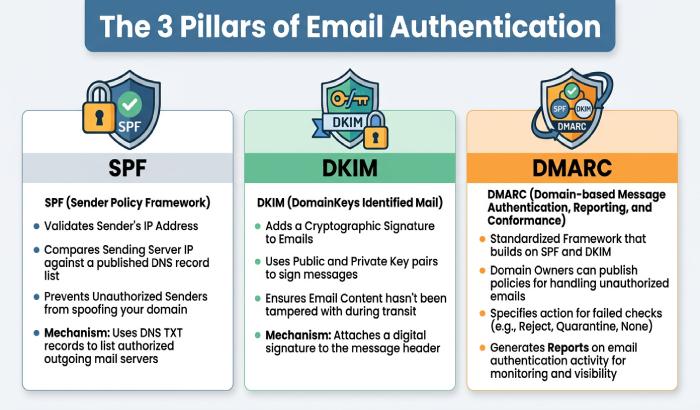
SPF is one part of broader email authentication. A complete setup normally includes:
- An SPF record to authorize mail IP sources and mail relay services.
- A DKIM record that publishes a public key in DNS while the email provider signs messages with a private key.
- A DMARC policy to define handling, reporting, policy alignment, aggregate reports, and possibly a rejection policy such as p=reject.
The goal is consistency: your SPF record, DKIM record, DMARC policy, MX record, and other email DNS records should describe a coherent sending environment. A grasp of understanding SPF mechanisms helps you keep that record coherent.
How WP Engine Uses SPF Records for Domain Authentication
WP Engine is primarily a WordPress infrastructure provider, not a custom email hosting platform. However, WordPress email generated by your site”such as form alerts, password resets, plugin notices, and transactional messages”may leave through WP Engines mail relay infrastructure unless you configure an SMTP plugin or transactional mail provider.
WP Engine commonly uses MailChannels as an email relay service for outbound mail. In SPF terms, that means your SPF record may need to include:
include:relay.*mailchannels*.net
A typical WP Engine SPF record might look like:
v=spf1 include:relay.*mailchannels*.net ~all
This TXT record authorizes MailChannels, via relay.mailchannels.net, to send on behalf of your domain. MailChannels helps with spam control, reputation management, email logs, bounce handling, and protection against a blocklisted IP affecting broad server stability. You may also see references to MailChannels documentation at mailchannels.zendesk.com.
WP Engine Is Not Your Full Email Host
WP Engine does not replace Gmail, Microsoft Office 365, or a dedicated email provider. Your MX record may still point to Google Workspace, Microsoft Office 365, or another email host at mail.domain.com. The MX record controls inbound mail delivery, while the SPF record controls which outbound servers are authorized to send.
That distinction matters. An MX record, A record, CNAME record, and TXT record all serve different roles in DNS management. Your DNS host”such as Cloudflare or another DNS provider”stores these records, but the services listed inside the SPF record may include WP Engine, MailChannels, Statuspage, Mailgun, SendGrid, or another third party email host.
How Statuspage SPF Requirements Fit Into Your Existing DNS Setup
Statuspage may require a specific SPF mechanism to authenticate email sent from your branded domain. The required SPF value can depend on your Statuspage configuration and the email-sending setup associated with your account. Always use the exact SPF mechanism provided by Statuspage during domain authentication or in its current documentation. Do not assume that a Mailgun, SendGrid, or other third-party include is required unless Statuspage specifically instructs you to add it.
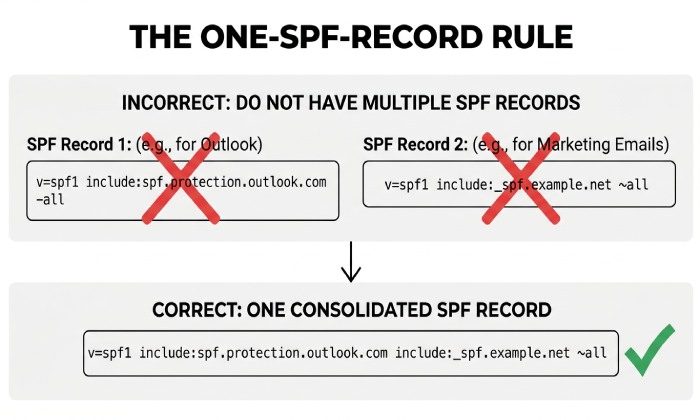
If your domain already has a WP Engine SPF record, you do not create a second SPF record. Instead, you add the Statuspage include mechanism into the existing TXT record.
For example, if your current WP Engine TXT Record is:
v=spf1 include:relay.mailchannels.net ~all
And Statuspage requires Mailgun authorization, your combined SPF record may become:
v=spf1 include:relay.mailchannels.net include:mailgun.org ~all
If Statuspage provides a different include, use that exact value:
v=spf1 include:relay.mailchannels.net include:sendgrid.net ~all
The principle is simple: one Sender Policy Framework entry, multiple authorized senders. If you’d rather build the merged record automatically, you can generate an SPF record that combines every sender.
Where Statuspage Validation Usually Fails
Statuspage domain validation may fail when the DNS host contains duplicate SPF TXT records, an outdated SPF record, or missing authentication details. Validation can also fail if a domain owner edits DNS at the wrong DNS provider, such as updating records in a registrar panel while the active DNS host is Cloudflare.
For Statuspage, WP Engine, and any third party email host, verify the authoritative DNS host before editing. First, look up your SPF record to see what’s currently published. Check the SPF record, DKIM record, DMARC policy, MX record, A Record, and CNAME Record in the same DNS zone for domain.com or the applicable subdomain.
The One-SPF-Record Rule: Avoiding Duplicate SPF TXT Records
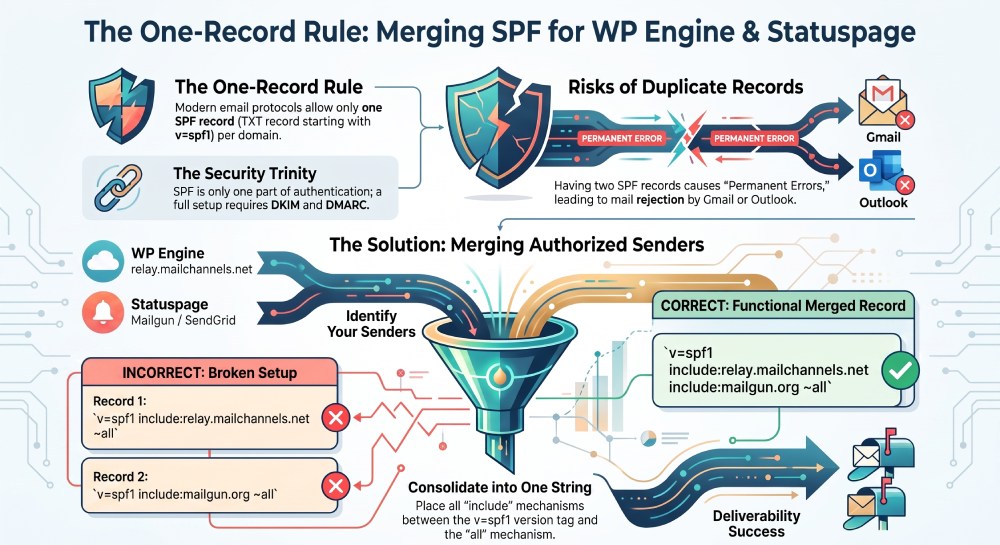
A domain must have only one SPF record at a given hostname. This is a core Sender Policy Framework rule from the OpenSPF model and is reflected in modern email authentication protocols. If your DNS host has two separate TXT records that both start with v=spf1, recipient systems may return a permanent SPF error.
Incorrect duplicate setup:
v=spf1 include:relay.mailchannels.net ~all
v=spf1 include:mailgun.org ~all
Correct merged setup:
v=spf1 include:relay.mailchannels.net include:mailgun.org ~all
This single SPF record tells the recipient mail server that WP Engines MailChannels mail relay and Statuspages sending provider are both allowed senders. That improves email deliverability and supports DMARC policy alignment.
Choosing the Right SPF Ending
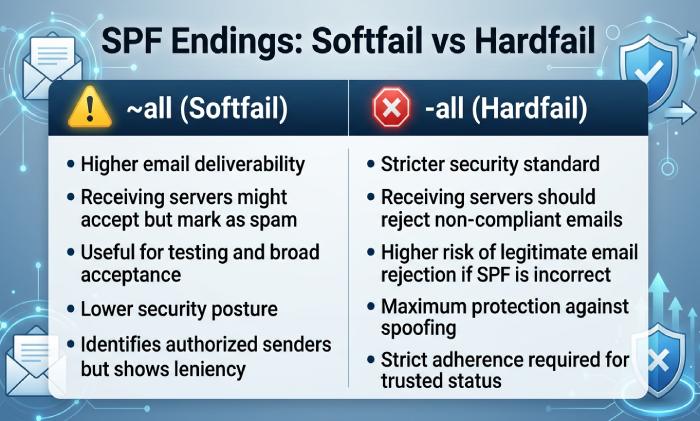
Many domains use ~all, a softfail mechanism. Stricter environments may use -all, especially with a DMARC policy such as p=reject. Before adopting a hard rejection policy, confirm that all legitimate sources are included: WP Engine, Statuspage, Gmail, Microsoft Office 365, Mailgun, Brevo, MailChimp, Mandrill, Constant Contact, Post SMTP, WP Mail SMTP, and any mail API or SMTP options used by your applications.
If your DMARC policy sends reports to an address such as postmaster@dmarcdomain.com, review aggregate reports and reporting failures before tightening enforcement. Resources such as dmarc.org can help domain owners understand DMARC policy, quarantine behavior, and policy alignment across SPF and DKIM. AutoSPF helps businesses manage and optimize their SPF records for reliable email delivery and better email security.
General Manager
General Manager of DuoCircle. Product strategy and commercial lead for AutoSPF's 2,000+ customer base.
LinkedIn Profile →