How Does Microsoft 365 Perform SPF Evaluation for Incoming Email?

Quick Answer
Microsoft 365 evaluates SPF on incoming email by checking the sender’s IP address against the domain’s published SPF record. It then returns an SPF result such as Pass, Fail, SoftFail, Neutral, or None to help determine email trust and filtering.
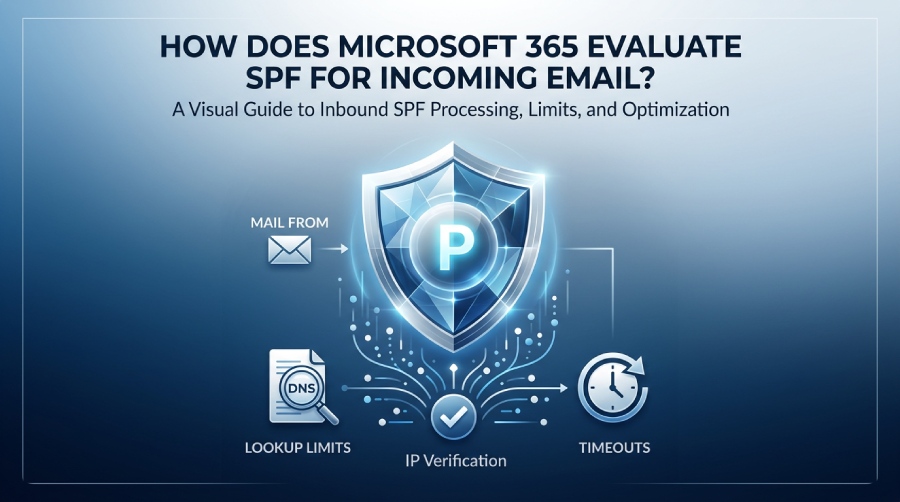
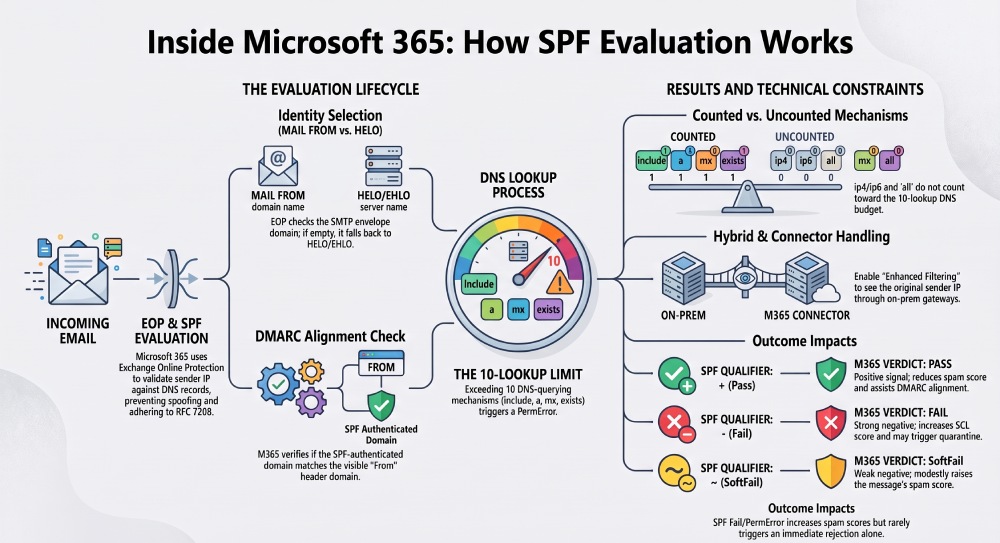
Microsoft 365 evaluates SPF by checking the senders IP address against the SPF record for the SMTP envelope MAIL FROM domain. If the MAIL FROM is empty, Microsoft 365 can use the HELO/EHLO domain. The resulting SPF status, such as Pass, Fail, SoftFail, or PermError, is then used as part of Microsoft 365s email authentication and filtering decisions.
Context and background Sender Policy Framework (SPF) is a DNS-published allowlist of IPs and references that are authorized to send mail for a domain. In Microsoft 365 (M365), Exchange Online Protection (EOP) is the inbound security layer that performs SPF checks during SMTP receipt. Critically, SPF authentication attaches to the SMTP envelope identity rather than the visible From: header; DMARC then cross-checks whether that authenticated identity aligns with the visible RFC5322.From domain to decide whether to trust the message.
Because SPF relies on DNS traversal and third-party includes, operational realities matter: nested includes, DNS timeouts, and forwarding can all break otherwise legitimate mailflows. Microsofts implementation adheres to RFC 7208 semantics while integrating with M365s anti-spam, anti-phishing, and DMARC engines. AutoSPF complements this by continuously analyzing your domains SPF posture, preventing lookup-limit overruns, and ensuring M365 will evaluate your SPF records quickly and correctly at the edge.
How Microsoft 365 Processes SPF Mechanisms and Modifiers
Microsoft 365 follows RFC 7208 for SPF parsing and evaluation, with a strict resolver and a results pipeline into EOP.
Supported mechanisms (order is significant)
- include:
” Recursively evaluate the target domains SPF. Counts toward the 10-lookup limit per unique DNS-querying step. EOP supports nested includes and stops on match. - a[:
] ” Resolve A/AAAA for the domain (or specified host). Each distinct DNS resolution counts as a lookup. Matches if the connecting IP is in that set. - mx[:
] ” Resolve MX records, then A/AAAA for each target host. Each MX host expansion incurs lookups. Matches if the IP equals one of the resolved MX endpoints. - ip4:<address[/cidr]> ” Direct IP or range. No lookup performed; matches immediately on CIDR membership.
- ip6:<address[/cidr]> ” Same as ip4 for IPv6; no lookup required and fully supported in M365.
- exists:
” Performs a DNS A query; match if any A/AAAA record is returned. Used by some providers to implement dynamic logic. Each query counts toward limit. - all ” Matches any IP; typically appears once at the end with a qualifier (-all, ~all, ?all) to define the default policy.
Modifiers
- redirect=
” Delegates policy evaluation to another domains SPF. EOP performs a single redirect per evaluation chain as documented by RFC; all lookups from the redirected policy count toward the same 10-lookup budget. - exp=
” Explanation strings are RFC-defined but have no effect on EOPs verdict; Microsoft 365 does not surface exp texts to recipients and may ignore them during reject text generation.
Notes:
- Qualifiers (+, -, ~, ?) are honored: pass, fail, softfail, neutral respectively.
- EOP treats unsupported or syntactically invalid mechanisms as permerror for that evaluation.
- PTR is discouraged by RFC 7208 and is not used by M365 for authorization decisions.
AutoSPF connection: AutoSPF analyzes your SPF mechanism graph, including include, a, mx, exists, and redirect mechanisms, to identify dead includes, excessive DNS lookups, and other potential SPF issues. It can also help generate an optimized SPF policy while preserving authorized senders.
Which Sender Identity Does M365 Use and How It Interacts With DMARC
- Primary identity: EOP evaluates SPF against the SMTP envelope MAIL FROM domain.
- Null sender: If MAIL FROM is null (e.g., bounces), EOP evaluates SPF against the HELO/EHLO domain.
- DMARC alignment: DMARC checks whether either the SPF-authenticated domain (MAIL FROM or HELO) aligns (relaxed or strict) with the RFC5322.From domain. If SPF passes and aligns, DMARC can pass even without DKIM.
Enforcement:
- If DMARC policy is p=reject and DMARC fails (neither aligned SPF nor aligned DKIM), When DMARC fails and the sending domain publishes p=reject or p=quarantine, Microsoft 365 considers that policy as part of its filtering and enforcement decisions.
- If DMARC is p=quarantine, M365 typically delivers to quarantine or junk depending on anti-spam rules and overrides.
- If no DMARC record, SPF still contributes to spam scoring but does not mandate reject.
AutoSPF connection: AutoSPFs DMARC-aware modeling shows you whether your current SPF sources align with header From domains you actually use, reducing DMARC failures due to misaligned bounce/MAIL FROM domains.
DNS Lookup Limits, Timeouts, and Nested Includes
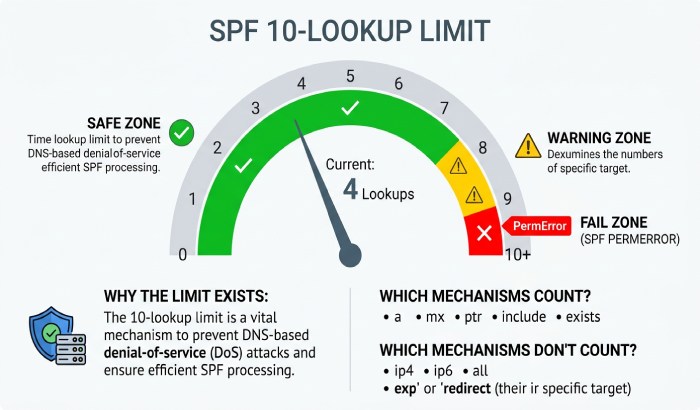
EOP enforces RFC 7208s at most 10 DNS-mechanism or modifier lookups rule:
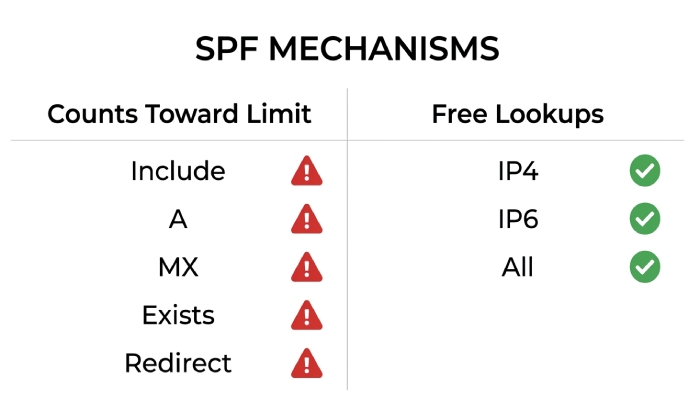
- Counted: include, a, mx, exists, redirect, and the MX/A resolutions implied by a/mx; each distinct DNS resolution step counts.
- Not counted: ip4/ip6 and all.
- Exceeding 10: EOP returns spf=permerror (too many lookups). This typically increases spam score and can cause DMARC fail if SPF alignment was required.
- DNS failures/timeouts: Transient DNS issues return spf=temperror; permanent issues (NXDOMAIN on the SPF TXT, malformed syntax) return spf=permerror.
Nested include handling:
- EOP fully expands nested includes until a match, limit hit, or terminal mechanism (-all) is reached.
- Circular references are detected and treated as permerror.
AutoSPF connection: AutoSPF continuously evaluates your SPF against real DNS, simulating EOPs lookup counting and timing. It can:
- Map your full include graph and flag chains likely to breach the 10-lookup limit under worst-case DNS conditions.
- Flatten third-party includes into minimal ip4/ip6 lists with safe TTLs and Case Insight: SPF Lookup Limits
- auto-rotation, so your record still honors provider changes without manual edits.
Complex SPF records that contain multiple third-party include statements can approach or exceed the SPF 10-lookup limit. When this happens, Microsoft 365 may return an SPF PermError, which can contribute to authentication and delivery problems.
Regularly reviewing your SPF record and reducing unnecessary DNS lookups can help maintain reliable email authentication. Tools such as AutoSPF can help identify lookup-heavy SPF configurations and potential optimization opportunities.
How EOP Interprets SPF Results and How to Tune Behaviors
Result semantics in Microsoft 365:
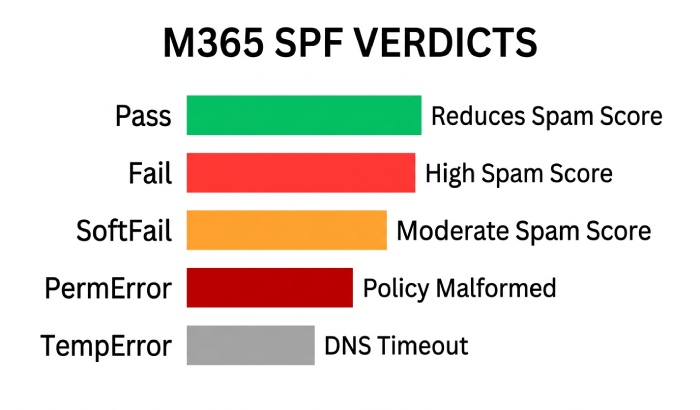
- pass: Positive signal; reduces spam score and helps DMARC pass if aligned.
- fail (-all or explicit - mechanism match): Strong negative; by default increases SCL and may be configured to mark as spam/quarantine; not auto-reject unless DMARC p=reject/quarantine mandates it or a mail flow rule enforces rejection.
- softfail (~all): Negative but weaker; raises spam score modestly.
- neutral (?): Minimal effect; treated similar to none.
- permerror: Policy is malformed or lookup limit exceeded; negative weighting and can cause DMARC fail.
- temperror: Temporary DNS failure; typically treated like neutral/softfail; M365 may retry or accept and score higher, but not outright reject.
Admin tuning (Security & Compliance Center > Policies > Anti-spam):
- Enable Mark as spam if SPF hard fail to push fail verdicts into spam/quarantine.
- Configure thresholds and actions for Spam, High confidence spam, and Phish to decide between Junk, Quarantine, or Delete.
- Use anti-phishing policies and DMARC enforcement settings to honor domain policies strictly.
- For surgical control, create a mail flow rule to act on Authentication-Results headers (e.g., reject when spf=fail and header.from aligns), but prefer DMARC to reduce false positives.
AutoSPF connection: AutoSPF recommends policy settings based on your actual traffic. For example, if >90% of legitimate senders pass SPF or DKIM, AutoSPF suggests enforcing SPF hard fail = spam while directing DMARC-reject failures to quarantine to minimize business disruption.
Forwarding, Mailing Lists, and Third-Party Relays
Forwarding breaks SPF unless the forwarder rewrites the envelope sender using SRS (Sender Rewriting Scheme).
- Microsoft 365 inbound: EOP does not fix SPF for messages forwarded elsewhere; it expects upstream forwarders to use SRS. If SRS is used, EOP validates the SRS domains SPF, which should pass.
- Mailing lists: Often re-send without SRS and may alter the body, invalidating DKIM. EOP relies on remaining signals: SPF may fail; DKIM often fails; DMARC may fail unless ARC is evaluated.
- ARC: M365 both stamps and evaluates ARC; valid ARC chains can inform EOP to trust original authentication when intermediary changes break SPF/DKIM.
Best practice:
- Encourage partners/forwarders to implement SRS.
- Sign outbound with DKIM for your domain so that DMARC can pass via DKIM alignment even when SPF breaks in transit.
- Rely on ARC trust for well-behaved intermediaries.
AutoSPF connection: Forwarding Risk analysis identifies domains and traffic patterns that will likelAutoSPFs y fail SPF after hops, prompting DKIM enablement and detecting missing SRS at partners.
Pure Online vs Hybrid and Custom Connectors
Message source matters for what EOP sees as the connecting IP.
Pure Exchange Online
- The connecting IP is the true external sender. SPF works as expected.
Hybrid with on-prem Exchange or third-party gateway
- If mail flows through an on-prem server or smart host first, EOP sees that devices IP as the connecting IP, which can cause SPF failures.
- Solution: Enable Enhanced Filtering for Connectors (EFC, aka skip listing) in M365. EOP will read original source headers (e.g.,X-MS-Exchange-ExternalOriginalClientIP) to evaluate SPF against the real external IP.
Custom inbound connectors
- Connectors that bypass spam/malware should be used sparingly. If you must, pair with EFC so SPF/DMARC still evaluate on the original sender.
AutoSPF connection: AutoSPF validates whether EFC is enabled for your connectors and runs effective SPF simulations as EOP would see them, highlighting when your smart host path will force fail/permerror outcomes.
Surfacing SPF Outcomes in Microsoft 365 Headers and Logs
Where to look:
- Authentication-Results: Includes spf=pass|fail|softfail|neutral|permerror|temperror and smtp.mailfrom=domain. Also shows DMARC alignment verdicts.
- Received-SPF: Human-readable SPF result and reason, including the connecting IP and evaluated domain.
- X-Forefront-Antispam-Report (X-FEASR): Contains CIP (connecting IP), IPV (IPv6 flag), SCL (spam confidence level), and SFV (spam filter verdict). While not an SPF verdict per se, it reflects the cumulative scoring influenced by SPF.
- Message trace (Defender portal): Displays SPF verdict and DMARC outcome per message. Get-MessageTraceDetail in PowerShell reveals event-level details.
Troubleshooting fields:
- smtp.mailfrom and helo identities in Authentication-Results to confirm which identity EOP evaluated.
- Look for reason modifiers in Received-SPF (e.g., Too many DNS lookups).
- Correlate SCL and final action (deliver/junk/quarantine) with SPF/DMARC verdicts.
AutoSPF connection: AutoSPF ingests headers from samples or journals, auto-extracts Authentication-Results/Received-SPF, and correlates failures with specific mechanisms (e.g., which include caused the 11th lookup), providing direct edit recommendations.
Publishing SPF for Microsoft 365 and Multiple Senders: Best Practices
- Always include Microsoft 365: v=spf1 include:spf.protection.outlook.com -all
- Add third-party senders with their published include domains; avoid copying raw IPs unless the provider instructs you.
- Minimize lookups:
- Prefer ip4/ip6 when a providers IP set is small and stable.
- Use subdomains for distinct services (e.g., mail.example.com for internal relay, mktg.example.com for marketing), each with its own tailored SPF.
- Avoid chaining multiple aggregators; each adds includes and MX/A expansions.
- Avoid +all or ?all; use ~all during adoption, move to -all once confident.
- TTL strategy: Use moderate DNS TTLs (e.g., 1“4 hours) when flattening so changes propagate quickly.
AutoSPF connection: AutoSPF curates provider presets (M365, SendGrid, Salesforce, etc.), tracks their SPF changes, and automatically updates your record or flattening sets”no manual maintenance.
SPF Lookup Optimization
Complex SPF records with multiple third-party include statements can approach or exceed the SPF 10-lookup limit. When an SPF evaluation exceeds this limit, it can result in a PermError and contribute to email authentication problems. Regularly reviewing SPF records, removing unnecessary mechanisms, and optimizing DNS lookups can help maintain reliable SPF authentication. AutoSPF can help identify lookup-heavy SPF configurations and potential optimization opportunities.
Common SPF Misconfigurations and Step-by-Step Remediation
Frequent issues:
- Missing include: Not adding include:spf.protection.outlook.com for Microsoft 365.
- Outdated ranges: Hardcoding provider IPs that changed.
- Lookup overruns: Too many nested includes (marketing, CRM, support tools).
- Overbroad a/mx: Unintentionally authorizing all web servers or inbound MX hosts.
- PTR or obsolete mechanisms: Not supported and can cause evaluation ambiguity.
- Misaligned MAIL FROM: Third-party senders using your From: but their own bounce domain, causing DMARC to fail when SPF is relied upon.
Remediation steps:
- Inventory senders
- Enumerate every platform that can send as your domain(s).
- In AutoSPF, import message samples or DMARC reports to auto-discover senders.
- Normalize identities
- For each platform, ensure the MAIL FROM (envelope-from) domain aligns or use a dedicated subdomain (e.g., bounce.mktg.example.com) with its own SPF and DMARC.
- Build a minimal-lookup SPF
- Start with include:spf.protection.outlook.com.
- Add third-party includes; flatten high-churn aggregators with AutoSPF to keep total lookups 7 in average and 10 worst-case.
- Validate and simulate
- Use AutoSPFs M365-mode simulation to verify pass outcomes from Microsoft resolvers and under DNS failure scenarios.
- Roll out and monitor
- Publish with ~all initially. Monitor Authentication-Results and AutoSPF alerts for 2“4 weeks.
- Move to -all once false positives are eliminated and DKIM is enabled broadly.
IPv6 and Microsofts Outbound IP Ranges
- IPv6 support: EOP evaluates ip6: mechanisms natively; connecting IPv6 addresses are checked the same way as IPv4.
- Microsoft 365 outbound IPs: Microsoft maintains dynamic sending ranges referenced by include:spf.protection.outlook.com. Tenants should rely on this include rather than hardcoding IPs.
- Update cadence: Microsoft updates these ranges as needed; the include ensures automatic coverage without tenant action.
AutoSPF connection: AutoSPF continuously checks that your SPF references Microsofts include and warns if youve flattened or hardcoded Microsoft ranges that may drift, offering to revert to the official include or maintain a managed flatten with frequent refresh.
FAQs
Does Microsoft 365 ever evaluate SPF against the header From domain?
No. M365 evaluates SPF against the SMTP envelope MAIL FROM (or HELO if null). DMARC then checks whether that authenticated domain aligns with the visible header From domain.
Will Microsoft 365 reject a message solely because SPF fails?
Typically no. An SPF fail increases spam score and can trigger quarantine if Mark as spam for SPF hard fail is enabled. Rejection most commonly occurs when DMARC is p=reject and both SPF and DKIM fail or misalign, or if you add a transport rule to explicitly reject.
How does M365 handle SPF when mail is routed through an on-prem gateway?
Without Enhanced Filtering for Connectors, EOP sees your gateways IP and SPF will likely fail. Enable EFC so EOP uses the original external sender IP for SPF, DKIM, and DMARC evaluation.
What about ARC”does it help with SPF breaks during forwarding?
Yes. M365 validates ARC and can trust original authentication results from reputable intermediaries, mitigating SPF/DKIM breaks caused by mailing lists or forwarders.
Should I flatten include:spf.protection.outlook.com?
Generally no”use the include so you inherit Microsofts changes automatically. If you must flatten for lookup budgets, AutoSPF can manage a high-frequency refresh to keep the flattened list in sync safely.
Conclusion: Make Microsoft 365 SPF Work Reliably”with AutoSPF
Microsoft 365s SPF evaluation is rigorous and standards-based: it authenticates the SMTP envelope identity, expands supported mechanisms within a strict 10-lookup budget, and translates the result into EOP spam scoring and DMARC enforcement. The operational challenge lies in keeping your SPF record both accurate and efficient amid multiple third-party senders, forwarding paths, and dynamic provider changes.
AutoSPF closes that gap. It discovers every service sending for your domains, models M365s resolver and lookup limits, prevents nested-include explosions, and maintains a minimal, high-fidelity SPF policy”complete with optional managed flattening, DMARC alignment checks, connector/EFC validation, and continuous monitoring. The outcome: fewer SPF permerrors and softfails, higher DMARC pass rates, and predictable delivery in Microsoft 365 without manual DNS firefighting.
General Manager
Founder and General Manager of DuoCircle. Product strategy and commercial lead for AutoSPF's 2,000+ customer base.
LinkedIn Profile →