How Email Spoofing Fuels Romance Scams and How SPF Help

Quick Answer
Email spoofing enables scammers to impersonate trusted senders and manipulate victims in romance scams. SPF helps verify authorized email servers, reducing spoofing risks and strengthening email security to protect users from fraudulent messages.
Romance scams often begin with a convincing online identity, a seemingly genuine relationship, and regular communication through email or social media. However, behind these interactions, cybercriminals may use fake email addresses, lookalike domains, and email spoofing techniques to make fraudulent messages appear trustworthy. Their ultimate goal is often to manipulate victims into sharing personal information, sending money, or investing in fraudulent opportunities.
Email spoofing is particularly useful in these schemes because attackers can manipulate sender information to impersonate individuals, businesses, financial institutions, or government organizations. When victims believe an email comes from a legitimate source, they may be more likely to trust payment requests, emergency notifications, and investment instructions.
Understanding how email spoofing works and how email authentication technologies such as SPF, DKIM, and DMARC help protect domains is important for organizations that want to reduce impersonation risks and strengthen email security.
How Cybercriminals Use Fake Email Addresses in Romance Scams
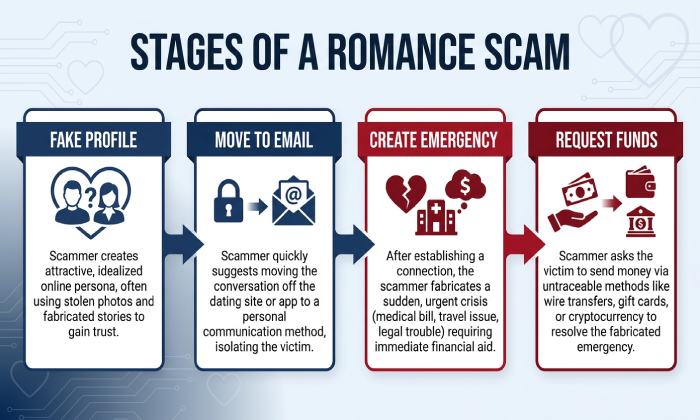
Cybercriminals frequently create fake email accounts to support fabricated identities. They may pretend to be military personnel, doctors, engineers, business professionals, or individuals working overseas. These identities help establish credibility and make their romantic intentions appear genuine.
After establishing contact through dating platforms or social media, scammers may encourage victims to continue conversations through private email accounts. Moving communication away from the original platform can make it harder for victims to access platform-specific reporting tools and safety protections.
Some scammers also use email addresses that resemble legitimate organizations. For example, an attacker might impersonate a shipping company, bank, hospital, or government office to support a fabricated emergency.
These messages may claim that the scammer needs money for medical treatment, travel expenses, customs clearance, or unexpected legal fees. The victim is encouraged to make a payment quickly, often under emotional pressure.
Although creating a fake email account and spoofing a legitimate sender address are different techniques, both can help cybercriminals make fraudulent communication appear credible.
Common Email Spoofing Techniques Used in Romance Scams
Email spoofing involves forging email sender information so that a message appears to originate from an address or domain that the attacker does not legitimately control.
Several techniques can make fraudulent emails difficult to recognize.
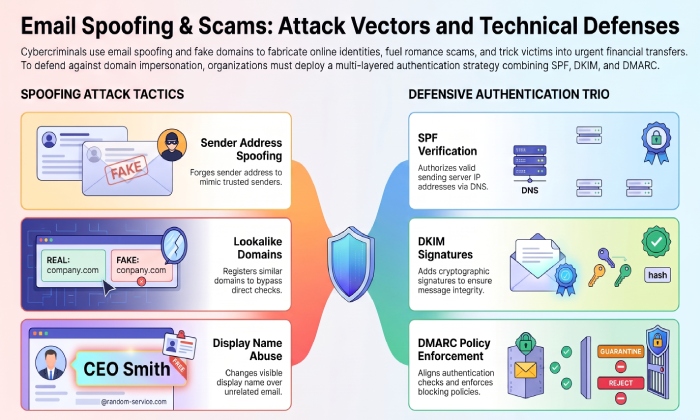
1. Sender Address Spoofing
Attackers may manipulate the visible sender address in an email to make it appear as though a message came from a trusted person or organization.
For example, a victim might receive a message that appears to come from a bank or payment provider requesting verification of a transaction. The message may contain a link to a fraudulent website designed to collect login credentials or financial information.
Without proper authentication checks, some spoofed messages may reach recipients’ inboxes.
2. Lookalike Domain Registration
Another technique involves registering domains that closely resemble legitimate organizations.
For example, an attacker might register a domain with a slightly different spelling or an additional character. At first glance, the email address may look almost identical to the genuine organization’s address.
Scammers can use these domains to send fraudulent payment instructions, fake investment notifications, or impersonation messages.
Unlike direct sender spoofing, lookalike domains involve a separately registered domain. SPF authentication for the legitimate organization’s domain does not automatically protect users from messages sent through a different, attacker-controlled domain.
3. Display Name Impersonation
Some attackers use familiar names in the sender display field while sending messages from unrelated email addresses.
For example, an email might display the name of a bank representative, company executive, or government official, even though the underlying sender address belongs to an unrelated account.
Recipients who only glance at the display name may overlook the actual email address.
How SPF Authentication Helps Protect Against Email Spoofing
Sender Policy Framework (SPF) is an email authentication protocol that helps domain owners identify which mail servers are authorized to send messages on behalf of their domains.
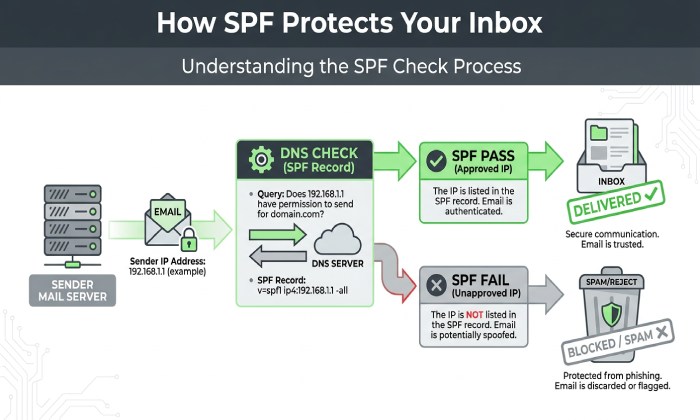
SPF works through a DNS TXT record that lists authorized sending sources. When a receiving mail server gets an email, it can check the sender domain’s SPF record and compare the sending server’s IP address against the authorized sources.
If the sending server is authorized, the message can pass SPF authentication. If it is not authorized, the message may fail the SPF check.
For example, a business that sends emails through its own mail server and an approved email marketing provider should include the necessary authorized sending sources in its SPF record.
If a cybercriminal attempts to send an email directly from an unauthorized server while impersonating that business’s domain, SPF can help receiving systems identify the unauthorized source.
However, SPF is not a complete solution against every form of impersonation. It does not verify the sender’s personal identity, inspect message content, or automatically block emails from unrelated lookalike domains. Its effectiveness also depends on correct DNS configuration and receiving-server enforcement.
Why SPF Alone Cannot Prevent Romance Scam Emails
Although SPF is an important email authentication mechanism, it cannot eliminate romance scams or every type of email fraud.
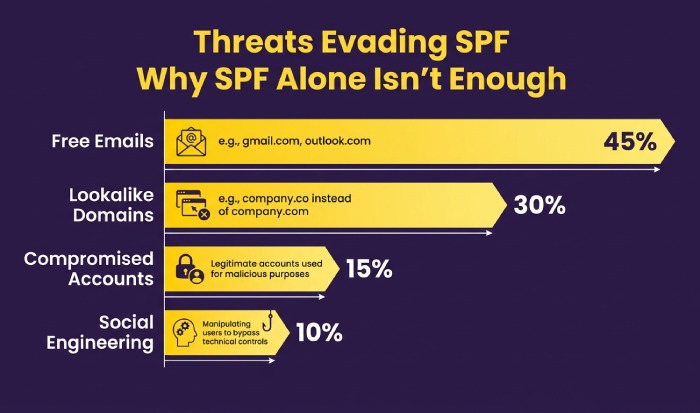
Cybercriminals can use several approaches that fall outside SPF’s direct protection.
- Free email accounts: Scammers can create accounts using legitimate free email services and communicate under fabricated identities.
- Lookalike domains: Attackers can register their own domains that resemble trusted organizations.
- Display name manipulation: Fraudulent senders can use familiar names to mislead recipients.
- Compromised accounts: Attackers may gain access to legitimate email accounts and send fraudulent messages through them.
- Social engineering: Scammers can manipulate victims into trusting requests even when the email itself does not contain technical spoofing.
This is why organizations should combine SPF with other authentication technologies and security practices rather than relying on a single DNS record.
How SPF, DKIM, and DMARC Work Together
SPF, DomainKeys Identified Mail (DKIM), and Domain-based Message Authentication, Reporting, and Conformance (DMARC) provide complementary protections for email domains.
SPF: Authorizing Sending Servers
SPF identifies which servers are authorized to send email using a domain. It helps receiving mail systems detect messages originating from unauthorized sending sources.
Domain administrators should maintain accurate SPF records and ensure that legitimate third-party email providers are properly authorized.
DKIM: Verifying Email Signatures
DKIM adds a cryptographic signature to outgoing emails. Receiving servers can use the corresponding public key published in DNS to verify the signature.
This helps establish whether signed message components have remained intact and whether the message was signed using a key associated with the signing domain.
DMARC: Applying Authentication Policies
DMARC builds on SPF and DKIM by checking whether at least one passing authentication mechanism aligns with the domain visible in the email’s From address.
Domain owners can configure DMARC policies to monitor authentication results, request that suspicious messages be quarantined, or instruct receiving systems to reject messages that fail DMARC evaluation.
DMARC reports can also provide information about email sources using a domain, helping administrators investigate unauthorized sending activity and authentication problems.
Together, these protocols make it more difficult for attackers to impersonate protected domains through direct domain spoofing.
Best Practices for Protecting Business Email Domains
Organizations should follow several practical steps to strengthen email authentication and reduce domain impersonation risks.
1. Configure an accurate SPF record
Identify all legitimate email-sending services and authorize the appropriate sources in the domain’s SPF TXT record. Avoid unnecessary DNS lookups and monitor the SPF lookup limit to prevent configuration errors.
2. Enable DKIM signing
Configure DKIM for business email services and verify that receiving systems can retrieve the correct public keys through DNS.
3. Implement DMARC gradually
Begin with a monitoring policy to understand authentication results. Review reports, correct legitimate sending-source problems, and gradually move toward stronger enforcement when appropriate.
4. Monitor DNS configuration changes
Regularly review SPF, DKIM, and DMARC records to identify missing entries, outdated sending sources, syntax errors, or unauthorized modifications.
5. Educate employees about impersonation
Train employees to inspect sender addresses, verify unusual payment requests through separate communication channels, and avoid opening suspicious links or attachments.
6. Use multiple security controls
Email authentication should complement phishing protection, account security, multifactor authentication, access controls, and incident response procedures.
General Manager
General Manager of DuoCircle. Product strategy and commercial lead for AutoSPF's 2,000+ customer base.
LinkedIn Profile →