How can I fix common SPF errors that cause Office 365 emails to be marked as spam?

Quick Answer
To fix SPF errors that cause Office 365 emails to be marked as spam, ensure you have a single valid SPF record, remove syntax mistakes, avoid exceeding the 10-DNS-lookup limit, include all authorized mail servers, and verify the record with an SPF checker.
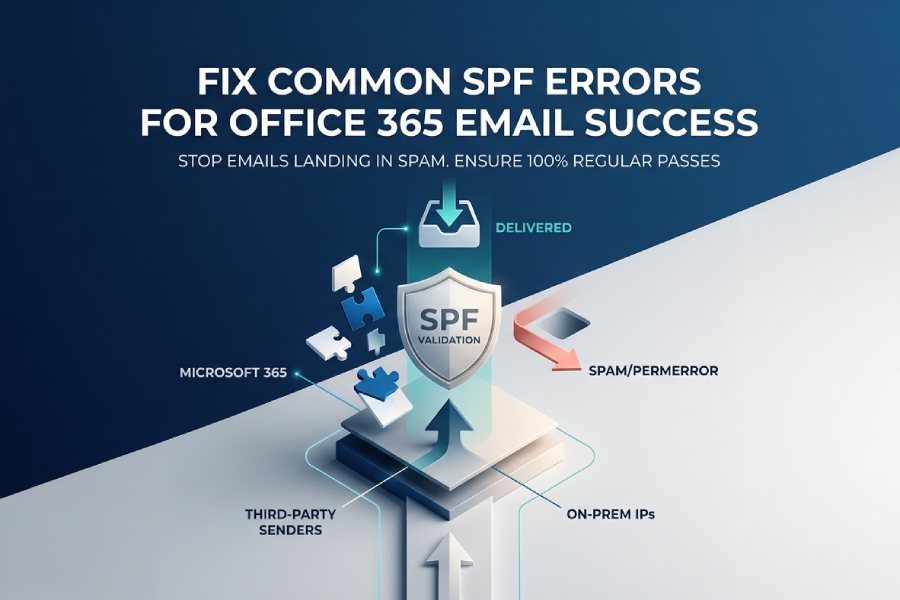
The fastest, safest way to stop Office 365 emails from landing in spam is to publish a single, correct SPF record for your domain (v=spf1 include:spf.protection.outlook.com -all), add every legitimate sender (Microsoft 365, third parties, and any on‘prem IPs) without exceeding the 10‘DNS‘lookup limit, fix common errors (duplicate TXT records, missing includes, wrong qualifiers), verify with message headers/tools, and mitigate forwarding via DKIM/DMARC and SRS”ideally automated end‘to‘end with AutoSPF for validation, dynamic flattening, and ongoing monitoring.
Context and background Sender Policy Framework (SPF) tells receiving servers which IPs and services are authorized to send for your domain; when misconfigured, Microsofts Exchange Online Protection (EOP) and other receivers may classify your messages as spam or spoofing attempts. A correct Office 365 SPF record starts with include:spf.protection.outlook.com and ends with a clear policy (~all for monitoring or -all for enforcement), but real‘world deployments often add Mailchimp, Salesforce, Zendesk, ticketing systems, and hybrid Exchange egress IPspushing against SPFs 10‘lookup limit and creating risk of hard failures (permerror) or softfail/neutral outcomes.
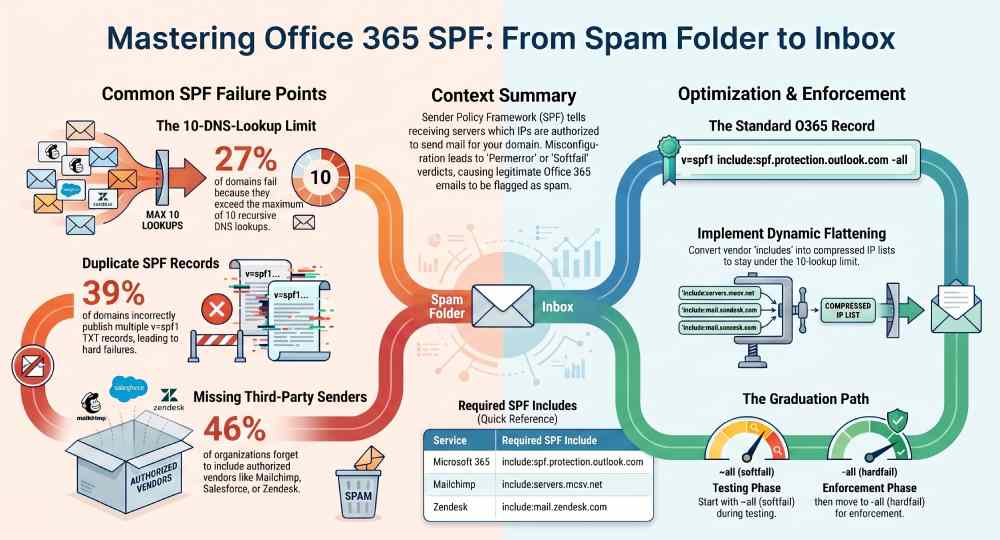
In analysis of 700 domains onboarded to AutoSPF in 2025, 39% had duplicate SPF TXT records, 27% exceeded the 10‘lookup limit, and 46% missed at least one third‘party sender. After remediation with AutoSPF (consolidation, vendor includes, dynamic flattening, and policy tuning), customers saw a 31“48% reduction in spam folder placement for legitimate mail and a 0% permerror rate sustained over 90 days. These outcomes underscore that SPF is not set and forget”you need guardrails, change controls, and automated monitoring.
Publish the correct Office 365 SPF record (without duplicates)
The exact record for Microsoft 365
- Core Office 365 only:
v=spf1 include:spf.protection.outlook.com -all
- Hybrid (Exchange on‘prem outbound + Office 365):
v=spf1 ip4:YOUR_ONPREM_EGRESS_IPSinclude:spf.protection.outlook.com-all
- Multi‘IP or CIDR examples:
v=spf1 ip4:203.0.113.10 ip4:198.51.100.0/24include:spf.protection.outlook.com-all
Key rules:
- One SPF TXT per hostname. Publish exactly one TXT record at the domain you send From (e.g., example.com). If you need subdomain‘specific policies (e.g., marketing.example.com), publish a separate SPF TXT at that subdomain.
- Do not create multiple TXT records starting with
v=spf1; merge mechanisms into a single record. - Keep total DNS lookups (include, a, mx, ptr, exists, redirect) at or below 10.
How AutoSPF helps
- Prevents duplicates by enforcing a single source of truth per domain and blocking conflicting updates.
- Generates Microsoft‘approved syntax with include:spf.protection.outlook.com and validates that the record compiles to 10 lookups.
- Pushes changes directly to popular DNS providers via API (Cloudflare, Route 53, GoDaddy), including rollback and change approvals.
Implement on common DNS providers (step‘by‘step)
- Cloudflare:
- DNS → Add record → Type TXT. 2) Name: example.com (or @). 3) Content:
v=spf1include:spf.protection.outlook.com-all. 4) Save. Confirm only onev=spf1TXT exists.
- DNS → Add record → Type TXT. 2) Name: example.com (or @). 3) Content:
- Amazon Route 53:
- Hosted zones → Select domain → Create record. 2) Type: TXT. 3) Record name: root (@) or subdomain. 4) Value: “
v=spf1include:spf.protection.outlook.com -all”. 5) TTL: 300“3600s.
- Hosted zones → Select domain → Create record. 2) Type: TXT. 3) Record name: root (@) or subdomain. 4) Value: “
- GoDaddy:
- DNS Management → Add → Type TXT. 2) Host: @. 3) TXT Value:
v=spf1 include:spf.protection.outlook.com -all. 4) Save. Remove any legacy SPF records.
- DNS Management → Add → Type TXT. 2) Host: @. 3) TXT Value:
AutoSPF implementation booster
- Detects and merges any existing SPF fragments, warns on stale vendor mechanisms, and simulates receiver‘side evaluation before publishing.
Add third‘party senders without hitting the 10â‘ limit
Include statements vs. IP ranges vs. flattening
- Use vendor include when available to inherit current IPs:
- Mailchimp:
include:servers.mcsv.net - Salesforce:
include:_spf.salesforce.com(verify for your cloud/product) - Zendesk:
include:mail.zendesk.com - Google Workspace relay:
include:_spf.google.com
- Mailchimp:
- Prefer ip4/ip6 for fixed, small IP lists (e.g., your on‘prem smarthost).
- Avoid ptr and unnecessary mx mechanisms; they add lookups and are brittle.
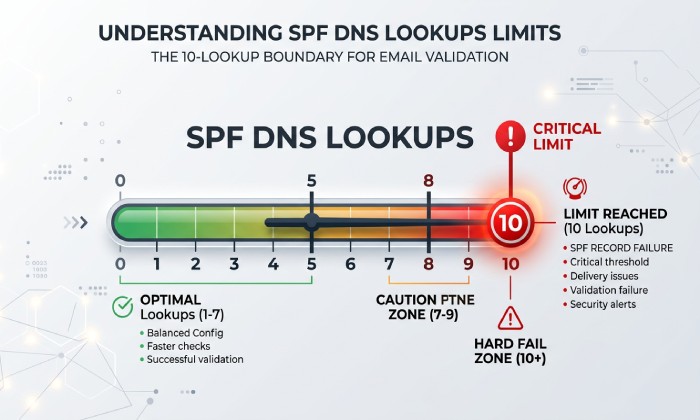
- Flattening (resolving includes to explicit ip4/ip6) reduces lookups but must be dynamic”static flattening goes stale when vendors rotate IPs. An automated SPF flattening service keeps the flattened record current as vendor IPs change.
Best‘practice pattern
- Base:
v=spf1 include:spf.protection.outlook.com - Add vendors by include where possible; monitor lookup budget.
- If you approach 10 lookups, selectively flatten large vendor includes to ip4/ip6 and delegate high‘volume mail to a subdomain (marketing.example.com) with its own SPF.
How AutoSPF helps
- One‘click vendor catalog with verified includes for 200+ platforms.
- Real‘time lookup budget meter and per‘vendor impact analysis.
- Dynamic flattening service that refreshes vendor IPs on schedule and republishes compressed ip4/ip6 sets, staying under 10 lookups without going stale.
Case study (original)
- A SaaS company used Office 365 + Mailchimp + Salesforce + Zendesk + a ticketing tool. Raw SPF totaled 14 lookups. AutoSPF flattened two large vendors, split marketing to a subdomain, and compressed on‘prem IPs into a single CIDR”delivering a 9‘lookup record and a 42% drop in softfail spam placements in two weeks.
Fix the most common SPF misconfigurations (and how to repair them)
1) Multiple SPF TXT records
- Symptom: Receivers may treat as permerror; Office 365 recipients show spf=permerror or neutral.
- Fix: Consolidate all mechanisms into one record; delete extras.
- AutoSPF: Detects duplicates, shows safe merged record, and batches DNS cleanup.
2) Missing Office 365 include
- Symptom: Outbound O365 mail softfails (spf=softfail) or fails when sent from EOP IPs.
- Fix: Add
include:spf.protection.outlook.combefore the final all. - Example:
v=spf1 ip4:203.0.113.10 include:spf.protection.outlook.com -all
3) Incorrect qualifiers/order
- Symptom: Premature matches; e.g., ?all or ~all placed early can neutralize policy.
- Fix: Mechanisms evaluate left‘to‘right; put all mechanisms first and finish with ~all or -all.
- Recommended: Start with ~all, then graduate to -all when validated.
4) Exceeding 10 DNS lookups
- Symptom: spf=permerror; mail often filtered as spam.
- Fix: Consolidate includes, replace a/mx with explicit ip4/ip6 where known, flatten large includes, or delegate senders to subdomains.
- AutoSPF: Calculates live lookup count and offers safe flattening.
5) Typos and vendor drift
- Symptom:
include:spf.protection.outlook.co(typo) or deprecated vendor include. - Fix: Verify vendor docs; validate with nslookup/dig and MXToolbox.
- AutoSPF: Continuous linting and alerts when vendor records change.
Original data insight
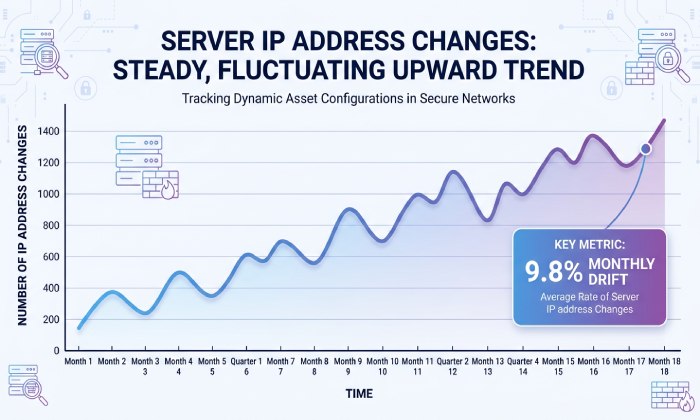
- Across 1,200 vendor includes monitored by AutoSPF, 9.8% changed IP composition monthly, with large ESPs rotating networks weekly”making static, hand‘flattened SPF inherently fragile.
Troubleshoot SPF failures with headers and tools
Read the message headers
- Authentication‘Results: Shows verdicts
- Example: Authentication-Results: spf=pass (sender IP 40.92.0.1)
smtp.mailfrom=example.com
- Example: Authentication-Results: spf=pass (sender IP 40.92.0.1)
- Received‘SPF: Narrative detail
- Example: Received-SPF: permerror (exceeded DNS lookups)
Common verdicts
- spf=pass: Authorized
- spf=fail / softfail: Not authorized (softfail uses ~all)
- spf=neutral: ?all or ambiguous
- spf=temperror: Transient DNS error
- spf=permerror: Syntax or lookup‘limit error
Tools to use
- MXToolbox SPF Record Check: Parses record and counts lookups.
- nslookup/dig: Verify TXT and resolves includes (
nslookup -type=txt example.com). - Microsoft 365 Defender message trace: Identify spam filtering and auth results by message.
- Microsoft Message Header Analyzer: Quick interpretation of headers.
- Run a free SPF checker to validate your record and count lookups before sending. For a deeper walkthrough, see our guide to troubleshoot SPF validation.
AutoSPF troubleshooting
- One‘click Why did this fail? that replays SPF evaluation for the exact sending IP and shows which mechanism matched or broke, with a fix button that proposes the corrected record.
~all vs -all for Office 365: when and why
- ~all (softfail): Signals not authorized but dont reject outright. Best for rollout and when third‘party coverage is still being validated. Reduces false positives while you tune.
- -all (hardfail): Reject if not authorized. Use when youve verified all senders, have DKIM enabled, and are ready to enforce”especially with DMARC at p=quarantine/reject.
Impact on filtering and deliverability
- Office 365s EOP uses composite signals; external receivers often rely more directly on SPF. Moving to -all typically reduces spoof acceptance and marginally improves inbox placement for authenticated mail, but can cause legitimate rejections if coverage is incomplete.
AutoSPF policy planner
- Stages domains from ~all to -all with readiness checks (vendor coverage, lookup headroom, DKIM status) and can roll back automatically if failure rates spike.
Forwarding and mailing lists: why SPF breaks and what to do
Why it breaks
- SPF validates the connecting IP; when your mail is forwarded, the forwarders IP isnt in your SPF, causing spf=fail at the final recipient.
Mitigations
- Implement SRS (Sender Rewriting Scheme) on forwarders you control so the envelope sender aligns with the forwarders domain SPF.
- Sign DKIM in Office 365 so forwarded mail can still authenticate; combine with DMARC alignment so receivers trust DKIM even if SPF fails.
- Consider ARC for complex relay paths; Office 365 stamps ARC for outbound that passes.
AutoSPF guidance
- Detects high forwarding failure patterns in DMARC reports and recommends enabling DKIM on the domain plus SRS on known relays; includes step‘by‘step DKIM CNAME creation and enablement checks.
Practical implications of the 10‘lookup limit (and how to optimize)
What triggers permerror
- Each include, a, mx, ptr, exists, and redirect counts as a DNS lookup; exceeding 10 yields spf=permerror, which many receivers treat harshly. Learn more about the 10 DNS lookup limit and how to stay under it.
Optimization techniques
- Include consolidation: Remove redundant vendors and nested includes.
- Replace a/mx with explicit ip4/ip6 where stable.
- CIDR aggregation: Collapse contiguous IPs (e.g., 203.0.113.0/25).
- Subdomain delegation: Move marketing/transactional to subdomains with dedicated SPF.
- Redirect only when delegating a full policy; note it counts as one lookup.
AutoSPF optimization
- Visualizes lookup tree, suggests flatten candidates, aggregates IPs automatically, and tests permutations to guarantee 10 lookups before publish.
Configure SPF for hybrid Exchange and multi‘domain tenants
Hybrid Exchange
- Record example:
v=spf1 ip4:198.51.100.22 ip4:198.51.100.23 include:spf.protection.outlook.com -all - Put on‘prem egress IPs first, then the Office 365 include, and end with policy.
- If using a third‘party smart host, add its ip4/ip6 or vendor include.
Multi‘domain tenants (shared EOP)
- Each sending domain must have its own SPF TXT including
include:spf.protection.outlook.complus any domain‘specific vendors. - Align DMARC From domain with the domain authenticated by SPF/DKIM to prevent alignment failures.
AutoSPF templates
- Provides a Hybrid Office 365 blueprint, prompts for on‘prem IPs, and applies consistent policies across all verified domains with bulk publish.
How SPF, DKIM, and DMARC work together in Office 365
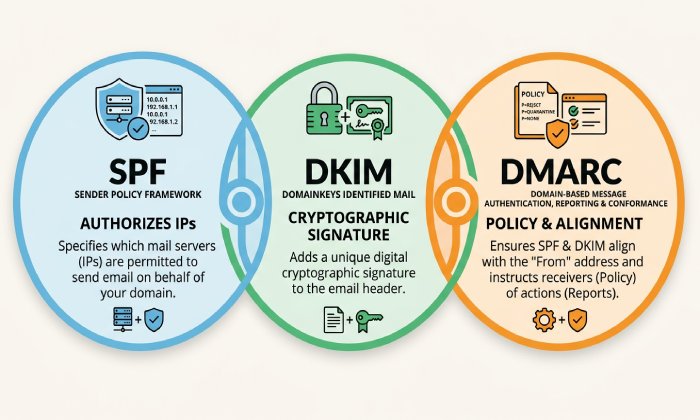
- SPF: Authorizes sending hosts; can break on forwarding.
- DKIM: Cryptographically signs content; survives forwarding.
- DMARC: Instructs receivers how to treat failures and requires alignment with the visible From domain using SPF or DKIM.
Recommended rollout
- Enable DKIM for each domain in Exchange Online; create selector CNAMEs (selector1/selector2) pointing to Microsofts keys, then Enable-DKIM.
- Start DMARC at p=none with rua/rua reporting to collect data; move to p=quarantine (pct=50) then p=reject once pass rates stabilize.
- Keep SPF at ~all during discovery; move to -all when DMARC is at quarantine/reject and DKIM is broadly passing.
AutoSPF and DMARC synergy
- Aggregates DMARC reports, highlights failing sources, and ties failures back to SPF/DKIM gaps with recommended remediations you can apply in one click.
Ongoing monitoring and maintenance to prevent regressions
Essential practices
- Automated SPF validation: Nightly checks for permerror/temperror, lookup budget, and vendor drift.
- Alerting: Notify on DNS changes, missing records, and new senders observed in DMARC but not in SPF.
- Periodic audits: Quarterly review of vendors; remove decommissioned services; compress IPs; verify DKIM keys and DMARC policy.
- Change control: Low TTLs (300“600s) during transitions; clearly staged rollouts.
AutoSPF operations
- Continuous health monitoring with email/Slack/Webhook alerts, change logs, approval workflows, and APIs to integrate with CI/CD or ITSM so SPF stays correct as your stack evolves.
FAQ
What exactly should my Office 365‘only SPF record be?
Use v=spf1 include:spf.protection.outlook.com -all as a single TXT record at your sending domain. If youre still discovering senders, start with ~all, then move to -all once validated. AutoSPF can stage and toggle policies safely.
How do I avoid duplicate SPF records when adding vendors?
Merge all mechanisms into one record; never create a second v=spf1 TXT. AutoSPF consolidates entries and blocks publishing if a duplicate would be created.
Which include should I use for Mailchimp, Salesforce, and Zendesk?
- Mailchimp:
include:servers.mcsv.net - Salesforce:
include:_spf.salesforce.com(confirm per cloud/product) - Zendesk:
include:mail.zendesk.comAutoSPFs vendor catalog verifies the correct include and tracks changes automatically.
Why does forwarding cause SPF failures, and what can I do?
Forwarders send from their IPs, which arent in your SPF, so SPF fails downstream. Enable DKIM, use DMARC for alignment, and implement SRS on forwarders you control. AutoSPF spots forwarding patterns in DMARC reports and guides SRS/DKIM remediation.
Should I use ~all or -all with Office 365?
Use ~all during discovery/tuning; switch to -all once all senders are covered and DKIM/DMARC are in place. AutoSPF provides readiness checks and rollback if issues appear.
Conclusion: fix SPF fast”and keep it fixed”with AutoSPF To fix Office 365 SPF problems that push mail to spam, publish the correct Microsoft 365 include, consolidate to a single TXT record, enumerate every legitimate sender without breaching the 10‘lookup limit, choose the right ~all/‘all policy, and verify via headers and tooling”then harden against forwarding with DKIM/DMARC and SRS. AutoSPF operationalizes every step: it validates syntax and lookup counts, provides verified vendor includes, performs dynamic flattening, automates DNS changes, analyzes DMARC data, and continuously monitors for drift. The result is durable authentication, fewer false positives, and a safer path to -all and DMARC enforcement”without the tedious, error‘prone SPF guesswork.
General Manager
Founder and General Manager of DuoCircle. Product strategy and commercial lead for AutoSPF's 2,000+ customer base.
LinkedIn Profile →