Hostgator SPF Record Guide: Prevent Email Spoofing And Delivery Issues

Quick Answer
HostGator SPF records help protect your domain from email spoofing, improve email delivery, and reduce spam risks. Learn how to set up, verify, and fix SPF issues for secure email authentication.
Securing your email infrastructure on platforms like HostGator is critical to preserving sender reputation and ensuring reliable email deliverability. A properly configured SPF record is fundamental to robust email authentication, safeguarding your domain name from email spoofing and phishing threats. In this comprehensive guide, youll discover how SPF records work, how HostGator handles email sending, where to locate and manage your SPF DNS record, and the exact SPF syntax recommended for HostGator customers”including for users on a shared server environment.
What Is an SPF Record and Why It Matters for HostGator Email
Sender Policy Framework (SPF) is an important email authentication protocol that utilizes a DNS record”specifically, a TXT record”to publish which email servers are authorized to send messages from your domain. The SPF record for a domain acts as a public allow list for email sender IP addresses and SMTP servers. Mail servers that receive messages claiming to be from your domain perform an SPF check by querying your DNS records and evaluating the sender against the SPF rule defined in your DNS zone.
For HostGator customers, implementing an accurate SPF record ensures emails sent from HostGators webmail, cPanel SMTP server, or authorized external providers will be validated as legitimate. An incorrect or missing SPF record can harm email deliverability, causing messages to land in spam or be outright rejected by recipient servers. Additionally, an SPF record is a cornerstone of modern email security”its a required component for implementing further protection mechanisms, such as DMARC and BIMI.
The Role of an SPF Record in Shared Hosting
Many HostGator plans operate on a shared server, which means multiple domain names use the same mail server or sending resources. Proper SPF record creation in these environments often requires using a shared server reference”like websitewelcome.com”to ensure all authorized servers used by HostGator are permitted.
How SPF Helps Prevent Email Spoofing, Phishing, and Domain Abuse
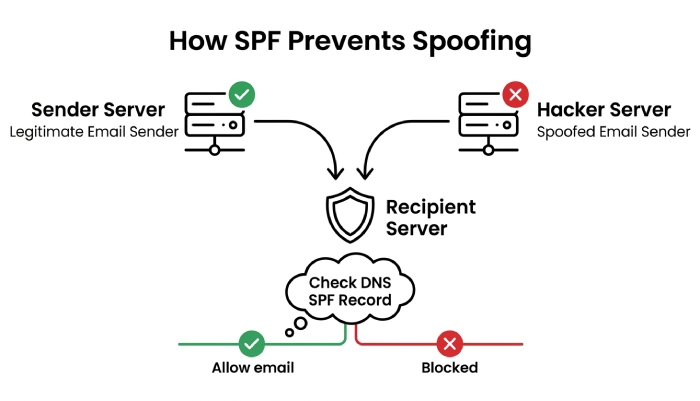
One of SPFs primary advantages is its effectiveness in combating email spoofing. By establishing a protocol for email server matching, SPF ensures only specified, authorized servers can send on behalf of your domain. Heres how it works:
- Email Spoofing Prevention: Attackers often forge the From address to trick users. SPF validation checks if the sending servers IP address is listed in the SPF record”if not, a soft fail or fail operator is triggered, and the recipient server can reject or quarantine the message.
- Phishing and Domain Abuse: When properly enforced via a strict SPF rule (using a deny rule or fail operator), phishing attempts and domain abuse become far less effective, since most major mail server platforms use SPF checks as part of their email authentication procedures.
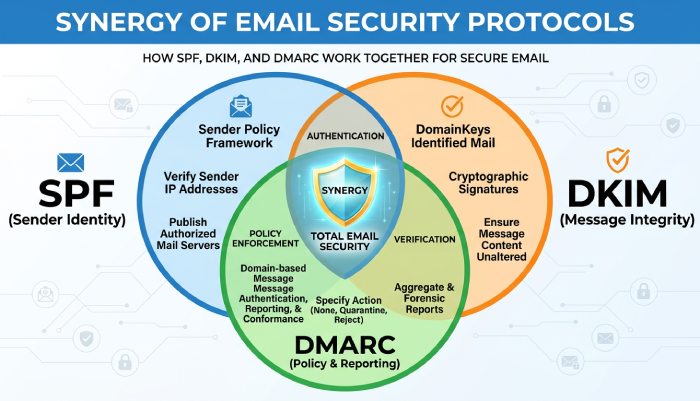
- Synergy With DMARC and DKIM: SPF is often combined with DKIM (DomainKeys Identified Mail) and DMARC policies to establish multi-layered email security. These standards enhance sender reputation and further reduce risk of unauthorized email passing.
Organizations can use EasyDMARC or native HostGator tools like the Email Deliverability Test and SPF Record Checker in cPanel to analyze, validate, and monitor their SPF setup for vulnerabilities.
How HostGator Email Sending Works: cPanel, Webmail, and Third-Party Services
Understanding HostGators own email infrastructure”and its interaction with SPF”is vital for accurate DNS record management.
HostGator cPanel and Webmail
HostGator provides cPanel access, where users can create email accounts and send mail through its built-in webmail interface. Whether youre using webmail or an email client configured for SMTP relay, outgoing email is sent through HostGators authorized servers.
- Emails Sent via cPanel use SMTP servers tied to the HostGator shared server infrastructure, commonly referencing websitewelcome.com.
- Webmail and Desktop Clients like Outlook or Thunderbird use HostGators SMTP settings as defined in cPanel.
Integrating Third-Party Email Services
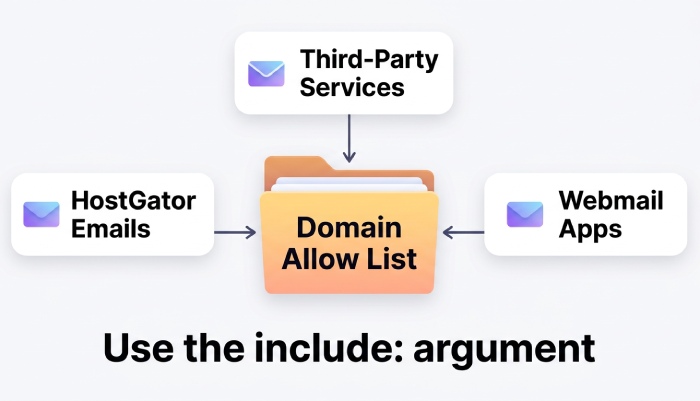
Businesses may employ third-party email services such as EasySender, Touchpoint, Google Workspace, or MSP platforms alongside HostGator hosting. In these cases, you need to use the include argument (include:) in your SPF rule to add those providers authorized servers to your allow list. Adding too many includes can trigger SPF too many DNS lookups errors, so keep the count in check.
Key Considerations for SPF in Hybrid Setups
- Always update your SPF record when you add or remove third-party services to avoid unintended email blocks or unauthorized passing. If the record grows past the lookup limit, you may need to flatten your SPF record.
- For advanced management, HostGators Advanced DNS Editor within cPanel offers granular DNS modification, including complex SPF arguments and ordering.
Finding Your Current SPF Record in HostGator cPanel or DNS Zone Editor
To manage or validate your SPF record for a domain hosted on HostGator, youll need to access your TXT records, typically via cPanel or another DNS interface.
Locating Your SPF TXT Record in cPanel
- Access Your cPanel: Log into your HostGator cPanel dashboard.
- Open the Zone Editor (or Advanced DNS Editor): This tool provides access to all DNS records”including TXT, MX record, A record, and PTR record types.
- Find the TXT Record for SPF: Look for a TXT record that starts with “
v=spf1”. This is your SPF record for the domain. - Review or Edit: From here, you can view the full SPF syntax, arguments list, and any include argument or IP address authorization entries.
Using Third-Party DNS or External SPF Check Tools
If your DNS is managed outside of HostGator (e.g., via Cloudflare or another third-party DNS provider), youll use their DNS modification interface to manage your SPF data field. Its highly recommended to use SPF validation tools like SPF Record Checkers or the Email Header Analyzer to perform an SPF check and ensure correct processing order and SPF rule application order.
The Recommended HostGator SPF Record Syntax and What Each Part Means
Correct SPF record format is critical for email deliverability and security. Knowing the six SPF record types helps you pick the right mechanisms. Heres an SPF record breakdown recommended for most HostGator users”especially those on shared hosting:
v=spf1 a mx include:*websitewelcome.com* ~all
You can build and customize this record with our free SPF record generator before publishing it in cPanel.
SPF Record Breakdown
v=spf1The SPF prefix identifies the SPF version and starts every SPF record syntax. It signals to receiving mail servers that this TXT record details the SPF rule for your domain.a(A record match) Authorizes the server(s) whose IP address is returned by the domains A record. This typically allows webmail sent from your root web server.mx(MX record match) Permits mail servers defined in your domains MX record(s) to send email on your behalf. Often points to the core HostGator mail infrastructure.include:websitewelcome.com(Include argument)Adds all authorized servers managed by HostGators backend (websitewelcome.com) to your allow list. This is essential for SPF for shared hosting and ensures proper email authentication when using HostGators SMTP servers.~all(Soft fail operator / SPF all argument) The~allat the end acts as a soft fail rule, indicating that email from all other sources not previously allowed should be accepted but treated with suspicion (often placed in the spam folder). For more restrictive settings, you might use-all(fail operator or deny rule) as your SPF all argument for a stricter deny list, preventing unauthorized senders entirely.
General Manager
General Manager of DuoCircle. Product strategy and commercial lead for AutoSPF's 2,000+ customer base.
LinkedIn Profile →