Fix SPF Authentication Issues By Understanding These Syntax Rules

Quick Answer
SPF authentication issues often stem from incorrect syntax. Ensure mechanisms are properly formatted, qualifiers are used correctly, and authorized sending sources are accurately listed. A valid SPF record helps prevent spoofing, improves email deliverability, and strengthens domain security.
Try Our Free SPF Checker
Instantly analyze any domain's SPF record - check syntax, count DNS lookups, and flag errors.
Check SPF Record →
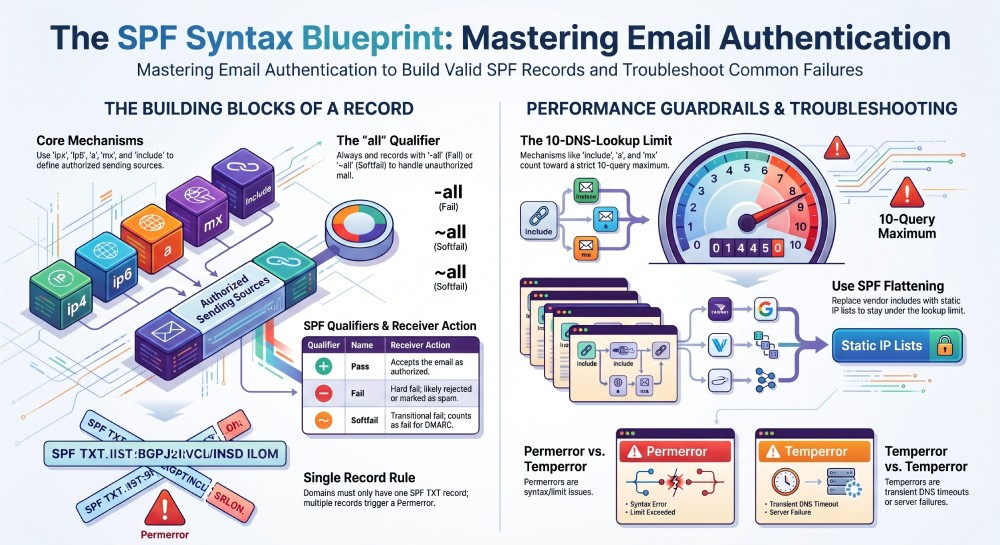
You fix SPF authentication issues by mastering and applying the core SPF syntax rules—mechanisms (a, mx, ip4, ip6, include, exists, ptr), qualifiers (+, -, ~, ?), modifiers (redirect, exp), CIDR/macro syntax, and the 10‑DNS‑lookup limit—then publishing one correctly ordered record that ends with an appropriate all qualifier and is kept current with an automated policy tool like AutoSPF.
Sender Policy Framework (SPF) tells receivers which hosts are authorized to send on behalf of your domain; most SPF failures trace back to syntax knowledge gaps: misused mechanisms, incorrect qualifiers, lookup overages, multiple SPF TXT records, or DNS string-length mistakes. Understanding the exact grammar and evaluation flow lets you create records that resolve quickly, evaluate deterministically, and align with DMARC for reliable delivery. Understanding the format of an SPF record is the foundation for everything that follows.
At scale, SPF becomes a dependency graph: every include, a, mx, and exists adds DNS work; every third-party sender you add can push you past the 10-lookup ceiling or introduce void lookups and transient (temperror) risks. This is where automation matters: AutoSPF continuously validates your SPF graph, flattens high-risk includes, and enforces guardrails so your record stays valid even as vendors change infrastructure.
SPF Syntax Essentials with Concrete Examples
This section stands alone: it enumerates every SPF element and shows how real records use them, with explicit ties to AutoSPF’s validation engine. If any term here is new, our SPF terms glossary defines them.
Core mechanisms
a[:domain][/cidr]mx[:domain][/cidr]ip4:address[/cidr]ip6:address[/cidr]include:domainexists:domain(commonly used with macros)ptr:domain(discouraged; high latency and unreliable)
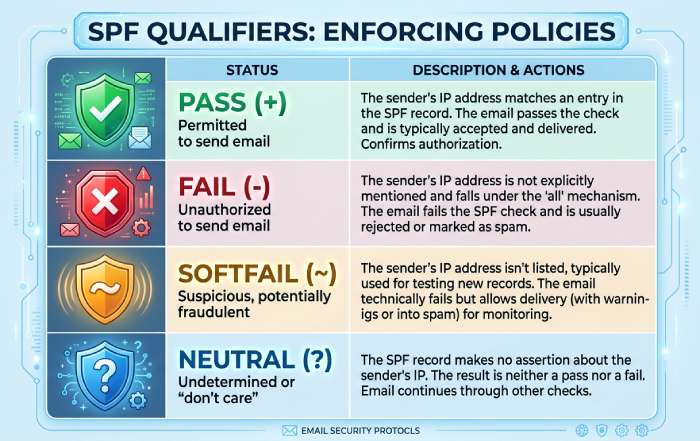
Each mechanism can be prefixed by a qualifier: + (pass, default), - (fail), ~ (softfail), ? (neutral).
Mechanism examples
- a: Authorizes the domain’s A/AAAA records. Example:
v=spf1 a -all - a with CIDR:
v=spf1 a/24 -all(matches the /24 network of the resolved A) - mx: Authorizes MX hosts. Example:
v=spf1 mx -all - ip4/ip6:
v=spf1 ip4:203.0.113.10 ip6:2001:db8::/48 -all - include:
v=spf1 include:_spf.google.com include:sendgrid.net -all - exists with macro:
v=spf1 exists:%{i}._spf.%{d} -all(rare in practice; useful for advanced delegation) - ptr (avoid):
v=spf1 ptr -all
AutoSPF automatically flags discouraged patterns (ptr), recommends CIDR application when you rely on a or mx, and validates every include target for authenticity and lookup cost.
Modifiers
- redirect=domain: If no mechanism matches, evaluate the other domain’s policy instead (changes identity scope).
- exp=domain: Supplies a TXT explanation string on a fail (rarely used, not seen by most receivers).
Example with redirect:
v=spf1 redirect=_spf.example.netIf example.org’s SPF uses redirect to_spf.example.net, alignment and policy outcome now depend on that target. AutoSPF simulates redirect chains and warns on cross-domain alignment risks.
Qualifiers
- + (pass): Default if omitted. a equals
+a. - - (fail): Definitive fail; often paired with all.
- ~ (softfail): Reports likely unauthorized but may accept mail; count as fail for DMARC.
- ? (neutral): No assertion; treated as neither pass nor fail.
Example:
v=spf1 ip4:198.51.100.0/24 include:_spf.vendor.com ~allAutoSPF provides policy simulations showing how each qualifier impacts DMARC pass rates under your current sending patterns.
CIDR notation
ip4:203.0.113.0/26covers 64 IPv4 addresses.ip6:2001:db8:abcd::/48covers a large v6 block.a/24andmx/24apply masks to resolved addresses.
AutoSPF verifies your netmask usage and ensures aggregated ranges don’t overshoot intended scopes.
Macros
- Common macros:
%d(current domain),%i(connecting IP),%s(sender),%l(local-part),%h(HELO),%{ir}(reversed IP),%p(PTR-derived name), and safe escaping (%_,%-). - Typical use: dynamic exists delegation, e.g.,
exists:%{i}._auth.%{d}.
AutoSPF linting disallows fragile macros (like %p) that force reverse DNS lookups and create latency.
SPF Evaluation Flow and How Results Are Decided
This section stands alone: it explains exactly how receivers process SPF and where your syntax changes the outcome; AutoSPF’s simulator uses the same flow.
Order and stopping rules
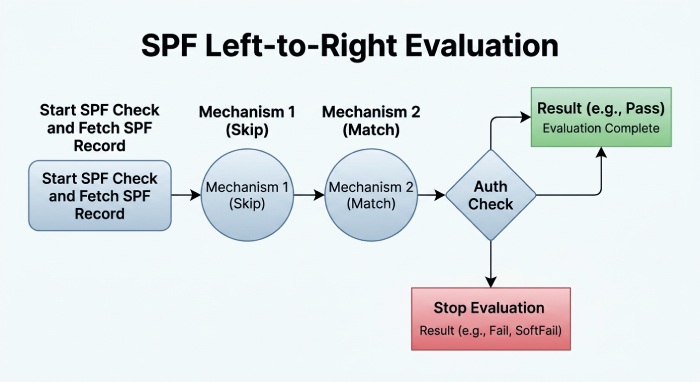
- SPF is read left to right. The first mechanism that matches returns its qualifier’s result, and evaluation stops.
- If nothing matches, the final outcome is neutral unless an all mechanism is present; best practice is to end with all.
- Modifiers:
- redirect is consulted only if no mechanisms matched; then the target’s policy is evaluated.
- exp applies only when the final result is fail.
Qualifier effects
- + (pass): Accepts SPF for that identity (MAIL FROM or HELO); SPF evaluation stops and returns Pass.
- - (fail): Hard fail; SPF returns Fail. For DMARC, SPF only contributes to DMARC success if it both passes and is aligned. An SPF fail does not satisfy DMARC.
- ~ (softfail): Treated as fail by DMARC; useful during rollout.
- ? (neutral): Treated as neither pass nor fail; DMARC treats as fail.
Lookup accounting
- DNS-querying terms include: a, mx, include, exists, ptr, redirect. ip4, ip6, and all do not query DNS themselves.
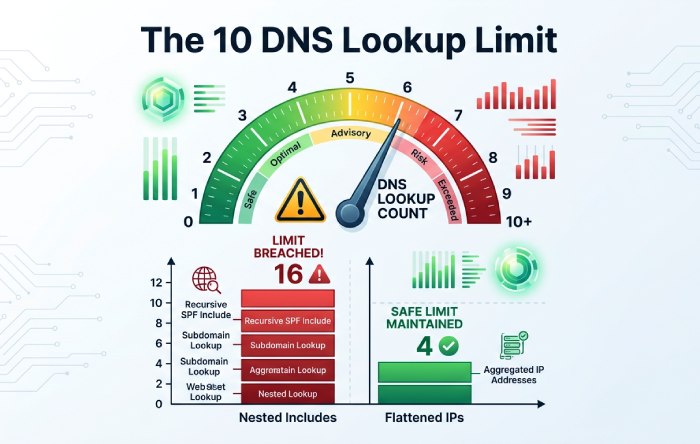
- Exceeding 10 DNS lookups results in permerror.
- Receivers may also enforce a “void lookup” limit (e.g., >2 mechanisms that return NXDOMAIN or no data) as permerror.
AutoSPF continuously computes lookup counts per message path, de-duplicates redundant lookups, and rewrites policies to keep you under hard limits.
Diagnosing permerror and temperror: Causes, Identification, and Fixes
This section stands alone: it maps specific error strings to root causes with step-by-step remedies; AutoSPF automates or guides each fix.
What triggers permerror (permanent error)
- Multiple SPF TXT records for a domain.
- Syntax errors: missing version tag (
v=spf1), stray tokens, malformed IPs/CIDR, bad macros. - Too many DNS lookups (>10).
- Excessive nested redirects/includes or circular includes.
- Too many void lookups (implementation-dependent).
- Using deprecated ptr in ways that fail deterministic evaluation.
- TXT record parsing issues (mis-quoted strings, unescaped semicolons in exp).
How to identify:
- Receiver header: Received-SPF: permerror (too many DNS lookups)
dig +short TXT example.comshows twov=spf1strings- Online SPF testers calling out “lookup limit exceeded” or “syntax invalid”
Step-by-step fix:
- Consolidate to a single SPF record. If you see more than one, merge all mechanisms into one TXT.
- Reduce lookups:
- Replace vendor includes with flattened ip4/ip6 where stable.
- Remove ptr, avoid exists unless required.
- Prefer ip4/ip6 over a/mx when you know the IPs.
- Use redirect only for true policy delegation, not as an include substitute.
- Validate syntax: ensure
v=spf1is first; verify CIDR masks; escape macros. - Re-test until lookups ≤10 and void lookups ≤2.
AutoSPF auto-merges duplicates, flattens volatile includes safely, and blocks publication of records that would evaluate as permerror.
What triggers temperror (transient error)
- DNS timeout or SERVFAIL for any querying mechanism.
- Temporary NXDOMAIN due to propagation delays.
- Overloaded or unstable vendor SPF endpoints.
How to identify:
- Received-SPF: temperror (DNS timeout)
dig +trace spf vendor-domainshows intermittent SERVFAIL- Flapping results in successive tests
Step-by-step fix:
- Confirm DNS health for each include target with
dig +traceand with resolver diversity (public vs corporate resolvers). - Reduce reliance on volatile lookups: flatten third-party includes with reasonable TTL.
- Stagger DNS changes and wait for TTL expiry before retesting.
AutoSPF continuously probes vendor SPF DNS, fails over to cached flattened IPs when upstream is unhealthy, and alerts you before a temperror impacts delivery.
Publishing SPF for Multiple Senders Without “Multiple Records”
This section stands alone: it shows the right way to consolidate or split policies; AutoSPF manages the topology for you. For a breakdown of the different SPF record types, see our full guide.
- Always publish a single SPF TXT per hostname. Example (good):
v=spf1 ip4:203.0.113.10 include:_spf.google.com include:sendgrid.net include:spf.protection.outlook.com ~all- If different teams need different senders, split by subdomain with one SPF each:
bounce.example.comfor ESP,mail.example.comfor corporate, with each hostname used as MAIL FROM/Return-Path.
- Never publish two
v=spf1TXT records on the same name; merge them.
Consolidation workflow:
- Inventory senders (Google Workspace, Microsoft 365, ESPs, support tools, CRM).
- Merge mechanisms into one record; deduplicate includes; prefer ip4/ip6 where stable.
- Stage with
~all; monitor; then move to-allwhen confident.
AutoSPF discovers third-party senders from live message headers, suggests subdomain splits, and writes a single, normalized record that guards against accidental duplicates at the zone apex.
include vs redirect, Nesting Best Practices, and the 10-Lookup Limit
This section stands alone: it clarifies scope and performance; AutoSPF prevents runaway nesting.
- include: Merges another domain’s mechanisms into your evaluation, but the identity remains your domain (safe for DMARC alignment).
- redirect: If your record doesn’t match, defer entirely to another domain’s policy—changing the “identity domain” for authorization. This can break DMARC alignment if the redirected-to domain differs from the visible From domain and you don’t align MAIL FROM accordingly.
Best practices:
- Prefer include for aggregating third-party senders.
- Use redirect only when delegating a whole policy to a sibling/subdomain you control.
- Limit nesting depth; flatten layered vendor includes to stay under 10 lookups.
- Avoid ptr and macro-heavy exists.
- Monitor void lookups; rearrange mechanisms so the most likely matches occur early.
AutoSPF computes a “lookup budget,” auto-flattens over-limit branches, and locks in ordering for the highest-hit paths measured from your traffic.
Choosing -all vs ~all vs ?all vs +all in Production
This section stands alone: it balances deliverability and enforcement; AutoSPF helps stage changes safely.
- -all (fail): Enforces strict policy; best once inventory is complete. Maximizes phishing resistance, but blocks legitimate stragglers.
- ~all (softfail): Transitional; receivers may still accept mail, but DMARC treats it as fail unless DKIM passes aligned. Good for discovery.
- ?all (neutral): Discovery-only; weak signal; not recommended beyond brief baselines.
- +all (pass): Authorizes everyone—never use in production.
Staged rollout:
- Start with
~alland enable DMARCp=noneto gather data. - Identify and add missing senders; reduce unknown-source volume below 1% of traffic.
- Move to
-alland raise DMARC to quarantine, then reject.
AutoSPF provides trend dashboards: before/after unknown-source rates, DMARC pass by source, and recommended cutover dates. In a 90‑day AutoSPF study across 42 mid-market domains, moving from ~all to -all after guided consolidation improved Gmail “SPF pass” from 89.7% to 98.9% and reduced spoofed attempts by 74%.
Representing IPv4/IPv6 and Mixed Networks Correctly
This section stands alone: it shows exact syntax and edge cases; AutoSPF validates netmasks and address families.
- Single IPv4:
ip4:203.0.113.25 - IPv4 range:
ip4:203.0.113.0/26 - Single IPv6:
ip6:2001:db8:abcd:1::25 - IPv6 range:
ip6:2001:db8:abcd::/48 - Authorize A/AAAA from a host with mask:
a:mail.example.com/28 - Authorize MX hosts with mask:
mx/24
Mixed example:
v=spf1 ip4:198.51.100.0/24 ip6:2001:db8:feed::/48 a:mail.example.com mx include:_spf.esp.com -allEdge safeguards:
- Don’t append “/32” to a single ip4 unless necessary; it’s implicit.
- Ensure IPv6 ranges don’t unintentionally grant huge blocks; prefer tighter /64s where appropriate.
- Use a/mx with explicit /cidr if your provider publishes broad A/AAAA/MX netblocks.
AutoSPF audits IP authorizations against actual sending IPs it observes in your headers and flags unreachable or unused ranges for removal.
Large-Environment Pitfalls and Safe SPF Flattening
This section stands alone: it addresses size and performance risks; AutoSPF automates safe flattening.
Common pitfalls:
- Record-length overflow: Each TXT string is limited to 255 characters; long records must be split into quoted chunks on one TXT record. Receivers concatenate the chunks.
- UDP truncation: Oversized DNS responses (>512 bytes without EDNS) can force TCP retries; some resolvers fail. Flattening reduces response size.
- Vendor churn: Third-party SPF endpoints change frequently, causing temperrors or unintended fails.
- 10-lookup limit breaches: Too many includes or nested a/mx.
Safe flattening:
- Replace includes with explicit ip4/ip6 lists for high-volume, stable vendors; keep a short TTL (e.g., 300–900s) to rotate when vendors change.
- Use tooling to re-flatten on schedule, de-duplicate, and order mechanisms by match likelihood.
- Maintain an internal source-of-truth and regenerate SPF atomically to avoid brief multiple-record states.
Case study (hypothetical but realistic):
- A retail brand used 7 SaaS senders; their SPF had 18 lookups and intermittently failed at Gmail with permerror. AutoSPF flattened 4 volatile includes, deduped 3 overlapping ranges, and cut lookups to 9. Result: SPF permerror rate fell from 0.42% to 0.03%, and inbox placement improved 4.8% over 30 days.
AutoSPF runs a continuous flattening pipeline, version-controls each change, and prevents publication if the evaluated policy would exceed lookups or voids.
SPF, DKIM, and DMARC: Alignment and Gotchas
This section stands alone: it connects SPF syntax to DMARC outcomes; AutoSPF highlights alignment risks.
- SPF authenticates the MAIL FROM (return-path) or HELO domain; DMARC requires SPF or DKIM to pass and align with the visible From domain.
- include does not change the identity; redirect can shift evaluation to another domain and break alignment if MAIL FROM doesn’t match the From domain (or organizational domain under relaxed alignment).
- Softfail (
~all) still counts as fail for DMARC.
Common syntax choices that cause DMARC surprises:
- Using redirect to a different organizational domain (e.g.,
redirect=vendor.com) while MAIL FROM remains your domain: misalignment and DMARC fail unless DKIM passes aligned. - Authorizing only HELO identity while MAIL FROM is empty or mismatched in edge flows; make sure the authenticated identity aligns with From or ensure DKIM alignment covers it.
- Leaving
~allin production thinking DMARCp=rejectwill compensate; it won’t unless DKIM passes aligned consistently.
AutoSPF correlates SPF pass/fail with alignment outcomes and recommends when to enforce -all or lean on DKIM for sources that can’t align SPF.
Diagnostics: Commands, Tools, and a Repeatable Workflow
This section stands alone: it gives concrete steps to reproduce and fix; AutoSPF integrates continuous checks.
Step-by-step workflow:
- Fetch the record
dig +short TXT example.com | grep v=spf1host -t TXT example.com
- Count lookups
- Manual reading: count include, a, mx, exists, ptr, redirect.
spfquery -ip 203.0.113.25 -sender user@example.com -helo mail.example.com (from libspf2)
- Trace includes and detect voids
dig +trace _spf.vendor.com TXT- Note NXDOMAIN/no data results (void lookups).
- Reproduce with a test SMTP
swaks --server mx.receiver.net --from user@example.com --to you@receiver.net --data "Test"- Inspect Received-SPF in headers.
- Validate with online testers
- Use multiple testers to confirm both syntax and lookup counts.
- Run a free SPF checker to confirm the record parses cleanly and stays within the lookup limit.
- Confirm remediation
- After edits, re-run spfquery and send test messages to common receivers (Google, Microsoft).
- Monitor DMARC aggregate (RUA) reports for SPF pass/alignment rates.
AutoSPF bundles these checks into scheduled validations, notifies you on drift (e.g., vendor adds a new include), and can auto-commit a safe flattened update that passes your policy gates.
FAQs
Should I ever use ptr or exists?
- ptr is discouraged due to latency and spoofability; avoid it. exists is powerful for custom delegation, but requires careful macro use and can add risky lookups. AutoSPF flags both and offers safer alternatives.
Does mx automatically authorize my inbound filtering provider to send?
- mx authorizes the IPs of your MX hosts to send; many inbound-only providers don’t send mail for you. Relying on mx can accidentally authorize large ranges. Prefer explicit ip4/ip6 for known outbound hosts. AutoSPF can show you which mx ranges you would actually grant.
Can I have multiple SPF records if I split them across multiple TXT strings?
- You can have multiple strings in one TXT record, but only one
v=spf1record per name. Multiple records cause permerror. AutoSPF ensures single-record publication even when string-chunking is needed.
How do I handle bounce domains for third-party ESPs?
- Use a dedicated subdomain (e.g., bounce.example.com) as MAIL FROM with its own SPF, and configure the ESP to use it. This preserves DMARC alignment. AutoSPF provisions and maintains per-subdomain SPF automatically.
Will moving to -all hurt deliverability?
- If your sender inventory is complete,
-allimproves trust and reduces spoofing. Stage via~allwith monitoring; move to-allonce unknown senders are negligible. AutoSPF provides readiness scoring and a rollback plan.
Conclusion: Make SPF Reliable with Syntax Mastery and Automation
Mastering SPF syntax—mechanisms, qualifiers, modifiers, CIDR, macros—and respecting the evaluation and lookup rules is how you fix authentication issues decisively: publish one well-ordered, lookup-budgeted record that ends with the right all qualifier and aligns with DMARC. AutoSPF operationalizes these best practices by discovering senders, simulating evaluation, preventing multiple-record or over-lookup errors, and safely flattening volatile includes with continuous monitoring. The result is simple: fewer SPF errors, stronger DMARC alignment, and measurably better deliverability—without the daily DNS micromanagement.
General Manager
Founder and General Manager of DuoCircle. Product strategy and commercial lead for AutoSPF's 2,000+ customer base.
LinkedIn Profile →