One-Click Auto DNS Publishing with Entri: A Guide to SPF Record Setup

Quick Answer
Entri simplifies SPF record setup with one-click DNS publishing. Learn how to connect your domain, automatically publish SPF records, reduce DNS configuration errors, and improve email authentication and deliverability.
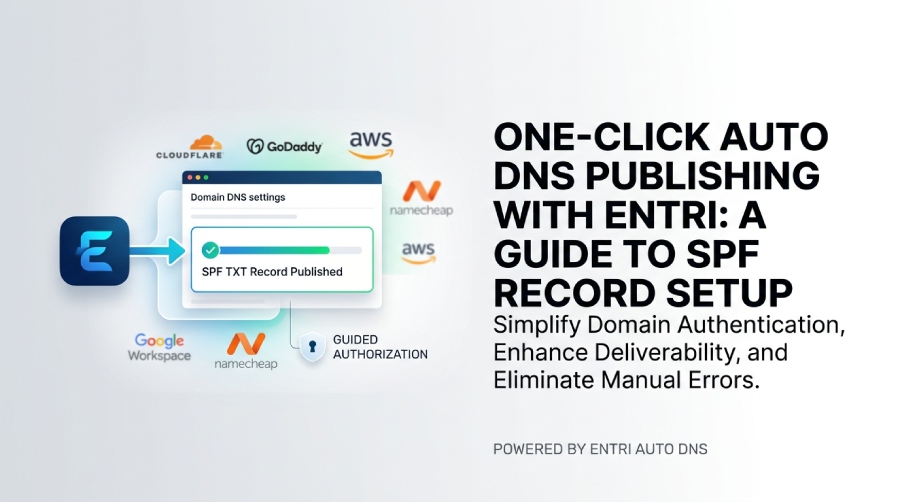
Sender Policy Framework, or SPF, is one of the foundational DNS records used for domain authentication. It tells receiving mail servers which IP addresses, mail platforms, and Host services are authorized to send email on behalf of your domain. Without a valid SPF TXT record, legitimate messages from your email infrastructure may be treated as suspicious, quarantined, or rejected.
SPF is published as a TXT record in your DNS settings. When a receiving server gets an email claiming to come from your domain, it checks the SPF TXT record to determine whether the sending source is approved. This helps reduce spoofing, phishing, and unauthorized use of your brand identity.
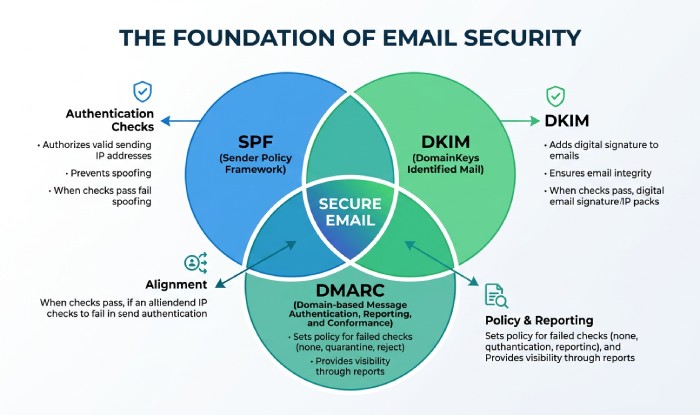
SPF also works alongside a DMARC record and DKIM authentication. A DMARC record defines how receivers should handle messages that fail authentication, while DKIM relies on cryptographic signatures often published through a CNAME record or TXT record, depending on the provider. Together, SPF, DKIM, and DMARC create a stronger email authentication framework.
Deliverability, Compliance, and Brand Protection
Modern mailbox providers increasingly enforce domain authentication requirements. If your SPF TXT record is missing, duplicated, malformed, or outdated, your deliverability can suffer. This is especially important for organizations using multiple sending platforms, marketing automation tools, CRMs, help desk support systems, or transactional email services.
A clean SPF configuration supports compliance standards and protects your email infrastructure from abuse. It also contributes to DMARC alignment, helping your DMARC record move toward stricter policies such as quarantine or reject.
As organizations manage SPF, DKIM, DMARC, BIMI, MTA-STS, and TLS-RPT records, accurate DNS configuration becomes increasingly important. Entris automated DNS publishing capabilities can simplify this process by reducing manual entry and helping users publish required DNS records through a guided workflow.
What One-Click Auto DNS Publishing with Entri Does
How Auto DNS Publishing Simplifies Record Creation
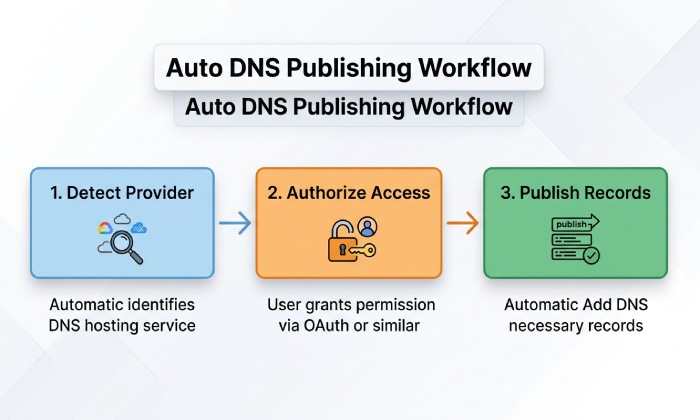
Auto DNS Publishing with Entri automates much of the publishing process required to add authentication DNS records to a domain. Instead of copying values from a platform interface and pasting them manually into a DNS provider dashboard, users can rely on One-Click DNS to securely connect to their provider and publish DNS record entries with guided authorization.
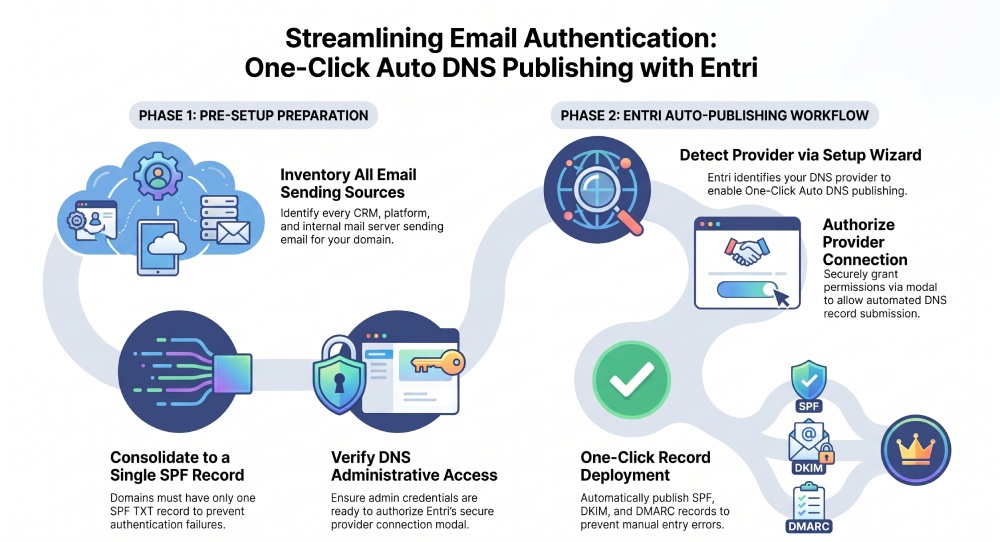
In a typical manual flow, an administrator must locate the correct zone, choose the right record types, create a TXT record for SPF, possibly add a CNAME record for DKIM, and verify a DMARC record. With Auto DNS Publishing, Entri helps detect DNS provider details, initiate provider authorization, and complete the domain setup faster.
This automated DNS process can reduce manual entry and help minimize common configuration errors, especially for teams managing multiple domains. It also provides a more structured approach to DNS management by using provider authorization before publishing supported DNS records.
Supported DNS Providers and Record Publishing Options
Entri works with many supported DNS providers, including Amazon Route 53, Cloudflare, GoDaddy, Namecheap, 123-Reg, Aruba, Arsys, Bluehost, Crazy Domains, Domain.com, Digital Ocean, DNSimple, DreamHost, Dynadot, Enom, Gandi, Hetzner, Hover, Hostgator, Hostinger, Inmotion Hosting, IONOS, IWantMyName, Linode, LocaWeb, Name.com, Namebright, and NameSilo.
The availability of One-Click DNS depends on DNS provider capabilities. Some supported DNS providers allow direct API-based publishing, while others may provide limited record publishing options. Where Auto DNS Publishing is available, the Setup Wizard can publish DNS record entries automatically. Where it is not available, the platform may guide users through manual DNS publishing using support documentation.
Common record types handled during domain setup include the SPF TXT record, DKIM CNAME record, DMARC record, and additional security records. A Whitelabel setup may also require a CNAME record, NS records, or other DNS records depending on the service architecture.
Preparing Your Domain and Email Sending Services Before Setup
Inventory Your Sending Sources
Before using Auto DNS Publishing, identify every service that sends email for your domain. This may include Microsoft 365, Google Workspace, Salesforce, HubSpot, Zendesk, Mailchimp, SendGrid, Amazon SES, or internal mail servers. Your SPF TXT record must include authorized sending sources without exceeding SPF lookup limits.
For complex environments, AutoSPF can help simplify SPF management by making it easier to organize authorized sending sources and identify common SPF configuration or lookup-limit issues.
This preparation improves domain setup accuracy. If your SPF record omits a legitimate platform, messages from that service may fail SPF checks. If it includes obsolete senders, your domain may remain exposed to unnecessary risk.
Review Existing DNS Records and Access
Next, review your current DNS records. Look for an existing SPF TXT record at the root domain, because a domain should not have multiple SPF records. If more than one SPF TXT record exists, record validation may fail, and receivers may treat the SPF result as a permanent error.
Also check whether your DNS settings already contain a DMARC record, DKIM record, or other email authentication records. Reviewing your existing DNS configuration helps prevent duplicate or conflicting records and ensures that new authentication records are added to the correct domain and DNS zone.
Make sure you have administrative access to your DNS provider. One-Click DNS requires provider authorization, and Entri may open a modal window where you authenticate with Cloudflare, GoDaddy, Namecheap, Amazon Route 53, or another supported provider. Review privacy prompts and consent preferences before approving access.
Step-by-Step SPF Record Setup Using Entri
Launch the Setup Wizard
Start from the domain or email authentication setup area where Entri is integrated. Select the SPF configuration workflow and enter the domain you want to authenticate. The setup wizard can then guide you through the steps required to publish the SPF TXT record through your DNS provider.
The Setup Wizard may first attempt to detect DNS provider information for your domain. If Entri can detect DNS provider details and your provider is among supported DNS providers, One-Click DNS becomes available. If the provider is not supported, the Setup Wizard may display manual instructions instead.
Authorize the DNS Provider Connection
When prompted, choose Auto DNS Publishing. Entri will redirect you to your DNS provider or display a secure modal window for provider authorization. This step allows Entri to publish DNS record changes on your behalf.
Authorization should be handled carefully. Confirm that the domain shown in the modal window is correct, review consent preferences, and verify that the requested permissions align with the intended record management activity. This supports secure DNS management and prevents accidental changes to unrelated DNS records.
Publish the SPF TXT Record
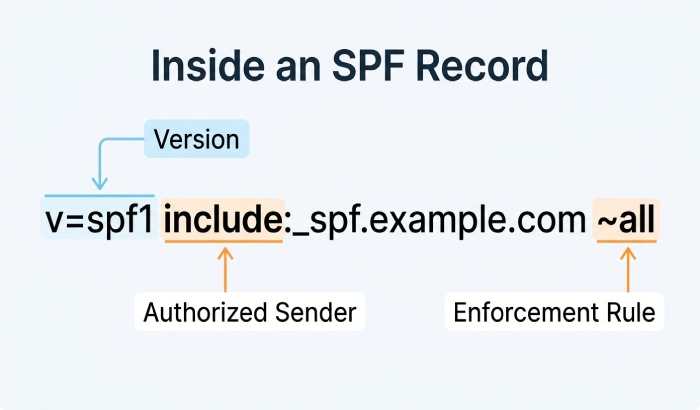
After authorization, the Setup Wizard prepares the SPF TXT record. The record usually begins with v=spf1 and includes mechanisms such as include, ip4, ip6, or a, followed by an enforcement qualifier such as ~all or -all.
With One-Click DNS, you can publish the required DNS record changes directly through the setup workflow. Entri’s Auto DNS Publishing can help publish the SPF TXT record to the domain’s DNS provider after the required authorization is completed. Depending on the email authentication setup, you may also need to publish additional records, such as a DMARC TXT record or a DKIM CNAME or TXT record.
Once the system completes the publishing process, you should see a success message. That success message confirms that Entri submitted the DNS records to your provider, although DNS propagation may still take time.
Add Related Authentication Records
SPF is only one part of domain authentication. During the same domain setup, you may also configure a DMARC record, a DKIM TXT record, a DKIM CNAME record, or a tracking CNAME record for a Whitelabel setup.
Organizations may also need to publish other email authentication records, such as DKIM and DMARC, alongside SPF. In these cases, Entri’s Auto DNS Publishing workflow can help simplify DNS configuration by allowing supported records to be published through the same guided setup process.
General Manager
General Manager of DuoCircle. Product strategy and commercial lead for AutoSPF's 2,000+ customer base.
LinkedIn Profile →