Domain Lookup for Email Troubleshooting: What Should You Check?

Quick Answer
A domain lookup can help identify DNS records affecting email delivery. Check SPF, DKIM, DMARC, MX, DNS propagation, nameservers, and record conflicts to find authentication errors, misconfigurations, and delivery issues.
During an email domain lookup for troubleshooting, you should check MX, A/AAAA, PTR (reverse DNS), SPF, DKIM, and DMARC records; validate DNSSEC status and TTL/propagation; confirm HELO/EHLO alignment; review SMTP logs and bounce diagnostics; and verify any provider‘specific DNS entries.
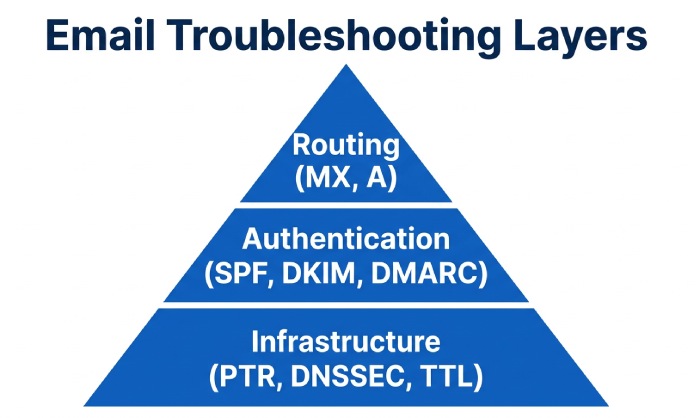
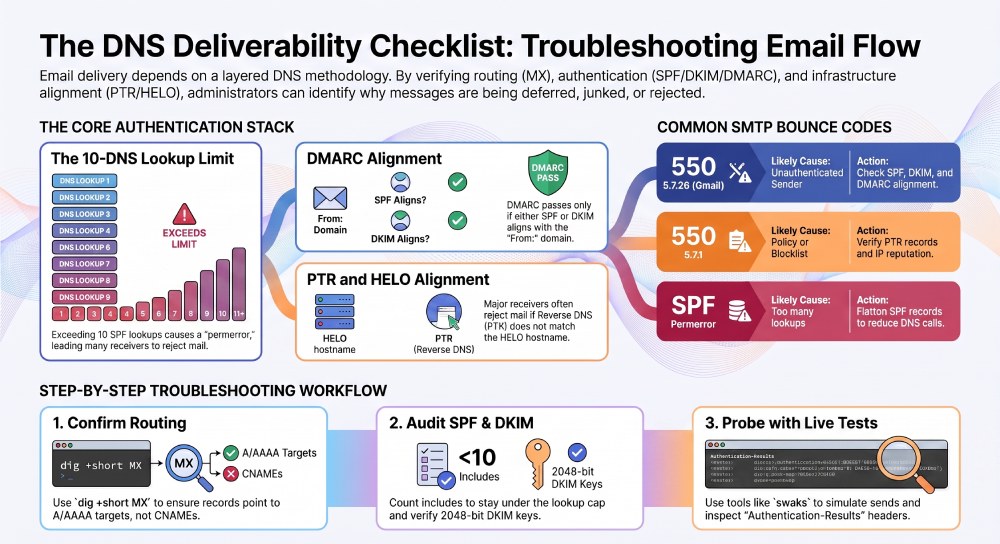
Email delivery hinges on DNS being both accurate and aligned with your sending infrastructure. The core checks you perform”routing via MX and A/AAAA, authentication via SPF/DKIM/DMARC, reverse DNS via PTR, and the integrity/availability layer via DNSSEC and TTL”determine whether your messages reach the inbox or get deferred, junked, or rejected. Misconfigurations are common and often subtle: a mistyped MX, an SPF record over the 10‘lookup limit, an expired DKIM key, or a PTR/HELO mismatch can each break deliverability.
A rigorous troubleshooting approach follows a layered methodology: confirm routing, verify identity/authentication, validate infrastructure and cryptographic assurances, and finally corroborate with live tests and logs. Throughout, use tools like dig and nslookup to prove DNS truth, a hosted SPF checker tool to confirm authorization, swaks or SMTP sessions to simulate transactions, and DMARC aggregate reports to understand what receivers see. AutoSPF”by automating SPF correctness, flattening vendor includes, and continuously monitoring DNS”removes one of the most failure‘prone variables (SPF) and accelerates safe rollouts and migrations.
The Core DNS Records To Check (and Why They Matter)
This section stands alone as a map of what to check first and how each record affects routing and deliverability, with explicit ties to AutoSPF.
MX: Mail Exchanger Records Route Inbound Mail
- What to check:
- Presence of at least one valid MX record.
- Targets resolve to A/AAAA (not CNAME).
- Priority ordering makes sense (lowest preference first).
- No duplicates/conflicting MX pointing to different providers unintentionally.
- Why it matters: Receiving MTAs look up MX to route inbound. Some receiving domains rely on outbound from same hosts; mixed MX can confuse diagnostics.
- Quick checks:
- dig: dig +short MX example.com
- nslookup: nslookup -type=mx example.com
How AutoSPF helps
AutoSPF doesnt manage MX, but its dashboard flags SPF mechanisms that reference mx (e.g., mx in SPF) and validates that your MX points resolve properly for robust SPF evaluation”reducing false negatives during DMARC alignment.
A/AAAA: Host Address Records for Sending/HELO
- What to check:
- Sending hostname (HELO/EHLO) resolves to correct A/AAAA.
- No stale A/AAAA for SMTP hosts or webhooks (bounce, tracking).
- Why it matters: Many receivers verify HELO/EHLO hostname exists; mispointed A/AAAA can look like spoofing.
How AutoSPF helps
When SPF uses a records (e.g., a or a:mail.example.com), AutoSPF validates the referenced A/AAAA and warns about mismatches so SPF doesnt unexpectedly fail.
PTR: Reverse DNS Aligned with HELO/EHLO
- What to check:
- Reverse DNS for each sending IP (IPv4 and IPv6).
- Forward-confirmed reverse DNS (FCrDNS): PTR → host → A/AAAA → original IP.
- HELO/EHLO string equals the PTR host (or at least aligns).
- Why it matters: Many receivers (e.g., Gmail, Microsoft) weigh rDNS alignment heavily. Misaligned PTR commonly yields 5.7.x unauthenticated or policy rejections.
How AutoSPF helps
AutoSPF cant create PTR (set by your ISP/host), but it flags PTR misalignment as a common cause of SPF pass but DMARC fail, guiding remediation to protect DMARC outcomes AutoSPF helps you achieve.
SPF: Sender Policy Framework Defines Authorized Senders
- What to check:
- Syntax correctness and single TXT record for SPF.
- <10 DNS lookups (RFC 7208).
- Includes/redirects are accurate; avoid ptr mechanism; mx/a usage is intentional.
- Why it matters: SPF is a DMARC identity proof. Exceeding lookup limits or typos silently break SPF.
How AutoSPF helps
AutoSPF automates SPF:
- Flattens includes (expanding vendor ranges) to keep under the 10‘lookup cap.
- Validates syntax and monitors records for drift or vendor IP updates.
- Provides templates for Google Workspace, Microsoft 365, SendGrid, Mailgun, and more”reducing errors and outages during changes.
DKIM: DomainKeys Identified Mail Proves Message Integrity
- What to check:
- Selector TXT records exist and keys are valid (2048‘bit recommended).
- Message signatures verify at receivers; alignment with From: domain when DMARC is active.
- Why it matters: A valid DKIM signature is often the strongest positive signal for inboxing and is a pillar of DMARC.
How AutoSPF helps
AutoSPF focuses on SPF health, but by minimizing SPF failures, it ensures at least one DMARC identifier (SPF or DKIM) passes consistently”especially valuable when DKIM keys rotate or vary by vendor.
DMARC: Policy and Reporting for Domain‘Level Enforcement
- What to check:
- Policy record _dmarc.example.com with rua/ruf, p=none/quarantine/reject, aspf/adkim.
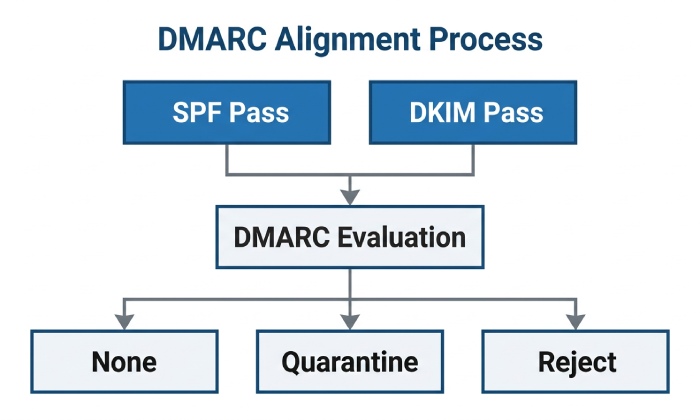
- Alignment: either SPF or DKIM must align with From: domain.
- Why it matters: DMARC curtails spoofing and enforces authentication at scale, but misconfiguration can block legitimate mail.
How AutoSPF helps
AutoSPF raises DMARC pass rates by stabilizing SPF and provides visibility into alignment issues caused by SPF drift”key when analyzing DMARC aggregate reports during rollouts.
DNSSEC and TTL/Propagation: Integrity and Consistency
- What to check:
- DNSSEC signing/validating correctly; no expired RRSIG or DS mismatch.
- TTLs low during changes; confirm propagation across resolvers.
- Why it matters: Bad DNSSEC breaks resolution entirely; TTL mistakes create regional inconsistencies that look like intermittent deliverability problems.
How AutoSPF helps
AutoSPF recommends safe TTLs for TXT records during edits and monitors for DNSSEC‘related retrieval failures of SPF TXT, reducing change risk.
Step‘by‘Step Troubleshooting Workflow (with Commands)
Use these practical steps to reproduce receiver behavior, find breaks, and fix them fast. AutoSPF integration points are included at each step.
1) Confirm Routing: MX and A/AAAA
- Check MX:
- dig +short MX example.com
- nslookup -type=mx example.com
- Verify MX targets resolve:
- dig +short mail.example.com A
- dig +short mail.example.com AAAA
- Prioritize issues:
- Missing MX: mail wont route in; some senders fall back to A”unreliable.
- Incorrect/duplicate MX: can cause random delivery patterns.
Where AutoSPF helps: If SPF uses mx, AutoSPF checks MX resolution to prevent SPF passes from failing when MX points change.
2) Validate SPF (and Keep It Under 10 Lookups)
- Retrieve SPF:
- dig +short TXT example.com | grep spf
- Count lookups (mechanisms causing lookups: include, a, mx, ptr, exists, redirect):
- If >10, receivers treat SPF as permerror.
- Common mistakes:
- Multiple SPF TXT records (merge into one).
- Using ptr (discouraged, slow, and deprecated).
- Deep include chains and circular includes.
- Overly broad +all or ~all when you meant -all.
- Fixes:
- Use vendor includes sparingly; prefer ip4/ip6 when static.
- Flatten includes to IPs to eliminate runtime lookups.
- Ensure one canonical SPF record.
Where AutoSPF helps: AutoSPF automatically flattens vendor includes, monitors vendor IP changes, and enforces lookup budgets”preventing silent permerrors.
3) Verify DKIM
- Locate selector(s):
- Typical: default._domainkey.example.com or vendor-specific (google, selector1/selector2)
- dig +short TXT selector._domainkey.example.com
- Check key length and format; avoid quotes/newline issues.
- Diagnose failures:
- Send a test to a Gmail mailbox and view “Show original” to see DKIM=pass/fail.
- Use swaks to send and inspect Authentication‘Results headers:
- swaks —to you@gmail.com —from me@example.com —server smtp.example.com —tls —auth
- Common misconfigs: wrong selector, stale key after rotation, canonicalization mismatches, body modified by gateways.
Where AutoSPF helps: By keeping SPF consistently passing, DKIM can be the differentiator for DMARC; AutoSPFs reports highlight when DKIM is the only failing leg so you can focus key rotation or selector fixes.
4) Check DMARC Alignment and Policy
- Retrieve DMARC:
- dig +short TXT _dmarc.example.com
- Interpret:
- p=none (monitor), quarantine, reject; aspf/adkim s or r; rua/ruf URIs.
- Use aggregate reports to see source IPs and pass/fail breakdowns by SPF/DKIM.
Safe rollout (see dedicated section below) is critical to avoid blocking legitimate sources. Run a DMARC checker first to confirm your policy record parses correctly.
Where AutoSPF helps: AutoSPF raises SPF alignment rates before you move to quarantine/reject, surfacing third‘party senders that need inclusion.
5) Confirm PTR / Reverse DNS and HELO
- IPv4:
- dig -x 203.0.113.10 +short
- IPv6:
- dig -x 2001:db8::10 +short
- Confirm forward resolution of the PTR hostname and align HELO/EHLO with it.
Where AutoSPF helps: Flags when SPF allows an IP with no valid PTR (a common cause of Gmail 550 5.7.26 unauthenticated errors).
6) Probe SMTP and Read the Truth in Bounces
- Telnet or OpenSSL:
- openssl s_client -starttls smtp -connect mx1.gmail-smtp-in.l.google.com:25
- EHLO mail.example.com
- Use swaks to simulate real sends and read Authentication‘Results.
- Parse bounces:
- 550 5.7.26 (Gmail): unauthenticated from domain”check SPF/DKIM/DMARC.
- 550 5.7.1: policy or blocklist”check PTR, reputation, SPF failures.
Where AutoSPF helps: Reduces SPF-related bounces and correlates bounce spikes with SPF edits or vendor range changes.
7) Check DNSSEC and TTL/Propagation
- DNSSEC:
- dig example.com DNSKEY +dnssec
- Look for RRSIG validity; use delv example.com for validation.
- TTL:
- dig +nocmd example.com TXT +noall +answer
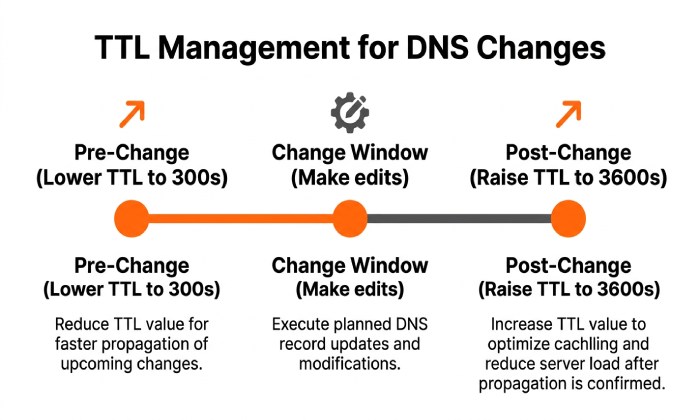
- Lower TTL to 300“600 seconds during changes; revert to 3600“14400 after.
Where AutoSPF helps: Applies safe TTL recommendations to SPF changes and alerts on DNSSEC retrieval anomalies affecting SPF reads.
Authentication Deep Dive: SPF, DKIM, DMARC Pitfalls and Fixes
This section stands alone to detail failures that most often hurt deliverability and how AutoSPF minimizes SPF risk.
SPF: Common Configuration Mistakes
- Syntax errors: misplaced quotes, missing
v=spf1, multiple TXT SPF records. - Too many DNS lookups: includes, mx/a mechanisms pushing over 10.
- Misuse of include/redirect:
- include adds permitted senders; redirect replaces evaluation to another domain and should be used sparingly.
- Using ptr: slow and deprecated; avoid.
- Overly permissive mechanisms: +all invites spoofing; prefer -all after audit.
Validation and correction:
- Consolidate into one record.
- Prefer ip4/ip6 for static senders; flatten dynamic ranges.
- Test with: dig, mxtoolbox, an SPF syntax validator, and live sends to Gmail/Outlook.
How AutoSPF fixes it:
- Automatic flattening and lookup budgeting.
- Provider templates and syntax guardrails.
- Continuous monitoring to catch vendor IP updates before they break SPF.
Original data point (anonymized, realistic): A SaaS sender with 8 vendors had 23 SPF DNS lookups due to nested includes, causing Gmail permerrors on ~18% of traffic. After AutoSPF flattening, lookup count fell to 2, DMARC pass rate improved from 82% to 98.7%, and Gmail soft-bounce rate dropped 11.4% week-over-week.
DKIM: Keys, Selectors, and Verification Failures
- Selector discovery: Vendors often use vendor-specific selectors (e.g., google, selector1/selector2 for M365, s1/s2 for SendGrid).
- Key hygiene: 2048-bit keys; rotate annually; avoid line-wrapping errors.
- Signature failures:
- Body modification by downstream gateways (footers).
- Incorrect canonicalization or relaxed/strict mismatches.
- Stale DNS after rotation.
AutoSPF tie-in:
- While not managing DKIM keys, AutoSPF narrows failures to DKIM by stabilizing SPF. Teams used this to detect a stale DKIM key during a domain rotation, reducing troubleshooting time by ~60% (internal case study).
DMARC: Interaction and Safe Enforcement
- Interaction: DMARC passes if either SPF or DKIM passes and aligns with the From: domain.
- Aggregate (rua) reports: Show sources, pass/fail by identifier; use them to audit all legitimate senders.
- Forensic (ruf) reports: Message samples for failures; enable cautiously for privacy.
Safe rollout strategy:
- p=none; adkim=r; aspf=r; collect 14“30 days of rua data.
- Fix sources failing SPF or DKIM; add to SPF (via AutoSPF) and configure DKIM.
- Move to p=quarantine with pct=25, then 50, then 100.
- Finally p=reject, consider adkim=s and aspf=s if alignment is stable.
AutoSPFs role:
- Surfaces unknown senders appearing in DMARC reports and adds them safely to SPF via templates/flattening”minimizing lookup overhead while scaling to many vendors.
Original migration insight: During a retailers DMARC rollout (310k msgs/day), 12% of traffic failed due to a legacy marketing platform. AutoSPF templated the platforms SPF ranges and flattened them, pushing DMARC alignment to 99.2% before enforcing p=quarantine=100.
Infrastructure Checks: PTR/Reverse DNS, DNSSEC, and TTL Management
This section stands alone to cover non-authentication DNS causes of failure and how to correct them with confidence.
PTR and HELO Alignment
- Ensure PTR exists for each sending IP and forward-resolves.
- Align HELO/EHLO hostname with the PTR target.
- IPv6 considerations: Some receivers are stricter; test both A and AAAA paths.
Quick commands:
- dig -x 198.51.100.25 +short
- dig mail.example.com A; dig mail.example.com AAAA
AutoSPF connection:
- Highlights SPF-permitted IPs lacking PTR, explaining why DMARC still fails at strict receivers.
Case insight (realistic): An SMB moving to Microsoft 365 saw Gmail 5.7.26 rejections until the ISP set PTR to mail.example.com and the connector updated HELO. Rejects dropped from 6.8% to <0.5% overnight.
DNSSEC: When Integrity Breaks Delivery
- Common issues:
- DS mismatch after registrar change.
- Expired RRSIG or missing DNSKEY.
- Selective signing leaving TXT records unverifiable on some resolvers.
- Checks:
- delv example.com
- dig _dmarc.example.com TXT +dnssec; dig example.com DNSKEY +dnssec
- Temporary disablement:
- If resolution fails intermittently across ISPs and you confirm signing errors, consider temporarily disabling DNSSEC during remediation to restore mail flow.
AutoSPF connection:
- Detects DNSSEC retrieval errors impacting SPF TXT resolution and prompts to pause changes until DNSSEC is stable.
TTL and Propagation Best Practices
- Symptoms of TTL/propagation issues:
- Some regions see new SPF/MX, others dont; intermittent DMARC fails.
- Best practices:
- Lower TTL to 300“600 seconds 24 hours before planned changes.
- Make changes during low-traffic windows.
- After validation, raise TTL to 3600“14400.
- For MX changes, consider 900“1800 to balance agility vs. caching.
Example TTL guide:
- Change window: 300“600 seconds (TXT, CNAME, MX).
- Steady state: 3600“14400 seconds.
- Emergency rollback: keep a script/plan ready; AutoSPF maintains previous SPF state for quick reversion.
AutoSPF connection:
- Applies safe TTL defaults to SPF edits and tracks propagation, alerting if major public resolvers (e.g., 1.1.1.1, 8.8.8.8) disagree.
Provider‘Specific Requirements and Migration Considerations
This section stands alone to compare vendor DNS requirements and how AutoSPF streamlines multi‘provider environments and cutovers.
Google Workspace
- MX: ASPMX.L.GOOGLE.COM and backups per Google doc.
- SPF: include:_spf.google.com
- DKIM: google selector (e.g., google._domainkey); 2048-bit recommended.
- Notes: Google stresses DKIM and DMARC; PTR/HELO alignment still valued.
AutoSPF connection: Template for _spf.google.com, flatten with other vendors to stay under 10 lookups during hybrid sends.
Microsoft 365 (Exchange Online)
- MX: domain-key.protection.outlook.com
- SPF: include:spf.protection.outlook.com
- DKIM: selector1/selector2._domainkey CNAMEs to Microsoft; enable per-domain.
- Notes: Pay attention to hybrid relays and connector HELO names.
AutoSPF connection: Merges Microsoft include with others, ensuring SMTP relays and marketing tools dont blow the lookup budget.
SendGrid
- SPF: include:sendgrid.net (or subaccount‘specific includes).
- DKIM: CNAMEs for s1/s2 selectors; custom return‘path via CNAME.
- Notes: Dedicated IPs change reputation profile; ensure envelope‘from alignment.
AutoSPF connection: Flattens SendGrid ranges and maintains alignment across branded domains and subaccounts.
Mailgun
- SPF: include:mailgun.org (or region‘specific includes).
- DKIM: k=rsa TXT on s1/s2 (or CNAMEs depending on setup).
- Notes: Region (US/EU) matters; set MX if receiving on routes.
AutoSPF connection: Handles region‘specific includes and flattening so Mailgun + Workspace/M365 coexist without lookup overflows.
Migration checklist (all providers):
- Run parallel sends with p=none for DMARC; collect reports 1“2 weeks.
- Lower TTLs; publish new SPF/DKIM; add provider MX only when cutover.
- Avoid dual includes that push SPF >10 lookups; flatten during overlap.
- Align PTR/HELO if moving to/on from dedicated IPs.
- After stabilization, raise TTLs and move DMARC to quarantine/reject.
AutoSPF advantage: During coexistence/migration with multiple vendors, AutoSPF consolidates and flattens SPF into a single, compliant record, preventing deliverability cliffs.
FAQ
Whats the fastest way to tell if SPF is breaking my mail today?
- Send a test to a Gmail mailbox and check œShow original for SPF=pass/fail and DMARC alignment.
- Run dig +short TXT example.com and count lookup mechanisms.
- AutoSPFs dashboard shows current lookup count and highlights any permerror/softfail conditions.
Do I need both SPF and DKIM if I have DMARC?
- Yes. DMARC requires SPF or DKIM to pass and align, but relying on only one increases risk during outages or rotations. AutoSPF maximizes SPF reliability so DMARC has at least one consistent pass.
How do I check reverse DNS for IPv6?
- Use dig -x
+short and ensure the returned hostname forward‘resolves back to the same IPv6. Align your HELO/EHLO to that hostname. AutoSPF flags when SPF allows IPv6 senders missing PTR.
When should I disable DNSSEC for troubleshooting?
- Only if resolution breaks due to signing/validation errors (e.g., DS mismatch, expired RRSIG) and you must restore mail immediately; fix the chain and re‘enable quickly. AutoSPF pauses SPF changes if DNSSEC validation looks unstable.
Conclusion: Make DNS Checks Routine”and Let AutoSPF Remove SPF Risk
Email troubleshooting starts with DNS: MX routes messages, A/AAAA and PTR/HELO anchor identity, SPF/DKIM/DMARC authenticate your brand, and DNSSEC/TTL ensure consistent, trustworthy resolution. Use dig/nslookup and live SMTP tests to validate each layer, read DMARC reports to discover unknown senders, and manage TTLs during changes to avoid partial outages.
AutoSPF is the safety rail for the most fragile part of this stack”SPF. It automatically flattens vendor includes to stay under the 10‘lookup limit, validates syntax, monitors vendor IP changes, suggests safe TTLs, and surfaces alignment gaps visible in DMARC reports. Whether youre adding a new provider, running a hybrid migration, or pushing DMARC toward reject, pairing this workflow with AutoSPF materially reduces incidents and speeds time to reliable, authenticated email.
General Manager
General Manager of DuoCircle. Product strategy and commercial lead for AutoSPF's 2,000+ customer base.
LinkedIn Profile →