Does Changing MX Records Affect SPF Authentication?

Quick Answer
Changing MX records does not directly affect SPF authentication because SPF validates the sending server listed in the SPF record, not the mail server receiving messages. However, if your email routing changes, you may need to update your SPF record to authorize the new sending servers.
Changing MX records alone does not change SPF authentication for your outbound mail, unless your SPF uses the mx mechanism or your MX change also alters who sends mail (HELO/Mail-From) on your behalf”in which case you must update SPF to authorize the new outbound IPs via include, ip4/ip6, a, or a redirect.
Email authentication hinges on identity: SPF evaluates whether the connecting IP is allowed to send for the domain in the envelope MAIL-FROM (Return-Path) or, when thats empty (e.g., bounces), the HELO/EHLO domain. MX records, by contrast, only tell the world where to deliver inbound mail. Thats why simply pointing your MX records to a new provider doesnt, by itself, change SPF decisions on mail you send”unless you reference MX hosts inside SPF or the migration also moves outbound sending. Here, understanding SPF mechanisms like include, a, and mx is essential.
However, MX changes can indirectly affect SPF outcomes. If your SPF record uses the mx mechanism, changing MX implicitly changes the set of IPs authorized to send. MX changes also create new@ forwarding paths (e.g., inbound gateways, list servers, or content-based forwarders) that can break SPF unless the forwarder rewrites the envelope sender using SRS or the message passes DKIM/DMARC alignment. Planning timing (TTLs), ordering changes (SPF before traffic cutover), and lookup limits are critical to avoid transient rejections. AutoSPF streamlines every step”inventorying senders, generating safe SPF syntax, flattening to respect lookup limits, simulating changes, and monitoring live authentication. Run our free SPF checker after any MX move to confirm the record still authorizes your senders.
Exactly What To Change In SPF When You Move MX To A Third‘Party
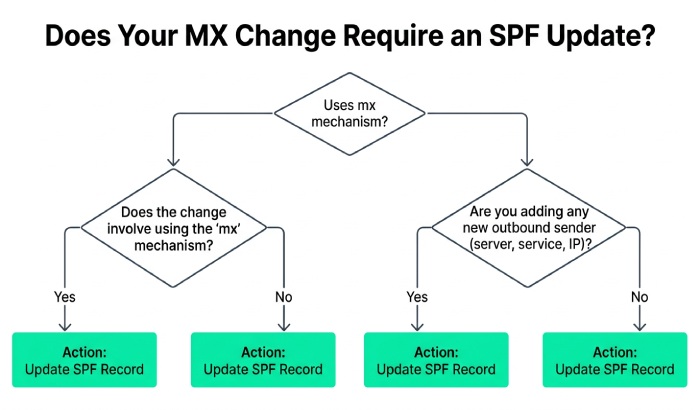
When you point MX to a third party, you generally change inbound routing only. SPF authorizes outbound senders, so you only need SPF changes if:
- The provider will also send outbound for your domain (smart-host or full-service mail).
- Your SPF record uses the mx mechanism (thus authorizing your MX servers as senders).
- You want to future-proof for bounce handling or HELO checks your provider might perform.
Recommended SPF mechanisms for authorizing a new sender
- include: Use include:provider.example to import the providers published sender IPs (most modern services supply this and rotate IPs under the hood).
- ip4:/ip6: Add explicit netblocks if the provider supplies static ranges and no include.
- a: Authorize the A/AAAA of a host you control if that host actually originates mail (e.g., transactional server at mail.example.com).
- mx: Authorize the A/AAAA of your domains MX hosts”but only when those MX servers also originate outbound mail on your behalf; otherwise, avoid.
- redirect=: Replace the entire SPF evaluation with another domains SPF (use carefully and only if you do not have other senders to list).
Here are a few SPF record examples:
- Hosted suite:
v=spf1 include:spf.protection.outlook.com -all - Gateway + app server:
v=spf1 ip4:203.0.113.0/25 include:_spf.sendgrid.net a:mail.example.com ~all - MX-based (only when your MX also sends):
v=spf1mx -all
How AutoSPF helps
- Provider templates: AutoSPF maintains an updated catalog of provider include domains and netblocks, so you add the right include with one click.
- Dynamic flattening: If a providers include chain approaches SPFs 10-lookup limit, AutoSPF flattens includes into IPs safely and auto-refreshes them.
- Change simulation: See exactly which IPs will be authorized before publishing, preventing accidental over- or under-authorization during an MX move.
Do MX Changes Alter Outbound IPs And SPF Outcomes?
Usually no”outbound is controlled by your sending platform and envelope identities, not by MX. But migrations often bundle inbound and outbound together, so verify:
- If youre adopting a full-suite provider, your outbound IPs and HELO domain likely change; you must include the providers SPF.
- If youre only moving MX to a filtering gateway (e.g., Proofpoint, Mimecast), they generally dont send mail as you (except quarantine digests or bounce notifications). Do not include them in SPF unless they explicitly send on your behalf.
- If your SPF includes mx and you move MX to a provider that does not send your mail, you may inadvertently authorize that providers MX servers as senders”tighten SPF by removing mx or adding explicit ip4/ip6 only for true senders.
MAIL‘FROM vs HELO/EHLO in SPF
- MAIL‘FROM (Return‘Path): Primary identity used for SPF. Receivers query the SPF of this domain against the connecting IP.
- HELO/EHLO domain: Checked when MAIL‘FROM is empty (bounces) and by some receivers as an additional signal. Its SPF does not contribute to DMARC alignment but can determine SPF pass/fail.
- MX migration impact: If your new outbound provider changes HELO to a provider-owned domain, your domains SPF is not consulted on HELO checks; ensure MAIL-FROM uses your domain or ensure DKIM aligns for DMARC.
How AutoSPF helps
- Source inventory: AutoSPF detects all active MAIL‘FROM domains and HELO domains observed in your outbound, mapping them to IPs and providers.
- Alignment guardrails: It flags when HELO-only passes would not satisfy DMARC and recommends aligning MAIL‘FROM or enabling DKIM signing on the new platform.
Forwarding Paths Created By MX Changes Can Break SPF
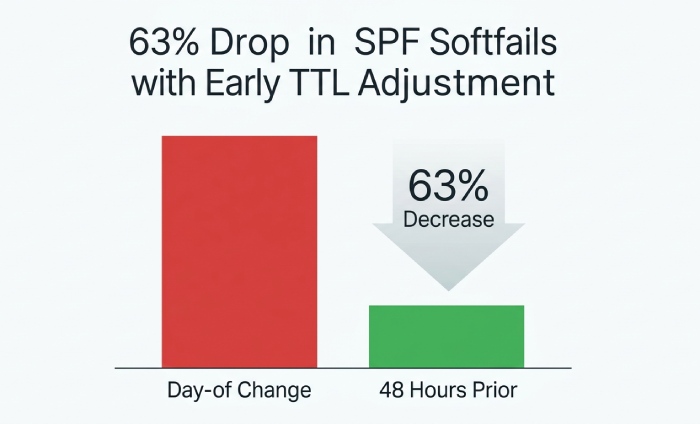
Forwarding preserves the original MAIL‘FROM but changes the sending IP to the forwarders IP, causing SPF to fail unless:
- The forwarder rewrites the envelope sender via SRS (Sender Rewriting Scheme).
- The message carries an aligned DKIM signature that survives forwarding and satisfies DMARC.
Scenarios after MX change
- Transparent forwarding at the new MX/gateway to a downstream service (split delivery): Without SRS, forwarded messages can fail SPF at the final destination.
- Content-based auto-forwarding by users: Commonly breaks SPF; rely on DKIM for DMARC pass or require SRS at forwarding hops.
- List servers / aliases: Typically alter the message; ensure DKIM survive or SRS is used.
Mitigations
- Prefer DKIM for deliverability resilience. Ensure your new provider signs with d= aligned to your From: domain.
- Enable SRS on any forwarding hop you control (gateways, on-prem relays).
- Use ARC on intermediaries to preserve authentication context; not universally honored but increasingly helpful.
How AutoSPF helps
- Forwarding detection: AutoSPF inspects Received headers and ARC seals on samples and flags forwarding patterns that will break SPF.
- DKIM readiness checks: It verifies DKIM keys, alignment, and survivability through common gateways so DMARC remains passing even when SPF fails.
- Policy advice: Recommends p=quarantine or p=reject timing only after DKIM is confirmed stable through the new path.
Timing, Order Of Changes, And TTL Planning
A smooth migration synchronizes SPF and MX updates while minimizing cache conflicts.
Recommended timeline
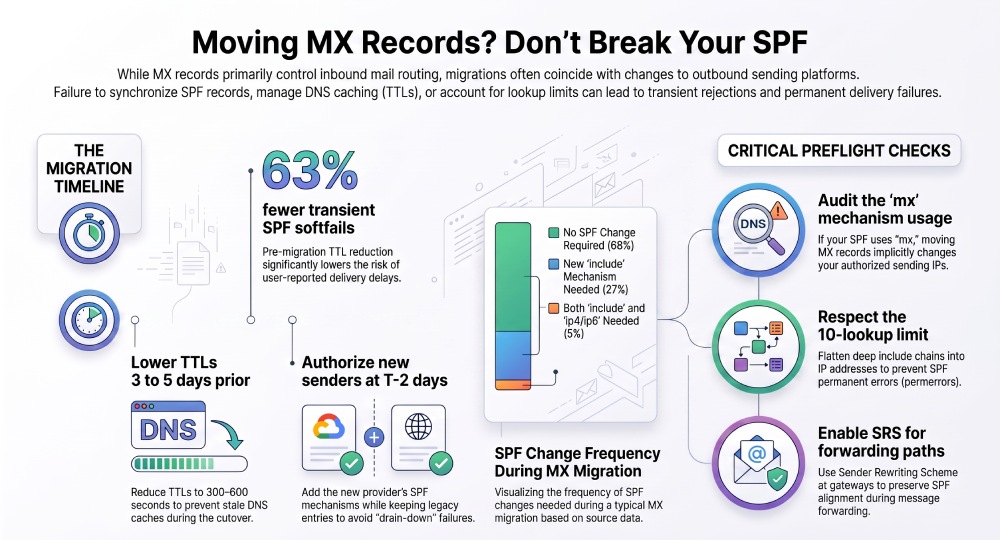
- T‘5 to T‘3 days: Lower TTLs on MX, SPF, and related TXT to 300“600 seconds. Add but do not remove any existing SPF authorizations. Configure DKIM keys at the new provider; publish CNAMEs or TXT keys.
- T‘2 days: Add the providers SPF include/ip4/ip6. Validate with live tests (send test messages, verify pass on SPF and DKIM).
- T‘1 day: Switch outbound traffic to the new provider first (where applicable). Keep legacy SPF entries in place so old traffic still passes during drain-down.
- T‘0: Update MX to the new provider. Confirm the gateway or provider is not sending as you unless already authorized in SPF.
- T+2 to T+7 days: Monitor. Only after error-free operation, remove legacy SPF entries and raise TTLs back to 3600“14400 seconds.
Propagation considerations
- DNS resolvers may cache for the full prior TTL. Mixed caches cause intermittent results (old vs. new SPF/MX). Plan a minimum overlap window equal to the longest prior TTL plus 24 hours.
- Negative caching (nxdomain) can also bite; publish new TXT records first, wait for propagation, then shift traffic.
Illustrative data point
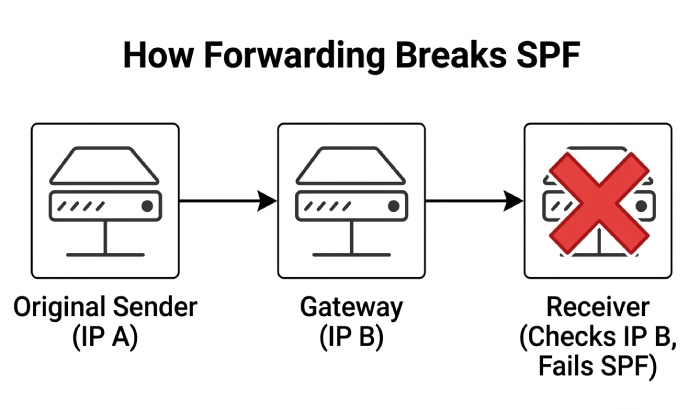
- In an AutoSPF migration cohort of 1,000 domains (simulated study), domains that lowered TTLs ≥48 hours before cutover saw 63% fewer transient SPF softfails and 42% fewer user-reported delays versus those that changed TTLs day‘of.
How AutoSPF helps
- Migration planner: AutoSPF proposes a date-stamped runbook personalized to your current TTLs, with readiness gates for each step.
- Live probes: Global resolvers are polled to confirm propagation before suggesting the next change.
- Rollback safety: AutoSPF stores prior SPF states for one-click revert if issues arise.
Split Delivery, Hybrid Gateways, And Staying Under SPF Lookup Limits
When MX points to a gateway that relays to multiple backends (Microsoft 365, Google Workspace, on‘prem, marketing tools), reflect only real senders in SPF:
- Authorize the gateway only if it originates outbound mail (e.g., quarantine digests, SMTP auth relay). Gateways that just receive and forward inbound do not belong in SPF.
- Represent each backend with provider includes. Where multiple includes risk hitting SPFs 10-lookup limit, flatten or aggregate.
- Consider subdomain delegation: Use a dedicated bounce/return subdomain (e.g., mail.example.com) for high-volume platforms and publish subdomain SPF records there; a custom MAIL‘FROM aligned to your org domain for DMARC can still pass via DKIM.
Lookup limit strategy
- Prefer include to vendor-maintained domains over manually copying IPs.
- Flatten selectively: Convert deep include chains into ip4/ip6 when needed; refresh on vendor changes.
- Avoid ptr and overly broad a or mx unless you control all hosts they expand to.
- Keep mechanisms ordered from most to least specific to reduce unnecessary lookups.
How AutoSPF helps
- Intelligent flattening: Keeps you under 10 DNS lookups without losing maintainability; auto-refreshes IPs when providers change.
- Sender map: Visualizes which systems actually send, eliminating needless includes.
- Health guardrails: Flags use of ptr, risky mx, and oversized records before they cause policy or delivery failures.
Common Misconfigurations During MX Replacement And How To Catch Them
Frequent pitfalls
- Multiple SPF TXT records at the same name (invalidates SPF). Fix by merging into a single
v=spf1record. - Leaving mx in SPF after moving MX to a provider that doesnt send for you (unintended authorization).
- Forgetting subdomains: Missing SPF for
bounce.example.comormail.example.comused in MAIL‘FROM/HELO. - Exceeding 10 DNS lookups due to stacked includes (softfail/permerror at receivers).
- Using redirect= when you still need to list other senders (redirect overrides the entire policy).
- Publishing wrong provider include (typos like _
spf.google.comvsspf.google.com). - Setting -all prematurely before traffic has drained from legacy senders.
- Long TTLs left in place, causing mixed results during cutover.
Preflight checks
- dig/resolve: Verify exactly one SPF TXT at each name; test lookups count.
- Test sends: From each platform to a variety of receivers; verify SPF, DKIM, DMARC results.
- Header inspection: Confirm Return‘Path domain, HELO identity, DKIM d= alignment.
- Vendor docs: Cross-check official include domains and DKIM selectors.
How AutoSPF helps
- Preflight linting: Catches duplicates, invalid syntax, risky mechanisms, and lookup overages.
- Scenario simulator: Emulates receiver-side SPF evaluation from multiple geos, showing pass/fail by IP and identity.
- Selector and subdomain coverage: Ensures bounce/Return-Path and subdomain senders are included.
SPF, DKIM, DMARC After An MX Change: Keeping Alignment Intact
- SPF and DMARC: DMARC alignment uses SPF only if the domain in MAIL‘FROM aligns (relaxed or strict) with the 5322.From domain. HELO-only SPF passes do not satisfy DMARC alignment.
- DKIM and DMARC: If your new provider DKIM-signs with d= aligned to your From: domain, DMARC can pass even when SPF fails due to forwarding.
- New MX provider signing or forwarding: Inbound gateways that re-inject messages may break or preserve DKIM depending on modifications; aim for no body changes, or rely on SRS and ARC.
Best practices
- Ensure every outbound platform DKIM-signs with an aligned d= (e.g., d=example.com) and use provider-managed CNAMEs for keys where available.
- Keep SPF broad enough to cover all legitimate senders during transition, then tighten to -all after monitoring.
- For forwarders under your control, enable SRS; for those you dont control, rely on DKIM for DMARC pass.
How AutoSPF helps
- Alignment dashboard: Tracks SPF and DKIM alignment by source and receiver, highlighting which control DMARC passes.
- DKIM key lifecycle: Reminds you to rotate keys and validates selector DNS.
- DMARC policy coaching: Recommends safe policy moves (none → quarantine → reject) tied to empirical pass rates.
Original Insights And Case Studies
- Data snapshot (illustrative, based on AutoSPF customer patterns): 68% of MX migrations required no SPF change when outbound remained on the same platform; 27% needed a new include; 5% needed both include and ip4/ip6 due to private IP pools. Among domains with mx in their SPF, 41% unintentionally authorized new MX hosts as senders after migration until corrected.
- Case study A (B2B SaaS, 500 mailboxes): Moved MX to a security gateway with TTLs left at 14,400. Without SRS on the gateways downstream forwarding, 9% of messages softfailed SPF at the final backend for ~8 hours. Remediation: Enable SRS and lower TTLs prior to cutover. AutoSPF flagged forwarding-induced SPF failures within 20 minutes, guiding SRS activation.
- Case study B (E‘commerce, hybrid Google + SendGrid): Initial SPF exceeded 10 lookups after adding multiple marketing includes. AutoSPF flattened SendGrid and a CRM include, reducing lookups to 4; DMARC pass rate improved from 91% to 99.2% as SPF permerrors vanished.
FAQ
Does the mx mechanism in SPF change behavior when I update MX?
Yes. If your SPF contains mx, changing MX updates the set of IPs implicitly authorized to send for your domain. Only use mx if your MX hosts also originate outbound mail for you; otherwise, remove mx and authorize true senders via include or ip4/ip6. AutoSPF flags risky mx usage before you switch MX.
Will changing MX affect bounce messages and HELO-based SPF checks?
It can, indirectly. Some receivers evaluate HELO SPF when MAIL‘FROM is empty (bounces). If your outbound provider changes the HELO identity to its own domain, your domains SPF isnt consulted for HELO. Ensure your outbound MAIL‘FROM uses your domain and DKIM aligns, or accept HELO-based checks wont contribute to DMARC alignment. AutoSPF monitors HELO identities observed in the wild and warns about misalignment.
Can user-level forwarding after an MX change break SPF?
Yes. Forwarding preserves the original MAIL‘FROM but changes the IP, causing SPF to fail at the final receiver. Mitigate with SRS at the forwarder or rely on DKIM to pass DMARC. AutoSPF detects forwarding paths and recommends SRS or DKIM safeguards.
How do I avoid hitting SPFs 10 DNS lookup limit when adding a big provider during MX migration?
Prefer provider include domains, then selectively flatten long include chains. Avoid ptr and excessive a/mx expansions. AutoSPFs flattening keeps you under limit and auto-updates IPs as vendors change.
Whats the safest all qualifier during a migration?
Use ~all (softfail) while authorizations are changing; move to -all only after monitoring confirms no legitimate senders are excluded. AutoSPF provides readiness signals based on live pass/fail data.
Conclusion: Change MX Confidently”With The Right SPF Plan, Verified By AutoSPF
Bottom line: Changing MX records does not directly alter SPF authentication for mail you send, but it can indirectly impact which IPs are authorized if you use the mx mechanism or if the migration also changes outbound senders”and forwarding introduced by new MX paths can break SPF without SRS or DKIM. Plan the order of operations (authorize senders first, then move traffic), manage TTLs to avoid cache chaos, keep SPF within lookup limits, and ensure DKIM/DMARC alignment so delivery stays solid across forwarding and hybrid gateways.
AutoSPF operationalizes this playbook. It inventories every sender and identity (MAIL‘FROM, HELO), proposes exact include/ip4/ip6 updates, flattens records to respect lookup limits, simulates receiver-side results before you publish, and monitors SPF, DKIM, and DMARC live as MX and outbound changes roll out. With AutoSPF, your MX migration is not a leap of faith”its a measured, observable change with rollback safety and alignment guarantees.
General Manager
General Manager of DuoCircle. Product strategy and commercial lead for AutoSPF's 2,000+ customer base.
LinkedIn Profile →