DNS SOA Serial Number: How It Tracks DNS Zone Updates

Quick Answer
The DNS SOA serial number indicates when a DNS zone was last updated. It helps secondary DNS servers identify changes and synchronize records, ensuring consistent DNS information across servers and supporting reliable domain resolution.
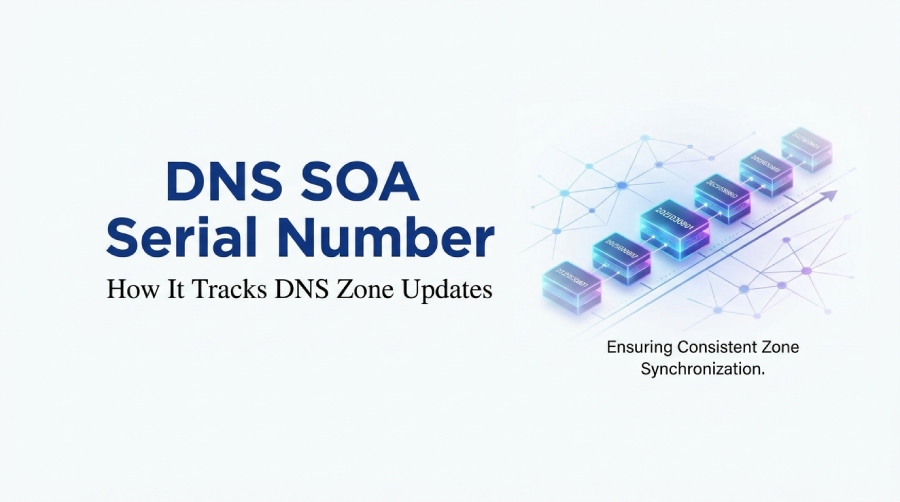
A DNS SOA (Start of Authority) record contains essential administrative and synchronization information for an authoritative DNS zone. Every authoritative DNS zone has one SOA record at its apex, identifying the primary nameserver, responsible administrator, zone serial number, and timing values used to coordinate updates across authoritative nameservers. Strong email security measures help protect businesses from phishing, spoofing, malware, and unauthorized access.
Unlike A records, which map domain names to IP addresses, or MX records, which identify mail servers responsible for receiving email, an SOA record manages important information about the DNS zone itself. Its serial number helps secondary nameservers identify when the zone has been updated, while refresh, retry, and expire values determine how zone synchronization is managed.
Understanding SOA records is useful for administrators managing DNS-based email authentication. When SPF, DKIM, or DMARC records are modified in a self-managed DNS zone, the SOA serial number must be updated so secondary nameservers can recognize and synchronize the latest zone version. RFC 1035 defines the SOA record structure, while RFC 2308 explains negative caching and RFC 1996 describes the DNS NOTIFY mechanism.
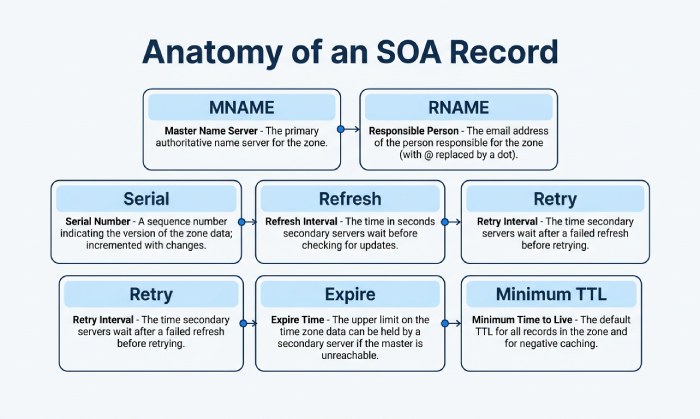
A typical DNS SOA record includes these fields:
- MNAME: the primary nameserver, sometimes called the primary master or master server
- RNAME: the responsible party, represented as an administrator email in DNS label format
- Serial number: the version number of the zone file
- Refresh: how often a secondary nameserver checks for updates
- Retry: how soon to retry after a failed check
- Expire: how long a secondary server may serve stale data
- Minimum / SOA minimum: historically a minimum TTL, now commonly used for negative response caching TTL
DNS diagnostic utilities, authoritative DNS dashboards, and command-line tools such as BIND’s dig utility can display SOA values. Understanding these values helps administrators verify whether DNS zone updates have been applied consistently across authoritative nameservers.
Where the SOA Serial Number Fits in a DNS Zone
The serial number is a field inside the SOA record, not a separate resource record. It lives at the apex of the DNS zone, usually at @ in a zone file. The zone file is the authoritative data file containing the DNS records for a domain, including A, AAAA, MX, TXT, NS, CNAME, and the required DNS SOA record.
Example BIND syntax for an SOA record
The example BIND syntax for an SOA (Start of Authority) record begins by defining the origin as example.com. and setting the default TTL to 3600 seconds. The SOA record identifies ns.primaryserver.com. as the primary nameserver and admin.example.com. as the responsible administrator. It also includes a serial number of 2025030801, a refresh interval of 3600 seconds, a retry interval of 900 seconds, an expiration period of 1209600 seconds, and a minimum TTL of 300 seconds, which determines the negative caching time for DNS responses.
In this BIND syntax, @ represents the origin or zone apex for example.com. The zone class is IN, meaning internet. The MNAME is ns.primaryserver.com., which identifies the primary nameserver for the zone. The RNAME is admin*.*example.com., which represents the administrator email. In DNS notation, the first unescaped dot in the RNAME becomes the @ symbol, so admin*.*example.com. corresponds to admin*@*example.com*.
This distinction is important: the administrator email is not written as a normal email address in the zone file. Instead, the RNAME uses DNS label format. For example, ICANN examples often use values such as ns.icann.org for the nameserver and noc.dns.icann.org for the responsible contact. Similarly, admin*.*example.com may represent the admin email admin*@*example.com.
The serial number acts as the version identifier for the DNS zone. Administrators commonly use a simple incrementing integer or a date-based format such as YYYYMMDDnn, where the final digits distinguish multiple updates made on the same day. DNS serial numbers use an unsigned 32-bit value and follow serial number arithmetic under RFC 1982. Administrators should ensure that each update advances the serial correctly and that secondary nameservers can recognize the newer version, including when the value eventually wraps around.
How SOA Serial Numbers Track Zone File Changes
The SOA serial number tracks whether the contents of a zone file have changed. When an administrator edits a domain record”perhaps adding a www subdomain, changing an MX target, updating DMARC TXT data, or modifying a nameserver”the serial number should be increased. This incremented serial tells every secondary DNS system that the zone has a newer version.
For example, suppose the current DNS SOA record for example.com has a serial number of 2025030801. If an administrator updates the domain’s SPF TXT record, publishes a new DKIM selector, or modifies its DMARC policy, the zone serial number might become 2025030802. This signals to secondary authoritative nameservers that a newer version of the zone is available. They can then synchronize the updated records through an appropriate zone transfer mechanism. This helps ensure that authoritative nameservers serve consistent email authentication information.
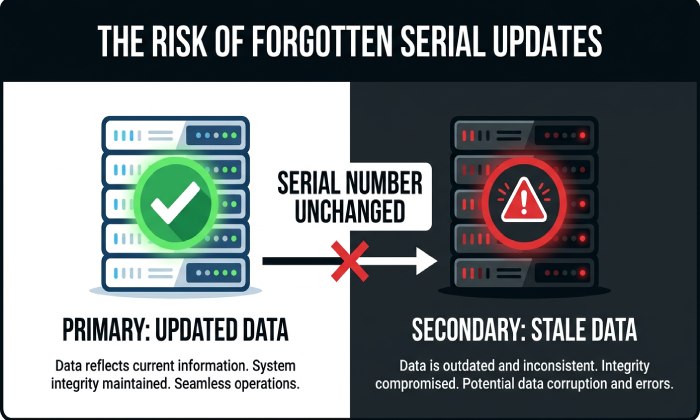
This is why the serial number must move forward consistently. If an operator changes the zone file but forgets to update the serial, a secondary nameserver may not detect the zone changes. The primary server may contain the updated DNS data while a secondary server continues serving an older version of the zone. This can create inconsistent DNS responses depending on which authoritative nameserver receives the query. For email authentication, such inconsistencies may cause different SPF, DKIM, or DMARC records to be returned during the synchronization period, potentially complicating email authentication checks and troubleshooting.
The refresh value determines how frequently a secondary nameserver checks the primary server’s SOA record for a newer serial number. For example, a refresh interval of 3600 seconds means the secondary normally checks for updates every hour. If it detects a newer serial number, it can initiate a zone transfer to retrieve the updated DNS data. DNS NOTIFY messages can also alert secondary servers to changes without requiring them to wait for the next scheduled refresh.
Other timing fields also matter. The retry value tells the slave server or secondary how long to wait before trying again after a failed contact with the master. The expire value indicates how long the secondary may keep serving the old zone if it cannot reach the master server. The TTL, or time to live, controls caching behavior for resource data, while the SOA minimum is used by modern resolvers for negative caching, as described in RFC 2308. This means the negative response caching TTL determines how long a resolver can remember that a requested name does not exist.
Operationally, platforms such as Cloudflare often manage these details automatically, but in self-hosted BIND, djbdns, or other authoritative DNS environments, the Admin must ensure the SOA record, MNAME, RNAME, administrator email, and serial number are correct.
Primary vs. Secondary DNS Servers: The Role of Serial Checks
Authoritative DNS commonly uses a primary nameserver and one or more secondary systems for resilience. The primary authoritative nameserver maintains the original zone data, while secondary authoritative nameservers receive synchronized copies through zone transfers. This arrangement improves DNS availability and helps maintain consistent responses across multiple authoritative servers. When email-related DNS records such as SPF, DKIM, and DMARC are updated, the same synchronization process helps distribute those changes across the authoritative DNS infrastructure.
The DNS SOA record ties this relationship together. The MNAME identifies the primary nameserver that holds the authoritative version of the zone. The RNAME identifies the responsible contact, or administrator email, for the domain. The refresh, retry, and expire values tell secondaries how aggressively they should poll or retain data. Most importantly, the serial number tells the secondary whether its local zone file is current.
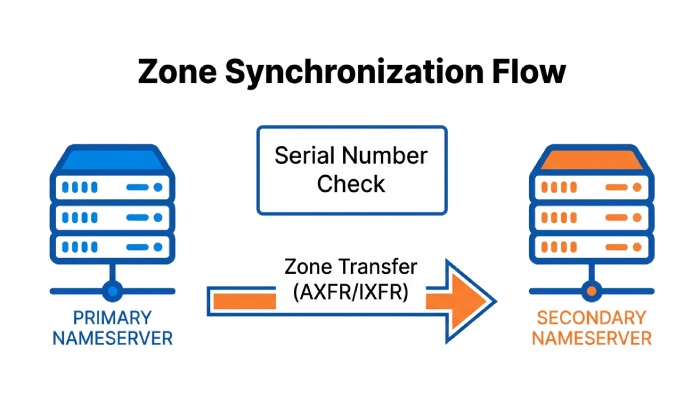
When a secondary nameserver checks the primary, it first compares the SOA serial number it has with the serial number published by the primary nameserver. If both values match, no zone transfer is needed. If the primary has a higher serial number, the secondary knows there has been a zone update and begins the synchronization process.
DNS serial numbers are compared using the serial number arithmetic defined in RFC 1982 rather than ordinary integer comparison. Because SOA serial numbers are unsigned 32-bit values, they can wrap around when reaching their maximum value of 4294967295. Secondary nameservers must use the defined comparison rules to determine whether a zone version is newer, even when its numerical value appears lower after rollover. Administrators should therefore follow consistent incrementing practices when maintaining DNS zones.
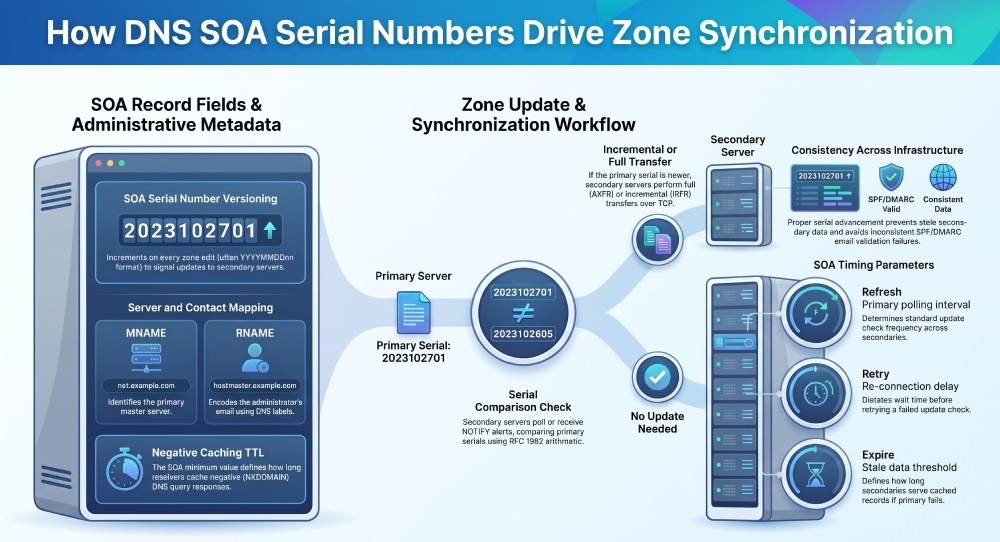
DNS Zone Transfers: AXFR, IXFR, and Serial Number Comparisons
A zone transfer is the mechanism by which authoritative servers replicate a DNS zone. Traditional full transfers use AXFR, while incremental transfers use IXFR. Both commonly run over the TCP protocol, because full zone transfer responses can be larger and require reliable delivery.
In an AXFR operation, the secondary nameserver requests the entire zone file from the primary nameserver. This includes all relevant DNS records, the SOA record, NS records, MX records, TXT records, and any subdomain entries. AXFR is simple and reliable, but it can be inefficient for large zones.
General Manager
General Manager of DuoCircle. Product strategy and commercial lead for AutoSPF's 2,000+ customer base.
LinkedIn Profile →