How to Use DNS History Lookup to Track SPF Record Changes

Quick Answer
A DNS History Lookup helps track previous SPF record changes by showing historical DNS data. Learn how to identify unauthorized modifications, troubleshoot SPF errors, monitor DNS updates, and maintain accurate email authentication to protect your domain and improve email deliverability.
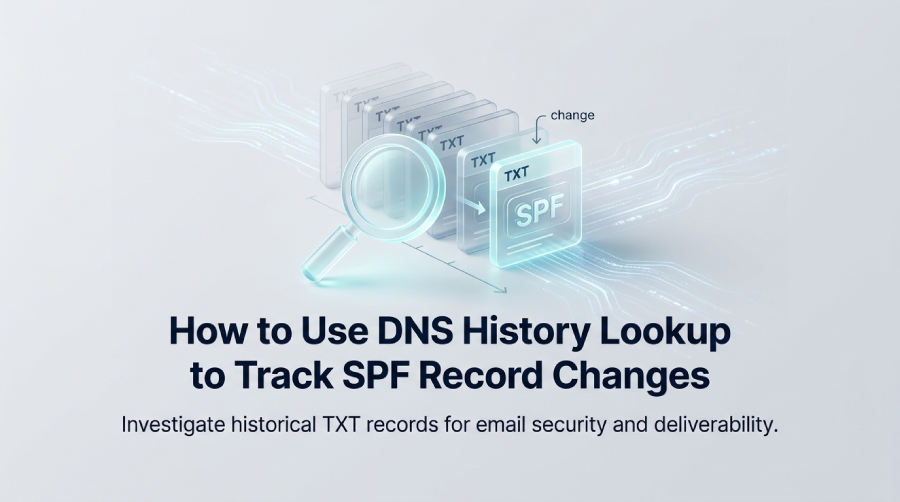
DNS history lookup helps you investigate SPF record changes by providing access to previously observed DNS records, including TXT records containing SPF policies. By comparing historical and current records, administrators can identify changes, investigate potential misconfigurations, and determine whether an update may have affected email authentication or deliverability.
DNS history lookup allows security and infrastructure teams to review previously observed DNS records. Since SPF policies are published in TXT records, comparing historical and current TXT values can help identify unauthorized changes, configuration mistakes, and outdated sending services.
What DNS History Lookup Is and Why It Matters for SPF Records
DNS history is the practice of collecting and reviewing timestamped snapshots of domain DNS configurations over time. A historical dns lookup allows teams to inspect previous dns records, compare them against current DNS data, and detect changes that may affect SPF, DMARC, DKIM, BIMI, MTA-STS, and TLS-RPT.
A dns history lookup is especially useful for SPF because the spf record is stored as a txt record. If a mail provider, SaaS platform, CRM, or marketing tool is added to SPF incorrectly, the domain may suffer email deliverability failures or create an opening for spoofing. This makes dns record history valuable for a domain audit, incident response, and long-term email security governance.
What a DNS History Lookup Shows
Depending on the data provider, a DNS history lookup may show previously observed versions of DNS records, including A, MX, NS, TXT, CNAME, and SOA records. The availability and timestamps of historical data vary between providers.
Common historical fields include:
- Record type: such as txt record, mx record, a record, cname record, ns record, or soa record
- Value: the SPF string, mail server, ip address, or nameserver
- Timestamp: when a dns snapshot or change was observed
- Source: the dns database, passive DNS provider, or DNS monitoring platform
- Context: related hostnames, co-hosted domains, or infrastructure pivots
Because dns history connects configuration changes to time, it gives SOC teams and administrators evidence that a normal dns configuration update”or a suspicious dns change”actually occurred.
Why SPF Tracking Depends on TXT Record History
SPF is published inside a txt record, not as a standalone DNS record type. That means a dns record checker must inspect the domains txt record values to find SPF entries beginning with v=spf1.
Example SPF Change Edge Case
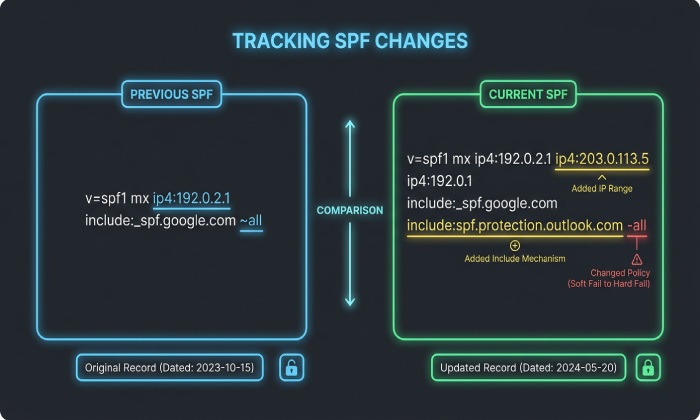
A domain may move from:
v=spf1 include:_spf.google.com -all
to:
v=spf1 include:_spf.google.com include:mail.vendor.example ~all
This looks minor, but a historical dns lookup can reveal whether the new include appeared during a legitimate mail provider migration, a compromised DNS Manager session, or a phishing campaign setup.
Why DNS History Matters for Security and Deliverability
DNS history matters because SPF failures are often caused by changes that are invisible without historical context. A current lookup only shows todays dns records, while a dns history lookup shows the older txt record versions that explain when SPF started failing.
Security teams also use historical dns lookup workflows for threat intelligence, infrastructure investigation, and domain attribution. For example, If a suspicious domain shares DNS infrastructure with a known phishing domain, analysts can investigate potential relationships between the domains. Shared hosting, nameservers, or IP addresses may provide useful investigative clues, but they do not independently establish common ownership or threat actor attribution.
Once historical SPF changes have been identified, organizations should review their current SPF configuration and ensure it remains within DNS lookup limits. Tools such as AutoSPF can help teams manage and optimize SPF records as part of their email authentication strategy.
Understanding, Performing, and Analyzing SPF Record Changes
SPF records change when organizations add mail platforms, remove vendors, migrate infrastructure, update a hosting provider, or remediate email authentication risks. A dns history lookup helps verify whether those changes align with expected business events.
Understanding SPF Records and Common Reasons They Change
An SPF policy tells receiving mail servers which senders are authorized to send email for a domain. Because SPF lives in a txt record, historical SPF tracking is really a specialized form of dns record history analysis.
Common reasons SPF changes include:
- New mail provider: adding Google Workspace, Microsoft 365, SendGrid, Mailchimp, or another sender
- Vendor offboarding: removing obsolete include: mechanisms
- IP migration: replacing an old ip address or CIDR block
- Security hardening: changing ~all to -all
- Acquisition or rebrand: consolidating multiple sender policies
- Incident response: removing unauthorized senders after Phishing or spoofing abuse
A strong dns history lookup does not evaluate SPF in isolation. It also compares the mx record for mail routing, the a record for web infrastructure, the ns record for DNS delegation, the cname record for vendor aliases, and the soa record for administrative DNS metadata.
How to Perform a DNS History Lookup for SPF Record Changes
To perform a dns history lookup for SPF, start with the root domain and query historical txt record data. Then compare each SPF version across the dns timeline to determine what changed, when it changed, and whether the change was authorized.
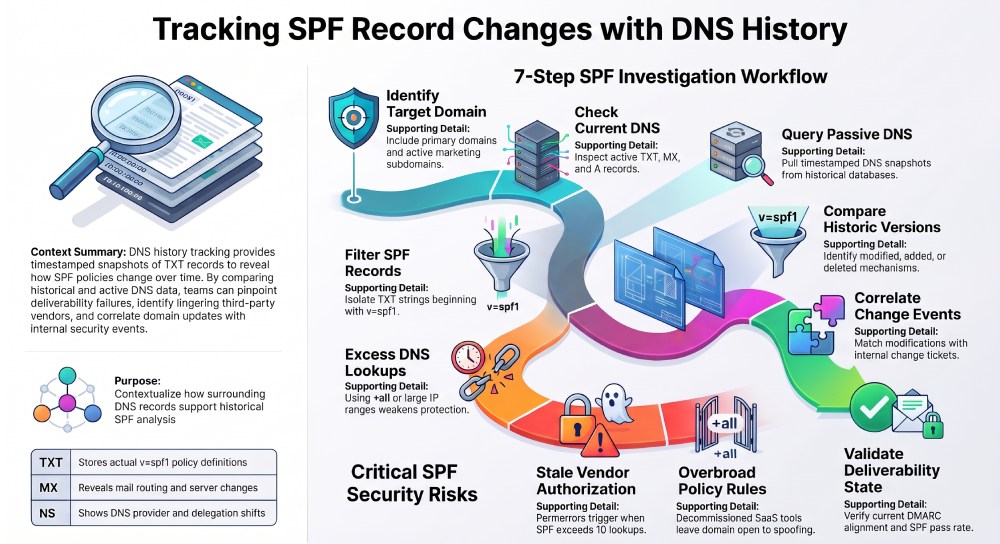
A practical workflow looks like this:
- Identify the domain: Use the primary sending domain and any subdomains used for marketing or transactional mail.
- Run current DNS checks: Review current dns records, including the txt record, mx record, a record, ns record, cname record, and soa record.
- Run a historical dns lookup: Pull timestamped snapshots from a passive DNS or dns database.
- Filter for SPF: Search txt record values containing
v=spf1. - Compare versions: Identify added, removed, or modified SPF mechanisms.
- Correlate with events: Match each dns change to ticketing, deployment, vendor onboarding, or Incident Response records.
- Validate current state: Use a dns record checker, Email Deliverability Test, or DMARC reporting platform.
Example DNS History Review Table
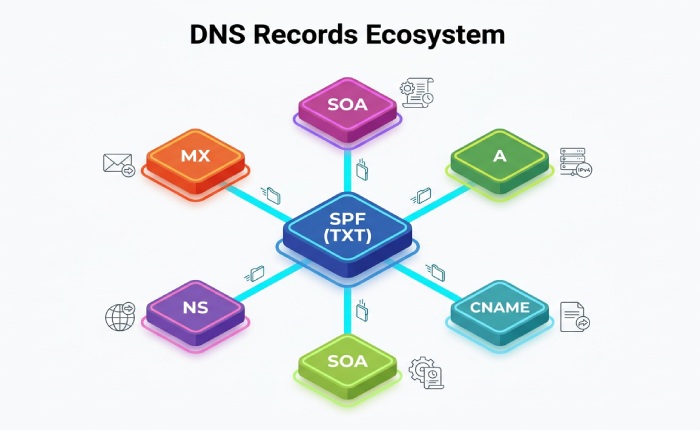
DNS records play an important role in tracking SPF changes and understanding updates to a domain’s email infrastructure. A TXT record stores the SPF policy and helps identify direct changes to the SPF configuration. An MX record reveals changes in mail routing, which may explain updates to authorized email senders. An A record helps identify related web or mail infrastructure changes that could affect SPF configurations.
An NS record shows delegation changes, such as a switch to a new nameserver or DNS provider. A CNAME record helps identify vendor-managed sending services or tracking hostnames associated with third-party email platforms. Finally, an SOA record provides administrative information about the DNS zone and helps track DNS zone updates, which can offer additional context when investigating SPF-related changes.
Analyzing Historical SPF Data to Identify Misconfigurations or Security Risks
Historical SPF data helps uncover misconfigurations that a current lookup may miss. For example, historical DNS data may reveal that a domain previously authorized an unfamiliar sending service. Administrators can investigate whether the service was legitimate or whether the SPF configuration was changed without authorization. Additional SPF evaluation is needed to determine whether the previous record exceeded the DNS lookup limit.
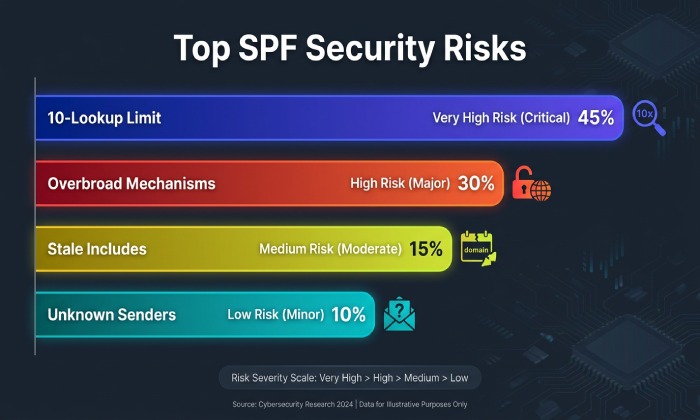
Key risks to look for include:
- Too many DNS lookups: SPF fails when it exceeds the 10-lookup limit.
- Overbroad mechanisms: +all, ?all, or large IP ranges may weaken email security.
- Stale includes: Old SaaS vendors may remain authorized after offboarding.
- Unknown senders: A suspicious include may indicate account compromise.
- Softfail drift: Long-term use of ~all may reduce enforcement strength.
- Record duplication: Multiple SPF txt record entries can cause SPF permerror.
A historical dns lookup is also useful in threat intelligence. If a suspicious SPF include points to infrastructure also associated with a malicious domain, C2, or a c2 server, analysts can perform an infrastructure pivot using reverse dns lookup, historical whois lookup, co-hosted domains, shared a record values, reused mx record values, common ns record providers, matching cname record patterns, or similar soa record metadata.
Linking SPF Changes to Threat Actor Infrastructure
When a Threat Actor prepares a phishing campaign, they may configure SPF, DKIM, and DMARC to improve inbox placement and domain reputation. That means SPF changes can be part of campaign tracking, not just IT administration.
Infrastructure Investigation Example
If a domain suddenly adds an unfamiliar include: value, analysts can check whether the included domain shares an ip address, nameserver, a record, mx record, cname record, txt record, ns record, or soa record with known abuse infrastructure. These infrastructure relationships can provide additional context during phishing investigations, although shared DNS infrastructure alone does not prove that domains belong to the same threat actor.
Best Practices for Monitoring and Documenting SPF Record Changes
The best way to manage SPF safely is to monitor DNS continuously, document every SPF modification, and correlate DNS history with email authentication outcomes. A mature workflow combines dns history, change control, alerting, and API-driven evidence collection.
Best Practices for Ongoing SPF Monitoring
Use continuous monitoring so a dns history lookup is not only a forensic activity after something breaks. A modern SOC or email operations team should monitor the SPF txt record, but also the surrounding dns records that explain infrastructure context.
Recommended controls include:
- Baseline all DNS records: Capture the current a record, mx record, ns record, txt record, cname record, and soa record.
- Enable alerting: Trigger notifications when SPF or related dns records change.
- Use API access: Pull historical SPF data into a central workflow through an API.
- Automate evidence capture: Store timestamped snapshots for compliance and audit review.
- Correlate with DMARC: Compare SPF alignment with DMARC, DKIM, BIMI, MTA-STS, and TLS-RPT results.
- Review reputation impact: Track sender failures through Reputation Monitoring and deliverability tests.
For larger environments, bulk dns analysis, programmatic access, SIEM integration, and SOAR integration allow teams to enrich alerts with dns history lookup results, current dns records, and historical SPF context.
Documentation and Change Control Checklist
Every SPF change should be documented like an infrastructure change because it affects authentication, routing, and brand trust. A strong domain audit should preserve the old SPF txt record, the new value, the business owner, and the expected impact.
Track these fields:
- Change date and time: based on DNS observation and internal ticket timestamp
- Old SPF value: pulled from archived dns or dns snapshot data
- New SPF value: verified with a dns record checker
- Reason for change: vendor onboarding, migration, remediation, or policy update
- Approver: email security, SOC, DNS administrator, or business owner
- Related records: changes to a record, mx record, ns record, cname record, and soa record
- Validation result: SPF pass/fail, DMARC alignment, and deliverability outcome
FAQ: DNS History Lookup and SPF Record Changes
How often should I run a DNS history lookup for SPF?
Run a dns history lookup whenever SPF changes and at least monthly for active sending domains. High-risk domains, executive domains, and marketing subdomains should be checked more often because a single unauthorized txt record change can affect email security and domain reputation.
Can DNS history show who changed an SPF record?
DNS history usually shows what changed and when, not always who made the change. To identify the person or system responsible, combine dns history, historical dns lookup data, DNS provider logs, DNS Manager audit trails, IAM logs, and change tickets.
Why review A, MX, NS, CNAME, and SOA records when tracking SPF?
SPF lives in a txt record, but related dns records provide context. The a record may show sender infrastructure, the mx record may reveal mail routing, the ns record may identify DNS delegation, the cname record may expose vendor-managed hostnames, and the soa record may indicate zone-level administrative changes.
Is DNS history useful during phishing incident response?
Yes, dns history is highly useful during phishing incident response. A historical dns lookup can reveal whether a suspicious SPF update, mx record change, new cname record, altered ns record, or unfamiliar a record appeared before a Phishing wave, helping the SOC connect DNS evidence to a Threat Intelligence investigation.
General Manager
General Manager of DuoCircle. Product strategy and commercial lead for AutoSPF's 2,000+ customer base.
LinkedIn Profile →