DKIM Syntax Checker: How to Validate Your DKIM Record Syntax Correctly

Quick Answer
A DKIM Syntax Checker validates your DKIM DNS TXT record for correct formatting, required tags, and public key structure. It helps detect syntax errors that can cause DKIM authentication failures, poor email deliverability, and DMARC alignment issues.
What DKIM Syntax Is and Why Correct Formatting Matters
DKIM, short for DomainKeys Identified Mail, is an email authentication mechanism that helps receiving mail servers verify whether a message was authorized by the domain owner and whether its content remained unchanged in transit. At the center of this process is the DKIM record, a specially formatted DNS TXT record published in your domain’s DNS.
A DKIM syntax issue can prevent mailbox providers from finding or reading your DKIM key. Even if your private key is correctly signing outgoing mail, a malformed public key in DNS can cause signature verification to fail. That means your legitimate email sender infrastructure may look suspicious to Gmail, Microsoft, Yahoo, and other receiving systems.
Why DKIM Record Syntax Is So Important
Correct DKIM record syntax matters because DKIM depends on precise formatting. The receiving mail server performs a record lookup using the dkim selector and signing domain found in the email header. It then retrieves the selector record from DNS and uses the public key to validate the DKIM signature.
If the dns txt record is broken, incomplete, or incorrectly quoted, the authentication mechanism fails. This can reduce email deliverability, weaken email security, and interfere with DMARC alignment. In practical terms, poor dkim syntax can lead to failed email authentication, increased spam placement, or even rejected messages.
How DomainKeys Identified Mail Works in Practice
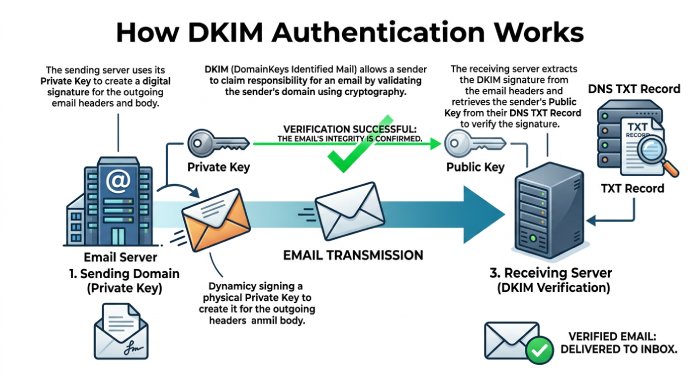
DomainKeys Identified Mail uses a cryptographic signature generated with a private key stored on the sending system, SMTP platform, or hosted dkim provider. The matching public key is published as a DKIM record in DNS. When an email is delivered, the recipient’s mail transfer agent checks the dkim signature against the public key in the dns txt record.
This process helps authenticate email, preserve message integrity, and prove that the email domain authorized the sending system.
Key Components of a Valid DKIM Record
A valid DKIM record has a specific record format. While different platforms may generate slightly different values, the same core dkim parameters are usually present.
The DKIM Selector
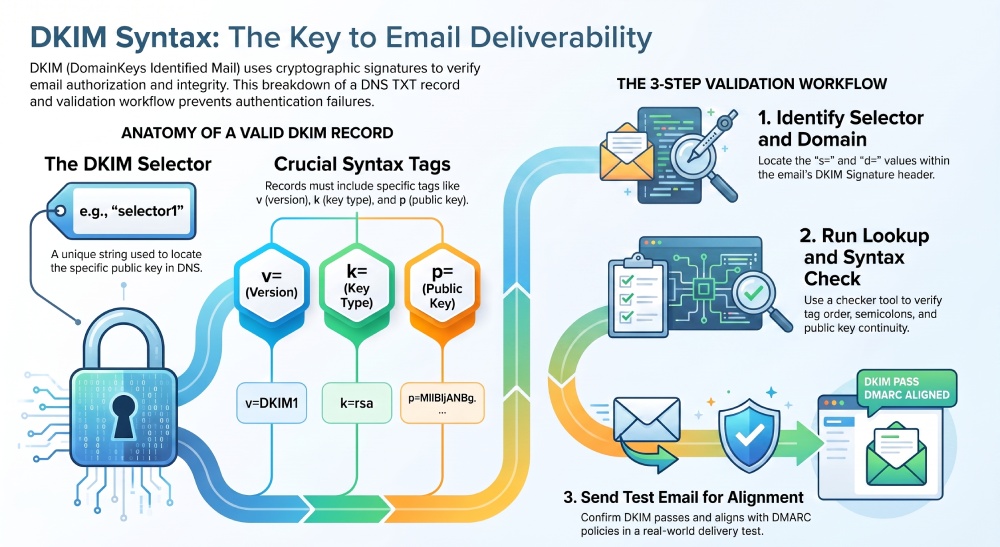
The dkim selector identifies which DKIM key should be used for validation. It appears in the email header as part of the DKIM-Signature field and maps to a DNS name such as:
selector1._domainkey.example.comThe dkim selector is essential when you use multiple sending services, such as WordPress, Freshdesk, YouTube notifications, PHP mail scripts, or marketing platforms connected through SMTP. Each email sender may require its own selector record and dkim configuration.
The Public Key and DKIM Key
The dkim key pair consists of a private key and a public key. The private key remains with the sending server or hosted dkim provider, while the public key is published in the DKIM record.
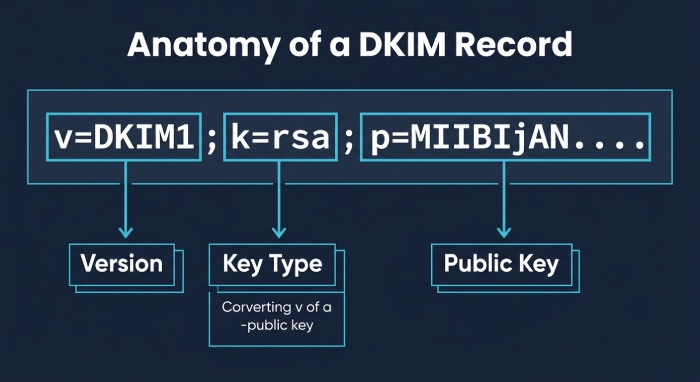
A typical DKIM record may look like this:
v=DKIM1; k=rsa; p=MIIBIjANBgkqh...
Here:
v=DKIM1identifies the TXT record as a DKIM record.k=rsaspecifies the key type.p=contains the public key.- Optional dkim parameters may define testing mode or service restrictions.
Common DKIM Tags
The most important tags in dkim record syntax include:
v: Version tag, usuallyDKIM1k: Key type, commonly RSAp: Public key valuet: Optional flags, such as testing modes: Optional service type
A dkim record checker verifies whether these tags are present, ordered correctly enough to be parsed, and free of obvious syntax error patterns.
DNS TXT Record Placement
A DKIM record must be published as a dns txt record under the correct host name. The host name combines the dkim selector with _domainkey and your email domain. For example:
google._domainkey.example.com`If the DNS record is added at the wrong location, record validation will fail even when the dkim record syntax itself is technically correct.
Common DKIM Syntax Errors and How to Spot Them
Even small dkim syntax mistakes can break email authentication. A dkim record checker or DKIM Checker can quickly reveal these issues, but understanding them helps prevent repeat failures.
Missing or Incorrect Version Tag
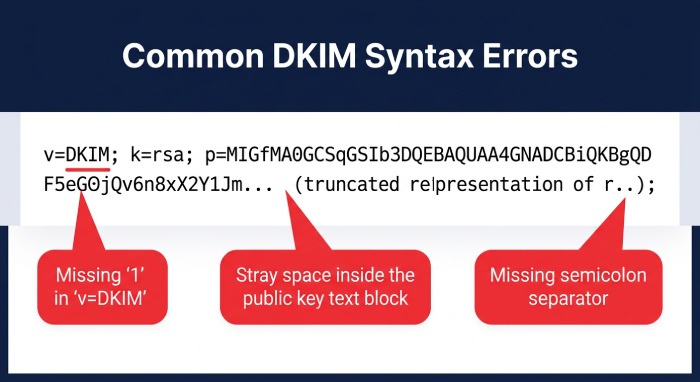
A valid DKIM record should begin with v=DKIM1. If the version tag is missing, misspelled, or placed in an invalid record format, receiving systems may not recognize the dns txt record as a DomainKeys Identified Mail record.
Broken Public Key Formatting
The public key must be published as a continuous value without accidental spaces, line breaks, or copied characters. DNS providers sometimes split long TXT record values automatically, which is acceptable if done correctly. However, manual line breaks can corrupt the dkim key.
Quotation and Spacing Problems
Some DNS dashboards require quotation marks around long TXT values, while others add them automatically. Duplicate quotes, missing semicolons, or extra whitespace inside the p= value can cause a syntax error. A dkim record checker helps detect whether the dkim record syntax is parseable after DNS publication.
Wrong DKIM Selector
A common problem is using the wrong dkim selector during record lookup. If your mail server signs with selector1 but your DNS contains only selector2, signature verification fails. This is especially common when organizations use multiple vendors, such as Google Workspace, Microsoft 365, Freshdesk, Crisp, CookieYes notifications, or WordPress SMTP plugins.
Invalid or Empty p = Tag
If the p= tag is empty, the DKIM key is effectively revoked. That may be intentional during key rotation, but it will fail normal DKIM authentication. A dkim record generator can help create a properly structured value, while a dkim record checker confirms the public key is present and readable.
How to Use a DKIM Syntax Checker Step by Step
A DKIM syntax checker performs syntax validation, DNS lookup, and record validation to confirm that your DKIM record is correctly formatted and publicly accessible.
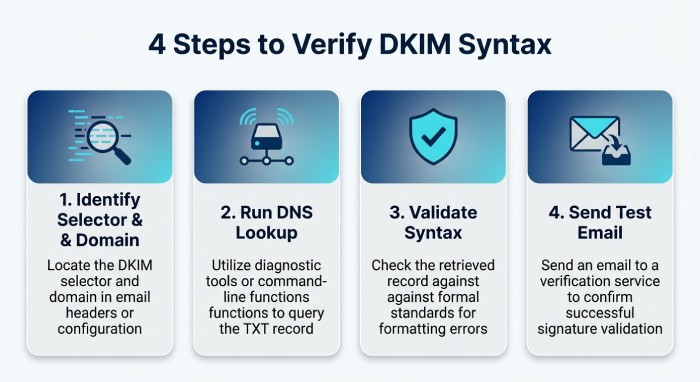
Step 1: Identify the DKIM Selector and Domain
Start by identifying the dkim selector used by your email sender. You can usually find it in your provider’s DKIM setup instructions or by checking the email header of a signed message. Look for the s= value in the DKIM-Signature header. The d= value shows the signing domain.
Together, these values tell the dkim record checker where to perform the record lookup.
Step 2: Run a DKIM Record Lookup
Enter the DKIM selector and email domain into a DKIM checker tool. The tool queries DNS for the selector record and retrieves the published DNS TXT record for validation.
If no record is found, check whether the DNS record was published under the right host name. DNS propagation delays can also affect newly created records.
Step 3: Validate DKIM Record Syntax
The tool then checks the dkim record syntax for required tags, public key structure, invalid characters, semicolon placement, and record format issues. This is where a dedicated dkim record checker is more reliable than a basic DNS lookup tool because it understands DomainKeys Identified Mail requirements.
A strong DKIM Checker may also warn about weak key lengths, unsupported algorithms, or TXT record fragmentation.
DKIM Record Generator vs. DKIM Record Checker
A dkim record generator or DKIM Generator helps create the initial DKIM record using a valid record generator workflow. A dkim record checker validates the final published dns txt record after it is added to DNS. Both are useful: the dkim record generator reduces setup errors, while the checker confirms real-world DNS visibility.
Step 4: Send a Test Email
After syntax validation passes, send a test email through the relevant SMTP server or application. Review the email header to confirm that DKIM passed. Also verify DMARC results, because DMARC depends on SPF or DKIM alignment to authenticate email successfully.
Best Practices for Maintaining Accurate DKIM Records
Maintaining accurate DKIM records is an ongoing part of email infrastructure management, not a one-time setup task.
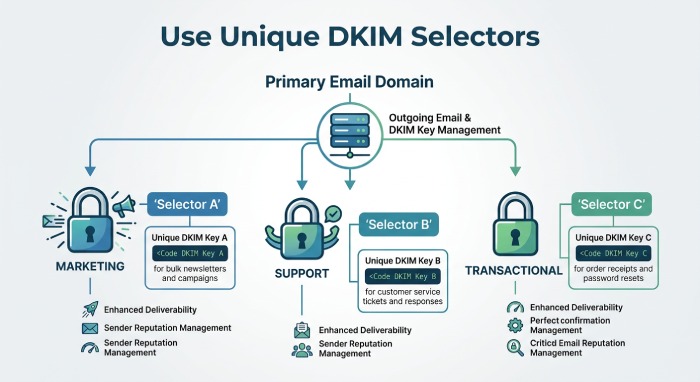
Use Unique Selectors for Each Sending Service
Assign a unique dkim selector for each email sender or platform. For example, your transactional mail server, WordPress site, Freshdesk support desk, and marketing automation platform should not all share the same dkim key. Unique selectors simplify troubleshooting, key rotation, and dkim analytics.
Monitor DKIM with DMARC Reporting
Use DMARC, SPF, and DKIM together to create a layered email authentication strategy. DMARC reports and DKIM monitoring help identify unauthorized senders, alignment issues, and failed email authentication attempts. Email security platforms can help organizations analyze authentication results, detect configuration problems, and improve domain protection at scale.
SPF also requires ongoing maintenance to ensure all authorized senders are included and validated. Tools such as SPF generators, SPF checkers, and AutoSPF can help manage SPF records, prevent configuration errors, and maintain reliable email deliverability alongside DKIM.
Rotate DKIM Keys Periodically
DKIM key rotation reduces long-term risk if a signing key is exposed. Generate a new dkim key pair, publish the new DKIM record under a new dkim selector, update your mail server or hosted dkim provider, and then retire the old selector after traffic has fully moved.
Validate After Every DNS Change
Any change to a dns record, txt record, DNS provider, or email platform should trigger a new dkim record checker test. DNS migrations, Google Tag Manager-related domain changes, PHP mail updates, and new SaaS tools can all affect email authentication indirectly.
Align DKIM with Broader Email Security Controls
DKIM should be maintained with SPF, DMARC, BIMI, MTA-STS, TLS-RPT, and, where applicable, DANE. BIMI Generator and BIMI Checker tools can support brand indicators, while MTA-STS and TLS-RPT improve transport security visibility. Advanced environments may also integrate DKIM analytics into an MCP Server or central security workflow.
For organizations managing multiple email authentication records, combining DKIM validation results with DMARC policy enforcement helps security teams identify authentication failures, monitor message integrity, and protect their domains from unauthorized email activity.
General Manager
Founder and General Manager of DuoCircle. Product strategy and commercial lead for AutoSPF's 2,000+ customer base.
LinkedIn Profile →