The dig Command Cheat Sheet: How to Query SPF Records Like a Security Pro

Quick Answer
The dig command helps query and troubleshoot SPF records through DNS. Use it to inspect SPF, DKIM, and DMARC records, trace DNS lookups, identify the 10-lookup limit, and detect configuration issues that can affect email delivery and security.
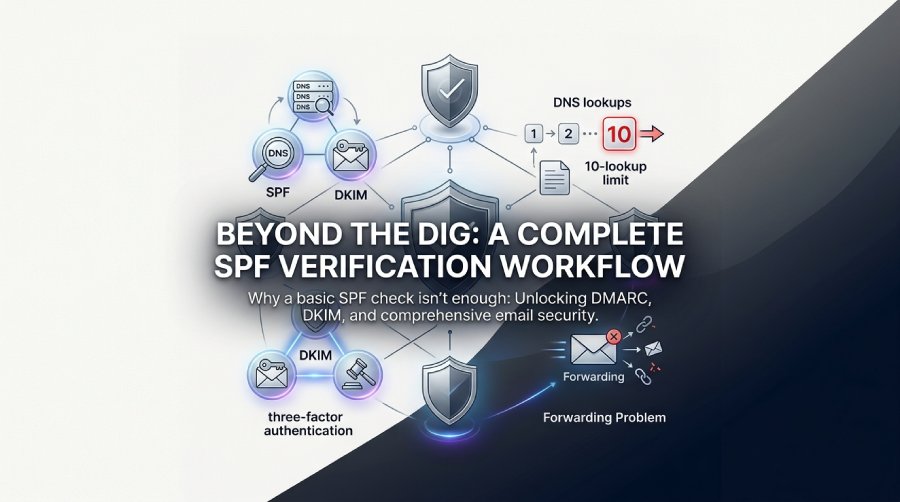
Here’s something most IT pros don’t realize until it’s too late: that little dig TXT command you run to check an SPF record? It only shows you one-third of your email security picture. And according to NSF-funded research, even perfectly configured SPF records can break legitimate emails when forwarding gets involved.
I’ve spent years helping organizations troubleshoot email delivery nightmares, and the pattern is always the same: someone assumes their SPF record is “fine” because it exists. Then invoices go missing, legal notices bounce, and suddenly a DNS misconfiguration becomes a business crisis.
This guide will teach you not just how to dig SPF records, but how to actually understand what you’re looking at—and catch problems before they catch you.
TL;DR: Use dig TXT domain.com +short to query SPF records, but always check DMARC too (dig TXT _dmarc.domain.com). SPF alone isn’t enough—the UK government protects all .gov.uk domains with the full SPF/DKIM/DMARC triad. Watch for the 10-DNS-lookup limit, and remember that strict SPF policies (-all) can break email forwarding.
Key Takeaways
-
SPF is one-third of email security—always pair it with DKIM and DMARC for real protection
-
The 10-lookup limit is real—complex SPF records with multiple include: statements can silently fail
-
Forwarding breaks SPF—academic research confirms this fundamental limitation
-
Non-mail domains need SPF too—use
v=spf1-allto prevent spoofing of parked domains -
Government implementations set the bar—the UK’s Active Cyber Defence program shows what comprehensive protection looks like
What Exactly Is an SPF Record (And Why Should You Care)?
SPF (Sender Policy Framework) is essentially a whitelist stored in your DNS. It tells receiving mail servers: “Here are the IP addresses authorized to send email on behalf of my domain.” When someone tries to send email claiming to be from your domain, the receiving server checks this list.
According to the USPTO’s DNS documentation, SPF records live as TXT records in the same system that resolves domain names to IP addresses. This matters because it means SPF inherits all of DNS’s quirks: propagation delays, caching issues, and character limits.
The basic dig command couldn’t be simpler:
dig TXT example.com +shortBut understanding the output? That’s where things get interesting.
Anatomy of an SPF Record: Decoding What You See
Here’s a real-world SPF record you might encounter:
"v=spf1 include:_spf.google.com include:servers.mcsv.net ip4:192.168.1.0/24 -all"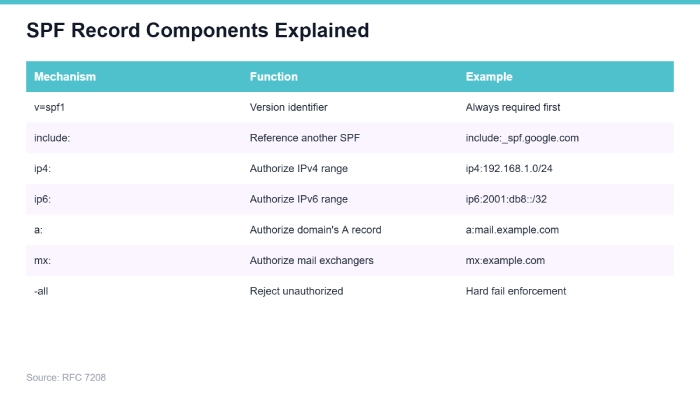 SPF Record Components Explained — Source: RFC 7208
Each component serves a specific purpose. The v=spf1 declares the version. The include: statements pull in another domain’s authorized servers (useful when you use Google Workspace or Mailchimp). The ip4: directly authorizes specific IP ranges. And that -all at the end? That’s your enforcement policy—and it’s where most organizations get into trouble.
The All-Important ‘All’ Mechanism
The ending mechanism determines what happens to emails that don’t match any authorized source:
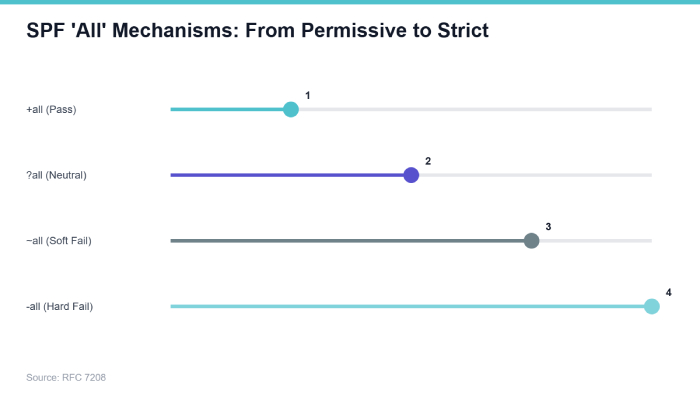
SPF ‘All’ Mechanisms: From Permissive to Strict — Source: RFC 7208
Notice the spectrum from permissive to strict. Organizations often start with ~all (soft fail) during testing, then forget to switch to -all (hard fail) for production. This leaves a security gap that attackers happily exploit.
Why SPF Alone Is Security Theater
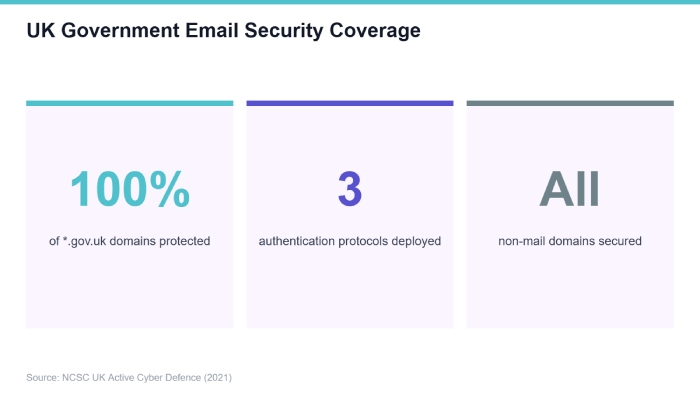
Here’s the uncomfortable truth the UK’s National Cyber Security Centre discovered: SPF by itself is insufficient. Their Active Cyber Defence program implements SPF as “one of three core email authentication controls alongside DKIM and DMARC.”
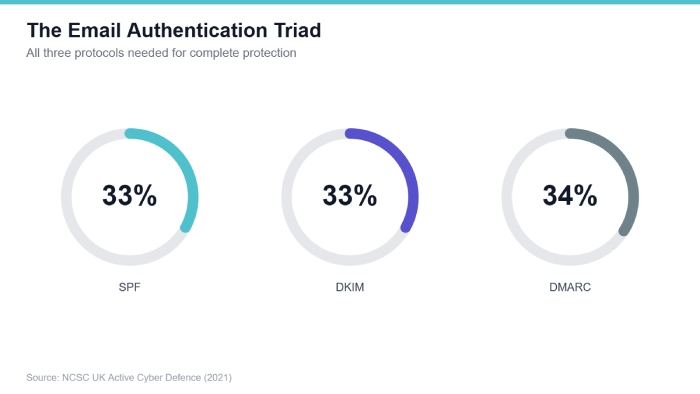 The Email Authentication Triad — Source: NCSC UK Active Cyber Defence (2021)
Think of it like a three-factor authentication system for email. SPF verifies the sending server’s IP is authorized. DKIM cryptographically signs the message content. DMARC ties them together and tells receivers what to do when checks fail. Skip any one, and you’ve left a door open.
The Complete Verification Workflow
When you’re auditing a domain’s email security, run all three checks:
dig TXT example.com +short — SPF record
dig TXT _dmarc.example.com +short — DMARC policy
dig TXT selector._domainkey.example.com +short` — DKIM key
A domain with a perfect SPF record but no DMARC policy is like having a fancy lock on your front door while leaving the back door wide open.
The 10-Lookup Limit: The Silent SPF Killer
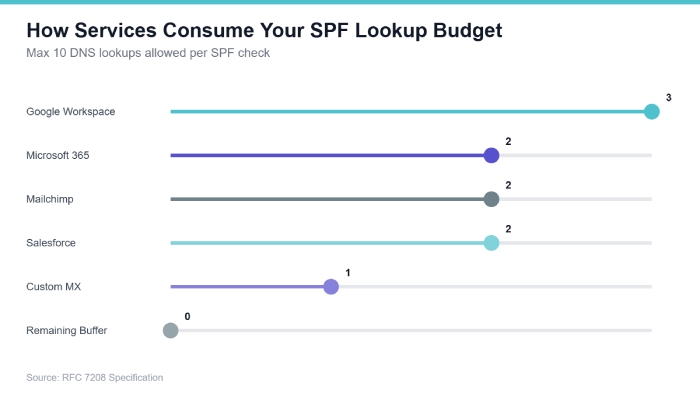
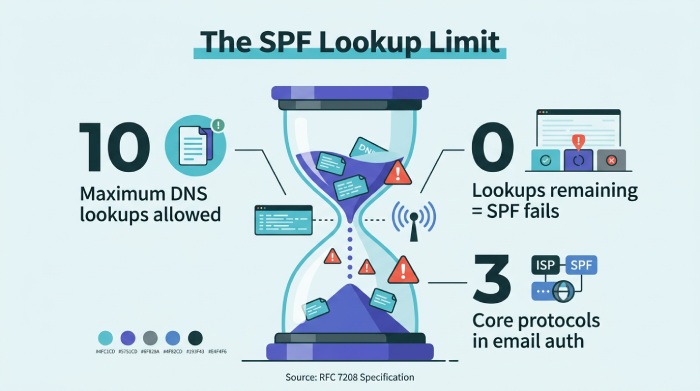
This is where even experienced admins get burned. RFC 7208 limits SPF to 10 DNS lookups. Every include:, a:, mx:, and redirect= counts. Exceed the limit, and your entire SPF record fails validation—silently.
 How Services Consume Your SPF Lookup Budget — Source: RFC 7208 Specification
Modern organizations easily hit this limit. You use Google Workspace (1-3 lookups), Mailchimp (1-2 lookups), Salesforce (1-2 lookups), your ticketing system (1-2 lookups), and suddenly you’re at 8 lookups before adding your own mail servers. The nested includes within those services can push you over.
How to Count Your Lookups
Trace each include manually:
dig TXT example.com +short — Main record
dig TXT _spf.google.com +short — First include (check for nested includes)d
ig TXT _netblocks.google.com +short — Nested include
Or save yourself the headache and use an online SPF validator. But knowing how to trace manually helps when you’re troubleshooting at 2 AM.
 The SPF Lookup Limit — Source: RFC 7208 Specification
When Good SPF Goes Bad: The Forwarding Problem
Here’s a scenario that trips up countless organizations: You implement strict SPF with -all. Your security team celebrates. Then your CEO’s assistant reports that emails forwarded to her personal Gmail aren’t arriving.
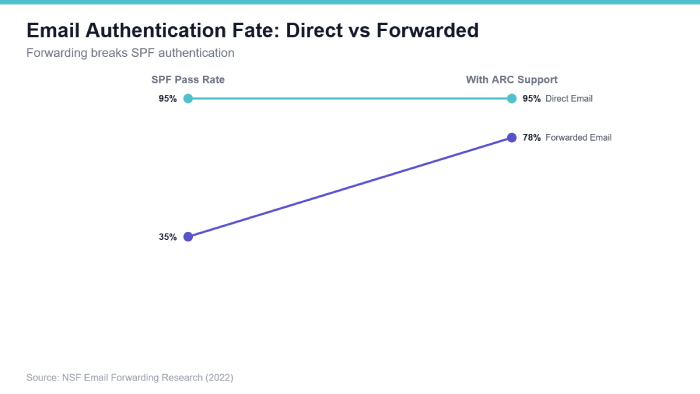
The NSF research paper on email forwarding confirms this isn’t a bug—it’s a fundamental design limitation. When email gets forwarded, the forwarding server’s IP becomes the apparent sender. That IP isn’t in your SPF record. Authentication fails.
 Email Authentication Fate: Direct vs Forwarded — Source: NSF Email Forwarding Research (2022)
This creates an impossible choice: strict SPF enforcement for security, or permissive policies for compatibility. Technologies like ARC (Authenticated Received Chain) and SRS (Sender Rewriting Scheme) help, but adoption remains inconsistent.
Diagnosing Forwarding Failures
When emails fail after forwarding:
-
Check the bounced email’s headers for the connecting IP
-
Run
dig TXT senderdomain.com +shorton the original sender -
Verify whether that forwarding server IP appears in the SPF record (it won’t)
-
Look for ARC headers indicating the forwarding chain was preserved
Government-Scale Implementation: Learning from the UK
The UK’s Active Cyber Defence program provides a masterclass in comprehensive email security. They didn’t just implement SPF for active mail domains—they protected all *.gov.uk domains, including those that never send email.
 UK Government Email Security Coverage — Source: NCSC UK Active Cyber Defence (2021)
Why protect non-mail domains? Because attackers love spoofing legitimate-sounding subdomains. An email from benefits-help@support.gov.uk looks convincing, even if that subdomain doesn’t exist. A null SPF record (v=spf1 -all) explicitly declares no servers are authorized, killing these attacks.
The Null SPF Strategy
For every domain you own that doesn’t send email:
v=spf1 -allThis includes: parked domains, retired marketing domains, defensive registrations (typosquatting protection), and internal-only subdomains. It takes five minutes per domain and eliminates an entire attack vector.
Real-World Consequences: The Brazilian Government Case
Think SPF misconfigurations only cause minor inconveniences? According to documented cases from CIGA, Brazilian municipal government chambers experienced “recurring email blocking issues” that prevented communication with judicial tribunals.
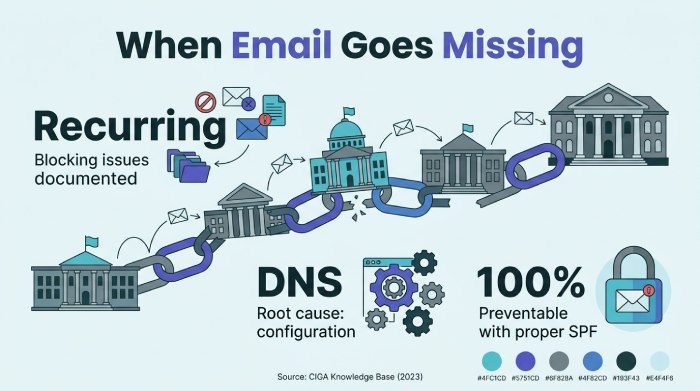 When Email Goes Missing — Source: CIGA Knowledge Base (2023)
Consider the implications: legal deadlines missed, official correspondence undelivered, government operations disrupted—all because of DNS configuration errors. The word “recurring” is particularly damning. This wasn’t a one-time mistake but an ongoing operational failure.
Advanced Dig Techniques for Power Users
Once you’ve mastered the basics, these advanced techniques will level up your SPF analysis:
Check DNS Propagation Across Servers
dig TXT example.com @8.8.8.8 +short — Google DNS
dig TXT example.com @1.1.1.1 +short — Cloudflare DNS
dig TXT example.com @ns1.example.com +short — Authoritative server
Inconsistent results indicate propagation issues—common after DNS changes.
Trace the Full Resolution Path
dig TXT example.com +trace`This shows every step from root DNS servers to your record. Essential for diagnosing DNSSEC issues or delegation problems.
Verify DNSSEC Protection
dig TXT example.com +dnssecDNSSEC prevents attackers from injecting malicious DNS responses. Without it, someone could theoretically spoof your SPF record.
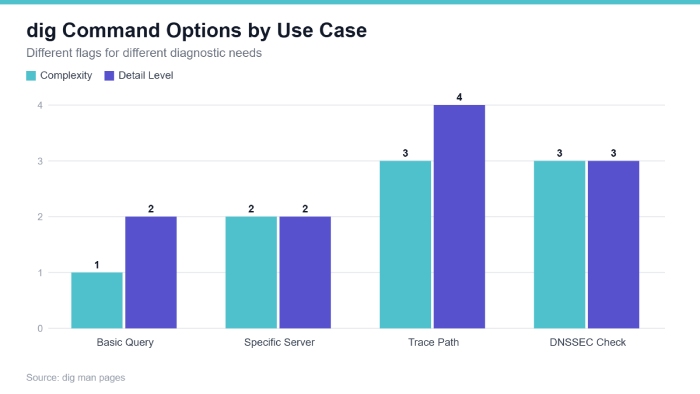 dig Command Options by Use Case — Source: dig man pages
Each technique serves a different diagnostic purpose. Choose based on what you’re troubleshooting.
Building Your SPF Monitoring System
Manual checks are great for troubleshooting. But for ongoing security, you need automated monitoring. Here’s a simple bash script:
#!/bin/bashEXPECTED_SPF='"v=spf1 include:_spf.google.com -all"
'CURRENT_SPF=$(digTXTexample.com+short|grepspf1)
if["$CURRENT_SPF" != "$EXPECTED_SPF" ]; then
echo "ALERT: SPF record changed!" | mail -s "SPF Alert" security@example.comfi mailto:security@example.com
fi)
Run this via cron daily. Unexpected changes could indicate: someone accidentally modified DNS, an attacker compromised your DNS management, or a well-meaning colleague “fixed” something they shouldn’t have touched.
Your SPF Implementation Checklist
Before you close this tab, here’s your action plan:
• Audit all domains you control—not just primary mail domains. Include parked domains, subdomains, and retired properties.
• Implement null SPF for non-mail domains—v=spf1 -all takes seconds and prevents spoofing.
• Check the complete authentication triad—SPF, DKIM, and DMARC. One isn’t enough.
• Count your DNS lookups—stay under 10 or your SPF silently fails.
• Test in monitoring mode first—use ~all before enforcing with -all.
• Set up automated monitoring—detect changes before they cause outages.
• Document your expected configuration—you can’t catch drift if you don’t know the baseline.
Email security isn’t glamorous, but it’s foundational. Every phishing attack starts with a spoofed email. Every BEC (business email compromise) scam exploits weak authentication. The dig command is your first line of defense—use it wisely.
References
-
Revisiting Email Forwarding Security under the Lens of Email Authentication Protocols (2022). https://par.nsf.gov/servlets/purl/10327874
-
Active Cyber Defence (ACD): The Fourth Year - National Cyber Security Centre UK (2021). https://www.ncsc.gov.uk/files/Active-Cyber-Defence-ACD-The-Fourth-Year.pdf
-
What is DNS? How Domain Name System works - USPTO Public Information Document (2023). https://ptacts.uspto.gov/ptacts/public-informations/petitions/1556023/download-documents?artifactId=hNYJFPaEzScr5f170uAD4ly1MZtTmqWOz4NlUx5HVLwJIH-oOqg5_K0
-
SPF – E-mails bloqueados nas Câmaras (problema de DNS) - CIGA Knowledge Base (2023). https://conhecimento.ciga.sc.gov.br/books/ciga-camara/page/spf-e-mails-bloqueados-nas-camaras-problema-de-dns/export/pdf
General Manager
General Manager of DuoCircle. Product strategy and commercial lead for AutoSPF's 2,000+ customer base.
LinkedIn Profile →