Create Perfect Reverse DNS Entries with a PTR Record Generator

Quick Answer
A PTR Record Generator creates the correct reverse DNS (PTR) record for IPv4 and IPv6 addresses by converting them into the proper in-addr.arpa or ip6.arpa format. It helps reduce configuration errors and improves email deliverability, DNS accuracy, and network validation.
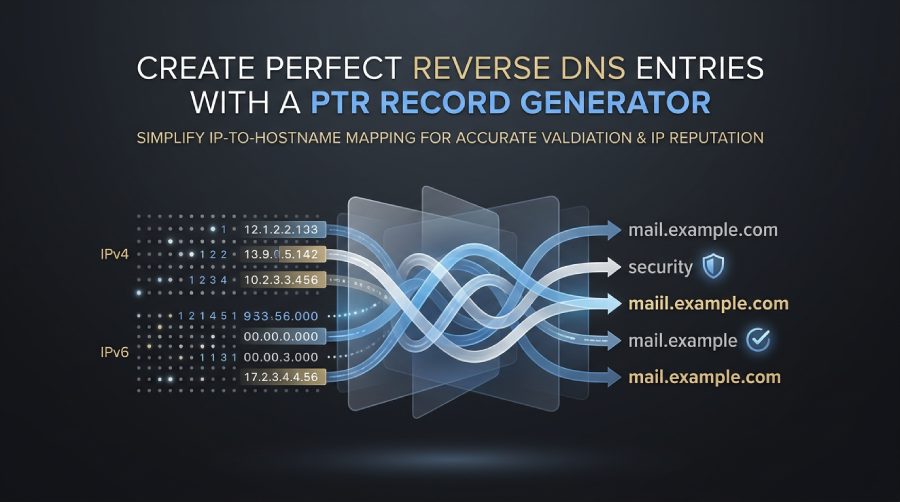
Reverse DNS is one of those DNS configuration details that is easy to overlook until mail delivery, logging, monitoring, or security systems start failing validation checks. A well-formed PTR record connects an IP address back to a fully qualified domain name, helping receiving systems verify identity and trace network activity accurately. A reliable ptr record generator or reverse dns generator can reduce manual errors, especially when working with IPv4, IPv6, delegated reverse zones, and large address blocks.
What PTR Records Are and Why Reverse DNS Matters
A PTR record, also called a ptr dns record, is a DNS record used for reverse mapping. Instead of resolving a hostname to an IP address, as with an A Record or AAAA Record, a PTR record maps an IP address back to an FQDN.
In a standard forward lookup, DNS resolves:
mail.example.comto an IPv4 address using an a recordmail.example.comto an IPv6 address using an aaaa record
In a reverse lookup, DNS resolves:
192.0.2.10back tomail.example.com- An IPv6 address back to a fully qualified domain name through the appropriate reverse DNS zone
This is why reverse dns matters: it confirms that an IP address has an expected DNS identity. Mail servers, SIEM platforms, monitoring systems, access logs, and anti-abuse tools often perform a reverse dns lookup to validate traffic sources.
PTR Records Versus A and AAAA Records
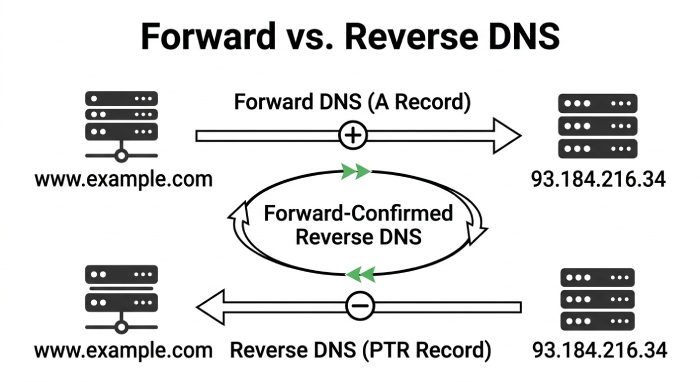
A forward dns record and a reverse dns dns record are related, but they are not interchangeable. An ipv4 a record maps a hostname to an IPv4 address, while an ipv6 aaaa record maps a hostname to an IPv6 address. A ptr record does the opposite by mapping the IP address back to the hostname.
Forward-confirmed reverse DNS
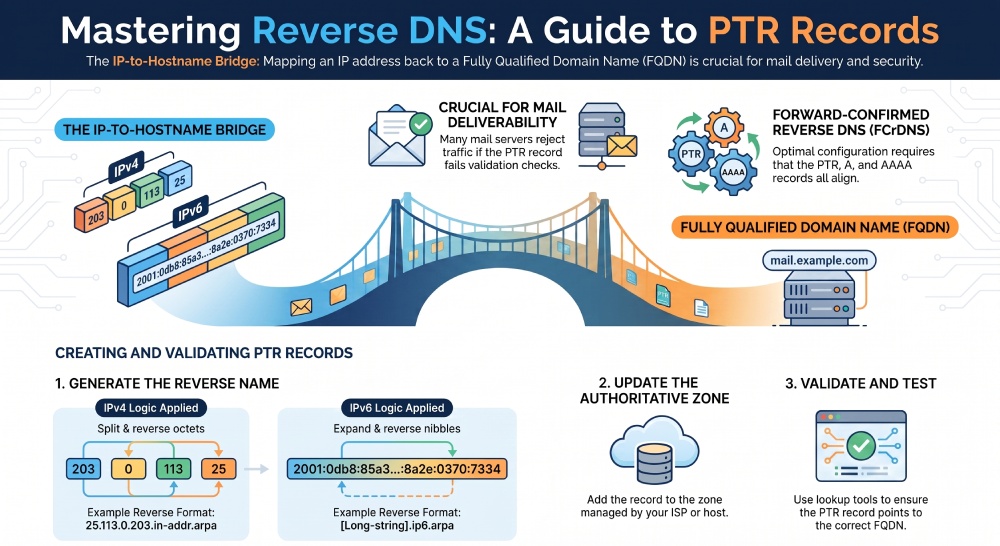
For mail servers, the best configuration is forward-confirmed reverse DNS. That means:
- The ptr record for the sending IPv4 address or IPv6 address points to an FQDN.
- The FQDN has a matching A Record or AAAA Record.
- The forward lookup returns the same IP address used by the mail server.
This alignment helps preserve IP reputation and improves deliverability. Tools such as What’s My DNS, DNS lookup utilities, and network tools can confirm whether the reverse dns lookup and forward lookup agree.
How a PTR Record Generator Simplifies Reverse DNS Setup
A ptr record generator automates the conversion between an IP address and the correct reverse DNS name. This is especially useful because IPv4 and IPv6 use different reverse dns formats.
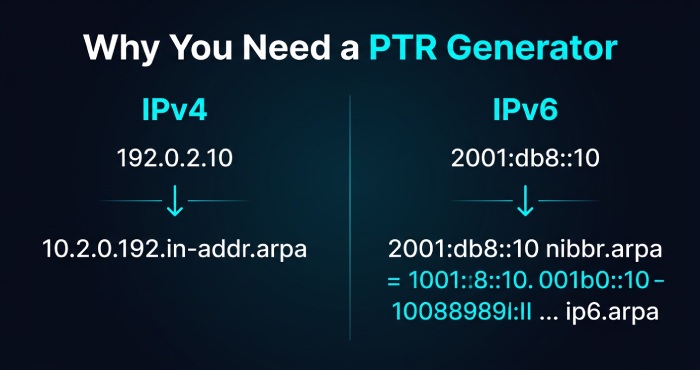
For IPv4, reverse zones use in-addr.arpa. For example, the IPv4 address 192.0.2.10 becomes:
10.2.0.192.in-addr.arpa
That format requires you to split ip address values into octets and reverse their order. For ipv4 reverse dns, even a small typo in the octets can create a broken dns entry.
For IPv6, reverse zones use ip6.arpa. An IPv6 address must be expanded into canonical form, split into nibbles, reversed, and appended to the arpa domain. This is where a reverse dns generator becomes especially valuable.
IPv4 Reverse DNS and in-addr.arpa
An ipv4 reverse dns zone is normally delegated by the IP address owner, ISP, or hosting provider. A ptr record generator can take an ipv4 address, perform the required ip conversion, and output the correct dns record format for the reverse DNS zone.
Example IPv4 PTR format
For the IPv4 address:
203.0.113.25
The reverse dns name is:
25.113.0.203.in-addr.arpa
The PTR record might be:
25.113.0.203.in-addr.arpa. IN PTR mail.example.com.
A good reverse dns generator validates the ipv4 address, performs address calculation, and produces the correct ip to ptr output. Some dns tools and ip tools also include an ipv4 subnet calculator, CIDR block helper, and ip validator to confirm the address belongs in the expected dns zone.
IPv6 Reverse DNS and ip6.arpa
IPv6 reverse dns is more complex because an IPv6 address can appear in compressed ipv6 address notation. For example:
2001:db8::10
Before creating the PTR record, you need to expand ipv6 address notation into its full canonical form. RFC 5952 provides guidance for IPv6 text representation, but reverse DNS requires each hexadecimal nibble to be reversed under [ip6.arpa](http://ip6.arpa).
Example IPv6 PTR format
The IPv6 address:
2001:db8::10
Expands to:
2001:0db8:0000:0000:0000:0000:0000:0010
Its reverse dns name becomes a long nibble-reversed name ending in:
ip6.arpa
A ptr record generator or ip format converter handles ip normalization, address generation, and canonical form conversion automatically. This reduces mistakes when creating an ipv6 reverse dns dns entry.
Step-by-Step Guide to Creating Accurate PTR Records
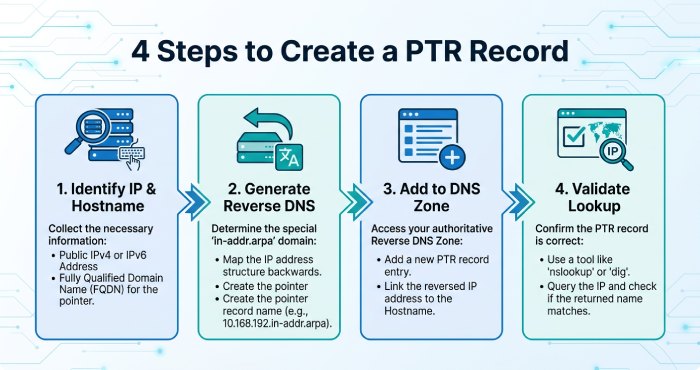 Creating an accurate ptr record requires more than entering a hostname. You need to understand who controls the dns zone, what reverse DNS delegation exists, and whether the PTR record aligns with forward DNS.
1. Identify the IP Address and Hostname
Start with the IPv4 address or IPv6 address that needs reverse dns. Confirm the intended hostname is an FQDN, such as:
mail.example.com.
The hostname should be stable, descriptive, and controlled by your organization. Avoid assigning a PTR record to a temporary name unless the IP address is also temporary.
2. Generate the Reverse DNS Name
Use a ptr record generator, reverse dns generator, or dns generator tool to convert the IP address into the correct reverse DNS hostname.
For an ipv4 address, the tool should:
- Split ip address values into octets
- Reverse the octets
- Append
in-addr.arpa - Produce the correct ipv4 reverse dns name
For an ipv6 address, the tool should:
- Expand ipv6 address notation
- Normalize the compressed ipv6 address
- Reverse each hexadecimal nibble
- Append
ip6.arpa - Produce the correct ipv6 reverse dns name
A high-quality ip record generator should also detect invalid input through an ip validator and support both IPv4 and IPv6 address generation.
3. Add the PTR Record to the Correct DNS Zone
The PTR record must be added to the authoritative reverse dns zone, not usually the same dns zone that holds your website’s A Record or AAAA Record.
If your organization owns the address block, your DNS administrator can update the reverse dns zone directly. If the IP address belongs to a cloud provider, ISP, or data center, you may need to configure the PTR record through that provider’s control panel.
4. Validate with Reverse DNS Lookup Tools
After publishing the dns record, use a reverse dns lookup, ptr lookup, or general dns lookup service to test it. DNS tools from platforms like What’s My DNS or Networking Toolbox can help verify global propagation.
Check that:
- The PTR record exists
- The reverse lookup returns the expected FQDN
- The FQDN resolves forward to the same IPv4 address or IPv6 address
- The dns record format is valid
- The dns zone is authoritative
Best Practices for PTR Records, Mail Servers, and IP Reputation
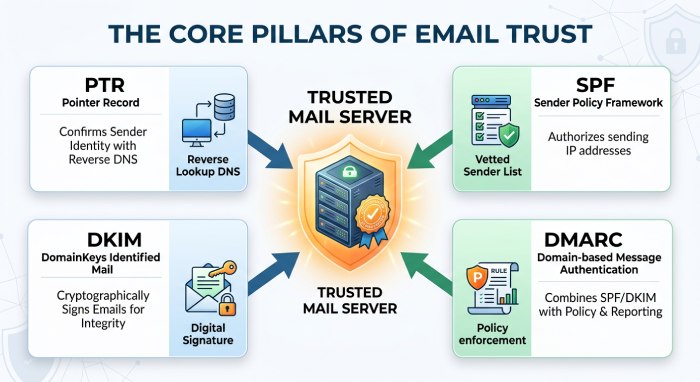 Mail systems are particularly sensitive to reverse dns. Many receiving servers evaluate the ptr record during SMTP connection checks, just as they validate your SPF — you can confirm yours with an SPF record lookup. If reverse dns fails, the message may be rejected, delayed, or classified as suspicious.
Align PTR, SPF, DKIM, and DMARC
A PTR record is not a replacement for authentication records. For strong mail identity, align reverse dns with SPF, DKIM, and DMARC. If you manage many senders, AutoSPF can help maintain SPF infrastructure, and you can use an SPF record alongside PTR, DKIM, and DMARC for better domain trust. Build one quickly with our free SPF record generator.
Use consistent hostnames
For mail servers, use a hostname such as:
mail.example.com
Then ensure:
- The ptr record points to
mail.example.com mail.example.comhas an ipv4 a record or ipv6 aaaa record- The reverse dns lookup matches the forward lookup
- SMTP banner, HELO/EHLO hostname, and FQDN are consistent
This is especially important for dedicated mail servers, bulk sending infrastructure, and transactional email platforms. Teams isolating sending streams should also review how to configure SPF on a subdomain.
Consider DHCP, PXE Boot, and Enterprise Networks
In enterprise environments, reverse dns may interact with DHCP, PXE Boot, and automated host registration. RFC 4704 covers DHCP client FQDN handling, while RFC 2132 defines common DHCP options such as Option 3 - Default Gateway, Option 6/15 - DNS & Domain, Option 51 - Lease Time, Option 43 - Vendor Specific, Option 60 - Vendor Class, Option 61 - Client ID, and Option 82 - Relay Agent. Option 119 - Domain Search is described in RFC 3397.
For IPv6 networks, RFC 3646 and RFC 8415 are relevant to DHCPv6 behavior. RFC 3442 applies to classless static routes, RFC 4193 covers Unique Local IPv6 Unicast Addresses, and RFC 6731 is sometimes referenced in advanced DHCP and network service contexts. When DHCP dynamically assigns an IP address, MAC address tracking and DNS updates should be designed carefully so the dns entry remains accurate.
Troubleshooting Common PTR Record and Reverse DNS Issues
PTR record problems usually come from delegation mistakes, incorrect formatting, propagation delays, or mismatched forward and reverse records.
No PTR Record Found
If a reverse dns lookup returns no result, the PTR record may not exist, or you may not control the correct reverse dns zone. Confirm whether your ISP, hosting provider, or cloud platform manages the dns zone. For ipv4 reverse dns, check the appropriate in-addr.arpa delegation. For IPv6 reverse dns, verify the ip6.arpa delegation.
PTR Points to the Wrong Hostname
If the ptr lookup returns an unexpected hostname, the dns record may be stale. This often happens when an IPv4 address is reassigned but the old PTR record remains in place. Update the ptr record and confirm the new FQDN resolves forward to the same IP address.
IPv6 Formatting Errors
IPv6 errors are common when administrators manually convert a compressed ipv6 address. Use a ptr record generator that can expand ipv6 address input, apply RFC 5952-aware ip normalization, and generate the correct ip6.arpa name. A reverse dns generator reduces risk when working with long IPv6 reverse dns labels.
Incorrect Reverse Zone or CIDR Boundary
Reverse dns delegation may not align cleanly with your CIDR allocation. Use an ipv4 subnet calculator or ipv6 subnet calculator to confirm the block boundaries. In smaller IPv4 delegations, providers may use classless reverse delegation techniques, so the visible arpa domain may not look like a traditional full-octet ipv4 reverse dns zone.
Propagation and Caching Delays
Even after the dns configuration is corrected, recursive resolvers may cache old data until the TTL expires. Test from multiple dns tools and network tools, including public resolvers and external lookup services. If a reverse dns lookup works from the authoritative server but not globally, wait for cache expiration and verify that all authoritative name servers serve the same dns record.
General Manager
Founder and General Manager of DuoCircle. Product strategy and commercial lead for AutoSPF's 2,000+ customer base.
LinkedIn Profile →