Computer Security Starts with Secure Email: Why SPF Matters

Quick Answer
SPF (Sender Policy Framework) improves computer security by verifying authorized email senders, reducing spoofing and phishing attacks. For stronger protection, use SPF together with DKIM and DMARC to authenticate email and protect your domain from impersonation.
Why Email Remains a Primary Computer Security Concern
Email is still one of the most important control points in computer security because it sits at the intersection of identity, communication, access, and trust. Employees use Email to reset passwords, approve invoices, share documents, access Cloud services, and coordinate with HR, vendors, Banks, Government agencies, and customers. That makes it a prime channel for cybersecurity abuse and a constant source of security risks.
Email Is a Launchpad for Broader Cybersecurity Threats
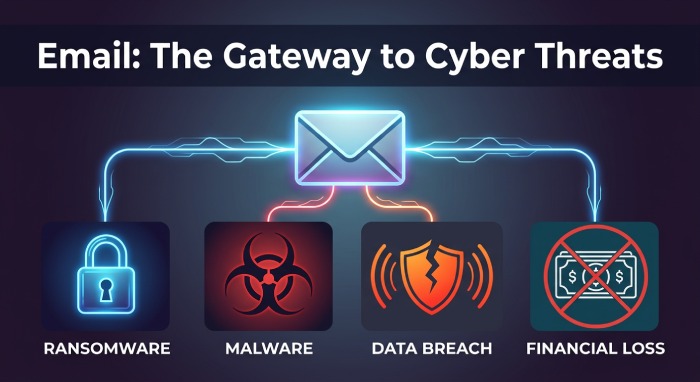
Phishers and Cybercriminals use Email to deliver malware, ransomware, Trojans, Worms, and Viruses to Desktops, Servers, Mobile devices, and even Network equipment. These threats often begin with a simple message that appears to come from Microsoft, an internal administrator, a Cloud platform, a Database alert, or a trusted partner.
Once a user clicks a malicious link or opens an attachment, the impact can spread quickly. A single compromised mailbox can lead to unauthorized access, credential theft, identity theft, data leaks, data breaches, and even financial losses. For regulated organizations, a security breach may also create Compliance issues, legal consequences, and long-term reputation damage.
Email Risk Extends Beyond Phishing
Although phishing attacks are the most visible Email-based threat, they are not the only concern. Attackers may use stolen User accounts to support cybercriminal activities, distribute malware, trigger ransomware, or pivot into other systems. They may also combine Email compromise with man-in-the-middle attacks, zero-day exploits, software vulnerabilities, insider threats, sql injection, and weak application controls.
For example, an attacker who steals credentials through Email may later access a SQL Database, exploit poor input sanitization, bypass access control, or use missing parameterized queries to perform sql injection. In other cases, attackers may use compromised accounts to coordinate denial of service attacks or DoS attacks, causing operational disruptions, system crashes, and service outages.
The Role of Email Authentication in Preventing Cyberattacks
Email authentication is a foundational layer of email security because it helps receiving mail systems determine whether a message really came from an authorized source. It does not replace Endpoint protection, firewalls, antivirus software, intrusion detection systems, IDS, intrusion prevention systems, or IPS, but it reduces a major class of identity-based Email threats.
Authentication Supports a Layered Defense Model
Modern computer security depends on multiple safeguards working together: network security, network segmentation, encryption, encryption protocols, secure remote access through a VPN or virtual private network, strong authentication, multi-factor authentication, MFA, OAuth-based authorization, role-based access control, RBAC, and sometimes biometric verification using Biometric factors.
Email authentication complements these controls by making impersonation harder. If Phishers cannot easily spoof a trusted domain, phishing attacks become less convincing, reducing the chance of credential stuffing, a brute-force attack, a dictionary attack, or exploitation of weak passwords after a user is tricked into visiting a fake login page.
Authentication Reduces Human Error
Even well-trained employees can make mistakes. Human error remains one of the most persistent security risks in cybersecurity, especially when messages appear to come from executives, HR, administrators, Microsoft 365, Social media platforms, or Cloud services. That is why security awareness training, employee training, and phishing simulation should be supported by technical controls.
Authentication helps reduce dependence on user judgment alone. It also gives security teams better signals for security monitoring, incident response, and policy enforcement. Products such as SentinelOne Singularity Endpoint Protection, AI-driven Email analysis, Artificial intelligence, and Machine learning tools can use authentication results alongside Endpoint telemetry to detect malware, ransomware, suspicious links, and account takeover behavior.
What SPF Is and How It Works
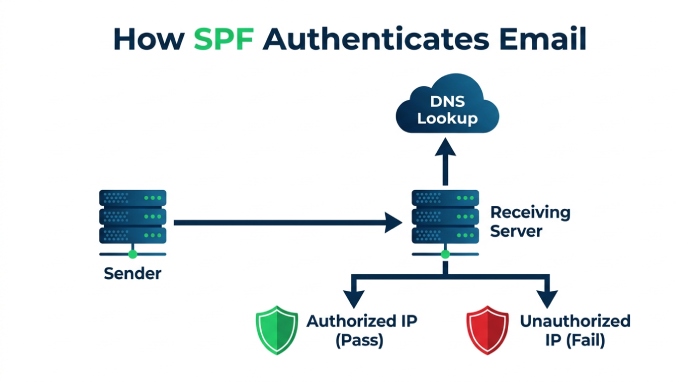
Sender Policy Framework, or SPF, is an Email authentication protocol that lets a domain owner publish which mail servers are allowed to send Email for that domain. A practical primer on SPF explains the concept in terms of sender validation: the receiving server checks the sending IP address against the domain’s published DNS policy.
The Basic SPF Flow
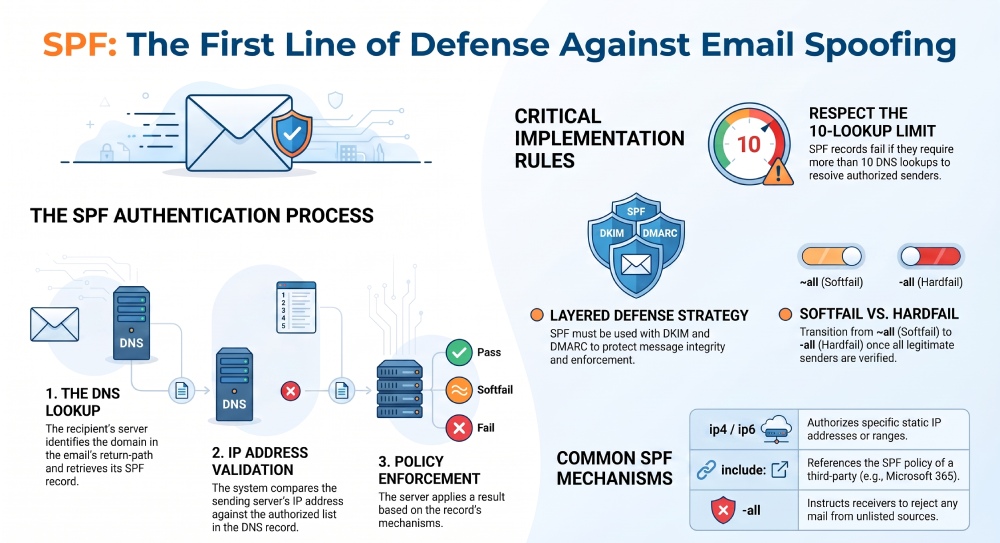
When an Email arrives, the recipient’s mail server looks at the domain in the return-path address. It then performs a DNS lookup for that domain’s SPF record. If the sending server is listed as authorized, the message can pass SPF. If the server is not listed, the result may be fail, softfail, neutral, or another policy outcome depending on the SPF configuration.
This matters for computer security because spoofed Email is a common delivery mechanism for phishing attacks, malware, ransomware, and other threats. SPF does not stop every attack, but it makes domain impersonation harder and gives receiving systems a clear policy signal.
SPF Does Not Work Alone
SPF should be used with DKIM and DMARC, plus broader cybersecurity controls. Organizations still need patch management, regular software updates, security patches, automated update tools, patching vulnerabilities, and a disciplined security update process for Windows, Linux, Mac, Servers, Cloud workloads, and Mobile devices.
This is important because Email authentication cannot fix legacy systems, unpatched software vulnerabilities, exposed Database services, zero-day exploits, man-in-the-middle attacks, insider threats, or application flaws such as sql injection. A mature program combines SPF with Firewall rules, IDS alerts, IPS enforcement, Endpoint detection, access reviews, and data backup.
How SPF Helps Stop Spoofing, Phishing, and Business Email Compromise
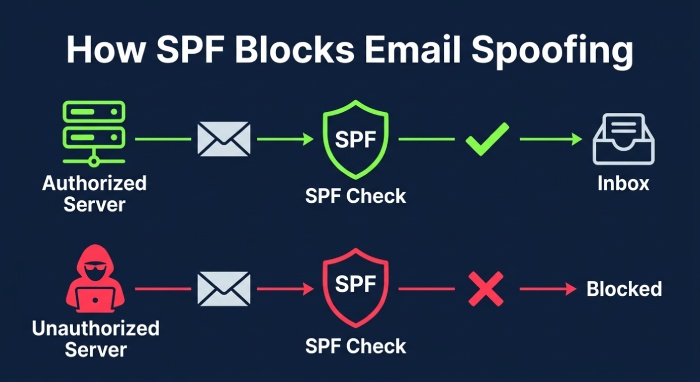
SPF helps prevent attackers from sending Email that falsely appears to come from your domain. This is especially important for organizations with customer-facing brands, finance teams, supply chains, and executive communications.
Spoofing and Business Email Compromise
In business email compromise, attackers often impersonate executives, vendors, HR staff, Banks, or Government agencies to request payments, tax documents, password resets, or confidential files. Without authentication, a spoofed message may look legitimate enough to cause financial losses, data breaches, intellectual property theft, and reputation damage.
SPF reduces that risk by identifying mail servers that are not authorized to send for the domain. While it cannot prevent all social engineering, it helps receiving systems filter or flag suspicious messages before users act on them.
Phishing, Malware, and Ransomware Containment
SPF is especially valuable when combined with filtering systems that detect phishing attacks, malicious URLs, malware, and ransomware payloads. Many data breaches begin with Email, but not every attack ends there. A compromised account can be used to spread ransomware, steal files, create data leaks, or prepare follow-on denial of service attacks and DoS attacks against exposed services.
A forged Email may also be part of a broader campaign involving man-in-the-middle attacks, zero-day exploits, software vulnerabilities, insider threats, and sql injection against web applications. SPF narrows one avenue of trust abuse, while secure coding practices, input sanitization, parameterized queries, and code review reduce the risk of sql injection and related application-layer threats.
SPF in the Wider Security Stack
SPF should be viewed as one control within a larger cybersecurity architecture. Organizations should still maintain password security, eliminate weak passwords, enforce multi-factor authentication, and review User accounts regularly. They should also implement disaster recovery planning, cloud backup, Cloud-based backup, Backup services, and tested restoration procedures so that ransomware, system crashes, or denial of service attacks do not become catastrophic.
Security teams should monitor authentication failures alongside Firewall logs, IDS events, IPS blocks, Endpoint alerts, VPN activity, and Cloud identity events. This helps detect DoS attacks, credential misuse, man-in-the-middle attacks, zero-day exploits, and other cybercriminal activities before they escalate into major data breaches.
SPF Records Explained: Authorized Senders, DNS, and Policy Mechanisms
An SPF record is a DNS TXT record that defines which systems are allowed to send Email for a domain. Administrators typically publish SPF records for corporate mail platforms, marketing systems, ticketing tools, Cloud services, and other approved senders.
Authorized Senders
Authorized senders may include Microsoft 365, Google Workspace, CRM platforms, support tools, payroll systems, or dedicated Email gateways. The goal is to ensure that legitimate services can send mail while unauthorized systems fail SPF checks.
A basic SPF record might authorize a specific IP address, a range of addresses, or another provider’s SPF policy through an include mechanism. This helps reduce security risks from spoofing and supports better computer security hygiene across distributed Cloud and hybrid environments.
DNS Mechanisms and Qualifiers
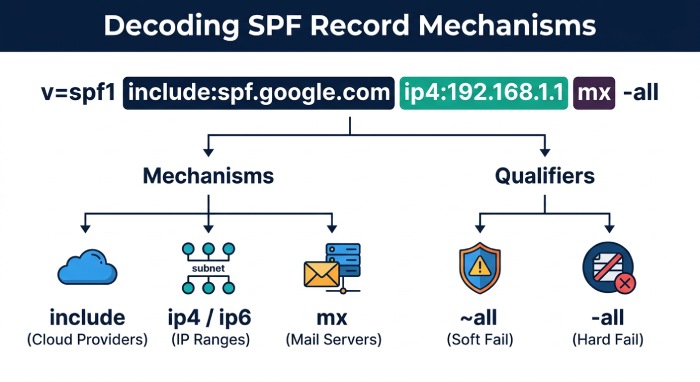
Common SPF mechanisms include:
ip4andip6: These authorize IPv4 or IPv6 addresses that are allowed to send Email for the domain.include: This references another domain’s SPF record, often used for Cloud Email providers or third-party platforms.a,mx, andexists: These mechanisms authorize hosts based on DNS records or conditional lookups.~all: A softfail tells receivers that unlisted senders are probably unauthorized but should not always be rejected immediately.-all: A hard fail tells receivers that unlisted senders are not authorized and should generally be rejected or treated as suspicious.?all: A neutral policy makes no strong assertion and is usually less useful for enforcement.
Policy Design and Operational Discipline
SPF records must be maintained carefully. Too many DNS lookups can break SPF validation, while missing senders can disrupt legitimate Email. Automated SPF flattening keeps records within the 10-lookup limit as senders change. Good patch management tools, change control, and administrator documentation help prevent outages and operational disruptions.
SPF should also be reviewed whenever the organization adds a new Cloud service, retires legacy systems, changes mail gateways, or updates routing for remote teams using secure remote access. Combined with security monitoring, regular audits, and strong authentication controls, SPF helps organizations reduce spoofing, limit phishing attacks, and strengthen the Email layer of modern computer security.
Common SPF Implementation Mistakes That Weaken Security
SPF is simple in concept, but incorrect implementation can create serious security risks across an organization’s computer security program. When SPF is misconfigured, phishers and cybercriminals can impersonate trusted domains, launch phishing attacks, distribute malware, and increase the likelihood of ransomware incidents, data breaches, and reputation damage.
Publishing Too Many DNS Lookups
SPF records are limited to 10 DNS lookups. Organizations often exceed this limit by adding multiple Email platforms, CRM tools, Cloud services, marketing automation systems, and help desk applications. Once the lookup limit is exceeded, SPF can fail open or produce inconsistent results, creating security risks that phishers can exploit.
This is especially common in large environments using Microsoft 365, Google Workspace, bulk email vendors, and third-party notification tools. Administrators should consolidate senders, remove obsolete services, and review SPF records after every vendor change.
Using Overly Permissive SPF Mechanisms
A record ending in ~all or ?all may allow questionable senders to pass with minimal enforcement. While soft fail can help during testing, leaving it permanently weakens computer security and increases exposure to phishing attacks, malware campaigns, credential theft, and identity theft.
A mature policy generally progresses toward -all once legitimate sending sources are validated. This helps reduce unauthorized access attempts that begin with spoofed Email and social engineering.
Forgetting Legacy Systems and Shadow Senders
Legacy systems, outdated Servers, forgotten notification scripts, and business units using unsanctioned platforms often send email without security oversight. These gaps are usually caused by human error, poor asset tracking, or weak change management.
Such blind spots can support cybercriminal activities, data leaks, insider threats, and even security breach scenarios involving intellectual property. HR platforms, finance systems, Cloud tools, and Database alerts should all be inventoried before enforcing SPF.
Failing to Monitor SPF After Changes
SPF is not a one-time configuration. Vendor migrations, new marketing tools, Cloud-based backup notifications, and new domains can break authentication. That is why regular SPF record checks are an important part of ongoing security hygiene. Without security monitoring, these changes may go unnoticed until data breaches, financial losses, legal consequences, or operational disruptions occur.
SPF Limitations: Why It Must Be Used with DKIM and DMARC
SPF is essential, but it is not sufficient by itself. It helps verify whether a sending server is authorized for a domain, but it does not fully protect message content, displayed sender names, or domain alignment in forwarded email.
SPF Does Not Validate Message Integrity
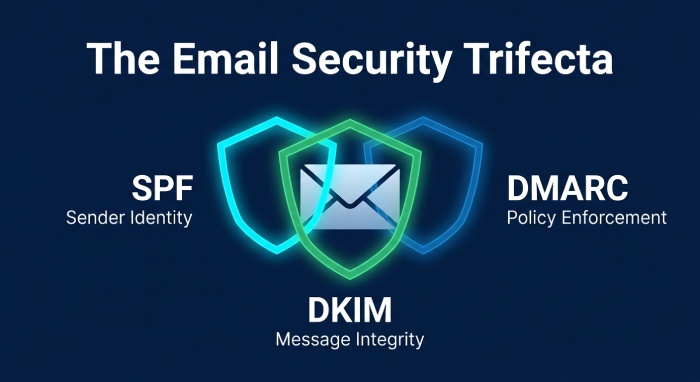
SPF checks the sending source, not whether the message was altered in transit. That means it does not directly stop man-in-the-middle attacks, malware injection after compromise, or spoofing tactics that abuse lookalike domains. DKIM adds cryptographic signing, while DMARC tells receiving mail systems how to enforce alignment and report failures.
Encryption protocols such as TLS also matter because they protect transport channels, but they do not replace SPF, DKIM, or DMARC. Strong email security requires layered controls.
SPF Alone Cannot Stop Every Email Threat
SPF will not prevent all phishing attacks, ransomware delivery, Trojans, Worms, Viruses, or malware attachments. It also does not stop denial of service attacks, DoS attacks, sql injection, zero-day exploits, software vulnerabilities, or insider threats. These threats require broader cybersecurity controls.
For example, denial of service attacks and DoS attacks target availability, while sql injection targets web applications and databases. Zero-day exploits and software vulnerabilities may compromise Windows, Linux, Mac, Desktops, Servers, Mobile devices, Network equipment, or Endpoint systems before email controls ever apply.
DMARC Provides Enforcement and Visibility
DMARC allows domain owners to instruct receivers to quarantine or reject unauthenticated mail. It also provides reports that help identify legitimate senders, malicious spoofing, and configuration gaps.
This is critical for Banks, Government agencies, healthcare organizations, and Compliance-driven industries where data breaches, ransomware, phishing attacks, and reputation damage can have severe business impact.
Practical Steps for Setting Up and Testing SPF Records
A reliable SPF deployment begins with an accurate inventory, careful syntax, and staged enforcement. For teams new to sender validation, this SPF resource can help clarify how SPF works within email authentication.
Inventory All Legitimate Senders
List every system that sends mail for the domain, including Microsoft 365, Cloud platforms, marketing tools, ticketing systems, payroll applications, Backup services, Database alerting, and internal Servers. Include user-facing systems, automated workflows, and third-party platforms using OAuth integrations.
Administrators should also check subdomains, User accounts, Social media notification systems, and applications owned by HR, finance, legal, and operations teams.
Build a Clean SPF Record
A typical SPF record includes approved IP addresses and authorized third-party senders. Avoid duplicate includes, outdated vendors, and broad IP ranges. If multiple services must be authorized, simplify where possible to avoid DNS lookup failures.
Use Clear Enforcement Stages
Start with a cautious testing phase, review logs, then move toward stricter enforcement. Once legitimate senders are confirmed, use -all to tell receivers that unauthorized sources should fail.
Validate DNS Syntax
SPF syntax errors can cause authentication failures. Test records before publishing and after every change, especially when adding new vendors or migrating Cloud email infrastructure. A free SPF checker confirms your record parses correctly before you publish it.
Test Authentication Results
Send test messages to multiple providers and inspect headers for SPF, DKIM, and DMARC results. Monitor rejected messages, false positives, and suspicious sources. Machine learning and AI-powered tools can help identify anomalies, while Artificial intelligence in modern platforms can correlate suspicious sender behavior with broader cybersecurity events.
Endpoint products such as SentinelOne Singularity Endpoint Protection can complement SPF by detecting malware, ransomware, and post-delivery compromise attempts on endpoints.
How SPF Strengthens Broader Computer Security Programs
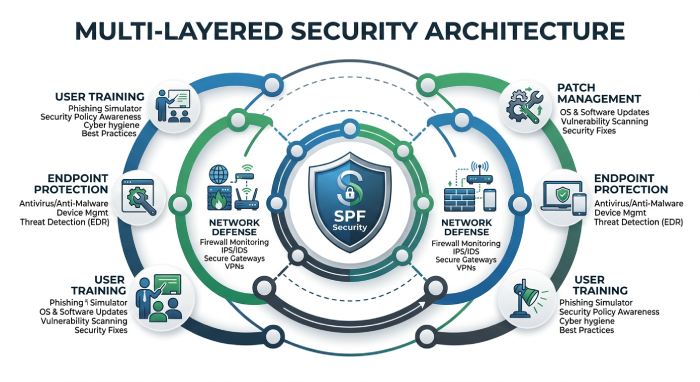 SPF is one control inside a broader computer security and cybersecurity architecture. Its value increases when paired with endpoint protection, identity controls, application security, and resilient recovery planning.
Reducing Email-Based Entry Points
Many security risks begin with spoofed email. SPF helps reduce spoofing, phishing attacks, malware delivery, ransomware attempts, and credential theft. However, organizations must also address password security, weak passwords, brute-force attack attempts, dictionary attack methods, and credential stuffing.
Strong authentication, multi-factor authentication, MFA, role-based access control, RBAC, and biometric verification reduce the chance that stolen credentials lead to unauthorized access. Biometric controls can help protect privileged User accounts, especially for Administrators.
Supporting Network and Endpoint Defense
SPF complements network security controls such as firewalls, Firewall rules, intrusion detection systems, IDS, intrusion prevention systems, IPS, network segmentation, VPN, virtual private network access, and secure remote access. These controls help contain threats that SPF cannot stop, including man-in-the-middle attacks, denial of service attacks, DoS attacks, malware, ransomware, and insider threats.
Antivirus software, Endpoint detection, and security monitoring help identify Trojans, Worms, Viruses, suspicious PowerShell activity, and lateral movement after a user interacts with a malicious email.
Connecting Email Security to Patch and Application Security
Email controls should align with patch management, regular software updates, security patches, automated update tools, and every critical security update. Patch management tools help reduce exposure to zero-day exploits and known software vulnerabilities, while patching vulnerabilities quickly limits attacker options.
SPF also supports application security indirectly. If a phishing email leads a user to a fake portal, attackers may later attempt sql injection against web apps or exploit poor secure coding practices. Developers should use input sanitization, parameterized queries, and secure coding practices to reduce sql injection risk and protect SQL-backed applications.
Improving Resilience After Incidents
Even strong controls cannot eliminate all threats. Computer security programs should include data backup, disaster recovery planning, and cloud backup to recover from ransomware, data breaches, system crashes, or destructive insider threats.
Cloud-based backup and tested restoration procedures reduce operational disruptions and financial losses when malware, ransomware, zero-day exploits, man-in-the-middle attacks, or denial of service attacks affect production systems.
Strengthening People and Process Controls
Security awareness training, employee training, and phishing simulation exercises help users recognize suspicious messages. This reduces the chance of human error leading to data leaks, credential theft, identity theft, data breaches, and unauthorized access.
Regular tabletop exercises should include scenarios involving phishing attacks, ransomware, insider threats, software vulnerabilities, man-in-the-middle attacks, DoS attacks, denial of service attacks, and sql injection to validate cross-functional response.
Key Takeaways: Making Secure Email a Foundation of Cyber Defense
SPF is most effective when treated as part of an integrated cybersecurity strategy rather than a standalone DNS entry. It reduces spoofing and lowers security risks tied to phishing attacks, malware, ransomware, and data breaches, but it must be paired with DKIM, DMARC, endpoint defense, identity security, and network controls.
Organizations should continuously monitor SPF records, remove obsolete senders, enforce DMARC, and align email authentication with computer security priorities such as patch management, access control, encryption, secure remote access, and disaster recovery planning.
FAQs
What is the most common SPF mistake organizations make?
The most common mistake is adding too many third-party services without tracking DNS lookup limits. This can cause SPF failures and create security risks that enable spoofing, phishing attacks, malware delivery, and data breaches.
Does SPF stop ransomware?
SPF can reduce ransomware risk by blocking some spoofed email sources, but it does not stop ransomware by itself. Organizations also need endpoint protection, antivirus software, security awareness training, data backup, and strong authentication.
Why should SPF be used with DKIM and DMARC?
SPF verifies authorized sending sources, DKIM validates message integrity, and DMARC provides enforcement and reporting. Together, they offer stronger protection against phishing attacks, malware campaigns, impersonation, and domain abuse.
Can SPF protect against non-email threats?
No. SPF does not prevent sql injection, zero-day exploits, software vulnerabilities, denial of service attacks, DoS attacks, man-in-the-middle attacks, or insider threats. These require broader computer security controls such as patching, firewalls, IDS, IPS, VPN access, and secure coding practices.
How often should SPF records be reviewed?
SPF records should be reviewed whenever email vendors, Cloud services, domains, or sending applications change. A quarterly review is also recommended to remove legacy systems and reduce configuration drift.
What happens if SPF is too strict?
If SPF is enforced before all legitimate senders are identified, valid emails may fail authentication. Teams should test carefully, monitor reports, and move gradually from soft fail to hard fail.
Key Takeaways
- SPF helps reduce spoofing, phishing attacks, malware delivery, ransomware risk, and data breaches.
- SPF must be combined with DKIM and DMARC for stronger email authentication and enforcement.
- Misconfigured SPF records can create security risks, reputation damage, and operational disruptions.
- Broader cybersecurity still requires patch management, MFA, network security, endpoint protection, backups, and employee training.
- Secure email should be treated as a core layer of modern computer security.
General Manager
General Manager of DuoCircle. Product strategy and commercial lead for AutoSPF's 2,000+ customer base.
LinkedIn Profile →