Can I Set Up DMARC Without DKIM? A Complete Guide to SPF-Based DMARC Authentication

Quick Answer
Yes, you can set up DMARC without DKIM if SPF passes and aligns with your From domain. However, SPF-only DMARC is less reliable because email forwarding and third-party senders can cause authentication failures. Adding DKIM later improves security and deliverability.
Try Our Free DMARC Checker
Validate your DMARC policy, check alignment settings, and verify reporting configuration.
Check DMARC Record →
What DMARC Requires: Understanding SPF, DKIM, and Identifier Alignment
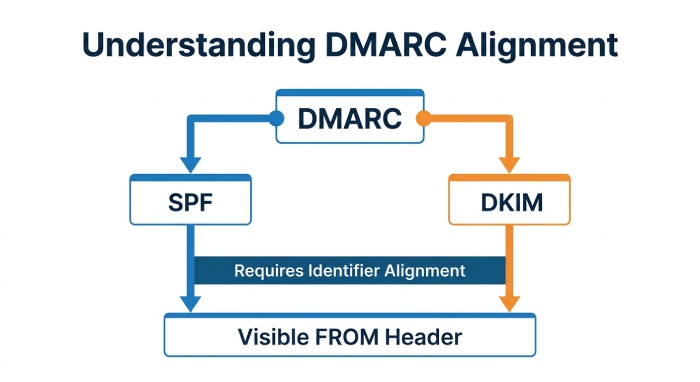
DMARC authentication is built on two underlying email authentication mechanisms: SPF and DKIM. A domain does not necessarily need both to pass DMARC, but it does need at least one of them to pass and align with the domain shown in the visible From header. That alignment requirement is what makes DMARC more powerful than a simple SPF check or DKIM authentication result.
SPF, DKIM, and DMARC in plain terms
SPF allows a domain owner to publish an SPF record in DNS that lists which mail servers are authorized to send outbound email for that domain. For example, a domain using a cloud email service such as Microsoft 365, Google Workspace, Zoho Mail, Amazon SES, or Mailgun typically authorizes its email platform by adding the provider’s SPF include mechanism to its DNS record. The exact value depends on the email service being used. A properly maintained spf record helps receiving mail systems determine whether a sending IP address is permitted. If you need to build one, an SPF generator produces the correct syntax.
DKIM adds a cryptographic signature to outbound email. With DKIM authentication, the sending platform signs the message using a private key, and the receiving server validates that signature against a public key published in DNS. Unlike SPF authentication, DKIM can survive many forms of email forwarding because it is tied to message integrity rather than the connecting IP address.
DMARC sits above SPF and DKIM. A DMARC record tells receivers what to do when DMARC authentication fails and where to send DMARC reports. For additional background on how domain alignment affects DMARC, it is useful to understand the relationship between SPF, DKIM, and the From domain.
Why identifier alignment matters
Identifier alignment means the domain authenticated by SPF or DKIM must match, or align with, the domain in the visible From header. This is often called header alignment because users see the From address, not the hidden technical identities used during transport.
1. SPF identifier alignment
SPF identifier alignment compares the domain in the RFC5321 Mail From, also called the envelope sender or return-path, with the visible From domain. If the SPF check produces an SPF pass and the Mail From domain aligns with the From header, SPF identifier alignment succeeds. That can be enough for DMARC authentication even if DKIM is missing. Learning how SPF alignment works makes the rest of DMARC configuration easier to reason about.
2. DKIM identifier alignment
DKIM identifier alignment compares the d= domain in the DKIM signature with the visible From domain. If DKIM authentication passes and the DKIM signing domain aligns, DMARC authentication succeeds through DKIM. This is why setup DKIM is strongly recommended even when SPF authentication is already working.
Can DMARC Work Without DKIM? The Short Answer and Key Limitations
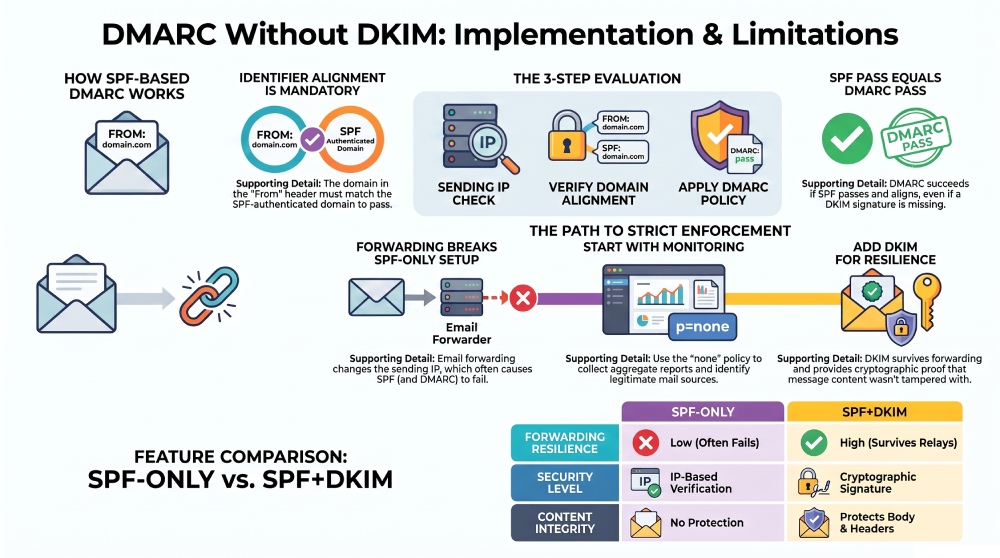
Yes, you can set up DMARC without DKIM. DMARC without DKIM can work when SPF authentication passes and SPF identifier alignment is satisfied. In other words, if an outbound email passes SPF and the authenticated SPF domain aligns with the visible From domain, the email passes DMARC authentication.
However, relying on SPF alone has important limitations.
What works when DKIM is missing
If DKIM is missing, a valid DMARC record can still evaluate messages using SPF authentication. If example.com sends outbound email through a supported email service and its SPF record authorizes that provider’s sending servers, the messages can pass SPF authentication. When the authenticated Mail From domain also aligns with the visible From domain, the messages can pass DMARC authentication even if DKIM is not configured.
This is a legitimate implementation approach, especially during the initial rollout when the DMARC policy is set to p=none for monitoring and report collection.
Key limitations of SPF-based DMARC
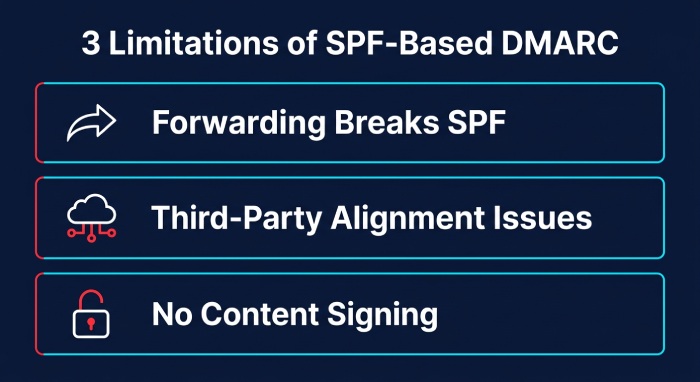
SPF-based DMARC authentication has several limitations:
1. Email forwarding can break SPF
Email forwarding often changes the sending IP address. A forwarded email may arrive from a server that is not listed in the original domain’s SPF record, causing SPF authentication fail even though the original message was legitimate. DKIM authentication is more resilient in this scenario, assuming the message content is not modified.
2. Third-party senders complicate alignment
Marketing systems, CRM tools, ticketing platforms, and cloud services may send outbound email on your behalf. If the email provider uses its own return-path domain, SPF authentication may pass for that provider’s domain but fail SPF identifier alignment for your custom domain.
3. SPF does not sign message content
SPF provides sender verification at the IP level, but it does not protect message headers or body content. DKIM authentication provides stronger protection against tampering because the message is cryptographically signed.
These limitations do not mean DMARC without DKIM is useless. It can reduce malicious spoofing and improve visibility through aggregate reports. But for stronger security, email delivery stability, and policy enforcement, DKIM should be added later.
How SPF-Based DMARC Authentication Works Step by Step
SPF-based DMARC authentication follows a predictable evaluation process. Understanding each step helps prevent failures during implementation.
Step 1: The receiving server performs an SPF check
When a message arrives, the receiving mail system checks the connecting IP address against the sender domain’s SPF record. If the sending server is authorized, the SPF authentication result is SPF pass. If not, SPF may return fail, softfail, neutral, or another result.
For Microsoft 365 and Exchange Online, the SPF record for a custom domain often includes Microsoft’s sending infrastructure. A simplified example may look like:
v=spf1 include:spf.protection.outlook.com -allOrganizations using Office 365, Exchange Server hybrid routing, Dynamics 365, Power Platform, Azure services, or Copilot-related workflows should verify every source of outbound email before tightening policy enforcement.
Step 2: DMARC checks identifier alignment
Next, DMARC evaluates identifier alignment. SPF authentication alone is not enough. SPF identifier alignment must also pass. If Woodgrovebank.com sends a message where the visible From header is user@woodgrovebank.com, but the Mail From domain belongs to a third-party platform, SPF may pass for that third party while DMARC authentication fails for Woodgrovebank.com.
Step 3: DKIM is evaluated if present
If DKIM exists, the receiver also evaluates DKIM authentication. If DKIM authentication passes and the signing domain aligns, DMARC authentication can pass even if SPF authentication fails. If there is a DKIM fail but SPF pass with SPF identifier alignment, DMARC can still pass through SPF.
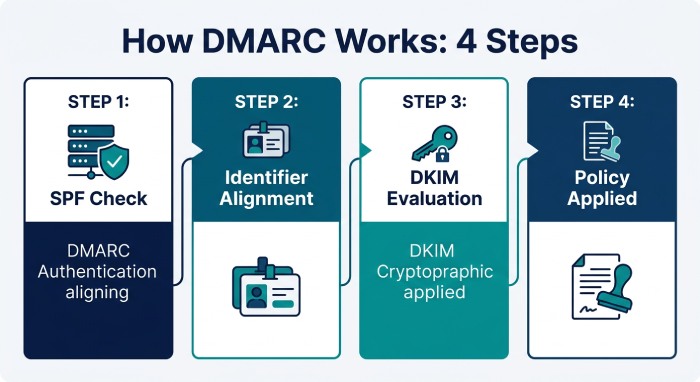
Step 4: The DMARC policy is applied
The receiver then reads the DMARC record and applies the DMARC policy. A basic DMARC record using monitoring mode may look like:
_dmarc.contoso.com. TXT "v=DMARC1; p=none; rua=mailto:dmarc-reports@contoso.com"The rua tag defines where aggregate reports are sent. The ruf tag can request forensic reports, though many providers limit or do not send them for privacy reasons. Mailto destinations must be valid and monitored.
Setting Up DMARC Without DKIM: DNS Records, Policy Levels, and Testing
Setting up DMARC without DKIM is mostly a DNS and reporting exercise, but accuracy matters. A small domain configuration error can cause legitimate outbound email to fail DMARC authentication.
Create or validate your SPF record
Start by identifying every source that sends outbound email for your domain. This may include Microsoft 365, Exchange Online, Outlook.com-connected services, SaaS platforms, payroll systems, email marketing tools, support desks, and legacy Exchange Server relays.
If you use Microsoft 365, confirm whether you are sending from a custom domain, a vanity domain, or a default domain such as tenant.onmicrosoft.com. Microsoft documentation often distinguishes between a Vanity domain and Default domain because DMARC authentication depends on the domain visible to recipients.
Tools such as AutoSPF can help manage SPF complexity, especially when multiple vendors must be included without exceeding DNS lookup limits. Before you publish, check your SPF record to confirm it resolves cleanly.
Publish a DMARC record in monitoring mode
 Begin with policy none so you can observe authentication result patterns without disrupting email delivery. A starter DMARC record may look like:
_dmarc.example.com. TXT "v=DMARC1; p=none; rua=mailto:dmarc@example.com; ruf=mailto:dmarc-forensic@example.com"In this DMARC record, the rua tag enables collecting reports, while the ruf tag requests forensic data where supported. DMARC.org and practical resources from experts such as Andy David - MVP, Kai Yao, and the broader emailauth community often recommend starting with monitoring before moving toward enforcement.
Test SPF-based DMARC authentication
Send test messages to major mailbox providers such as Microsoft, Outlook.com, Gmail, and business recipients. Review message headers in Microsoft Edge or another browser-based admin workflow if you are using portals such as Microsoft 365 Defender or Exchange admin center.
Look for:
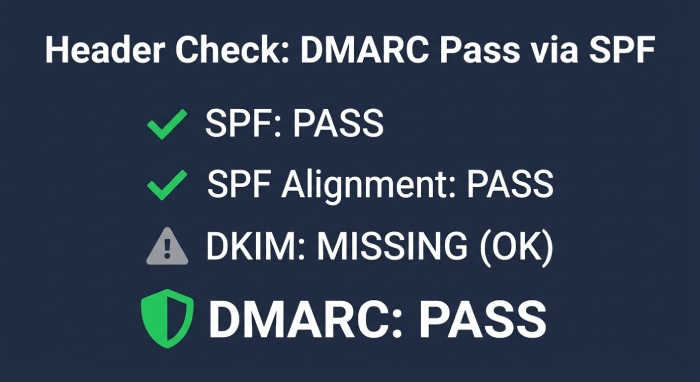
- SPF pass: The SPF check should show SPF pass for authorized infrastructure.
- SPF identifier alignment pass: The Mail From domain should align with the visible From domain.
- DMARC authentication pass: The final DMARC authentication result should show authentication pass. If DKIM is missing, the message can still pass DMARC through SPF authentication and SPF identifier alignment.
- DKIM fail or DKIM missing: If DKIM fail or DKIM missing appears, that is acceptable during SPF-only testing, provided DMARC authentication succeeds through SPF.
Review DMARC reports before enforcement
Reviewing DMARC reports is essential before changing the DMARC policy to quarantine or reject. Aggregate reports reveal legitimate sources, failures, misaligned senders, forwarded email issues, and possible malicious spoofing. Services such as emailauth.io can parse XML reports and make DMARC reports easier to interpret.
When to Add DKIM Later: Improving Deliverability, Security, and DMARC Enforcement
Even if DMARC without DKIM works initially, adding DKIM is one of the best practices for long-term email authentication. DKIM improves protection, strengthens sender verification, and reduces dependence on SPF alone.
Add DKIM before moving to strict enforcement
Before moving from p=none to p=quarantine or p=reject, setup DKIM for your primary sending platforms. Generate a signing key with our DKIM generator to get started. In Microsoft 365 and Exchange Online, DKIM can be enabled for a custom domain by publishing the required CNAME records and enabling signing in the admin portal. Once DKIM authentication is active, outbound email has two possible ways to pass DMARC authentication: DKIM identifier alignment or SPF identifier alignment.
DKIM improves resilience for forwarding and third parties
Forwarded email is one of the biggest reasons SPF authentication fails. Because DKIM authentication can survive many forwarding paths, it improves email delivery when messages pass through mailing lists, security gateways, or partner systems.
DKIM also helps when third-party platforms cannot provide aligned SPF. If they can sign with your domain, DKIM authentication may pass even when SPF identifier alignment fails.
Move gradually toward policy enforcement
A mature implementation usually follows this path:
- Publish a DMARC record with policy none.
- Validate the SPF record and SPF authentication results.
- Enable DKIM authentication for Microsoft 365, Exchange Online, and key third-party senders.
- Review aggregate reports and fix failures.
- Move to
p=quarantine. - Move to
p=rejectwhen legitimate outbound email consistently passes DMARC authentication.
This staged approach balances security, protection, and email delivery. It also gives administrators time to correct domain configuration problems, identify shadow senders, and reduce malicious spoofing before strict policy enforcement begins.
General Manager
General Manager of DuoCircle. Product strategy and commercial lead for AutoSPF's 2,000+ customer base.
LinkedIn Profile →