Blacklist Monitoring Service: The Missing Piece in Your Email Security Strategy

Quick Answer
A blacklist monitoring service continuously checks whether your email IPs or domains appear on spam blocklists (RBLs/DNSBLs). It helps detect reputation issues early, improves email deliverability, protects sender reputation, and enables faster action to prevent rejected or spam-filtered emails.
What a Blacklist Monitoring Service Is and Why It Matters
A blacklist monitoring service continuously checks whether your sending IPs, mail servers, or domains appear on an email blacklist, DNSBL, RBL, or broader blocklist used by mailbox providers and spam filtering systems. In practical terms, it helps you detect reputation problems before they become widespread email deliverability failures.
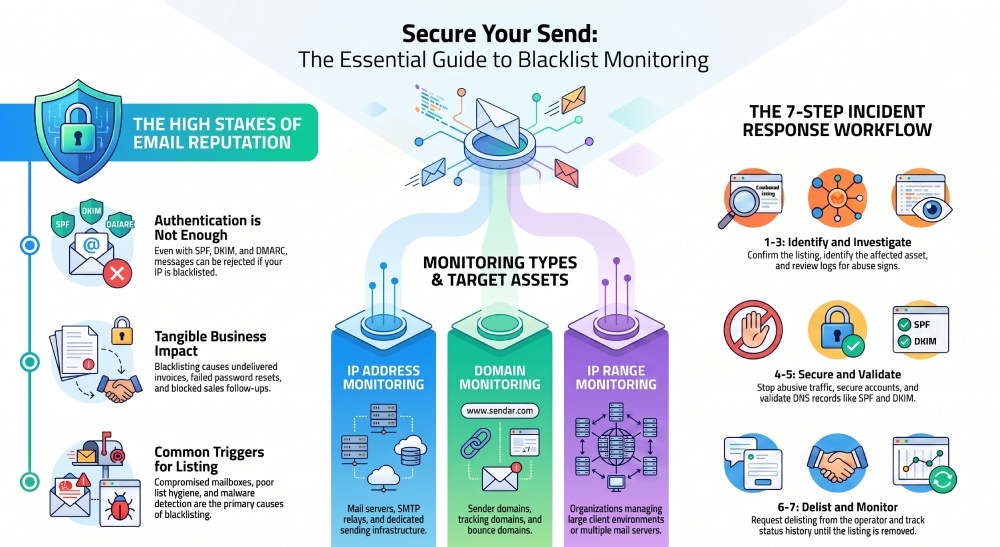
For organizations that rely on transactional email, newsletters, customer notifications, or cold outreach, blacklist monitoring is not optional” it is a core layer of Email Security. Even if your SPF, DKIM, and DMARC records are configured correctly, your messages can still be filtered or rejected if your IP address, domain, or host name appears on a spam block list. Keeping that SPF record lean with an SPF flattening service helps you stay under the 10-lookup limit so authentication never silently fails. Running the record through an SPF syntax validator first confirms it parses cleanly before you go live.
What It Monitors
A strong blacklist monitoring platform performs a recurring blacklist check against many public and private RBL and DNSBL databases. Services such as BlacklistMaster, HetrixTools, and BulkBlacklistCheck.com are commonly used to identify whether a domain or IP is listed on a blocklist.
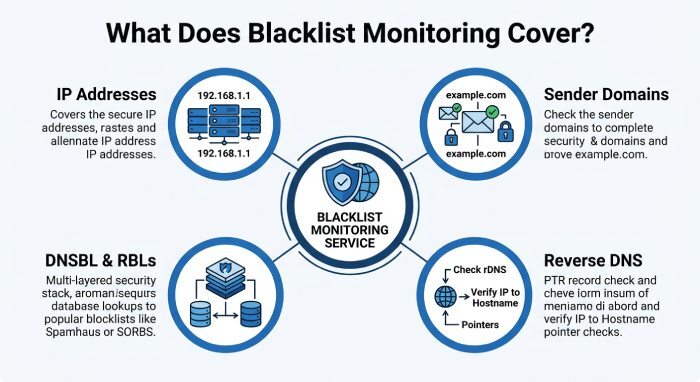
Effective monitoring typically includes:
- IP address monitoring for mail servers, SMTP relays, shared hosting IPs, and dedicated sending infrastructure
- Domain monitoring for sender domains, tracking domains, and bounce domains
- RBL monitoring across common real-time blackhole lists
- DNSBL checks for blocklists used by spam filtering gateways
- Reverse DNS monitoring and host name resolution validation
- IP range monitoring for organizations managing many mail servers or customer environments
Why It Matters for Security and Operations
Blacklist monitoring matters because email reputation changes quickly. A clean IP address today can be listed tomorrow because of spam complaints, compromised accounts, malware detection events, phishing alerts, or trap hits monitoring. Without automated blacklist alerts, teams may not discover the problem until customers complain that invoices, password resets, or support emails never arrived.
For hosting providers, MSPs, SaaS companies, and agencies, blacklist monitoring also protects client reputation and network reputation. It provides visibility into network health, helps maintain clean IP addresses, and supports faster incident response when a DNSBL listing occurs.
How Email Blacklists Impact Deliverability, Reputation, and Revenue
An email blacklist can directly damage email deliverability. When mailbox providers, corporate filters, or security appliances use an RBL or DNSBL to evaluate incoming mail, a listed sender may see messages rejected, quarantined, routed to spam, or silently dropped. This affects both marketing campaigns and mission-critical transactional email.
Deliverability and Spam Filtering Consequences
Modern spam filtering systems evaluate many signals: authentication, sending behavior, IP reputation, domain reputation, content quality, user engagement, and blocklist status. If your infrastructure appears on a DNSBL, even well-authenticated messages may fail to reach the inbox.
A recurring blacklist check helps detect these issues early. RBL monitoring identifies whether your IPs are present on a blocklist, while domain monitoring confirms whether your sending domain has been flagged. When used together, IP address monitoring and domain monitoring provide a fuller view of email deliverability risk.
For example, if customers using Hotmail or Outlook.com suddenly stop receiving messages, your team may need to review Microsoft SNDS data, check for spam complaints, and verify whether any related IPs are on an email blacklist.
Business Impact
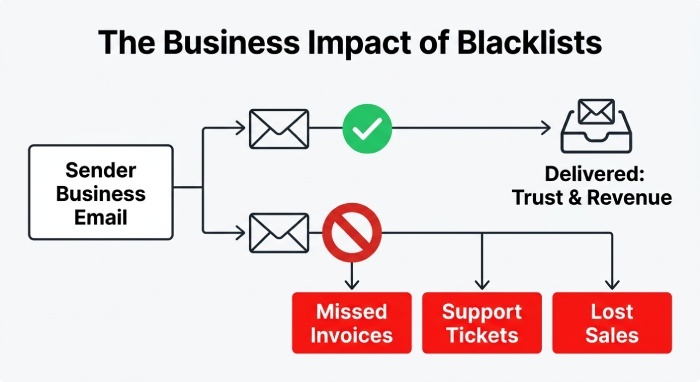
Poor email deliverability has measurable revenue consequences. Missed password resets increase support tickets. Failed order confirmations reduce trust. Undelivered invoices delay cash flow. Blocked sales follow-ups lower conversion rates.
For service providers such as Fusion Arc Hosting or managed infrastructure teams, a customers listing on an RBL can escalate quickly into a client reputation issue. Strong reporting, private reports, white label reports, and report sharing allow teams to explain incidents clearly and document remediation steps.
Common Causes of Blacklisting and Early Warning Signs
Blacklisting usually reflects a perceived risk: spam, abuse, malware, phishing, or misconfiguration. A single listing on a minor blocklist may not be catastrophic, but repeated listings across multiple DNSBL sources can significantly harm email deliverability.
Common Causes
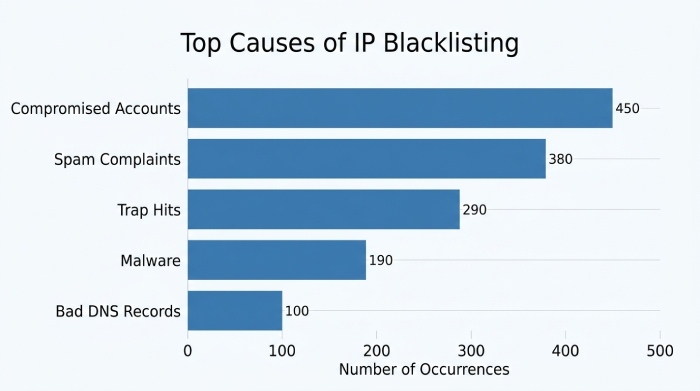
Frequent causes of email blacklist placement include:
- Compromised mailboxes sending spam
- Poor list hygiene and high spam complaints
- Sending to purchased or scraped contact lists
- Spam trap hits and poor bounce management
- Malware detection tied to hosted content or URLs
- Phishing reports from sources such as PhishTank
- Malicious URLs tracked by URLhaus
- Missing or incorrect reverse DNS monitoring results
- Failed host name resolution or inconsistent PTR records
- Sudden spikes in email volume from new IPs
- Shared hosting customers abusing mail infrastructure
A blacklist check may reveal whether the problem is tied to a single sending IP, an entire IP range, or a domain. That is why IP address monitoring, IP range monitoring, and domain monitoring should be used together.
Early Warning Signs
Early signs of blocklist trouble often appear before a major outage. Watch for rising bounce rates, declining open rates, authentication failures, customer complaints, or delays from specific providers. Blacklist notifications can also reveal patterns: for example, a mail server may repeatedly appear on a DNSBL after compromised credentials are used overnight.
Signals That Require Immediate Review
If your alerting system reports repeated blacklist alerts, investigate immediately. Review server logs, outbound mail queues, authentication records, and user activity. Check whether spam filtering gateways are rejecting your messages, and confirm whether the affected IP has lost IP reputation.
Operational Indicators
Useful operational indicators include status history, monitoring frequency, uptime monitoring, server monitoring, and multiple location monitoring. These help determine whether a deliverability issue is isolated to a blocklist listing or part of a broader infrastructure problem.
Security Indicators
Security-related indicators include phishing alerts, malware detection, spam complaints, trap hits monitoring, and unusual sending patterns. Together, these signals support spam prevention and help protect network health.
Key Features to Look for in a Blacklist Monitoring Service
The best blacklist monitoring tools do more than run a simple blacklist check. They provide automation, context, notification customization, and workflow integrations that help teams act quickly.
Comprehensive RBL and DNSBL Coverage
Look for broad RBL monitoring and DNSBL coverage across reputable blocklist sources. A service should check major spam block list databases, public RBLs, private reputation sources where available, and domain-based email blacklist systems.
A Bulk blacklist check is especially useful when onboarding clients, auditing infrastructure, or reviewing large IP ranges. Platforms like HetrixTools, BlacklistMaster, and BulkBlacklistCheck.com can help teams perform bulk verification and ongoing blacklist monitoring.
Alerts, Notifications, and Escalation
Timely blacklist notifications are essential. Your service should support blacklist alerts through multiple channels, including Telegram notifications, Slack notifications, Microsoft Teams notifications, Google Chat, PushBullet, Pushover, ntfy.sh, Mattermost, RocketChat, PagerDuty, Opsgenie, ilert, VictorOps, Zenduty, and SIGNL4.
Webhook notifications are also valuable for automation. A Web callback or Discord webhook can trigger internal workflows, create incident tickets, or notify a security operations channel in Discord.
Reporting and Account Management
Strong reporting turns raw blacklist monitoring data into useful operational intelligence. Look for custom reports, private reports, public status page options, white label reports, and report sharing. These are especially important for agencies, hosting providers, and MSPs managing multiple customers.
Sub-accounts allow teams to separate clients, business units, or technical roles. Contact lists help ensure the right people receive the right blacklist notifications without flooding unrelated teams. Notification customization should allow escalation based on severity, affected asset, or repeated blocklist events.
How to Integrate Blacklist Monitoring Into Your Email Security Strategy
Blacklist monitoring works best when it is integrated with identity, infrastructure, and incident response processes. It should not operate as a standalone dashboard that no one checks.
Connect Monitoring to Existing Tooling
Use API access or a restful API to connect blacklist monitoring results to your internal systems. For example, a team might send DNSBL status into Zabbix, correlate mail server health with HetrixTools Server Agent metrics, or trigger a ticket when RBL monitoring detects a new listing.
For larger environments, combine blacklist check automation with IP address monitoring, domain monitoring, uptime monitoring, and server monitoring. This creates a clearer picture of whether the issue is reputation-based, infrastructure-based, or security-related.
Build an Incident Response Workflow
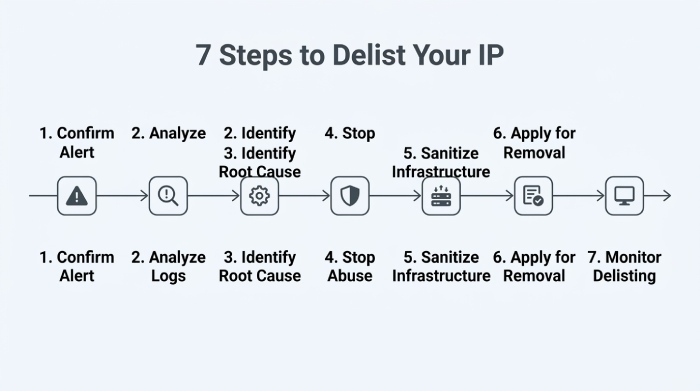
When an email blacklist listing appears, teams should follow a defined workflow:
- Confirm the listing with a fresh blacklist check.
- Identify whether the affected asset is an IP, domain, or IP range.
- Review logs for spam complaints, compromised users, malware detection, or phishing alerts.
- Stop abusive traffic and secure accounts.
- Validate reverse DNS monitoring, host name resolution, SPF, DKIM, and DMARC.
- Begin the delisting process with the relevant RBL, DNSBL, or blocklist operator.
- Monitor status history until the listing is removed.
The delisting process is more successful when you can show corrective action. Many DNSBL operators want evidence that the abuse source has been fixed before removing an IP or domain from an email blacklist.
Align Deliverability, Security, and Customer Success
Blacklist monitoring should be owned collaboratively by security, infrastructure, and deliverability teams. Security teams focus on spam prevention, phishing alerts, and malware detection. Infrastructure teams handle IP address monitoring, server monitoring, reverse DNS monitoring, and network health. Marketing and customer success teams track email deliverability, customer impact, and client reputation.
By combining RBL monitoring, domain monitoring, DNSBL checks, and blocklist intelligence with clear reporting and automated alerts, organizations can protect clean IP addresses, reduce downtime, and respond faster when email reputation is at risk. Pairing this with regular SPF record checks keeps authentication healthy alongside your blocklist hygiene.
General Manager
General Manager of DuoCircle. Product strategy and commercial lead for AutoSPF's 2,000+ customer base.
LinkedIn Profile →